We have a Canon E3 and needed a portable bag, that was comfortable, and also had room for other key life amenities during our recent travels throughout Southeast Asia. This bag was snug against the body when worn as a backpack and had great contour when worn as a side slinger. All zippers, pouches and compartments were perfectly placed and held up under fairly rigorous conditions.
Showing posts with label video digital camera review. Show all posts
Showing posts with label video digital camera review. Show all posts

Adobe CS6 Master Collection


List Price: $2,599.00
Sale Price: $2,250.00
Today's Bonus: 13% Off

Have had extended contact with Adobe about installation and registration of CS6. Have had to uninstall and reinstall, individual programs or entire suite at least 2 dozen times. The Adobe uninstall tool is a joke. I have had over a dozen calls with technical support. While some support staff seem to have some knowledge of the programs the majority continue to put you on hold with the resulting phone calls of up to 2 hours. Over 2 hours on several occassions. Some of the problems deal with poor language skills but they are mostly lack of familiarity of the registration part of the program. After about an hour many of the support staff get very nervous or frustrated and at least one stated that he had been working on my problem too long, minutes later I was mysteriously cut off and had to start another hour plus call with again no resolution. The one time that I was being turned over to a supervisor I was on hold for 1 and 1/2 hours with no one ever picking up I have used Smart Suite since CS2 and can now say that until they get the staff training up to speed technical support will be a disaster.
Adobe Support was always the state of the art for a US software company. Until buying CS6 I had not had to contact them in over 5 years for any problems! If I was an investor in this company I would be concerned with the company management that allows such poor customer service to thrive. We are very disappointed with Adobe.

Nikon D3200 24.2 MP CMOS Digital SLR Camera with 18-55mm


List Price: $1,299.99
Sale Price: Price Unavailable
Today's Bonus: 38% Off
This kit comes with everything that you need for starting right away taking pictures, only complain about the tripod that isn't sturdy at all, made of crapy plastic, you have to buy another a little more expensive, but guessing on the price of the whole package it doesnt matter, i gave away mine cuz i have a good quality spare. And the hdmi cable doesnt fit the camera mini hdmi port. But other than that, this is an amazing kit, amazing lenses and camera.
MADE IN USA RADIO ALARM CLOCK HIDDEN MEGAPIXEL CAMERA
This product is awesome. The hidden camera has amazing quality, both in day and night. The night vision is crisp and clear, not fuzzy and grainy as I have seen in some other cameras with night time capability. The clock radio is fully functional and looks pretty good to. The delivery was fast, and installation was relatively easy. Overall a solid product that delivered what it advertised.

Sony DVP-FX750 7-Inch Portable DVD Player, Black

List Price: $109.99
Sale Price: $66.00
Today's Bonus: 40% Off
I purchased my unit on sale at Target. I have seen these units on sale or online for about 40 percent off list price and Amazon usually has a similar discount but Amazon's prices "float" all the time so be sure to comparison shop and shop weekly or even daily on Amazon if you are price sensitive. While I purchased my sample of this review unit from a "bricks and mortar" retailer, in the past I have purchased other items from J&R, the seller currently listed for this unit, through the Amazon Marketplace program and they are a very reliable Amazon Marketplace seller. You can also log directly onto the J&R Music website, comparison shop, and use your Amazon account to place your order directly through J&R which is very convenient.
I am very happy with this 7" Sony. It has the "standard" resolution (which is to say, 1/2 DVD level) of most portable DVD players. Subjectively speaking, the image quality is about the same as pre-digital TV broadcasts which is more than enough for entertaining kids, the most common use of these players. The sound quality through the built-in speakers is also pretty decent, enough for kids watching DVD's at home in their room, and there are dual headphone outputs for better quality listening (or listening in a car without annoying parents).
If you want higher resolution, this is the only unit I know that offers true DVD resolution (800 x 480 pixels):
Sony DVP-FX950 9-Inch Portable DVD Player
It costs a lot more due to that higher resolution and the bigger screen, and it is not usually discounted as much, proportionately, as this smaller unit.
(I searched and found two different 9"/high rez models, the FX950 and the FX930 and I am not sure of the differences; I think I have the FX930; currently these are only offered by Amazon Marketplace sellers, but Amazon usually stocks them.)
This 7" unit has excellent "on machine" controls which should suffice if the remote is lost; the remote makes access to some buried adjustments (as noted by another reviewer) easier. The remote is as large as a TV remote, much larger than the small ones that come with most regular DVD players (that hook up to TV's) these days, and in fact much larger than the remote that comes with the 9" high rez edition.
Battery life is sufficient unless you are taking a long flight (not many portable DVD players go on flights anymore, what with netbooks and iPads and Touches). The player comes with both a home charger and car charger. I don't think the unit will charge and play at the same time, but it WILL play on external power, either on the home charger or the car charger, which is probably the most important issue.
Build quality is EXCELLENT. My wife picked up an RCA 7" portable player for only 10 dollars less than this one at Target around Thanksgiving and the build quality on the RCA is very disappointing in comparison, as are the controls.
Colors and brightness are EXCELLENT. More importantly, this Sony has good view angles. The RCA my wife bought has a peculiar view angle you have to tilt the screen slightly toward you to get optimal image contrast and brightness. The Sony has MUCH better viewing angles.
All in all this is one of those instances where paying a little more (perhaps) and buying a brand name (Sony) is well worth it. I highly recommend this Sony portable player.
Also, if you don't really need the higher resolution, there is no point in getting the 9" edition, since the difference in screen size doesn't add up to much at typical viewing distances. The 9" is much larger and heavier if you have to lug it around.
Finally, I really like the "resume" feature which lets you re-start DVD play where you left off after powering down, assuming you haven't changed discs in the meantime. It means not having to search for the spot where you left off.
A note on how I use mine: I have bunches and bunches of instructional DVD's I like to watch. I have been searching for an easy way to watch them, since I usually only watch 5 or 10 minutes at a time (it's the most I can absorb before brain freeze). Resetting the main home TV center from whatever device it has been running last (Roku? Apple TV? DVD?), and turning on the TV, player, amplifier, and pulling the last DVD left in the player (and finding where it goes) and putting my current one in, are steps that add up to more trouble than they are worth. Using this DVD player means I can turn it on with one switch and watch anywhere in the house...or in the car...or in a mall while the family is shopping. Turn it off, and it resumes on last chapter I watched. Very handy for golf players, tennis players, martial arts, or hauling to the patio or spare room for an aerobics or yoga session etc. These things aren't only for kids and Barney.
Acer Iconia W700-6495 11.6-Inch 64 GB Tablet (Silver)


List Price: $899.99
Sale Price: $599.99
Today's Bonus: 33% Off
I've waited and done extensive research on slate tablets for months since win8 release. What I looked at were surface rt, surface pro 128gb, Lenovo yoga 128gb, sony, and other rt tablets. After using the surface rt for 3 weeks, it was obvious that it's not going to cut it for work. Hence I went with the win8 tablet hybrid instead. OF the win 8 business tablets, I narrowed it down to the lenovo win 8 series and the acer w700 128gb. In the end i considered the acer based on its unique out of the box style that is practical; and of course, because the pricing is a steal when comparing to the lenovo at the same spec.
*********************************************
One complain I have with the acer naming convention for its w700 model is that it is utterly dumb. I know it's for marketing / price discriminiation (geography wise) purposes, but it sure confuses heck out of me. In this day and age, thankfully, the internet came through and aided me in the comparison.
For the W700 128gb, you'll have the 3 models to choose from: W700-6465, W700P-6821, W700-6680
You can visit mfr url to take a look at the comparison; noticed anything? THEY ALL HAVE THE SAME SPEC yet are different in prices.The W700P-6821 is the most expensive, yet offer the same build. HMMMM... So, I ended up choosing the W700-6680 and did not regret.
-----------------------------------------
One thing I considered was the space availability. As mentioned before, 64 gb won't be enough because after office and the OS, you'll barely have room left for software like Adobes, nevermind pictures.
Ideally, I wanted the surface 128gb, but its pricing and avialbility is ridiculous. Also the screen size is not great for work. So my next candidate ended with this acer w700 128gb.
Screen size, it's almost 12" so it's adequate. Other specs comparing to the other manufacture is a bargain since I was able to buy it for under $900 shipped. As a whole, it's worth the wait, kind of.
Acer did a good job with the hardware, but one big engineering flaw is their Bluetooth keyboard that came with it. It needed to be able to sense when you fold it behind the tablet and disable the keys because now, it's not possible to use the tablet without keys being spammed.
Another issue I see is the tablet keyboard/cover itself. It does not fit like a glove and took more than a hassle each time trying to hit the sleep button. You must use some manpower to press on the plastic cover to reach the button. It's very very annoying!
Lastly, the cover does not have the sleep/wake function. :(
The Bluetooth keyboard does not wake up once in a while after windows go to sleep so I would have to reset the pc. Very annoying as well. Not sure if this was an os issue or not.
It's too heavy......Maybe I'm spoiled by the weigh of other tablets are made for consumption such as my kindle because 3 pounds plus another 14 oz keyboards does add up.
I'm okay with these major flaw only IF acer sells other accessories covers to address the issue. If not, heck, for twice the cost of an ipad, I fail to see why customers would flock to windows tablet except for legacy softwares for work. (im a windows guy)
That's my take on this tablet. I truly want a perfect tablet, but as of now. i'm still looking but at the time, i'll keep my w700 128gb since it's the best product / value on the market at this time.
UPDATE: Been using it for a month now and i'm getting the hang of it. Windows 8 is awesome and this piece of hardware is the best $1000 tablet / convertible on the market in my opinion. I will give it another star for the excellent work done by Acer. I'm still waiting for Acer to release better accessories such as keyboard for this tablet because the bluetooth keyboard that comes with this Iconia is blah.
UPDATE: 3/17/13
Still no patch / accessories out to fix the following major issue so i'm knocking off a star:
unable to turn off screen (sleep mode) and play media. How ridiculous is this? All tablets even the cheap $100 could go into sleep mode and play music. It's not windows 8 flaw because the ms surface does sleep and play.
This is a major flaw!
Come on, if you spent $1000 on this mainly for work, the device ought to have a better functional keyboard, etc.
AS OF today, there are no accessories out that allow this. #1. You simply cannot use this to sit on your lap and type. #2. The Keyboard is blah. #3. Does not have the auto wake/sleep function on a $1000 device's cover....
I'm keeping this device for work, however, it's because this is the best device on the market for work/portability. Unfortunately, it's not perfect but it is worth using until the next generation of pro tablet.
CONCLUSION: Was it worth the cost and the wait? Do I recommend it?
Although there are shortfall, the answer is YES. I am keeping mine and does recommend it to other. Reason for the 3 stars is because 3 stars is for good ranking in my mind and I am very very picky with my electronics because of my profession.
Panasonic Lumix DMC-G10 12-MP Live MOS Interchangeable Lens SLR
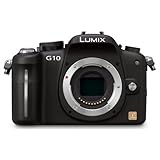
List Price: $824.84
Sale Price: $599.90
Today's Bonus: 27% Off
This is my third Lumix camera the others were more point and shoot, this had what I was looking for in a digital camera automatic exposure and focus as well as manual control of both focus and exposure. The fast mos sensor is a great plus and can now capture subjects in motion without blur. It's easy to use and even though it has many features they are quite easy to learn too.
My previous camera kit was Canon with the FD lenses, I will never buy new Canon kit again after they dropped support for FD lenses. I'm glad I found Micro Four Thirds which appears to becoming the standard across several makes. I can even use my FD lenses with an adaptor. It would have been nice to have had a full frame (35mm) digital camera but they are far too expensive and most haven't adaptors for FD lenses. The surprising feature of using my Canon FD lenses on this camera is that they have an equivalent focal lenth doubled and my telephoto's are really useful my 500mm reflector becomes a 35mm equivalent of 1000mm great for wildlife. The same with my other lenses my Canon 50mm f1.4 becomes 100mm f1.4 who could afford that for a 35mm camera. Canon FD lenses are among the best and I'm glad I can still use them. For those of you who haven't any Canon lenses they are cheap used.
The manual focus is good and easy although the eye level finder could be better it gets the job done. I think this camera with a suitable adaptor would be good for anyone migrating from film to digital it's not too expensive and it has lots of useful features.
The bottom line, I like it it suits the way I take pictures it's also nice to play with trying out different things.
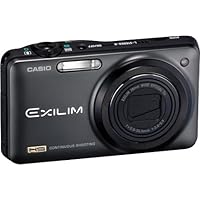
Casio Exilim EX-ZR10 Digital Camera with 12 MP CMOS Image
I bought this Casio camera because of its built in High Dynamic Range (HDR) capability. I wasn't disappointed. The HDR art feature was of less interest and once I tired it soon discounted it altogether.
Using simple auto mode the camera is quick and responsive. Using any other mode slows things up considerably while you wait for the camera to 'do' its thing for that particular mode. The results were ususlly worth the wait but waiting often meant you missed the next shot.
I returned the camera to Amazon, not because I was disappointed with it but because of its fiddly controls. At age 67 my fingers, already large, are less mobile and I found some of the buttons less than friendly. The on/off button is small and sometimes hard to find quickly. The mode buttons are larger but all buttons are flush mounted with the top of the case so less obvious where to put ones fingers especially in low lit places or at night.
Overall a fine camera with many desirable features. The pictures I did take were mostly very good it was just the controls that let you down. Also the zoom is too fast and often difficult to find the degree of zoom you want. Sometimes that meant I shot with a wider lens than needed simply because I couldn't stop it at the disired focal length.
Using simple auto mode the camera is quick and responsive. Using any other mode slows things up considerably while you wait for the camera to 'do' its thing for that particular mode. The results were ususlly worth the wait but waiting often meant you missed the next shot.
I returned the camera to Amazon, not because I was disappointed with it but because of its fiddly controls. At age 67 my fingers, already large, are less mobile and I found some of the buttons less than friendly. The on/off button is small and sometimes hard to find quickly. The mode buttons are larger but all buttons are flush mounted with the top of the case so less obvious where to put ones fingers especially in low lit places or at night.
Overall a fine camera with many desirable features. The pictures I did take were mostly very good it was just the controls that let you down. Also the zoom is too fast and often difficult to find the degree of zoom you want. Sometimes that meant I shot with a wider lens than needed simply because I couldn't stop it at the disired focal length.
Canon PowerShot D20 12.1 MP CMOS Waterproof Digital Camera

List Price: $299.00
Sale Price: $269.99
Today's Bonus: 10% Off
I preordered this camera when it was first announced. I was a little disappointed when Amazon dropped the price before it even reached my house. I anticipated this camera not only for the waterproof capabilities, but also because it is shock proof...and probably because it was a Canon. I live in Hawaii and intend to take this to the beach to take photos and videos in and out of the water. I'm a special education teacher and wanted to have my students to create their own learning stories with photos that they took themselves. I am very reluctant to have them use a DSLR or even a regular point & shoot camera with the fear of them dropping $1000+ worth of equipment.
When I got the camera, I quickly looked over the manual for any waterproof information that I might need to know. Everything was straight-forward with no hard-to-find switches to lock any waterproof seals. In other words, feel free to take this out of the box, put in the card and battery, and take underwater photos. I didn't even charge the battery and was able to take about 100 photos and 15 minutes of video right out of the box. I used this opportunity and the next 2 days to extensively test my camera in order to create this review.
DESIGN: 6/10
It's feels very sturdy like it should. The blue metal panel on the front is very nice to look at. Unfortunately, I think the shape is a little too "showy". If you want to show off the fact that you have a waterproof camera then this is the one for you. (I sort of liken it to a Prius, which everyone knows is a hybrid. At first glance, many people will know there is something special about this camera.) I'm a little confused about the left-hand side of the camera which is a little curved. You can put a strap there, but I don't really see the functionality of it being that shape.
My biggest gripe is that the included handstrap can be "twisted" on and clicks into a metal plug. It can be EASILY removed with a very light press on the button and twisting it off. It gives me the fear that it could be accidentally bumped and twisted and the camera will detach from your wrist (though you'd probably have to be mighty clumsy to do so). I would have wished that the strap attached directly to the camera instead of this metal knob. The strap clip also protrudes diagonally out of the bottom corner and you need to remove this if you want to lay in on a flat surface to take photos or video.
IMAGE QUALITY: 9/10
I am a camera enthusiast and mainly use Canon DSLRs (5D, 7D, 1D series, etc...) with L lenses. I also have an Olympus micro 4/3s camera and even have a Nikon D2x, so I'd like to think I know my stuff. Prior to this point & shoot, I used a Canon SD1100 before it got stolen. With this SD1100, I took over 10,000 photos and took hundreds of hours of video (which I made into DVDs to view on TV, or straight from iTunes to a TV...it's only 480p) edited with iMovie. I've always gotten compliments on the video quality of this older model P&S, and was quite impressed with it myself.
As far as photo quality of this camera, I've got to say that it's good, but nothing more than what you'd expect from a P&S camera from 2012. Color is nice and even zoomed in at 100%, the image quality is as great as one might expect. As with any camera, keeping the ISO as low as possible will keep any noise or grain to a minimum. Remember, you're paying a premium because this camera can go underwater or in the snow. It would be unfair to expect DSLR quality from this camera because that's not what it's meant for.
The same goes for video quality: the reason you bought this camera and paid more for it than another P&S is because it is waterproof. If you want that IMAX look, you've got to spend thousands of dollars. If you can't afford that, this is the next best thing. The quality of the out-of-water and underwater videos was superb. I took it to our pool and took videos of various colorful toys underwater. It was a sunny day and the quality was great, vibrant, and clear. I wasn't able to test it in low light situations. I also have a Panasonic TS-10 (underwater camera from 2010) and the Canon D20's video and image quality is surprisingly better.
For on-land videos, the microphone is not as good as normal P&Ss. I'm assuming that it has another waterproof protective layer over it. I don't think this should be surprising to anyone.
One last note on video. This camera has a 5x zoom. When shooting video, it can optically zoom in and out. It will also focus all the way from macro to infinity while still recording, which is different from other cameras that I used in the past, where if you started your video, it couldn't refocus or optically zoom. It even adjusts exposure, meaning that if you're recording in a bright area and come into a dim area, it will adjust automatically while still recording video. Thank you Canon!
ERGONOMICS: 8/10
Buttons are nicely spaced. There is a large thumb rest button that I just can't figure out why it's there except for cosmetic purposes. I thought the playback button on the top was a little strange, but the shutter button is much larger and protrudes so you shouldn't get them confused. It's somewhat on the larger side for a point and shoot, but it probably has something to do with the waterproofing, shockproofing, and freezproofing. It can still fit in pants pockets. I thought the black parts of the camera would have a little more grip, but they are plastic and not rubber. I have no complaints about the design or shape and it felt comfortable to hold. I was able to press buttons underwater very easily.
The screen is very bright at the default middle setting. It is bright enough that it was not necessary to brighten it while underwater. It is very clear and easy to look at. I hope sand or other earth elements don't scratch the screen since I don't know if I'll be able to apply one of those protective sheets over the LCD as it might fall off while underwater.
Snowboarders or divers with gloves might have different experiences than a casual user like myself as far as the button spacing is concerned.
The lens doesn't have a cover. It is in the upper corner, similar to other waterproof cameras. Not much out of the ordinary to comment on this. I got some sunscreen on it and wiped it off harshly with a t-shirt. No scratches at all. I'm hoping it's made of durable glass like other waterproof cameras.
The flash is moved to the middle. I find this makes it easier to avoid covering it with my fingers as I do with other cameras where the flash is in the upper corner. Definitely a plus.
BATTERY LIFE: 9/10
With a full charge I took 150 photos and about 30 mins of videos and still had 1 of 3 power bars leftover (approximately 33%? remaining life). If this is a vacation camera, it should easily be able to last a full day before you need to charge it at the hotel. If you're taking this camping or somewhere with no power, practice using it to gauge how long it will last. When the battery starts flashing, you still have about 10 minutes of video left before it completely dies.
In comparison, the Panasonic TS10 seems to die out before taking even 200 shots with no video. I am not pleased at all with the Panasonic's battery life.
WATERPROOFING: 10/10
I've used this only a few times so far (though intentionally submerged it in water overnight for this review) and have experienced no leaks. I have never experienced leaks with my Panasonic waterproof camera either. If it did leak it would get a zero, but for now, I can't say. It seems to be waterproof. I was a little skeptical about the latches on this camera and felt that there might be a chance that they could get accidentally opened since they only require one flip rather than use a 2-step safety switch, but I tried rubbing it and dragging it over areas that could possibly open the battery and input/output latches but they seem to stay closed as expected.
As with other waterproof cameras, be careful when taking this out on a boat or to the dock where you aren't in the water yourself. In my pool it took only 4 seconds for it to fall 8 feet. They don't float! Imagine if you're over the edge of a pier in 30 feet of murky dark water. It will hit the bottom before you can take your sunglasses off. The detachable strap (as mentioned above) is so easy to intentionally remove that I feel that it could also be easily removed accidentally. I am highly considering a floating strap.
SHOCKPROOFING: ?/10
Uh, I'll trust Canon and not attempt to drop this camera just for the sake of this review. The box says it can withstand a 5 foot drop and I'll take their word for it.
BELLS AND WHISTLES: 7/10
GPS: Works I guess. It has a little trouble getting a signal inside, and this is my first camera with GPS, so I'm not sure how accurate it should be. But it was able to record the coordinates of my outdoor shots (though not all of my indoor shots).
Camera features: It has SMILE DETECTION that seems to wait for the whites of the subject's teeth to snap the photo (a big grin doesn't seem to work). This will work great with my special needs students, who can just hold the camera and ask for the subject to smile. SUPER SLOW MOTION is pretty cool. It needs a lot of light and can only take it at low resolution. It also includes other more commonly included effects such as FISHEYE and MINIATURE. I don't think I'll find myself using these effects quite often. You can go to Canon's website or other review sites to find out more.
Playback features: Includes commonly found features such as slideshow functions and a photobook set-up. What confused me was the ACTIVE DISPLAY which lets you scroll through photos by tapping the corners of the camera with your index fingers during playback. A cool gimmick perhaps meant for snowboarders with thick gloves. I found it easier to scroll with my thumb on the directional keys.
Macro: (added this part in later) Forgot to mention the macro capabilities of this camera. It is unbelievably versatile. It can clearly and easily focus on items even 1cm away from the camera. And it's smart so you don't have to change settings from normal to macro modes (although it does have that capability if it can't detect it automatically). I haven't used any of Canon's newest P&S's, so don't know if this is normal to be this good. Feel free to take macro pictures of bugs, wet plants, or rocks, without worrying about the camera getting wet, dirty, or knocked around.
OVERALL IMPRESSIONS
This is a very solidly built camera that is very eye catching. Image quality is EXCELLENT for a point and shoot camera. After using a waterproof Olympus, as well as a Panasonic one, I would definitely recommend this Canon D20 for the superior image quality. I was originally going to give this a 4-star rating, but that would mainly be because I thought the strap placement and it's funky non-rectangular design were huge issues. However, after reviewing my photos and videos, this is definitely the waterproof camera to buy! The image quality is very exceptional for a point & shoot. If you're trying to capture those underwater photos during a trip-of-a-lifetime, spend a little more and get this camera.
Update: 5/31/2012
I'd like to add just a few more things since using this camera for about a month now.
Image Quality: No RAW. There are a number of mid to high-range P&S's with RAW. This does not have RAW. I don't want to get into a debate about the necessities of RAW on a P&S. This is what you get with this camera.
I took this to the beach and had it around my wrist for about 3 hours in salt water. The water was shallow, but I did not feel like I might accidentally undo the strap like I had originally thought. I also took it into the pool as well as in a jacuzzi (for about 30 minutes). No leaks, no indications of leaks, no water issues. I've had smaller P&S cameras before, and when looking at the size of this thing, it's quite large for 2012. However, I had it in my pants pocket and swim trunk pocket, and I didn't notice or mind the weight. I was able to take a number of low-light video...of course there's noise, but it was very acceptable and looks great in HD. Over 3 days I took about 12GBs of videos and photos. As I had guessed earlier, the battery should last the whole day until you're able to charge it overnight. I feel that the GPS sucks a lot of battery power, as I did get the flashing red battery towards the end of each day. And I couldn't get any videos of fish. They kept swimming away from me and I didn't have a snorkel. I will try to go to Hanauma Bay one day with this camera.
Students in my class have been able to use it, and it just feels so much less stressful letting them use a shockproof camera versus even a $90 regular P&S. It really allows them to experiment in their own way without restrictions or having an adult pay more attention to the camera than anything else. It's a pricey investment for children (so don't get one just because you'd like your 3 year old to become a photographer), but we used our other P&S for 3 years+ very diligently (until it got stolen) and know that we will use this one just as much as the other one.
ASUS VivoBook X202E-DH31T 11.6-Inch Touch Laptop

List Price: $569.99
Sale Price: $457.99
Today's Bonus: 20% Off
For roughly 550.00 this can hardly be beat for a small laptop that has windows 8 and a touchscreen. At first I was a little aggravated with the touch pad but, I installed the drivers from Samsung's website that are supposed to be for a series 5 laptop. This laptop along with several others have the same Elan touch pad in them. Once you install this driver it is a night and day difference in the touchpad.
The link for the drivers is in the first comment. Amazon won't let you link to an external website in the main review.
So go to the comment and get to the link then follow what is below.
You then need to click on the Manuals and Downloads link, then click Driver.
After that scroll down and click on the ZIP link for the Touch Pad driver 11.7.2.1
If you have the sorry Asus Smart Gesture installed, uninstall that first and reboot, then install this software. I have had various Macbooks for the better part of the last 7 years and this is my first PC laptop in a while. I was almost ready to return this laptop until I found these drivers. I would say the touch pad is 95% of a Macbook touch pad now and whether you like Apple or not, you have to admit they know what they are doing when it comes to track pads. Aside from all of that I'm extremely happy with the operation of this laptop now.
I am coming from a laptop that had an SSD drive in it so it does seem a little slow in some areas but, others it is working just fine. I have an extra SSD drive that I plan on putting in this machine as well as removing the half height mini PCI atheros wireless/bluetooth combo. I purchased an Intel Centrino 6235anhmw Mini Pci Express Bluetooth 4.0 to replace it with and based on my research I should be able to enable Intel Wireless Display on this laptop after that install. The card only cost me 30.00 bucks and I figured it was worth the gamble to see if it would work. I'll update this review once I get the card in a couple of days to state if it worked or not.
The sound coming from this laptop is actually quite good and I would say better than a lot of the previous laptops I am use to.
The touchscreen is extremely responsive and I haven't had any missed touches or erratic behavior out of it. I have played several touch based games and it worked flawlessly.
Last but, not least this thing is solid, the build quality on it is exceptional for something this cheap.
Okay, now for the bad which again considering this is a cheap laptop with a touchscreen really isn't that bad.
The fan runs constantly and while it is not overly annoying it does seem to run even when not doing much on the system. That is really my main complaint about the machine at this point. The second complaint is that the viewing angles on this machine are pretty poor but, again don't expect any machine at this price point with a touchscreen to have great viewing angles. Although viewing angles are bad, brightness is very good. I think with the brightness turned all the way up you could possibly do permanent damage to your eyes(a joke of course).
The keyboard is a little cramped but, really not all that bad. I would say I have slightly above average hand size but, again it isn't to bad and I'm able to kick out a reasonable speed without to many more mistakes than I usually make. Expect some adjustment if you are coming from a full size keyboard with large hands.
Again, the stock hard drive is a 5400rpm drive and it does seem a little slow for me but, if you are coming from another mechanical drive then you may not really notice it as a problem. I've been using SSD drives for some time so it does bother me a bit.
These might be major problems for others but, for me they are minor annoyances that I can live with on a cheap machine like this. This is basically an 11.6" Macbook Air that is missing the SSD(entry level is 64GB SSD), backlit keyboard, viewing angles aren't as good for the ASUS and fan runs more often than Macbook Air. However the Macbook Air doesn't have these features: touch screen, 500GB HDD that can be upgraded to a small or large SSD if you like and the Air cost about 450.00 more for the entry level. Granted the Macbook Air is considerably lighter but, it also makes your wallet lighter.
Sorry for all of the Macbook comparisons but, I have come from many years of having Macbooks and decided with Windows 8 to give PCs a try again. I'm glad I did.
Update 11/8/2012:
I installed the Intel wireless card I mentioned above, then installed the latest drivers for the card from the Intel website as well as the latest video drivers from the ASUS website. Then I installed the Widi display software and was able to connect to my Belkin Screencast. It took several tries and then it finally updated the software on the Belkin. After that it has been connecting perfectly with no problems. So I paid 40 bucks on Amazon for a refurbished Belkin Screencast and 32.00 for the intel card. Now for 72.00 bucks I'm able to use my 55" HDTV at 1080p as a second screen.
Update 11/14/2012
I finally got around to installing an SSD drive and replacing the mechanical drive. The drive that came in it was a Hitachi HTS5450A7E380 which is a 7mm thick drive. Unfortunately the SSD I had was a typical 9.5mm and was too thick to work at first. Luckily I was able to remove part of the casing on the SSD drive I used and that made for a perfect fit. So if you plan on swapping out for an SSD make sure it is no thicker than 7mm or it won't fit. I had some trouble where the laptop kept booting into the BIOS. when I went in and disabled fast boot as well as turned of drive security or something like that. I can't remember exactly now but, when the option is enabled you can go further into the BIOS and see PKI keys and DDB keys and a lot of other keys. I just disabled that portion and then it started recognizing the hard drive. This may not be a problem if you clone the hard drive to the SSD before you swap but, I did a fresh install. Laptop is blazing fast now as it boots into windows in about 10 seconds.
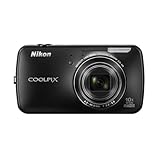
Nikon COOLPIX S800c 16 MP Digital Camera with 10x Optical Zoom

List Price: $349.00
Sale Price: $196.95
Today's Bonus: 44% Off
With the only review available, it was a little bit tough in making a decision buying the s800c, with it being the first phone with an Android operating system inside. Even though it is only running android version 2.3 (Gingerbread), it's smooth as hell, and sometimes you will forget that this was originally a camera. I caught myself treating it like my Samsung Epic Touch 4G, and with that note, taking pictures is so easy and once you take a picture, you can run any photo editing app (Instagram for one), and do whatever you gotta do right there on the spot. Why didn't they think of this sooner??? I think that cameras are deserving of an operating system, and in this case, the s800c runnign Android is a match made in Heaven!
Now that I have the camera, I do not know why the above reviewer got a 'grey market' item. Crutchfield.com makes a big fuss about how they DO NOT sell grey/gray market items, and this Nikon was up for sale on their site. So I took the plunge here on Amazon, and could not been happier. I was researching cameras for about a year before actually buying one, and the timing couldn't have been more perfect. I heard that the Galaxy Camera will come out soon, but I believe that it will be tied to a carrier.
In any case, as long as you are not an elitist photographer, this sexy little beast (mines white) will satisfy. Picture quality is good and especially in low light conditions. Lot's of fun modes, but now this is moot because now you have access to the Google Play store, in which a lot of photo editing apps are available. I really recommend Picsay Pro though. It reminds me more of photoshop than the actual photoshop app does lol!
October1 16, 2012 I can't leave this cammera alone!!! First time ever that I spend or put so much attention into a camera lol! This camera is a GO! Go get it!
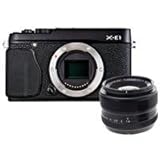
Fujifilm X-E1 Digital Camera Body, Black - Bundle
List Price: $1,598.00
Sale Price: $1,148.74
Today's Bonus: 28% Off
The sensor is fantastic for milky way photos. The colors rendered are very natural. It's not over the top, and if you like saturated photos, then you'll have to work that on your own, but the SOOC is so natural. Portraits are easy to get skintones in.
The metal and faux-leather body is amazing, and the lens is supurb.
The AF isn't that great, but I do landscape photography, so it doesn't matter at all.
Acer Aspire E1-571-6888 15.6-Inch Laptop (Glossy Black)

List Price: $499.99
Sale Price: $453.93
Today's Bonus: 9% Off
I bought this laptop today from my computer guy. It was brand new, I'm the one that actually cut open the box. I had him upgrade the RAM from 4GB to 8GB, and it flies! I recommend this computer for anyone looking for a nice, stable computer. Upgrade the RAM if you get a chance and just sit back and enjoy! I usually don't write reviews on Amazon if I didn't buy it on Amazon, but this computer is worth it. The best laptop I've had since my last Acer in 2009. I have since had a Toshiba and Sony, also both good computers. This is just what I've wanted for, not only speed, but convenience, as this is a lighter laptop then the rest have been.
Nikon D600 24.3 MP CMOS FX-Format Digital SLR Kit with 28-300mm

List Price: $2,949.95
Sale Price: $2,949.00
Today's Bonus: $0.95 Off
WHO IS THIS CAMERA FOR?
1.) More advanced photographers moving from DX/crop format to full frame (assuming they already own FX glass or plan to buy at least a couple FX lenses with the D600.)
2.) Photographers who want a second body to accompany their pro body as back-up.
3.) Nikon D300, D300s and D700 users who want better ISO performance, much better resolution and dynamic range and won't miss a couple of the pro features of the D300, D300s and D700.
4.) Patient beginners with very deep pockets who understand it's going to take more than "Auto" mode to create beautiful photos. Open yourself up to RAW.
WHO I WOULD NOT RECOMMEND THIS CAMERA TO:
1.) Beginners with no $$$$. You're gonna need money. Lots of money. Good full frame lenses are expensive. Forget the kit lens that comes with the D600. You're going to need something better to make this camera really shine. EDIT: A few people mentioned in the comments that the kit lens is fine for beginners. Yes, the kit lens is fine for beginners who are just getting started and don't know what they're looking for, however the kit lens can be quite expensive for what it is. In my opinion there are better, sharper, faster lenses out there for that price even if they are not as flexible as this slower zoom lens. Some people may be perfectly happy with the kit lens, but eventually you will want something better and that will most likely cost you lots of money.
2.) People who only want to shoot JPEGs. Yeah... you can shoot beautiful JPEGs with it, but that too requires adjusting settings. JPEGs can be unforgiving as opposed to RAW. Some might really disagree with me on this point, but I've known too many people who bought DSLRs and were surprised when the camera was taking unsatisfactory pictures. It's not the camera, it's the user!
3.) DX/crop sensor photographers who don't own any FX glass. Get yourself FX lenses first. No matter how much you're tempted, it makes much more sense. Trust me.
4.) Anyone expecting $3,000 + features for $2,100.00.
SHOULD YOU BUY THE D600 or the D800???
Depends on what you're shooting, why you're shooting it and how much money you have.
D800 = Pro 51 AF point module vs. 39 AF points slightly more accurate/faster focus and a tad more viewfinder coverage
D800 = 36 megapixels vs. 24 megapixels slightly more resolution
D800 = Up to 9 consecutive shots for HDR vs. 3 consecutive shots better HDR
D800 = Shutter life of 200,000 vs 150,000 longer life span
D800 = Teeny tiny bit more dynamic range
D800 = 1/250 flash sync speed vs. 1/200
D600 = 5.5 FPS vs 4 FPS better for sports and wildlife
D600 = Lighter and less pixel density easier to shoot hand-held with slower shutter speeds (Good for nightime and daytime photography. Less chance of camera shake/motion blurr)and easier to carry during long hikes.
D600 = Just a teeny tiny tad better at high ISO in low light
D600 = $1,000 less
D600 = Smaller file sizes, which means easier file handling.
There are a few more differences, but both cameras will give you incredible results, both cameras have insane high dynamic range and resolution, and both produce beautiful RAW and JPEG files. If you're a serious amateur, the D600 is plenty of camera for you. If you're a beginner, the D800 may be too much camera to start with. By the time you learn the ropes with the D800 (which may take years), the next best thing will be on the market, and you would have wasted $3,000.00 on a camera which you were able to use only 50% of its potential before you trade it in (then again if you're not the type who must upgrade as soon as something new is on the market, the camera will keep you busy for years). For beginners even the D600 may be a bit too much. Pro landscapes could do just fine with the D600, but may appreciate the 12 more megapixels and 9 shot bracketing (for HDR) when they're printing large posters. Wildlife photographers may appreciate the faster FPS, slightly better ISO performance and lighter body of the D600. In my opinion the D800 is more of a tripod camera while the D600 is more of a hand-held camera. If you're still not sure, rent them both and decide that way.
I WANT TO START OFF WITH THE POSITIVES:
I absolutely LOVE my new D600. I moved up from a D7000. Although I like the D7000 a lot, the D600 is even better in many ways.
1.) It has incredible high ISO performance
2.) Sharp, accurate and fast to focus (much better than the D7000) even in dim light
3.) Incredible resolution at 24 megapixels
4.) Very high dynamic range and the color reproduction is beautiful
5.) Fairly light compared to other Nikon pro bodies
6.) 5.5 frames per second which is slightly less than the D7000 6 frames per second, but the D600 has a larger buffer.
7.) Auto-ISO feature is very helpful.
The list goes on.....
As far as use and picture quality goes, this camera blows away anything within the same price range, and even some of the slightly older pro bodies that still go for well over $3,000.00. DXO Mark rates this camera as #3 on it's list, and the only cameras listed above it are the Nikon D800 and Nikon D800E. Believe it or not, the D600 sensor scored higher than the D3s, D4, D700 and all the current (2012) bodies in the Canon line-up. Obviously the D600 lacks some pro features like faster frames per second, an even bigger buffer, a couple of nice easy-setting-access buttons and full magnesium body, but let's face it; If Nikon had put all the good pro-features into the D600, why would anyone in their right mind pay $6,000.00 for a pro body? The D600 is purposely held back in some aspects by Nikon, but this does not mean that great performance and incredible image quality were sacrificed. In my opinion the price (at this time) can't be beat for what you're getting in return.
Contrary to what some believe, the D600 is not a repackaged D7000. It shares some features with the D7000, but it also shares some features with the D800. It's the best of both worlds. It is slightly bigger and heavier than the D7000, and slightly smaller and lighter than the D800. The body design in the front resembles that of the D7000, and the back of the body resembles the D800. Some have commented that the body feels cheap in their hands. I don't understand this sentiment. I guess some people feel that the heavier something is, the more expensive it feels. I can see why someone who has handled a D4 or D800 might say that, but in my opinion the D600 feels just fine. It has slightly better build than the D7000, and the D7000 is solid. I hear this mostly from people who have never taken their "pro" bodies outside the city. They need all this ruggedness, but they never use it. I've put my D7000 through a lot of abuse in the rain, snow, heat, climbed old castle ruins with it,...even dodged unruly kids, beer and drunks in bars and there's not a scratch on it. Do some of these people plan on dribbling their cameras? I keep mine on a neck strap, protecting my lenses. I think the D600 will be just fine.
NOW TO THE NEGATIVES:
Nikon's quality control is suffering greatly, and it's the only reason I'm rating the camera at four stars. It hurts me to do so, but I have to. I don't know if this is common with a lot of camera brands, but out of the four DSLRs I've owned, this is my second Nikon camera in a row suffering some kind of defect. Everything is absolutely perfect about it except the fact that it came with dust/oil spots on the sensor straight out of the box. I didn't notice this at first, but when I was shooting a fairly featureless subject stopped down, I noticed many small round spots concentrated mainly around the top left corner of the photo. These spots can be found all over the picture, but most of them are up in that corner. This is by far not as much of a concern for me as my D7000 back/front focusing issue was, because at least I can clean my own sensor. However it is disappointing to find something like this. It affects picture quality. I have done my best to remove these spots from photos in Lightroom 4, but at some point it becomes a chore. I have contacted Nikon about it and they want me to send it in. Since I love the camera so much, I don't want to be without it for a week or two, but if I don't get this issue resolved, maybe it will make me more upset in the long run. I will update the review once it's fixed.
WHAT ACCESSORIES TO BUY WITH THE D600
This is purely my opinion, but you may want to consider buying the following either directly with the D600, or a sometime after you purchase the D600:
1.) Make sure you buy a good-quality FX lens to go with the D600. Choose the lens based on what you like to photograph most. There are many specialized lenses out there such as wide angle, macro and telephoto. There are zoom lenses and prime lenses. Most pros already know that a well-rounded Nikkor lens line-up to own is the 14-24mm f/2.8, 24-70mm f/2.8 and the 70-200mm f/2.8 VR I. or VR II. There's also many great, fast prime lenses to choose from (cheaper options being the 50mm f/1.4G or f/1.8). I know of no lens that is good at everything, so you'll be making sacrifices no matter which one you choose. There are cheaper third-party options out there such as Sigma and Tamron. I myself prefer Sigma if I'm buying third-party. I've had a couple of Sigma lenses, and in fact one of my favorite lenses is the Sigma 150mm f/2.8 macro. I've used it for macro, birding, as well as portraits. It is super sharp and definitely rivals Nikon's 105mm macro lens in sharpness. Basically choose your first lenses based on what you will photograph most, and later on add more specialized lenses to your collection.
2.) A fast SD card, preferably nothing slower than 45MB/s. write/read speed and at least 16GB such as the SanDisk Extreme Flash memory card (maybe 2 of them), or even better, the 16GB or 32GB 95MB/s SanDisk Extreme Pro Flash memory card. Anything slower than that and you will find the buffer not clearing fast enough when you're shooting in burst mode.
3.) A good photo-editing program such as Lightroom 4, Photoshop CS6/Adobe Camera RAW. I personally use Lightroom 4 for all my photo editing, but some people prefer Adobe Camera RAW and Photoshop. If you're not shooting RAW with the D600, you're wasting a lot of its potential. RAW files hold the most information and give you greater dynamic range. Consider the program your developing room. The camera records the information and you develop that information into what you saw or what you wanted to see in the scene when you were shooting. If you're shooting JPEG only, the camera saves only very limited amounts of information. JPEGs also lose quality every time you re-save them, whereas RAW never loses quality and can be modified as many times as you want. It can also be reset to it's original form. RAW is the only way I shoot.
4.) If you have big hands, you may want to consider picking up the MB-D14 battery grip to give the D600 a little more size and better balance. It's also very handy for extended battery life and vertical shooting. There are cheaper third-party battery grips out there, but the quality is lacking and you risk possible damage to your camera. Many people are very satisfied with the cheaper third-party grip options, but I personally would not risk it with an expensive camera.
5.) Second battery. If you already own a D7000 and you plan on keeping it, the good news is that the D600 and D7000 share the same battery. I use my D7000 battery as a spare. Of course if I decide to use both cameras at the same time, this could be a problem. You can get a lot of shots out of the D600 battery on one charge, but it's always nice to have back-up. If you buy the battery grip, you can use regular AA batteries in the grip.
6.) A good sensor and lens cleaning kit. I would recommend at least getting a blower. I bought the Giottos Rocket Air Blaster and that seems to work nice. Other people use things like the Visible Dust Arctic Butterfly, but that's fairly pricey. I guess you get what you pay for. You can always get your sensor cleaned by a camera shop, but they'll charge you anywhere from $40 to $60 each time you bring it in. There's the security in knowing you got it done right, but that can add up to a lot of money down the line. If you don't feel confident enough to clean your own sensor, you're better off having it done by a professional.... however... it is nice to learn to do it yourself. I learned to clean mine on one of my older DSLRs for practice. It's easier than you'd think, but I'm not going to push you if you don't feel good about it.
7.) A camera sling strap like one of the Black Rapid straps or a Carry Speed FS-Pro strap. These attach to the tripod screw mount on the bottom of the camera and you can wear it over your shoulder with the camera and lens swinging next to your hip. You would really appreciate this carry method on longer hikes. or just walking around in general. The Carry Speed FS-Pro strap for example is very rugged and sturdy. The shoulder pad is wide and stretchy. It makes you feel like you're not carrying any weight at all. Neck straps are O.K. for lighter point and shoots, but if you want to save your neck some hardship, you'll look into getting a sling strap instead. It's easy to use, the camera is out of your way when you don't need it, and it's right there when you do.
UPDATE:
I have sent my D600 to Nikon service for the dust issue. They serviced the camera within one week. After I got it back, the sensor was spotless until I took about 600 shots with one lens (a prime, not a zoom) attached the entire time. After considering sending it back again, I decided to buy a sensor cleaning kit instead and cleaned it myself twice. After these two cleanings the spots are not coming back (at least none that I can see). Between shoots I use a Giotto blower to make sure I get rid of any possible spots. So far so good!
CONCLUSION:
I would highly recommend this camera to the category of people I listed at the very top, but I would also recommend caution as far as these dust/oil spots go. Not everybody has had this problem, but there are a number of people who are experiencing it. I'm one of the lucky few. Fact of life is that you're taking a risk no matter what manufacturer you choose. Nikon has had it's issues and so has Canon. The only thing we can do is hammer these companies with complaints and demand justice.
Toast 11 Titanium Pro Mac
I was hoping this might actually be an improvement over the dire Toast 10. I've been using Toast 9 since realizing Toast 10 was a disaster. Unfortunately, version 11 is just a more bloated, flashier-looking can of worms and I'm about to run a clean install to make sure every trace of this hiccup-ridden software is removed from my system. By the way, if you were hoping that Roxio has fixed the crossfade function (that way back used to be the excellent JAM but is now a mess), the answer is it is still the same as in Toast 10. For those who are aware of the audible click-inducing problems of 10 in that respect, there's no need to try out 11 they've done nothing to correct it. Disgraceful.

Transcend 16 GB SDHC Class 6 Flash Memory Card with Card Reader

List Price: $61.99
Sale Price: $16.99
Today's Bonus: 73% Off
Transcend 16GB SecureDigital SDHC Class 6 Card with Bonus SD Card Reader
Best thing about vacations is that they give you the perfect reason to go out and buy new toys!!! I'm heading to Costa Rica for 8 days of adventure and after looking fondly at my Canon SD850IS, the first thing I thought was, "I'm going to need more space". The one mistake I made when I purchased my 2GB SD card was underestimating how much video I'd take with this little camera (which this camera is surprisingly good at).
With the activities we have planned for CR, I needed to be certain that I'd have enough memory to capture all those crazy adventures (Volcano hikes, zip lines, canopy tours, white water rafting, scuba diving etc...)
* So how much does it store?
At max resolution here are the capacities:
Pictures: 8MP at Superfine resolution: 4,496 pictures
Video: 640x480, 30FPS, 127 minutes and 38 seconds!!!
30 seconds of continuous shooting with no flash at max res: 34 pictures (Canon claims 1.4 shots per second). Please note, I got identical results with the my Sandisk Extreme III 2GB SDHC
* Transfer Performance
Test Bed: 340MB Video File, USB hub, on my desktop (AMD X2)...Each test was repeated 5 times and the average taken (what can I say, I'm OCD :D)
Using the supplied SD card reader: 17 seconds (20 mb/sec)
Connecting directly to the camera: 50 seconds (6.8 mb/sec i.e. in line with the Class 6 rating)
Using the SD card reader and going through my laptop (IBM T41P): 29 seconds (11.7 mb/sec)
In other words, depending on your hardware it meets and/or exceeds the speed rating.
I also own a Sandisk Extreme III 2GB SDHC card, which boasts a faster transfer rate. The only test above that it performed better in were transfers to my laptop (22 seconds vs 29). It would appear based on the transfer rates that the camera was the limiting factor, but with the supplied SD card reader, that limitation is a non issue.
I'm lucky I found this card on a lark, and the day after I bought it, the price rose $30. Considering this product was announced Nov '07 and just released, not to mention the competitor's are priced about $50-$100 more, the price I paid for it was just too good to pass up.
So with all that said:
Pros:
Price (~150mb/$)
Performance is in line (and meets or exceeds) with its class rating
2 HOURS of VIDEO WOOO!!!!
Cons:
It's new and unproven. The only question that remains is whether or not it will hold up over time...if anything changes in the next month...I'll let you know :)
Enjoy!!!
Canon EOS Rebel T3i 18MP - Canon EF-S 18-55mm IS II - Canon EF
All of the items are brand new and in the box. The only complain have is the camera bag and the tripod. The tripod is junk and dangerous to use with any DSLR camera. The bag is small and not enough space for what is needed. All of the extras except the telephoto lens and the camera are all off brand items, but work just fine. I recommend this setup as you get all you need. Just buy a good tripod and a good camera bag for your nice new shiny camera. Good luck
