Showing posts with label 10 best slr digital camera. Show all posts

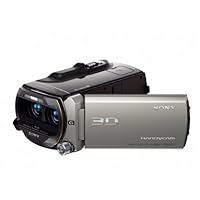
Sony HDR-TD10 High Definition 3D Handycam Camcorder with 10x

Sony HDR-TD10 High Definition 3D Handycam Camcorder with 10x Optical Zoom
Customer Ratings: 4.5 stars
Buy Now
I shot my first 3D movie in March 2010 using two Canon T2i cameras on a parallel 3D rig. Editing and rendering the footage was incredibly difficult; I used Sony Vegas to edit each view independently and Stereo Moviemaker to adjust the 3D effect. Finally, I was able to master a 3D Blu-ray using a beta version of NetBlender's DoStudio, a $10,000 program that included support for the 3D MVC codec.

Fast forward just over a year. The newly released 10.0d version of Sony Vegas natively supports the MVC codec, allowing 3D footage to be edited as easily as 2D footage. It also allows 3D Blu-rays to be burned directly from the timeline.

As for the camera itself: I was pleasantly surprised to find it exceeded my expectations. Color reproduction is exceptional, image stabailization is very good, and the glasses-free 3D display is extremely nice. Only the sound quality disappoints, but I almost never rely on built-in mics (opting instead for a Zoom H4N paired with an Audio Technica AT875R).

As an entry into the world of 3D, this camera is phenomenal. There are "prosumer" 3D cameras on the way, but for those who edit in Vegas, there's really no better or cheaper way to jump into the world of 3D shooting and editing today that with this camera.

For those without Vegas, editing a bit more difficult. Clips can be edited in-camera using some fairly simple software (you can even download music onto the camera to use as a soundtrack behind your clips). But you won't get nearly the performance you would get using dedicated editing software. And please note: Vegas is the ONLY software under $4000 currently offering the ability to manipulate MVC files. Premiere doesn't have it, nor does Final Cut Pro.

But for Vegas owners, or just those who love new tech, this camera come very highly recommended!

(I have shown this to a few colleagues unfamiliar with 3D and watched their faces light up with glee; one described it as "like traveling into the future." That's awesome.)

Click Here For Most Helpful Customer Reviews >>

Sony Cyber-Shot DSC-TX10 16.2 MP Waterproof Digital Still Camera

Sony Cyber-Shot DSC-TX10 16.2 MP Waterproof Digital Still Camera with Exmor R CMOS Sensor, 3D Sweep Panorama, and Full HD 1080/60i Video
Customer Ratings: 4 stars
Buy Now
First, some background on what I was looking for: I'm a casual photographer. I wanted a waterproof camera which would produce high-quality photos in all settings (indoor, outdoor, and underwater. My intention was to completely replace my 7.2MP Sony DSC-W7, which I LOVE. I wanted to add the underwater feature without compromising on other features. I did not want to spend more than about $400 for everything (camera, two 8GB memory cards (Class 10), two extra batteries with charger, and float strap. This left me with about $340 max to spend on the camera itself. I do NOT know a lot about photography. Terms like "ISO" and "white balance" are foreign to me. I like to use pre-programmed scene modes and auto features. I enjoy digital scrapbooking and I frequently zoom and crop. It takes a very high quality photo to crop out/enlarge a small figure without too much distortion.

I began my search online and spent about 6 hours researching the cameras in my price range. The cameras I focused on most were the Canon D10, Sony TX10, Panasonic TS3 (sometimes referred to as FT3), Olympus TG-810, Olympus Tough 8010, Fujifilm XP30, and Pentax WG-1.

I eliminated most of these options rather quickly based on their reviews, overall ratings, and the quality of photos that I reviewed. I narrowed my focus to the Canon D10, the Sony TX10, and the Panasonic TS3.

I wanted to love the Canon D10, since it seems to be the overwhelming fan favorite, but I ultimately decided that it wasn't going to be a good fit for me. The price of the D10 is similar to the Sony and the Panasonic, but it's a 2.5 year old model which doesn't have HD video. The photo quality seemed about equivalent to the other two, so I decided to only focus on the two models with HD video.

I would have been completely sold on the Sony, since I've used only Sony cameras most of my adult life and I've never been disappointed in one; however, there were some notable deficiencies which most reviewers found with this model (detailed below), so I was a bit hesitant to take the plunge. The Sony was also priced near the top of my budget ($329), whereas the Panasonic was only $275 at Amazon.com. The Panasonic reviews seemed to all be very positive, with the only significantly commonly-noted problem being lower quality indoor photos. However, all of the indoor, outdoor, and underwater photos that I reviewed online looked very good.

I decided to take a chance on the Panasonic TS3 and I really, really, wanted to fall in love with it. I ordered it from Amazon and they delivered it the next day. I wasn't blown away by this camera. The outdoor photos were good. The video was very good. The underwater photos (taken in my large fish tank) were very good. The indoor photos were POOR. I decided to order the Sony TX10, hoping that I'd see better results. I ordered it from Amazon at 9pm that night and it was delivered at 1:00pm the next day (gotta love Amazon!). The photo quality of the Sony camera is outstanding. I'll be keeping the Sony TX10!!! For some people, however, the Panasonic might be the better choice.

First, I'll provide my overall recommendations, then I'll add in all of the detail:

BUY THE SONY TX10 IF:

You value the quality of the photos/video above all else.

You like touch screen devices.

You don't plan to dive lower than 16 feet.

You don't care if you can't adjust your settings (other than zoom) underwater.

You want a VERY small camera.

You always use a wrist strap.

BUY THE PANASONIC TS3 IF:

You can live with grainy indoor photos.

You don't typically enlarge your photos to 100% (because they will be distorted).

You want a camera with GPS.

You plan to dive deeper than 16 feet.

You want a larger (but not too big) camera.

You're looking for a less expensive option.

NOW FOR MY DETAILED COMMENTS ON BOTH MODELS:

PRICE The Sony is +/$50 more expensive than the Panasonic.

SIZE The Sony is significantly smaller and lighter than the Panasonic. I don't think one is better than the other, per se. It's a matter of personal preference. The Sony will fit in most pockets. The Panasonic probably wouldn't.

RUGGEDNESS Both cameras are rated very well in this area. I haven't "tested" them, but it seems like the Panasonic is built a bit tougher and would be less likely to get destroyed in a fall. Rather than test this feature, I'm going to just trust the experts that either one will hold up well if dropped.

UPDATE: I also posted this review on another site and I recently added photos to it. Seeing is believing!

Click Here For Most Helpful Customer Reviews >>

Canon PIXMA MG2120 Color Photo Printer with Scanner and Copier

Canon PIXMA MG2120 Color Photo Printer with Scanner and Copier
Customer Ratings: 3.5 stars
List Price: $69.99
Sale Price: $45.00
Today's Bonus: 36% Off
Buy Now

I didn't buy this Canon MG2120 printer online but I bought it at Wal Mart for $38. Perhaps you can find this printer for the same price at your own local Wal Mart or Target. Anyhow, this is one of the cheapest printers you can get and it works really well. I only use it for everyday printing because I'm a student. I use it for printing out Power Point slides for my classes and it works fabulously. It's pretty silent when it prints too, compared to the noisy HP printer that recently broke down.

Click Here For Most Helpful Customer Reviews >>

Logitech HD Portable 1080p Webcam C615 with Autofocus

Logitech HD Portable 1080p Webcam C615 with Autofocus
Customer Ratings: 4.5 stars
List Price: $69.99
Sale Price: $54.68
Today's Bonus: 22% Off
Buy Now

Customer review from the Amazon Vine Program This is no doubt an excellent webcam with some fine features, including 1080p HD video recording, 720p HD video calling, autofocus, and full swivel, for which I rate it five stars. Sadly, I'm among those few for whom it isn't a good choice, for reasons that will become clear below. I'll post these comments about that for others who might profit from them, along with a suggestion for those for whom this webcam is a good choice.

System requirements

If your computer is relatively new, say three years old or less, you probably have no reason to worry about system requirements. However, those with older computers still running the software they were designed to work best with may not be able to use this device's advanced features, or if you have an even older fossil like I do, you might not be able to use it at all. For some reason, when I chose this camera the system requirements weren't given on the main Amazon product page as they usually are. Amazon has now posted them, under the heading Compatibility.

For software, you have to be running Windows XP (SP2 or higher), Windows Vista or Windows 7, or Mac OS 10.5 or higher. (The info Logitech supplied for Amazon says Mac OS 10.5 is required, but the Logitech website says 10.4.9 or higher will work, at least for some functions, as pointed out in a comment to this review. If you have a Mac you can find your operating system number by clicking on About This Mac in the menu under the Apple logo. I'm still running OS 10.3.9 myself, and love its stability--never crashes even under heavy use.)

To use only the basic functions of this webcam the hardware requirements include a 1 GHz or faster processor, 512 MB RAM, and a USB port, with USB 2.0 recommended. That last recommendation matters--if you only have USB 1.1 (12 Mb/second), your ability to stream video will be restricted to what you could do with cheaper, non-HD webcams. (Mac users can check their hardware using the About This Mac function mentioned above.)

To use the full functions of this webcam, including 720p video calling and 1080p video recording, you need a 2.4 GHz or faster Intel Core 2 Duo processor, 2 GB RAM, a USB 2.0 port, and high-speed internet (for HD calling or other HD streaming) of 1 Mbps upload speed or higher. (My trusty old PowerBook doesn't have any of those features except compatibility with high-speed internet.) If your system doesn't meet all those requirements, you're better off getting a cheaper webcam and not paying for the advanced features of this one.

A suggestion

Logitech has an older webcam, their premium model C910, that has the advanced features of this one plus built-in dual mikes for stereo sound recording (the C615 only records in mono), 10 MP still photos (only 8 MP for the C615, though in practice that's not a big difference--8 is enough!) and a high-quality Zeiss lens (the C615 has high-quality glass but not Zeiss, which has a reputation for the highest quality). Right now the C910 is only a few bucks more than this one, so you might want to consider it as well. It does lack the folding and swivel features of this one (the C910 only swivels vertically), which are pretty cool for some uses. The system requirements are almost exactly the same. (According to the info here at Amazon the C910 will work with Mac OS 10.4.11 or higher, while the C615 requires 10.5 or higher, but the Logitech website says 10.4.9 or higher will work for both, though it also says only the C910 is officially supported by Mac OS. If you own an earlier version of 10.4, the upgrade to 10.4.11 is free at the Apple website, by the way.) (Edit: Amazon has dropped the price of the C615, so now the gap in price with the C910 is more substantial, but it will probably tighten up again.)

Click Here For Most Helpful Customer Reviews >>

Casio WQV3D-8BNDL Camera Wrist Watch

Casio WQV3D-8BNDL Camera Wrist Watch
Customer Ratings: 4.5 stars
Buy Now
I'll admit it up front: the camera watch is tons of cool, but it's expensive and you may not use it as much as you'd think. Of course, it's a watch with alarms, so at least you are not spending your hard-earned money on a gadget you would use only once every 6 months. As a watch it's pretty basic and accurate, but also pretty large, so if you have small wrists, this product will look ridiculous and ridiculously bulky on you. In other words, this is a gadget for grown men with big wrists.

Of course, the reason you'd buy this product is the built-in digital camera, which sports a resolution of 120x120. This isn't much in today's world with 6 megapixel cameras, but we are not talking a professional camera here, or even a prosumer one. 120x120 is not too bad when you remember that most webcams have native resolutions of about 170x140, so this is just a bit less refined than webcams, in a package 1/5 the size or smaller. You can take up to 100 pictures, which you'd then transfer via the built-in IR to a PC. Unfortunately, you'll need to buy a separate IR sensor and upload software kit to do this, although some online shops give this away for free.

How's the image quality? Obviously you have to keep your expectations reasonable. After all, this is a cool gadget, not the digital camera to bring when you go on exotic trips. You need plenty of light, I think it's rated at 100 lux minimum. You also need to learn not to move the watch when you press the shutter button, or the picture will come out blurry. It's a focus-free camera, so everything will be in focus as long as you are at least 1 foot away from the subject (or is it object?). Finally, be sure not to take pictures of people from an angle that's too low, because most of us don't look great with our chin in the most prominent part of the picture.

Since it doesn't have flash, you can rule out taking pictures in a bar or club; besides, do you really want to snap the moment when you are drunk and look ridiculous? Not really, in my experience. So you'll probably use the camera only occasionally. For me, I caught a few heart-breaking moments on mine on Sept. 11, when the World Trade Center collapsed. Those blurry pictures caught the frenzy moment of a country in crisis, as well as the heroic efforts of New York's bravest and finest. Of course, you can't (and don't want to) expect to run into crises like this, so you can probably use the camera to spy on that cutie in your office (don't over do it!), or catch your friends in awkward manners (and risk losing their friendship!). Anyway, you can be creative, and that's what's ultimately cool about this gadget which you can carry everywhere, even in bed.

Click Here For Most Helpful Customer Reviews >>

Coby 7-Inch Android 4.0 8 GB Internet Tablet 16:9 Capacitive

Coby 7-Inch Android 4.0 8 GB Internet Tablet 16:9 Capacitive Multi-Touch Widescreen with Built-in Camera, Black MID7065-8
Customer Ratings: 4 stars
List Price: $179.99
Sale Price: $137.99
Today's Bonus: 23% Off
Buy Now

I bought this to replace another 7-inch android tablet that broke when it was sat on. That tablet had no brand name, and I had identified a few things I would improve about it if I were to replace it. I did not anticipate having to replace it when I did, but the list of requirements did enable me to narrow down my tablet choices significantly.

I wanted a faster processor. At least a dual core, if not quad core. I wanted a better, higher-resolution screen. I wanted bluetooth connectivity. And most importantly, I wanted better battery life. And I wanted all of this for under $200. I got all those and more with this replacement tablet.

My choices were narrowed down to this tablet, the Samsung galaxy tab 2 7" wifi, and the nexus 7. The nexus 7 fell out early on when I realized it did not have a micro-sd card slot. Moreover, the tablet would end up costing me more than $200 including taxes and shipping if I bought it from Google. The Samsung tablet had everything I wanted, and was about $170 to $180. I was about to buy it when this newly introduced tablet caught my eye.

It cost $110, which is less than two-thirds the cost of the Samsung tablet. It is superior to or equal to the Samsung Galaxy tab in pretty much all respects. It has a dual-core processor like the Samsung, but the processor frequency on this tablet is 1.2 GHz rather than 1 GHz. The screen resolution is 1024x600, same as the Samsung. It has bluetooth, and a 4000mAH battery (same as the Samsung tablet). The battery life, I knew, would be slightly lower than that of the Samsung tablet because of the faster processor, but I was willing to take that compromise. Also, this tablet comes with a single front camera whereas the Samsung tablet has two cameras, but I believe in taking photos with a camera rather than looking like an idiot taking pictures with a humongous tablet which blocks everybody else's view of what you are trying to photograph. One more perceived advantage this tablet had over the Samsung was that the Samsung tablet came with a proprietary cord to connect it to the computer, whereas this one uses a standard micro-USB port. I don't want to spend a few dollars replacing a lost or misplaced cord down the road.

The tablet came well-packaged. The package consists of the tablet, a user manual in three languages, charger, USB cord, various other bits of paper like a warranty card, registration card, etc., and a pouch for the tablet made of some very thin, indeterminate material that feels on the outside like suede leather. The tablet's screen is protected with a thin plastic sheet that I peeled off as soon as I unpacked it.

The tablet feels solid and well-constructed. It has a plastic body, but I was not exactly expecting a magnesium uni-body for the price I was paying! It has a wide bezel around the screen, and the ports are arranged and marked clearly. The only buttons are for turning on the tablet and/or screen, and a rocker switch that controls the volume. The front-facing camera is placed in a corner of the bezel, but I was not anticipating using a camera at all, so I didn't care where it is or what its resolution is.

I plugged the tablet in to the charger, and it was fully charged in about an hour. The tablet was probably shipped with about a 50% charge like most electronics with li-ion batteries are shipped. There is no LED or any other outward indication of being plugged into the charger. The screen does show a charging battery in the middle if the tablet is completely off, and an icon of a charging battery in the notification area if it is on.

Set up was quite easy and trouble-free. This is my third android device (after my phone and my previous tablet), so there were no surprises here. Actually, I take that back. The surprise I had was that some of the applications that had been compatible with my previous tablet were shown by the app store as not being compatible with this new tablet. Examples include the Audubon field guides, WebMD, itriage, etc. I attribute it to the newness of this tablet, and I suspect app developers will be updating the apps to make them compatible with this tablet as time goes on. There are ways to side-load these apps on to the tablet if you absolutely need them, and the tablet itself is fully capable of running them with absolutely no problems. The tablet boots up in about 90 seconds from a cold start. The bezel is completely free of touch capability: no home, back and recent apps icons on the bezel anywhere. They appear only on the touch screen as needed.

The tablet has 2GB of internal memory, and an 8GB internal SD card. About 4GB of this internal SD card is occupied by the android OS, and the built-in apps that come with the tablet (such as GMail, Google Maps, etc.). Only the other 4GB is usable by the end user. But, combined with the 2GB of internal memory, there is more than enough space for hundreds or even thousands of apps, so it should not be a problem. I have used up 1.3GB of the internal memory and none of the 4GB SD card after loading about 150 apps on the tablet. However, the tablet is not rooted, and there is no way to remove any of the built-in apps unless you want to go through the process of rooting the tablet. Some of the preloaded apps are of questionable value: For instance the maps app is pretty useless given that the tablet does not have GPS.

The tablet is very fast and the screen is fluid and smooth. There is no lag in running any app or switching between multiple apps. After the full charge, I took the tablet off the charger and loaded all the apps I want on it over the next four or four and a half hours on battery power. The processor (both its cores) was running at full power during this entire time, and the screen was on the whole time too, and the battery was drained down to about 5%. If I were just browsing the web or watching videos, it would probably last about 6 to 8 hours. If I were just listening to music or something like that with the screen off, it would probably last a couple of days. As such, when I leave it overnight, the battery goes down by a percent of two at most. The battery also charges when you plug the tablet into a computer using the USB cord.

The user manual is surprisingly informative, and has a bit of an introduction to android itself in it. If you are completely new to the android world, you might find it useful though in general I have found the system intuitive enough I that I didn't need it when I got my previous tablet, and that tablet's user manual consisted of a single folded sheet of paper! The user manual comes in three languages, but the Coby website does not have a PDF version of the manual up on it yet.

I have had no problems running any app that I have loaded on the tablet. The tablet has not crashed, and I don't remember any app crashing either. Youtube works perfectly. I have watched movies, listened to music, live streamed radio, played games like angry birds, etc. without any issues. The built-in speaker is not the strongest out there, and it is only a single speaker, so no stereo if you use the built-in speaker. But I had no problem pairing it with a set of stereo bluetooth headphones, and the output is loud and clear. Wired headphones work fine also. Pairing with my stereo bluetooth headphones was very quick, painless and reliable.

The screen is very good looking and videos and games look crisp and sharp. I have not tried using the tablet in bright sunlight, but in most indoor situations, including next to open windows, the screen does the job for me. There is no ambient light sensor, so you have to adjust the brightness manually if you find yourself straining because it is too dim for the environment.

I have also read a couple of ebooks on the tablet and found it to be very easy on the eyes. The words appear crisp and well-defined with no blurring or rounding of the edges of letters, etc. I primarily use the tablet for reading books, playing games and watching videos, so the screen quality was important. The high resolution paid off. There are no dead or stuck pixels as far as I can tell.

Overall, I am quite happy with the tablet, and I think anybody who buys it with realistic expectations would be too.

So, why did I not give it 5 stars? The first reason is the lack of a charging indicator of any kind (a small led on the bezel or something like that). I have to physically wake the tablet's screen up to confirm that it is charging. Next, the speaker is weak. The tablet's wi-fi antenna is not as powerful as I would have liked it to be. It has some problems holding the signal reliably in far corners of my home that are farthest from my router. It has no ambient light sensor. It comes loaded with some junk apps. I would have found better use for the space occupied by these apps, but I can't remove them easily. Which brings me to my final demerit: the tablet is not rooted. Also, it comes with Android 4.0.4 and Coby has not pushed an update to 4.1 or 4.2 yet.

The only thing left for me to evaluate is the long-term reliability of the tablet. I will try to provide updates if something changes significantly down the line. In the meantime, if you have questions or concerns, please post in the comments, and I will try to address them as best as I can.

Click Here For Most Helpful Customer Reviews >>
Tokina 17-35mm F/4 AT-X Pro FX Lens for Nikon Digital SLR Cameras

Tokina 17-35mm F/4 AT-X Pro FX Lens for Nikon Digital SLR Cameras
Customer Ratings: 4.5 stars
Buy Now
Before purchasing this lens, I'd been searching for a reasonable ultra-wide-angle lens for my D800. This was among 4 or 5 options in consideration. I love my Tokina 11-16mm f/2.8 Pro DX Digital Zoom Lens Nikon for DX, and had wanted an equivalent lens for full frame.

This is my third Tokina lens, behind the 11-16mm f/2.8 and 100mm macro. I'd been satisfied with those two, and so decided to give this lens a try.

First off, mechanics:

The build quality is typical of Tokina; that is to say: very good. It feels perfectly solid in the hands, and I doubt anyone would complain about the quality of the construction. One thing that I'd noticed, however, is that the zoom and focus rings are a bit more loose than the 11-16mm. This perhaps makes the lens a bit more usable, but at the same time gives it a different feel than I'm used to.

The focus and zoom rings are spaced well, and allow for easy manual focus. One thing to note: when changing the clutch from AF to MF, or vice versa, the focus setting can change slightly. This can sometimes be obnoxious, though it will not matter for most use.

Despite, on paper, only being slightly larger than the 11-16mm, make no mistake, this is a larger lens. It is just generally bigger in all regards. Despite being fairly large, it 'looks' like an appropriate size on the D800. The 82mm filter thread is annoying, but it is better than none at all. Anything other than a UV filter at this size can be a bit pricey.

Second, optics:

I've not had as much chance as I'd like to to 'real world' testing, so most of these findings are based off of test-type environments. I understand that this lens seems to have a moderately-high variance in quality (based on internet searching), so I can't generalize beyond my copy:

In the center, it seems to be sharp at all settings. Wide open is definitely less sharp than f/5.6 and beyond, but still not bad at all.

Towards the moderate corners, it is fairly sharp wide open, and plenty sharp from f/5.6 onward. Seems to be better at the wider focal lengths.

The extreme corners are somewhat disappointing. Wide open, they are not sharp. They don't become sharp until around f/8, and even then, not ideally so. Here, ~20mm seems to be the most sharp setting.

In general, the sharpness does not seem to be limited by resolution so much as it is by contrast. I think that it can resolve very well, but wide open it has a bit of 'haziness' about it.

Flare: at its worst when a bright object is just out of frame, which causes a low contrast veil. When the bright object is in frame, it copes with the flare better.

Distortion: Almost none, and looks easy to correct.

Bokeh: Very good actually. Certainly the best I've seen in the several UWA lenses I've owned.

Overall and conclusion:

If you treat it as a constant f/5.6 lens, you will certainly not be disappointed. For me, this is quite fine, as I likely won't shoot it much below f/8. Alternatively, if you crop away the most extreme bits of the corners, you'll be perfectly happy too. (I can see myself using 5:4 aspect ratios more commonly with this lens.)

In general, this lens has exceptional build, and very good, though not exceptional, optics. Is it an 11-16mm for full frame? Not really. Is it worth the money? I'd say so.

Click Here For Most Helpful Customer Reviews >>

PylePro PPHP157AI 15-Inch 1400 Watt Portable Powered 2 Way Full

PylePro PPHP157AI 15-Inch 1400 Watt Portable Powered 2 Way Full Range PA Speaker with Built-in iPod Dock USB SD and Remote control
Customer Ratings: 4.5 stars
List Price: $379.99
Sale Price: $266.95
Today's Bonus: 30% Off
Buy Now

There are times when you need to play your music loud. That isn't a big deal if you need to boom your music/movies in media room, but if you need to take that type of performance on the road you options are more limited. There are a variety of bluetooth speaker and ipod docks and while many of them are easy to use and highly portable they are rarely loud. In fact, the Pyle Pro 15" Powered Speaker passes the loudest bluetooth speaker that I have used (The Supertooth Disco Twin) at less than 30% of its total volume.

Make no mistake, the Pyle Pro 15" Powered Speaker is not intended to compete against small bluetooth speakers. Not even close. This speaker is designed to fill large spaces with with sound. It can fill anything from backyards, dance halls, to church auditoriums with total sound. In the video portion of the review you can see how loud it is at only 40% of its total volume (I was afraid to turn it up much louder for fear of upsetting my neighbors!).

The best part of the speaker is the cost the Pyle Pro 15" costs less (significantly less) than most 15" subwoofers that are the market. The Pyle Pro offers 1400 watts of power, a 1.75" titanium horn tweeter, multiple types of inputs, a hard plastic shell at a very reasonable price.

Notes-

In terms of sound performance as mentioned it is very loud.... in all settings. This speaker is loud enough to be used for DJ'ing weddings at dance hall (or a fraternity party).

I like it for use as the primary speaker for outdoor movies. I combine this speaker with a projector to show backyard movies with the right set-up this can make for an awesome neighborhood movie night.

The sound quality is more than acceptable, but it is hardly subtle. An audiophile may complain that the bass is a bit punchy and that the horn tweeter can come across as bright... and the combination means that the midrange is a bit undervalued.... but who really cares? A Two-way, 1400 watt speaker that features a 15" woofer is not designed to have the cleanest most subtle soundstage.

Frequency response of 40Hz to 22kHz although I would not be surprised if the frequency response was a little lower than the 40Hz.

Has a microphone input which allows it to be used as a public address speaker or for Karaoke.

The built in iPod/iPhone dock is a nice feature, but it is a bit awkward to use. I greatly prefer to use (although it is not included) the Aux-to-RCA splitter and directly plug the speaker into the headphone jack of my iPad.

Allows you to insert a SD memory card to play music directly from a memory card

Features a small remote control that is mainly used for use with the SD memory card.

Has a USB input so you can play music from any source that has an USB output.

Has gain controls for both bass and treble

Using an auxiliary output-to-RCA splitter and a small bluetooth device (like the Jabra Clipper) you can turn the Pyle Pro Powered Speaker into a HUGH and LOUD bluetooth speaker.

Has a hard plastic shell which has been pre-tapped so that it can be bolted (both vertically and horizontally) to a soundstage/mounting bracket.

Has a switch that allows the speaker to accept either a 110V or 220V source.

Has built in handles to help carry the speaker, but they don't help with the weight (weighs about 50lbs)

The manual is not exactly helpful it is about 4 pages and really doesn't offer much information on how to use the speaker.

Final verdict There is nothing subtle Pyle Pro 15 inch it is both large and loud but the great thing is that it provides a high level of functionality (as a backyard speaker, studio monitor, and sound stage speaker) at a very reasonable price. For me, it makes nearly the perfect speaker for backyard movie night so if you are in market for an inexpensive all-in-one speaker I would highly recommend that you investigate the Pyle Pro 1400 Watt 15 inch Powered Speaker.

5 Stars

Please Note I received this product for reviewing purposes.

Click Here For Most Helpful Customer Reviews >>

Pentax DA 12-24mm f/4 ED AL (IF) Lens for Pentax and Samsung

Pentax DA 12-24mm f/4 ED AL Lens for Pentax and Samsung Digital SLR's
Customer Ratings: 5 stars
List Price: $1,079.00
Sale Price: $799.99
Today's Bonus: 26% Off
Buy Now

Pop Photo (Apr-06) praised this lens as a "Wide Winner" for spectacular performance on bench testing: excellent image sharpness and contrast; imperceptible distortion ["best of breed"]; and barely notable vignetting at the short end. I can add breathtaking color, crisp contrast and ruler-straight linearity to that list. At first glance, a 2X zoom doesn't sound impressive these days until you realize that this parafocal zoom sweeps an incredible 100 to 60 degree viewing range, that's just perfect for cramped interiors, group pictures or landscapes. This zoom is a landmark of stellar engineering: combining extra-dispersion glass and aspheric lens elements into flagship "great glass".

But a finely-tuned optical engine performs optimally only if all cylinders fire in unison ... at daylight trial, I noted a hideous 'purple fringing' [chromatic aberration] of trees and power lines outlined against an overcast sky -something was badly remiss. Rather than returning the lens, I packed it up for warranty service so as to alert the manufacturer to quality control slippage. Irreparable misalignment [probably from rough shipping/handling] was acknowledged; replacement with a brand-new lens was hassle-free as well as timely.

Should you detect distortion (run some test shots before starting a formal shoot!), fear not -Pentax service was knowledgeable, courteous, and helpful. To their great credit, exchange was virtually painless, and the new replacement lens at last performs flawlessly. Although the initial unit turned out to be a glass lemon, Pentax made good (try that with a new car!); I have nothing but praise for the fair and decisive warranty follow-through.

Tip: the bulbous cyclops snout of the forward element is close to the surface, begging for scratches and smudges. Protecting the front end with a haze or UV filter in essence adds an unproven 14th glass element to a balanced optical design -buy the high quality multi-coated filter (mounted in a thin WA ring) this star performer deserves to minimize glare, internal reflection and corner vignetting.

Click Here For Most Helpful Customer Reviews >>

ASUS Google Nexus 7 Android Tablet

ASUS Google Nexus 7 Android Tablet
Customer Ratings: 4 stars
List Price: $299.00
Sale Price: $190.48
Today's Bonus: 36% Off
Buy Now

Words fail me on how much I love this tablet. I will say I'm slightly Google-biased, as I've owned Android phones before they were cool (and since), I use all their services (including Google+. Yes, there are people on there), and Google sent me a FREE Chromebook to beta-test it a year or two ago. So, yeah, I'm a little biased... =)

BUT, I've waited to buy a tablet. There's 2 iPads (both 3rd gen) in our house, and I do like them, they're worth the $500. However, it's not fun to just play with it. You need apps. Then, apps aren't really fun unless you get the paid version. Then, a $500 tablet becomes $50 dollars more, just to get some basic apps and games! Plus, it's cumbersome and weighty, so if you're playing a game, you'll be sitting it in your lap within 5 minutes.

The Nexus 7 has NONE of those problems.

1. It's $250. (Yes, I paid $275 for the one here, but I'm a Prime member and I have a store card here, so it made sense to buy from Amazon). It is NOT worth that price. It's worth $400 easy, in quality, look, feel, and performance.

2. The wallpapers, widgets, etc. alone can entertain you when you first get it! I customize my screens and change them every week to keep me from getting bored of it, so I gladly welcome how amazing it looks! Jelly Bean is silky smooth and the UI just makes sense, especially compared to Gingerbread, which my phone is stuck with... =(

3. Apps. There is enough on the device to get you started (including a copy of Transformers 3. Not that I'd pay for that *particular* title...), and the Play Store has so many naturally free apps that can do almost ANYTHING! Yes, if you get free apps, there will be some with ads, like with iOS devices, but at least you have a choice with almost every app, the prices for paid apps seem MUCH more reasonable, and Google gives you $25 credit just for buying a Nexus 7! $25!

4. Size. This was the make-or-break for me. I'm an avid reader. On the iPad, I fell in deep, deep love with iBooks. It was the PERFECTION of e-reader apps. Still is, in my opinion. I can get all my college books online in PDF, and I also have ePubs that I read, mark, highlight in. Owning an Android phone, I've shopped the apps, but nothing came close to the reading experience of iBooks on the iPad's nice 10" screen, the 5+ highlighting colors, and the shelves to keep my books organized.

That being said, I had reservations in buying this, as I doubted it could compete.

Even w/o a good reader app, it won. A 7" screen for a guy like me, who's NEVER at home, was a much better match than I imagined! It LITERALLY fits in a jacket pocket. Now pants, it'll depend on what kind, but the thought is that I can, will, and have taken this with me everywhere! It fits in my glove compartment, messenger bag, suit coat, jacket, you name it. With that alone, it beat the huge iPad, because now I was reading everywhere, instead of just at home. To make things better, I found an e-reader that's a very close 2nd to iBooks, Mantano reader (GET IT NOW!!), so I don't miss the iPad at all!

Cons: Hmm. Well, ummmm.... there's, no.... I got nothing. =)

Actually, I have a couple.

1. No HDMI port. That is a bummer, especially since Google is pushing their movie and TV selections so much, you'd think they'd give you a way to watch it on more than a 7" screen...

2. No 3G model... yet. ;D

3. Google Now needs some more work and features if it's going to compete w/ Siri. Not that it's bad, just limited...

4. Not many accessories, but how many do you need for a tablet? Phones, sure. But who would honestly dock their cutting-board-sized tablet? More case choices would be nice, though...

Basically, I've waited years to buy a tablet, waiting for a decent, GOOD Android tablet. Here it is, finally. It's waay cheaper than iPad, but not in quality AT ALL. It's running pure Android OS, unlike the Kindle Fires. Combining a quad-core processor with Jelly Bean means it's a MUCH better experience than any other Android tablet (I'm looking at you, Xoom), even rivaling/beating(?) an iOS experience!

Buy a Nexus 7 if you want a 7", $400 tablet for only $200 from Google.

Buy an iPad if you want a 10", $500 tablet from Apple.

Other than that, there is no difference or advantage.

Rate this if this review helped you in the slightest! (or even if you read it all... =D)

Click Here For Most Helpful Customer Reviews >>

Lomography Diana F+ Medium Format Camera

Lomography Diana F+ Medium Format Camera
Customer Ratings: 4.5 stars
List Price: $49.00
Sale Price: $39.95
Today's Bonus: 18% Off
Buy Now

I love this camera! The medium format is probably my most used and adored film format and this camera can do just about anything. B&W, color, whatever! It's also a pinhole, which is fantastic because you can have color pinhole photos and have one or two on a role and just keep switching it out. I highly recommend buying some of the other lenses that go with this but come separately. Also, I purchased the ringflash, which adds another dimension to your creative capabilities. If you get the 35mm attachment, you're really in business! Yes, it's a bit expensive (these cameras originally sold for literally pennies when the first generation came out decades ago) but what you can do with these cameras is worth every modern day dollar!

Click Here For Most Helpful Customer Reviews >>

Apple MacBook Pro MD318LL/A 15.4-Inch Laptop (OLD VERSION)

Apple MacBook Pro MD318LL/A 15.4-Inch Laptop
Customer Ratings: 4.5 stars
Buy Now
Let me start with the good:

So awesome. Great OS, fabulous improvements to the existing line bumping up the processor speed and adding the thunderbolt port. This is my second MacBook. The first one I had was a 2006 model, not the Pro. I fell in love with it. This one has had the same effect. I had upgraded my old MacBook to Lion, so I kind of knew what I was getting, but hadn't been able to enjoy some of the awesome new multi-touch features. The improvements to the OS have been relatively gradual, but substantive. The feel of this machine compared to the old MacBook is far superior. The Unibody construction is solid, sleek and beautiful. It is everything I'd hoped it would be from a look and feel standpoint, but somehow a bit more sturdy.

For the not so good, I got the stock screen which is VERY glossy. I mean ... REALLY glossy. It's still beautiful and has better color reproduction than I could ever expect from a notebook. The reflectiveness of the display is only a minor inconvenience if you work in a controlled-lighting environment like me (I prefer it dark) or if you can crank up the brightness.

My real problem with it? The statement of 7 hour battery life is not just mere exaggeration -it's a lie. I challenge anyone to show proof that through anywhere near normal use can get more than 2.5 hrs out of it. I've got the brightness all the way down to just one notch above 'off' and the keyboard backlight off. The first full charge of this battery got me only about 2 full hours. Enabling the battery timer is useless. The "Time remaining" goes from 4 hours plus to less than 2 hours over the span of about 10 minutes. It's a joke. It's so bad that I'm thinking I only got half a battery or something.

I have an extended battery on a Dell notebook that gives me 7.5 hrs of regular use, and had an extra "slice" battery that attached to a Compaq elitebook that gave me 7-8 hrs. I know what 7 hrs of battery looks like. This ain't it.

My only other complaint is that it gets really hot. There's a reason they aren't called laptops. :-)

If you buy this don't go into it expecting 7 hrs of battery life, and you'll be perfectly satisfied.

All that being said, I think I'm done buying Windows PCs.

UPDATE:

With the help of some responders to my original review, I am seeing much better results from the battery close to 5 hrs + of normal use. Leaving the original text of the review intact, but updating the rating to the 5 stars the product deserves. I'm extremely satisfied. Very happy Mac owner. :-D

Click Here For Most Helpful Customer Reviews >>

CineBags CB27 Lens Smuggler for DSLR Cameras and Lenses

CineBags CB27 Lens Smuggler for DSLR Cameras and Lenses
Customer Ratings: 4 stars
List Price: $229.00
Sale Price: $219.00
Today's Bonus: 4% Off
Buy Now

Great for stuffing camera, lens, computer, and anything else you might need for moving from point A to point B.. only reason i give it 4 stars, has nothing to do with the bag..iBut, on a smaller puddle jumper of an airplane its a little too big and wont fit in some of the smaller overhead bins and now means either checking the bag with all your important stuff.. or stuffing it under the very tiny seat in front of you.. which either means no leg room at all.... but once again.. that is no fault of the bag.. on all other planes it fits perfectly in the overhead..

Click Here For Most Helpful Customer Reviews >>

Panasonic LUMIX DMC-FZ70 16.1 MP Digital Camera with 60x Optical

Panasonic LUMIX DMC-FZ70 16.1 MP Digital Camera with 60x Optical Image Stabilized Zoom and 3-Inch LCD
Customer Ratings: 4.5 stars
List Price: $399.99
Sale Price: $289.00
Today's Bonus: 28% Off
Buy Now

The is going to be a quick review on the camera and I will add more as time goes on. The FZ70 takes really good sharp photos, but hand held might be a problem in lower light levels. I went out yesterday evening and took some shots hand held and they all came out blurry. I should have paid more attention to the shutter speed.

The camera works fantastically in iA, which is the auto mode. I mainly use Aperture but was impressed with the auto settings.

It will go with a 60 second exposure in the Starry Sky Mode, which is under the SCN mode on the main dial.

The lens thread is 55mm so if you plan on using your filters from any other Pany camera, you will need a 55 to 52mm Step Down Adapter. Amazon has them for cheap. I don't think vignetting will be a problem using 52mm filters as the lens is way smaller than the filter threads on the camera. Here is the 55 to 52mm Step Down Adapter.

Goja 55-52mm Step-Down Adapter Ring (55mm Lens to 52mm Accessory) + Bonus Ultra Fine Microfiber Lens Cleaning Cloth

The camera has no shutter remote cord jack, so a shutter release cable will not work. My Yongnuo YN-560 flash will not work on the camera either. It physically hits the camera flash housing, which is raised a little. The answer to that is to use a wireless flash trigger with the Yongnuo Flash and that works fine.

Addition: I looked at the Yongnuo flash again and it will fit on the camera, but it is a tight fit between the camera flash and the Yongnuo flash housing. I modified the Yongnuo flash by taking some of the plastic off the flash housing where the camera flash is hitting, with a pencil grinder. It doesn't take much, and it is right in the middle of the housing. You could remove some of the plastic in the flash housing with sandpaper, but it would take longer, but will also give you more control of how much plastic you are taking off. Now my Yongnuo Flash works perfectly on the FZ70 camera!

The video does not have a progressive setting. Interpolated is the best you are going to get with this camera.

The FZ70 does not have a jack for a shutter release cable and does not have an infrared input either. The camera has to be set to a timer delay within the camera for 2 or 10 seconds. If it was a Sony or Canon, the timer is set and stays on till you shut it off. Unfortunately this camera requires you set the timer delay for each and every photo.

The longest the camera will go on exposure under the Shutter or Manual Mode is 8 seconds. In the Starry Sky Mode it will go 15, 30, and 60 seconds.

Like I said the lens thread is 55mm so your filters will have to be that size or use an adapter. The camera will use a teleconverter with the DMW-LA8 adapter, which is not available yet. Addition: Those LA8 adapters are available on Ebay now. They are being sold out of Japan though. I had that happen with the FZ200 camera as well and had no problem getting one from a Japanese Ebay member. There are several teleconverters that work well with this camera, but may not be needed as this lens rocks as far as zoom goes!

It will take Raw pictures, but no one is supporting the FZ70 Raw files yet. It will come. Added: I found that FastStone will support the Raw files from the FZ70 and it is much better than Silkypix, in my opinion. Just Google FastStone and download and install the software. It is free.

Start up time is very fast. I was able to take a picture in one second after turning the camera on.

The focus button is on the top of the camera now. The AF/MF/Macro button is on the right side of the LCD instead of on the camera lens.

One thing I have noticed with this camera is the noise, or should I say the lack of noise! The shots I took at ISO 800 and ISO 1600 still look pretty good, and at ISO 100 noise is hard to find.

The camera will zoom to 60X (1200mm 35mm Equivalent) in the 16mp picture size. Setting the picture size to 10mp will give you 75X zoom, setting the size to 7mp will give you 90X, at 5mp you get 108X and at 3mp is 135X. This is Extended Optical Zoom. If you need more zoom than that, under IResolution, use I-Zoom for an additional 2X at all picture sizes and digital will give another 2X, but image quality will suffer. I took some shots at the 10mp picture size with I-Zoom on, and the photos in my photo software are showing 3030mm zoom and they look amazingly good! I will post a link to some shots in the first comment on the review.

There are two FN buttons on the camera that can be set the way you want them to be. I set FN 1 button to Bracketing and FN 2 button to Flash Control. I may change them as time goes on, but I find it really great to be able to get Bracketing with the push of a button.

I don't care much for the lens cap, and ordered a better 55mm one on Amazon.

eForCity 55mm Camera Lens Cap, Black

Hoya makes good filters and I found this one (55mm) that will work fine on this camera. I use filters as it seems more often than not, I end up with my fingerprints on the lens filter. It also keeps dirt and grime from getting to the lens. It might offer some protection in an accident too.

Hoya 55mm HMC UV Digital Multi-Coated Slim Frame Glass Filter

The camera does not come with a lens hood and none is available in the Accessories on the Panasonic web site either. It seems there is no lens hood for this camera at this time.

This is it for now. I will add to this review as time goes by, so check back often.

Addition:

I had a chance to check out the high speed picture mode with the camera and found this: At 2 fps (frames per second) all works as advertised and it takes 2 fps for an extended period of time. 5 fps it takes 5 frames per second for 3 shots and goes back to the 2 fps rate. I tried it in Auto Focus mode and the regular mode with the same results. 9 fps Once again, 3 shots and then the 2 fps rate. H Mode the camera took a very fast rate of speed (at least 9 frames per second) for 9 shots, or 1 second. I have since found in the manual that at that speed the picture size is 2.5 or 3 mp. I forgot which. That is excellent. The last mode is the Flash and it will take 5 quick photos with flash before stopping. That could come in very handy at times.

I really like this camera. I like the menu system on the Panasonic Cameras too. I have the Canon SX50 as well, and still have problems with the menu settings and I have had that camera for 6 months. The menu system just doesn't make sense to me on that camera.

I did a shootout with the Canon SX50, the Pany FZ200, the FZ70, and a Sony Nex 6. The FZ70 images look about the same as the Canon SX50, and in my mind better than the Pany FZ200 camera. The last shot is a Raw shot from the FZ70 camera converted to JPG. The picture files can be seen in the Comments on page 12, the 7th post.

Added: After using this camera for a while now, I am even more impressed with it. It takes great pictures and I really like the Panasonic Menu, which is laid out well and easy to use. I am getting lots of keeper photos and the lack of noise in the shots is really appreciated!

Addition 10-29-13 I sent the first FZ70 back because the photos at high zoom were soft. To make a long story short, it turned out that the Hoya UV filter I was using on the camera was responsible for the soft photos. I have changed to a Sigma DG 55mm filter and the results are outstanding. Sharp clear photos at all zoom levels. This camera takes photos every bit as sharp and detailed as the Panasonic FZ150 or FZ200 camera and is as good as the Canon SX50 in sharpness as well.

Click Here For Most Helpful Customer Reviews >>

ViewSonic PJD5123 SVGA DLP Projector 120Hz/3D Ready, 2700

ViewSonic PJD5123 SVGA DLP Projector  120Hz/3D Ready, 2700 Lumens, 3000:1 DCR
Customer Ratings: 4.5 stars
Buy Now
I've only had my ViewSonic PJD5123 one day, which is a little premature for reviewing, but with only one review posted, I thought another would be helpful. I actually made my purchase on that review's recommendation, since I could find no others.

First, let me say that my purchase was largely price-driven. I figured I'd have to buy a used projector, but the low price Amazon charged was the hook that caused me to bite on this brand-new one. My second criterion was that it had to work with a Mac; it does! I did have to purchase an extra cable for my Macbook Pro unibody ($29.99 from Apple). I could have gotten a third party cable for much less (and may still do that for a backup), but the reviews on them were not as favorable as those on the Apple one.

So I took the plunge, even paying an extra $4 (Amazon Prime) to have it delivered in two days. It arrived on time and I found everything in the box as advertised. The written documentation is worthless, but their CD has much good information. You can also go to the ViewSonic website and download their PDF manual to read before your purchase arrives (highly recommended).

I installed the software on my Macbook Pro, connected the ViewSonic PJD5123 and fired it up. My computer (running OS X 10.6.7) recognized the projector and the computer screen's image shone on the white wall across the room, but it was very blurry. My heart sank. Thinking I'd bought a pig in a poke, I began lamenting the irritation of having to ship it back. Then, I began to turn the adjustments this way and that, and the picture on the wall became as clear as the one on the laptop screen. Was I ever relieved!

Then I wondered, will it work in an environment with a lot of daylight? Because I teach college courses and give seminars in rooms with many windows, I needed a projector with enough brightness to provide a clear text and picture in broad daylight. Now please do not misunderstand. The picture and text are better at night, but they are just fine in the daylight.

Someone may wonder how it works for movie watching. I've been watching movies on my 17" computer screen, so when I focused the ViewSonic with a movie projecting from it on the wall, I held my breath hoping that it would provide at least an acceptable picture. Wow, was I every pleased! I now have a huge screen on the wall that looks as good as the one on my computer. This is a bonus I'd not planned on.

Another concern for me is the voltage. I travel internationally and was delighted to find that this little projector works with 110-240v/50-60hz. With a plug adapter I'll be in business in the USA and foreign countries.

I almost forgot to mention that while there is no carrying case, a remote (with batteries!) is included. I've barely used the remote, but the features look sufficient for my use. As for the bag, what do you want for a rock bottom price? I'll likely go to the local thrift store and find a suitable case for less than three bucks!

Do I have any concerns or disappointments? So far I'm not disappointed at all. This projector does all the basic stuff I need and provides a very nice picture. My only concern is that when I shut it down I do not hear the fan running to cool it down before final shut down as the instructions indicate. I will call or email the company to see if its shut down feature is defective. My guess is that it is just fine. Other than that, it seems to work A-OK!

Please note that this is not a heavy-duty, latest and greatest feature-filled projector. For such a product you'll likely pay three or four times what this little fellow costs. But it does what I need and even has an eye to the future with a sticker that boasts "3-D READY."

ADDED 6 JULY, 2011

Just a quick note on the issue of the fan not running after shutdown to cool the projector: I emailed ViewSonic on Saturday of the July 4th weekend and they responded promptly the following Tuesday after the holidays. Here's their email response:

"Dear Valued Customer,

Thank you for contacting ViewSonic. Our newer projectors have a feature in which the unit will cool off on its own when needed. This new feature is so that the unit can be used more on the go , ViewSonic and a few other brand name companies have added such feature to recently manufactured projectors . If you should have further questions please contact us back. Thank you for giving us the opportunity to provide assistance."

Well, I couldn't believe what I'd read, so I called ViewSonic and talked to a technical person. He assured me that the email was, indeed, correct and that the unit is working just fine. He said ViewSonic designed this projector so that one could immediately pack it away after using it. For me, this is a blessing in disguise! It means that I can use the projector until the close of class, and immediately walk out with it.

Summer 2012 Update: Just to let everyone know, I am still using the PJD5123 with satisfaction. Some have questioned whether it does, indeed, work with 240V as well as 110V. If you look on the bottom of the unit, it says AC 100-240V 50-60HZ.

Click Here For Most Helpful Customer Reviews >>

Nikon D100 6MP Digital SLR Camera

Nikon D100 6MP Digital SLR Camera
Customer Ratings: 5 stars
Buy Now
I'm not a professional photographer. I don't make a living off of my pictures. Most pros I've seen would opt for the much more expensive D1x or Canon EOS-1D as their primary DSLR, but wouldn't hesitate to have a D100 in their bag as a backup. If you're a very serious amateur or have professional aspirations, look no further than Nikon's new D100. At 6.1 MP, it can easily compete with standard 35mm film cameras up to 8x10 prints and beyond. Most people in this market will be wrestling between the D100 and the Canon D60. I'm not wed to Nikon, so the deciding factor in my selection was availability, price, and overall feel. The D100 just felt better and more substantial--with better switchgear--than the Canon. In most head-to-head reviews they usually come out in a draw, leaving it up to you to decide. They each possess strengths and weaknesses that the other doesn't, which balance the reviews without a clear nod to one over the other. Generally, most reviews tend to favor the sharpness of the Canon for still or studio work and the Nikon for outdoor or action work. The easiest decision will be whether you're fortunate enough to already have an existing lens collection. If you do, then the decision has already been made. If not, you can't go wrong getting the D100. There simply isn't enough room for a detailed review of the D100 in an Amazon blurb, but you'd be well advised to check out sites like DPreview.com (especially) and a myriad of others like StevesDigicams.com, etc. I would recommend getting the MB-D100 multifunction battery grip too. It adds another battery and the ability to use six (6) AA's in a pinch, plus it gives you a vertical grip, shutter release, and duplicate controls when in portrait mode, as well as a mini microphone and speaker that allow you to record voice remarks for each photo if you desire.

Naturally, the D100's image quality is astounding. Mated with quality lenses and proper technique you are left with no excuse for not producing the best photos you've ever taken. Friends and onlookers will drool with envy where ever you go, because you just can't hide a D100 with an MB-D100 grip and a fast AF 80-200mm f/2.8 ED IF zoom in your shirt pocket--forget about candids.

It's big, it's heavy, and it's all Nikon--and everyone will know that you're serious about your picture taking.

Click Here For Most Helpful Customer Reviews >>

Sony Alpha DSLRA350X 14.2MP Digital SLR Camera with Super

Sony Alpha DSLRA350X 14.2MP Digital SLR Camera with Super SteadyShot Image Stabilization with DT 18-70mm f/3.5-5.6 & DT 55-200mm f/4-5.6 Zoom Lenses
Customer Ratings: 4.5 stars
Buy Now
I don't have several hours to do a proper review on this excellent camera, but I can quickly share the high points. It has great "human factor" engineering, meaning it fits your hands like a glove and all the controls are easy to access. The camera/lens combo is very light and easy to handle. If you have any Minolta lenses, they fit. The ability to view the picture on the large, bright LCD instead of through the viewfinder is a definite plus in many situations. 14+ megapixels ... really, how many more do you need?

Here's the bottom line ... I worked for Kodak, I've been a serious amateur photographer for decades, I've shot thousands of pictures (hundreds so far with this camera) and it leaves nothing that I can think of to be desired. If you want to spend more bucks on a Nikon or Canon, have fun. But for my money, this little beauty is a clear winner.

Click Here For Most Helpful Customer Reviews >>