This was a nice camera, but I don't think it was worth the price tag. I felt any ISO above 1600 was extremely grainy. I'm not really sure why the ISO goes above 6400 because the quality is pretty bad at 3200.
Showing posts with label top 10 best digital camera. Show all posts
Showing posts with label top 10 best digital camera. Show all posts

Drift Innovation HD170 Stealth Action Camera with HD Recording
I've had a chance to play around with the new Drift HD170 Stealth camera for a few weeks now and made a quick video just to show a few things I've tried with it. What makes it "stealth," I guess, is the new sleek black design (the casing of the unit is made from a durable black rubberized plastic). The bright orange face of the older model did likely call some attention to itself, and for some uses (i.e. stealth uses) that's a drawback. While the older model's bright colored face made it look fun, I think I do prefer the solid black and can see why they opted for it. The feature that makes this camera really stand out from other similar POV or "extreme sports" cameras, though, is the onboard LCD screen, that allows you to see what you are going to be capturing on the spot, so you can arrange the camera just as you like; it also allows you to go through the menu on the spot and adjust options depending on your needs at the moment. (You can set things up in the menu so that the LCD turns off after a minute of being unused so as to prolong the life of the battery).
What's struck me is that the real value of this camcorder is its combination of a rugged and durable design with its versatility. It's emphasized for use with extreme sports but it's useful pretty much anywhere you wouldn't risk another more fragile camera. It's water and weather resistant not water proof so you could use it in light rain, maybe even during a hurricane if it was securely mounted, but certainly in extreme conditions where you'd be worried about a standard camcorder. (I've heard that Drift Innovation the company that makes these will be coming out with a fully waterproof case for the Stealth some time soon so that you can add cliff diving and snorkeling to the list of extreme sports you can capture subjectively with the Stealth) The camera comes with three different mounts one that you can secure to any kind of narrow belt (and it comes with an elastic belt), one that you can put on a handlebar, and one that you can secure to a helmet with the included velcro adhesives. It's easy to orient the camera, even if you've got it mounted in an odd spot the shooting orientation can be changed simply by rotating the lens manually, and the quick release mount can also be rotated so that the unit can be oriented however you like with respect to the mount.
I'm not much of an extreme sports guy but I can see where this would come in handy for various types of video projects other than extreme sports, and I tried to illustrate a few possible uses in the video. You can mount it on a bike, a motorcycle, a skateboard, or on a 12-foot-long paint pole elevated over a car (as I did in the attached video, using the handlebar mount attached to the end of the pole). Obviously, I wouldn't want to put my Canon VIXIA HFS10 on top of a long pole like that because if it dropped or bumped into something it would almost certainly be damaged. While the Stealth is not damage proof it's a lot more rugged than a standard camera, and so it works great in lots of precarious situations. I used to think that when I needed an extreme shot the best option would be a relatively inexpensive camera like my Flip, that I could more afford to have damaged than my nicer camera but with this one the risk of serious damage is significantly diminished.
You can shoot decent photos (5 megapixels and they look fine, but as you'd expect on a device that's tailored for video capture they don't really compare to the images you'd capture on a compact camera in this price range expect a few notches up from the quality you'd capture on a phone and you won't be disappointed), and very cool time lapse sequences (with shooting intervals from 3 to 30 seconds apart), plus it takes surprisingly good HD video for such a small camera. It's not as nice or as versatile as my Canon, but the video is at least as good or better than what I can capture on my Flip Mino HD plus it's got a much wider lens, which is ideal for "point of view" shooting. At 720p it captures a 170 degree view, and it's got a bit of a fisheye effect which is kind of nice, it looks very cool with POV sports footage but could be effective in other applications as well. At 1080p it captures a slightly narrower range of 120 degrees, and there's less distortion, but not as many options for frame rates. At 720p you can shoot at frame rates from 25fps to 60, and shooting at 60fps allows you to slow the footage down in an editing program without things looking jerky as they would if you'd shot at a standard 30fps and then played back at an effective 15 frames per second. At 1080p you can shoot either 25 or 30fps. (You can also shoot standard definition video if you like). The video is encoded with H.264 in a Quicktime (.mov) wrapper so it's easy to import and play or edit in a variety of applications.
One other nice feature is that the set comes with a remote control "watch" you can wear it on your wrist (it's got a velcro band) and it has two buttons: for record and stop. There's a bit of a time lag on the stop function it takes a couple seconds and sometimes I've found I've had to press the button twice to get it to respond, but otherwise it works quite well. The weak element on the camera is the onboard mike it doesn't capture clear sound at all. It's noisy and would really only work as reference and not playback. In other words if you spoke into the mike or near the mike you would be able to hear what you'd said assuming you weren't on a motorcycle, or free falling from high altitudes and it might help you to remember something but you wouldn't want to even consider including the audio in a completed video. The main reason for the weakness of the mike seems to be that its input is protected by a rubber seal in order to ensure the water resistance of the unit. The real value of this camera is in capturing video you wouldn't be able (or willing) to capture in other ways. There is another option with this camera that not all cameras of this type allow, which is to plug in an external microphone but I'm pretty sure the input is proprietary, which means you either have to buy the mike from Drift or you have to buy one of the input cables for your mike from them. When you do use an external mike you have to keep the rear hatch of the camera open and Drift sells a kind of silicon boot to help keep things sealed and protected when the mike is connected and the door is open.
The Stealth is not a one-size-fits-all camcorder that will meet every need and wouldn't by any stretch replace a standard camcorder for ordinary shooting, especially given its fixed, extremely wide lens and its substandard onboard mike but it can capture images you'd never dream of trying to capture with your standard camcorder. If all you want to do is capture extreme sports from the point of view of the athlete, or other extreme images that would put an ordinary camera at risk, this would be a very good option. For someone like me, who only rarely has a need for "extreme sports footage," I know I won't use this all the time, but I'm very happy to have it in my "bag of tricks" because, as I think my little video shows, it's a very versatile camera that can capture some very cool and fairly good quality images and video that could fit nicely into a wide range of different kinds of video projects.
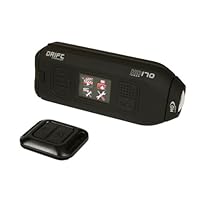
What's struck me is that the real value of this camcorder is its combination of a rugged and durable design with its versatility. It's emphasized for use with extreme sports but it's useful pretty much anywhere you wouldn't risk another more fragile camera. It's water and weather resistant not water proof so you could use it in light rain, maybe even during a hurricane if it was securely mounted, but certainly in extreme conditions where you'd be worried about a standard camcorder. (I've heard that Drift Innovation the company that makes these will be coming out with a fully waterproof case for the Stealth some time soon so that you can add cliff diving and snorkeling to the list of extreme sports you can capture subjectively with the Stealth) The camera comes with three different mounts one that you can secure to any kind of narrow belt (and it comes with an elastic belt), one that you can put on a handlebar, and one that you can secure to a helmet with the included velcro adhesives. It's easy to orient the camera, even if you've got it mounted in an odd spot the shooting orientation can be changed simply by rotating the lens manually, and the quick release mount can also be rotated so that the unit can be oriented however you like with respect to the mount.
I'm not much of an extreme sports guy but I can see where this would come in handy for various types of video projects other than extreme sports, and I tried to illustrate a few possible uses in the video. You can mount it on a bike, a motorcycle, a skateboard, or on a 12-foot-long paint pole elevated over a car (as I did in the attached video, using the handlebar mount attached to the end of the pole). Obviously, I wouldn't want to put my Canon VIXIA HFS10 on top of a long pole like that because if it dropped or bumped into something it would almost certainly be damaged. While the Stealth is not damage proof it's a lot more rugged than a standard camera, and so it works great in lots of precarious situations. I used to think that when I needed an extreme shot the best option would be a relatively inexpensive camera like my Flip, that I could more afford to have damaged than my nicer camera but with this one the risk of serious damage is significantly diminished.
You can shoot decent photos (5 megapixels and they look fine, but as you'd expect on a device that's tailored for video capture they don't really compare to the images you'd capture on a compact camera in this price range expect a few notches up from the quality you'd capture on a phone and you won't be disappointed), and very cool time lapse sequences (with shooting intervals from 3 to 30 seconds apart), plus it takes surprisingly good HD video for such a small camera. It's not as nice or as versatile as my Canon, but the video is at least as good or better than what I can capture on my Flip Mino HD plus it's got a much wider lens, which is ideal for "point of view" shooting. At 720p it captures a 170 degree view, and it's got a bit of a fisheye effect which is kind of nice, it looks very cool with POV sports footage but could be effective in other applications as well. At 1080p it captures a slightly narrower range of 120 degrees, and there's less distortion, but not as many options for frame rates. At 720p you can shoot at frame rates from 25fps to 60, and shooting at 60fps allows you to slow the footage down in an editing program without things looking jerky as they would if you'd shot at a standard 30fps and then played back at an effective 15 frames per second. At 1080p you can shoot either 25 or 30fps. (You can also shoot standard definition video if you like). The video is encoded with H.264 in a Quicktime (.mov) wrapper so it's easy to import and play or edit in a variety of applications.
One other nice feature is that the set comes with a remote control "watch" you can wear it on your wrist (it's got a velcro band) and it has two buttons: for record and stop. There's a bit of a time lag on the stop function it takes a couple seconds and sometimes I've found I've had to press the button twice to get it to respond, but otherwise it works quite well. The weak element on the camera is the onboard mike it doesn't capture clear sound at all. It's noisy and would really only work as reference and not playback. In other words if you spoke into the mike or near the mike you would be able to hear what you'd said assuming you weren't on a motorcycle, or free falling from high altitudes and it might help you to remember something but you wouldn't want to even consider including the audio in a completed video. The main reason for the weakness of the mike seems to be that its input is protected by a rubber seal in order to ensure the water resistance of the unit. The real value of this camera is in capturing video you wouldn't be able (or willing) to capture in other ways. There is another option with this camera that not all cameras of this type allow, which is to plug in an external microphone but I'm pretty sure the input is proprietary, which means you either have to buy the mike from Drift or you have to buy one of the input cables for your mike from them. When you do use an external mike you have to keep the rear hatch of the camera open and Drift sells a kind of silicon boot to help keep things sealed and protected when the mike is connected and the door is open.
The Stealth is not a one-size-fits-all camcorder that will meet every need and wouldn't by any stretch replace a standard camcorder for ordinary shooting, especially given its fixed, extremely wide lens and its substandard onboard mike but it can capture images you'd never dream of trying to capture with your standard camcorder. If all you want to do is capture extreme sports from the point of view of the athlete, or other extreme images that would put an ordinary camera at risk, this would be a very good option. For someone like me, who only rarely has a need for "extreme sports footage," I know I won't use this all the time, but I'm very happy to have it in my "bag of tricks" because, as I think my little video shows, it's a very versatile camera that can capture some very cool and fairly good quality images and video that could fit nicely into a wide range of different kinds of video projects.

Digital Dash Camera
Here is a camera that records at 320 x 240 at 15 FPS (a specification left out of almost every description of the product). I am fine with that. It's only $80.
The field of view is also very small, so that you can see little more than what is right in front of you. I am fine with that. It's only $80.
What I am not fine with is that 1 in 5 times you try to record, it will simply not respond. The only way to get it to respond is to unplug it, and plug it back in. If you are using batteries, you have to remove a battery and replace it (by the way, Energizer lasts about 2 hours total with the thing. I did not try the Lithium flavor of Energizer though).
And if that is not enough, sometimes it acts like it is recording (you know this only by a flickering blue light). You see some real ridiculous stuff on the road and you are all excited to get it off the memory card and post it on the internet (maybe even add some music). Well, turns out it recorded everything in black. At the bottom of the solid black video there is normally a line that looks similar to recorded video, but it being only one pixel in height you really can't make anything out. Why it does this, I don't know... but it has happened to me several times the worst of which when the roads were icy and it did not record lots of footage of cars going sideways. Expect to see solid black footage in at least one in ten videos you record.
Kodak M583 Digital Camera, Value Bundle kit w/ Case, 4GB Card
The camera is easy to use for someone that is familiar with digital camera settings and for those who are not! If one downloads the complete manual
they will not have any problems using it. The pictures that it takes are razor sharp and I had no blurred pictures. Most of the complaints
of blurred pictures are mostly due to not pushing the shutter button halfway in order to set the focus first before finally taking the
picture. The camera itself is quite small (shirt pocket size) and the finish of the body is very glossy.
I love this camera!
The included case, memory card and battery, and other accessories are so worth the purchase of this bundle compared to the camera only!
Nikon D5200 24.1 MP CMOS Digital SLR Camera (Red) with 18-55mm


List Price: $1,419.95
Sale Price: $1,019.95
Today's Bonus: 28% Off

The package was extensive for the price (I have seen the camera for the same price, at other venues without all the add-ons). I have another Nikon camera and the red body easily distinguishes between the two.
I am quite pleased with the camera and it's functionality. The inclusion of filters, tripod and other items make this a very good deal. The 55-300 lens is awesome.
Bushnell 8MP Trophy Cam Standard Edition

List Price: $259.95
Sale Price: $139.99
Today's Bonus: 46% Off
I received this product and am very pleased. I've had a lot of luck with these small Bushnell cameras. Battery life is great and trigger speed is also quite good. For clarification, this IS the 2011 model with the field scan. Up to 8 Meg images. My only semi negative feedback would be that with field scan you can only set one time period, so if you are going to take images during the morning and evening periods you basically have to include the entire day or the entire night. The entire night would definitely wear down the batteries (IR flash). I imagine it is a simple software fix that Bushnell will put out in the future. I own Moultries at the same price point and far prefer my Bushnells. I simply can't choke out the cash for the Reconyx cameras. They are entirely too pricey to have a sufficient quantity of them to try to understand the deer herd on the size property where I hunt. I can get five Bushnells for the price of two Reconyx. My Bushnell from last season stood the outdoor life well here in East TX (heat, rain, heat, rain...).
I also bought the python lock and metal outside case... they're kind of a pain in the rear to deal with (I'm a low irritant tolerant guy) and nothing a bolt cutter wouldn't make quick work of. Probably not worth it unless hunting public land.
Finally I searched the web pretty heavily and found the price at Amazon was the best I could do. If you can beat it though, congrats, then I'm the chump.
Regardless, I'm happy you're reading this because it means you're also excited about deer season. God blessed this great land and you too, be safe and happy scouting!
SGB
Sony NSZ-GS7 Internet Player with Google TV


List Price: $199.00
Sale Price: $136.80
Today's Bonus: 31% Off
Customer review from the Amazon Vine Program I am very pleased with this Sony NSZ-GS7 Internet Player with Google TV which I received two days ago, August 21, 2012, from Amazon Vine.
I have two of the Roku XDS Streaming Player 1080ps, purchased a year or so ago and which I use frequently; they are quite good (the newer, replacement, model is the Roku 2 XS 1080p Streaming Player which, I understand, is quite similar).
But this new Sony model is much more capable than the Roku because it has a built-in web browser. The browser is Google Chrome, normally a full-featured browser along the lines of Internet Explorer, Firefox, Opera, Safari, etc. Unfortunately here it appears to be somewhat restricted as, so far, I have found no way to add extensions, such as AdBlock. Nonetheless, the presence of this browser adds a great deal of value to this media player.
For example, one of my favorite web sites is the Internet Archive [archiveorg] which has thousands upon thousands of free public-domain movies, music, books, and so forth. (You could spend DAYS on this site and not see it all!)
Not only was it easy to "bookmark" this site, I also created an application ("app") from it so that it appears in my "All Apps" folder. (Please read further for instructions as to how to create a bookmark and/or an app.)
Netflix is built-in, common on these devices, as is Amazon Instant Video. There is no native TuneIn Radio app (my favorite Internet Radio portal), but it does have Slacker Radio as well as Pandora. However I went to the TuneIn Radio site via the browser, logged in to my account, and created a bookmark as well as an app from it, as I did for the Internet Archive.
I also created a bookmark and an app from my Watch List on the Amazon Prime Instant Video selection, so I have this in addition to the built-in Amazon Instant Video app. Creating these apps is simple once you know how to use the device. Please note that I am almost 70 years old and have had NO computer or computer-device training whatsoever; I am completely self-taught. I have had my Sony media player just two days. If, in that small amount of time, I can learn to use and manipulate (customize) it, so can you, no matter how "technologically-challenged" you may think you are.
There are many, many native apps offered on this player (too many to mention here) and there are lots more offered in the Google Play Store. Take it from me as far as media goes, there is something for everyone, whether it be music, movies, or television.
If a particular app you want is not present, or even offered in the Google Play Store, it is very easy to create your own app, as I did. In other words, you can customize this player any way you like. How do you create an app? Easy! When you're using the browser and you're on a web site you wish to save, merely click the bookmarks button on the front of the remote and you will be offered choices, one of which is to bookmark the page, and another is to place the page on your My Apps page (essentially creating an app). In my case, I have done both for the pages I wish to save (such as the Amazon Prime Video Watchlist page and the TuneIn My Favorites page). This capability is very, very welcome.
Now I have to tell you that initially the Google Chrome browser gave me no end of frustration. That is because, out of the box by default (WHY Sony?), the cursor click arrow (shaped like a fist and which appears when placed over a link on the screen) did not work (at least on my player)! Neither did the Enter key (on the back of the remote control) nor the center Okay (or Enter or Select it doesn't seem to have an official name) button on the front operate when clicked on a link. I clicked and clicked and nothing happened.
So I could go to a site by entering its URL but couldn't go any further! Clicking the links just did not work. (I do not know if this is the default setting for all samples but it was on mine.)
I went online to see if others were having the same problem (they were) and if there were a solution (as of yesterday, August 22, 2012, there was none).
So I went into the Settings and investigated EACH and EVERY option until I found the solution.
To make it easy for anyone concerned, the steps are these:
Go into Settings
Scroll down and go into Language & Input Devices
Within that, scroll down and go into Remote Settings; within that dialog box are three options: Tap to Select (turn it ON), Backtouch (turn it ON), and Backlight (it's your choice if you wish it to be on or off; I chose OFF as I found the backlight is of little use to me and it does drain the batteries).
At that point, you'll be able to click on any link you like.
I hope that helps some people.
I STRONGLY recommend that any purchaser do what I did: go into the settings and at least LOOK at every single option even if you have no intention of changing any of them. This is how you will learn your system. (You do not have to do it all in one day if you don't want to.) If you do change any of the options, it is very easy to change them back if you find the changes to be unsatisfactory. You will not "break" your system.
The initial setup, which does take a fair amount of time, is, however, very easy and straightforward and is done only once, the first time you turn on the unit. The choices, which apply to your particular situation, can be changed at any time if you find that you would wish to do so. Wi-fi connection was very easy; a wired connection would be even easier. Found on the back of the unit are two USB ports, an optical audio output (if needed), and an HDMI input and an HDMI output connection, as well as the LAN (wired Ethernet) port. These ports are all self-explanatory.
You can (and I did) password-protect the Google Chrome Browser as well as the Google Play Store. While you can password-protect these (good), the password can only be a 4-digit number (not so good). And, once the password has been entered (it must be entered separately for each of the items if you use both during one session), it stays active for your entire session (definitely not so good); so far I have been unable to find a way to log out. To "clear" those passwords, you must turn off the unit and then restart it.
You also have the ability to "hide" (not remove) some (but not all) of the pre-installed apps if you have no interest in them.
We do not have cable or satellite TV so I cannot comment on the unit's performance with them.
The excellent remote control included is unusual; I have never seen any like it. It has a "hidden" battery compartment (though it's easy to discover and access: a very clever design) and the remote has TWO functional sides, unlike any other. The first side, used the most, has many control buttons and the tap-sensitive touchpad. The reverse side has a complete QWERTY keypad, with numbers, letters, and symbols.
I do have some minor criticisms of the remote control: the front of the remote is in, for want of a better term, "portrait" orientation while the rear is in "landscape" orientation. Going from front to back (and the reverse) is, at least for me, somewhat awkward. I wish that Sony had chosen ONE orientation for the remote control. Now the following is perhaps unique to me: I like to use Symbols in my passwords (for extra protection). The symbols on a computer keypad are standardized. Not so on this Sony keypad. Symbols appear in different places than they do on a standard keyboard. I had to call to my wife, who was in another room, to tell me the symbols which appeared above certain numbers (I could not remember them) so I could enter the password from the Sony keypad.
We do not watch television shows. Thus, frankly, I have zero interest in Google TV. We watch watch streaming movies and listen to music. This is our reason for using these media devices. The actual performance of this entire Sony unit (the device itself and the remote control) is exemplary, the best I have experienced thus far. HD videos from Netflix and/or Amazon Prime look spectacular; ditto for the sound quality. And the reception of commands from the remote is amazing, the best I have ever experienced. (Another plus: in my opinion, the Netflix browser on this unit is slightly better than the one on the Roku.)
Would I recommend this one over the newer Roku to you? That depends. The Roku has, among other attributes and in addition to digital outputs, ANALOG AV outputs (which the government, in its wisdom, has banned from newly designed items) so it will work with older TV sets which have no HDMI inputs. Plus, the Roku, is much simpler in its operation (because it has fewer capabilities, though the ones included will be satisfactory for most purchasers; they are for me). This newly-designed Sony has ONLY HDMI and digital audio outputs, though, of course, all modern televisions and audio amplifiers have them too. Plus, using the HDMI cable in conjunction with a modern TV/audio system, the ONE HDMI cable carries both video and audio information. What a convenience!
By the way, it would have been nice had Sony included even a short HDMI cable. They do not so you MUST buy one. Fortunately one of the very best places to buy such cables is right here on Amazon (and make sure you consider their AmazonBasics cables; in my experience, they are very good in construction and performance and they are priced "right").
This Sony in much more of a media center in concept then is the Roku due, of course, to the presence of that genuine browser. You can watch any media from any site you wish, something not possible with a Roku. Activating Netflix and some other apps is much easier on this Sony than it is on the Roku. Plus the Sony boots up much faster than does our Roku.
But the Roku is half the price or less than the Sony. And, as I stated, its apps may be all you need. Finances, of course, play a very important part in deciding which, if any, media player you want to buy. I myself now much prefer the Sony over the Roku because of the Sony's greatly enhanced operating features. I feel that, even at its higher price, it offers much more value than does the Roku (but that's not to say that I do not like the Roku I do, very much). The above is my opinion. But your opinion, of course, may be different and yours is the only one that counts for you.
This Sony uses Android, a GNU/Linux operating system created by Google, in its version 3.2. Whether Sony will ever upgrade the Android version on this player is something I do not know (but I hope they will). Now I have been a "Linux" man (and my wife has been a "Linux" woman!) for quite some time (we have six currently-in-use computers, four using Xubuntu, one using Ubuntu, and the last being used for experimentation with GNU/Linux distributions: I have recently tried Fedora, Linux Mint, and am currently trying PCLinuxOS). but I have to say that, owning two Android devices (this one and the Dell Streak 7 Wi-Fi Tablet), I do not like Android. It is the weakest and "clunkiest" Linux distribution I have ever seen. (If I owned only Android devices, that would be enough to "turn me off" to Linux! Fortunately, that is not the case). Part of the reason for the "clunkiness" is that manufacturers can "customize" (i.e. hamstring!) their installations (a truly "open" Android might be all right) and Sony has attempted to do this here.
That being said, this Sony is essentially a budget-priced full-fledged media center and, as such, functions easily and well. And you can bypass Sony's restrictions by creating your own apps. Note that no matter how "clunky" I regard Android, at least it is VERY stable and does not crash (at least not very often)! Though this player is twice the price of the top Roku, I feel that it represents very good value for money.
A small, but very welcome, bonus is the fact that this player has no "wall-wart" plug or even a "brick" between two halves of a power cable. It has its power supply built-in, just like in the "old days" so there is only one (detachable) cable and it has a small two-prong "regular" plug on its end. (When I first opened the box and saw just this one power cable, I thought I was missing something!) This is superb engineering.
One of these days (when finances permit!) I am going to buy a full-fledged media center computer (the ZaReason MediaBox 5330 is the one I would like) for our home theater. Until that day arrives, however, the Roku units and, most especially, this Sony unit will suffice. (In addition, on trips, I plan to take this Sony box with us for use in hotel rooms.)
Needless to say, the construction quality, as is usual with Sony products, at least in my experience, is first-rate. A one-year warranty protects your purchase. Frankly, except possibly for connecting the unit, it is not necessary to read the instruction manuals (they're useless anyway; that's my impression after reading them). Going through the Setup options (ALL of them), as I suggested above, is the only way (in my opinion) to learn this device and the user will find the time spent to be quite rewarding.
I like this Sony NSZ-GS7. And I recommend it to anyone interested in such a device. I think that any purchaser will be pleased IF he or she takes the time to learn how to use it to maximum advantage. (Regarding the so-called "freezing" problem mentioned by some reviewers, please see Comment #6 which I wrote concerning this anomaly and the workaround I employ.)
Thank you for reading this. I hope that it has been informative to you.
Pentax K-50 16MP Digital SLR Camera Kit with DA 18-135mm WR


List Price: $1,099.95
Sale Price: $787.72
Today's Bonus: 28% Off
Purchased this unit from costco after researching reviews on comparable Nikon and Canon units. All but one of the tech reviews raved about this camera. The plus side is the unit is "weather proof" (still not sure how that is defined). The reviews in general favored this unit in overall image quality over the Canon T5i rebel which was the other unit I was comparing it to. This was less expensive than the Canon and weatherproof. Out of the box the unit is very easy to pick up and start shooting with if you have any experience with DSLR cameras. Very intuitive menu design. Overall build feels very solid and fits my hands well. Photo quality is amazing in the little bit of playing I have done with it. I need to work on learning the advanced features of the unit (which are many) to do a better job on exposure. I was seeing my subjects under exposed a bit in daylight. Playing with some of the settings has helped. I don't fault the camera for this, but my relative inexperience. I coupled this two lens set with a fast 50 lens for portrait shooting. Going off topic: I LOVE this lens. First prime lens and am really impressed with the bokeh effect I am capable of producing, nothing less than stunning with this camera. The combination has really been a huge step up in what I can produce over my D50. Going off topic again:I also added a class 10 eye-fi card 16gb for instant photo transfer. Love it. Third unit and to me they are very easy to setup and use, never had an issue with them. I have seen nothing negative yet about the camera. Like the color combinations. Got mine in white and it looks classy. I need to dig in and learn how to really unleash the potential of the camera.
I am excited about the "weather proof" aspects of the design and need to learn more about it. I purchased an Olympus Tough TG1 last year for less than perfect and underwater conditions and it does the job it's designed to do well but lacks the control and overall image quality of a DSLR. Being able to take this outside without paranoia over any exposure to the elements weighed heavily in my decision over the Canon and Nikon (I was really leaning towards the Canon after having used it). Just make sure that the lenses you are going to use carry the weather proof rating also. The fast 50 does not.
I am really looking forward to learning this camera better and have no regrets over buying it sight unseen over the canon and nikons. So far I am amazed with the quality of shots that I have produced. I will update this later when I get a little more time with the unit.
Lomography Diana F+ Medium Format Camera

List Price: $49.00
Sale Price: $39.95
Today's Bonus: 18% Off
I love this camera! The medium format is probably my most used and adored film format and this camera can do just about anything. B&W, color, whatever! It's also a pinhole, which is fantastic because you can have color pinhole photos and have one or two on a role and just keep switching it out. I highly recommend buying some of the other lenses that go with this but come separately. Also, I purchased the ringflash, which adds another dimension to your creative capabilities. If you get the 35mm attachment, you're really in business! Yes, it's a bit expensive (these cameras originally sold for literally pennies when the first generation came out decades ago) but what you can do with these cameras is worth every modern day dollar!
Sandisk MicroSD & MicroSDHC to SD Adapter (Static Pack)

List Price: $12.99
Sale Price: $1.40
Today's Bonus: 89% Off
I admit, I was thrown by the suspisciously low price, but I felt a little more reassured by looking at the reviews. And for that reason, I'm writing this one to add to the credibility of this item for others considering it. It's real, and it works. I use it to connect the microSD card in my phone to my computer. Works exactly as I want it to. Perfect. And oh so cheap. Not to mention the free and FAST (about 2-days) shipping.
If you need one of these adapters, buy it. :D
ZMODO 8CH DVR CCTV Surveillance System with 4 Sony CCD Bullet

List Price: $539.99
Sale Price: $400.00
Today's Bonus: 26% Off
I am very happy with my purchase: not only I got a good deal (comparing prices of single items), but this is very good combo. I had 4ch DVR before with 4 bullet cameras, and needless to say: when you are cheap, you pay twice! This is finally it: 8ch/cameras cover single family house territory completely! All cameras are very good quality, deliver crisp image, true colors. Dome cameras have wider angle, very good for the back yard. Bullet shows little closer image, good for entrance doors, gates. DVR is a bit complicated to set up, specially if you do it with the remote. Took me couple calls to customer service to set up network and mobile surveillance and couple additional calls to set up my PTZ :) Otherwise, all good.
Olympus Stylus Tough TG-2 iHS 12 MP Waterproof Digital Camera
Awesome seller. I received my package with more than ample amount of cushion for my electronics in a big box. My social purchase was then placed in a smaller box! Not only does the purchase come with everything in the picture but the camera also comes in its original box. Inside the Camera's box was a list of set up instructions, warranty service contract, lense ring, setup Cd-rom, usb cable, usb adapter, Lithium Ion battery, and wrist strap! This is the best purchase I've made on Amazon to date.

ViTiny Pro10 Portable Digital Microscope 10x - 200x

List Price: $419.99
Sale Price: $295.98
Today's Bonus: 30% Off
This little jewel opens up the digital photography world to the next step past macro-photography. It is a handheld microscope camera with video capability. Unfortunately it is subject to the same optical physics that make a microscope difficult to operate focusing and depth of field. However, one has a two eyed view on a 2" x 2.5" screen on the back of the instrument rather than the microscope's small round lens. The screen upon activation tells you that it is a "Digital Mobile Microscope". While useful for field applications where it it difficult to bring the subject to the instrument, one is more likely to bring mobile subjects to the kitchen table or work desk.
The manual seems to be a machine translation from some undetermined source language and is therefore somewhat limited. It needs to be rewritten by an American who has learned to use it. However, once one figures out the basics and determines that the instrument is relatively rugged, most functions can be determined using a combination of paging through the manual and pushing buttons.
This instrument should find use among naturalists, (professional & amateur) forensic professionals and anyone interested in exploring and documenting the world below the limit of visual acuity. Buy it now and generate a demand for the next model with more features.
Lowepro DryZone 200 Camera Backpack (Yellow)


List Price: $399.99
Sale Price: $219.99
Today's Bonus: 45% Off
This is a fantastic idea! I carry digital camera gear, hard drives and LOTS of rechargeable batteries onto boats to take photographs underwater. It has all become much easier with a waterproof backpack... and it seems to be accepted as hand luggage by airlines. This big version carries a lot, two cameras, two flashguns and two lenses and an aluminium camera housing. A wildlife photographer could get almost anything into the pack, and sling a tripod on the outside, with lunch in the pocket.
The waterproof layer has a zip that would not look out of place on a drysuit, and seems just as efficient at keeping water out.
The backpack looks bulky, but it's comfortable when it's adjusted. My only reservation is that the pack is bright yellow, and stands out in a crowd, which isn't ideal when it's filled with $$000s of gear. It would be easy to find if you dropped it in the sea, though, and Lowe claim that it would float, protecting the gear inside!
Ricoh GXR Mount A12 12 MP Digital SLR Camera

List Price: $649.00
Sale Price: $619.99
Today's Bonus: 4% Off
This unique photographic equipment, the Rioch GXR Mount A12 12 MP Digital SLR camera (the "GXR Mount A12") presents a reviewer some difficulty to share his user experience in a concise and interesting user review.
As a new owner of this product, I have a few points for the intended user of the GXR Mount A12 review :
1 NOT A STANDALONE PRODUCT
This is a system product it is part of a system and requires the Ricoh GXR body module to and a compatible M-mount interchangeable lens to work ;
2 DESIGNED TO WORK WITH LEICA M-MOUNT LENSES & M-MOUNT COMPATIBLE LENSES
It is a lens-sensor mount, it is part of a camera body built & designed to work with Leica "M" mount interchangeable lenses available since 1954. Today it works with most Leica-M, Zeiss ("ZM"), Cosina Voigtlander (CV) M-mount and where compatible certain LTM or Leica Thread Mount (LTM)lenses with the appropriate M-mount adaptors. Because of the millions of M-mount lenses out there, The GXR Mount A12 comes with a mount testing kit to test the mount compatibility of your lens before you mount the lens ;
3 AN M-MOUNT ADAPTOR WITH A 12.6Mp APS-C SENSOR.
In old "analog film terms", this would be both "the lens mount" and the "film" but of course things are much simpler to classify this as a "Digial SLR Camera body" because of the electronic components but it is NOT a standalone camera body product unlike the Leica M8/M9 because it the body is complete only with another system part, the Ricoh GXR Body module.
4 ONBOARD 1.5X SENSOR CROP MEANS IT IS A DEFAULT 1.5x TELECONVERTER.
The smaller than 35mm film format sensor of the 12 Mega Pixel APS-C sensor of the GXR Mount A12 has a 1.5x crop to the image taken with M-mount lenses, for example the Leica M-Summicron 50mm F2 would become a 75mm F2 M-Summicron lens, the 35mm F2 M-Summicron becomes a 52.5mm F2 M-Summicron,and the 90mm F2 M-Summicron becomes a 135mm F2 M-Summicron, In a nutshell, the usual 35mm,50mm and 90mm set-up becomes 50mm,75mm and 135mm! Add in an affordable (non Leica) lens like the 15mm f4.5 Voigtlander Superwide Heliar and you have a gang of four of 22.5mm, 50mm, 75mm and 135mm on your GXR! ;
5 RETAINS THE PERFORMANCE & CHARACTERISTICS OF THE LEGACY M-LENSES
The GXR mount does not interface electronically with M-Mount Leica lenses with electronic contacts. Since it is made as an adaptor to retain much of performance and characteristics of "analog film era" M-mount lenses, The GXR Mount A12 is quite minimalistic in terms of enhancement to lens, but the good news is, it still retains the old favour of your most favourite M-lenses, including those you received as an gift from your grandparents.
6 RELATIVE EXPENSIVE BUT COST EFFECTIVE NICHE PRODUCT
Although this is a relatively expensive product, its cost could be measured against relatively more expense product like the Leica M8, Leica M9 and the 2x crop micro-fourthirds (with expensive adaptors) product currently available.If you been saving up for an M8 or M9, this may be the "next" best choice available to date. Key advantage over the micro-fourthirds (MFT) Olympus Pen or Panasonic GF-series is the bigger 1.5x crop APS-C sensor.
7 REPLACES HIGH COST OF CONSUMABLES THE FILM
Replacing the hefty cost of consumable like film means that user is more encouraged to experiment and play with the M-lenses they already owned and to get the most out of the relatively expensive but extremely well built M-mount lenses. Though some would agrue that M-lenses were made for film, my comments are based on sound economics and does not imply that it would replace the quality of photographs made with film.
8 TWO MANUAL FOCUSING WITH FOCUS ASSIST MODES
Recommended for photographer who loves to manually focus their lenses only. The mount does not convert the lenses to Auto focus but it comes with 2 focus assist modes in case focusing with the 3 inch LCD screen of the GXR body module proves to be a challenge and requires some practice.
9 EXCELLENT IMAGE QUALITY AND PRICE-PERFORMANCE
This largely depends on the interchangeable lenses used, however, we are talking about the top-end class of lenses to "mate" with a optimal and high performance digital sensor. In the hands of a seasoned photographer, the technical specs, image quality, optical performance would meet the price of this GXR. Furthermore, the added cost of modifying M-lenses with electronic contacts is avoided, leaving the mechanical solid old lenses as they are.
FIVE STAR PRODUCT
As a owner of two Ricoh GXR cameras with the S10 and A10 interchangeable modules, and half a dozen old Leica M mount lens collection ; I had purchased this product on its release to the retail store without reading any review, a bold move if the product turns out to be a lemon-given the hefty price-tag.
Alas, the GXR Mount A12 has met and exceeded my expectations as a niche solution and a very compact and a GXR system built on high performance gear set-up. Thank you for reading this user review.
Sony Alpha A900 24.6MP Digital SLR Camera (Black)
Let me start by saying that I teach a digital photography class at the local community college, and I've seen/used/taught about every major brand and many minor brands of digital cameras, and I think every manufacturer makes a camera that is right for different people with different requirements. That being the case, the alpha900 is amazing. The resolution is not only record breaking, but the clarity of each of those pixels is quite good (with the right lens). The image stabilization on a full-frame sensor is a first (and so far, only). 5 Frames per second? At 24.6 megapixels? It is a testament to Sony's knowledge of electronics. The view finder really does exemplify why "live view" is more of a marketing checklist item, and not really necessary; looking through the view finder is a joy.
But, the world of the a900 isn't all roses. If you have a collection of Sony/Minolta lenses, hopefully they're all full-frame. Yes, the a900 supports APS-C lenses, but there is no real advantage to them with this body over other Sony DSLRs. The a900 does "find focus" better than previous Sony DSLRs, but the location of the focus points aren't as well laid out as other Sony models. While I usually carry an external flash, so the lack of a pop-up flash isn't a problem for me, many users will find the lack of one to be, at least, an annoyance.
And last, but certainly not least, is post production once the images are off of the camera. If you primarily shoot in RAW (as I do), and do much post-production, be prepared to bring your computer to it's knees. These files are huge, and all that wonderful resolution comes at cost; that being the amount of pure computing horsepower required.
Given those few caveats, the alpha900 really is a big step forward in digital SLRs, in many ways. If you can justify the cost of this body, it really is worth having, and you'll be surprised at just how much detail a single image can have when its almost 25 megapixels.
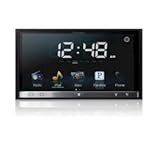
Pioneer SPH-DA100 AppRadio Car Stereo with iPhone 4 App Control
List Price: $600.00
Sale Price: $429.95
Today's Bonus: 28% Off
hello everybody,
I'd like to thank you for taking few minutes of your time to read this review. I hope you find it helpful :)
First of all, my review if from an enthusiast point of view and might be a little bit technical but my intention is to give you all guidelines before you buy. To know what to expect when you're expecting (the appradio of course ;)). BTW, I'm a mac user so here are some very few tips to make your life easier and save lot of time guessing.
Items used on this installation:
Pioneer SPH-DA100 AppRadio Car Stereo with iPhone 4 App Control and 7.0" Capacitive Touch
The software running on the appradio is version 8.17 (the latest)
Pioneer CDAH200C Appradio Adapter Kit For Android
Metra 70-1771 1989-2005 Ford/lincoln/nissan Cd Player Into Car Wire Harness
Factory unlocked iPhone 4s, Appradio applications, standard IoS 6.x software.
Factory unlocked Samsung Galaxy S3 (i9300) using rooted Jelly Bean, ARliberator, Tasker, Carhome Ultra, Triangle Away software.
Samsung EPL-FU10BEBSTA HDTV Adapter TIP (5 to 11 Pin Converter) Retail Packaging Black
What is in the box:
Appradio 2 headunit
Wiring harness
GPS Antenna which is magnetic and it includes an auto adhesive metallic plate which can be placed on the top of your dashboard to make the installation a breeze.
USB/iPhone cable. this is an 2 in 1 cable, not two cables which is very clever.
At a glance:
Screen quality: 5 stars
Look and feel: 5 stars
Overall quality: 5 stars
Handsfree quality: 100 stars (sorry amazon, i know your scale is 5 but... this thing is that good)
Appmode: 4 stars
Easy to use appmode: 4 stars
Warnings: 2 stars
Now the loooong story :)
Appradio 2 update process:
The reason i named the iPhone cable an USB/iPhone cable is because it has two cables going out of the iPhone connector, my guess is one of them transports the audio signals and the other one is the usb control. The USB control side of the cable has a division where you can put a USB pendrive to perform the update process. Take into account, if you leave this portion of the cable hiding (i did) you're going to face some problems when trying to update.
Updating is very easy, just download the single file from the Pionner web site, uncompress it on a empty pendrive, plug it in your appradio using the described (see added photos to the product page) port and it simply asks you if you want to update, once confirmed, it begins to update beeping everytime it feels to, so don't worry about the beeps. Mac users beware, mac os adds some silly files on the pendrive so the appradio does not recognizes the file. Just copy the file using a windows computer and you're done.
So... how does it works with an iPhone 4s?
It works reasonably well, just plug it in your iPhone 30 pin connector, then touch the apps icon on your screen, let the appradio know you're not crazy enough to drive while watching Harry Potter, then let the iPhone know you allow the connection and after all the prohibitions/limitations, there you are... now you can use all your appradio ready applications with also a reasonable reliability.
If you use the music app on the appmode environment, you can use Waze or whatever appradio app you like.
I particularly like to use the PLX Devices 'PLX Kiwi 2 Wifi' Car to Smartphone Connection connector with dashcommand so you can see the real-time data on your screen... this is awesome!, another application i do like using appradio is Waze, it is very funny and while with my wife, she reports traffic jams so we can earn some points that really gives you absolutely no real benefit whatsoever but keeps you entertained while on a massive traffic jam.
One personal note about all the warning screens and handbrake signaing and the lot:
We, the consumers are reasonably smart people, at least smart enough to know if we keep watching movies while driving and hit the tree, we're going to hurt ourselves, hurt the tree and wreck the car. If we hit another car we can be liable for the damage to the other car and for the possible injuries to other people... there are laws for all of this. Don't you think a warning message everytime you try to do anything when driving while annoying, is a bit of stupid? I mean, don't play videos while on the go and that's it but all the time receiving a warning? really?
Ok, now back to the regular service... we have arrived to the android section of the review... and if you're like me, you might have a lot of questions without answers... I still do but I'll try to give you the few answers I have but first, let me tell you, this is my first Android phone and my first appradio so please forgive me if I go to thing that may appear too obvious to experienced android users.
The first problem pioneer faces with android devices is, because android unlike IOS devices comes from different makers, they do have different ways to connect basically, MHL connectors and HMDI connectors. MHL is a micro USB connector with embedded HDMI so here's the thing, If your android compatible phone uses HDMI connector, you don't really need the android kit, what you'll need is an hdmi cable with one normal HDMI connector to the back of your appradio and an micro USB power source with 1000 mah or more to keep your phone alive.
If you have a compatible MHL connector phone, you can go with the pioneer kit which includes the HDMI cable, the USB power source with the USB to Micro USB cable and a 5 pin MHL converter. This convertes receives the HDMI cable and the power and delivers everything on a single MHL cable to your phone.
The main difference between the iPhone and android standard behavior is the android phones sends control signaling like touches to the screen using Bluetooth, don't worry, you can still use BT for handsfree calling which by the way is nothing less than espectacular and maybe your OBD II BT which is a lot cheaper than the PLX Kiwi and the Torque app which is also a lot cheaper than the dashcommand app so connecting the android phone needs a little bit more interaction from the user. After connected, it works and feels just like the iPhone does.
But wait... if you have a Galaxy S3 phone, you're going to need the described 11 to 5 pin adapter which despite the fact is Samsung original, doesn't work propperly... the video starts to flick whenever it feels to, you're going to loose the connection and you're going to be VERY frustrated so you can opt for different ways to connect your phone other than the android kit Pioneer sells. I'm not going to be any more critic about the kit because, to be fair, Galaxy S3 is NOT on the Pioneer's phone compatibility matrix.
Galaxy S3 Connection option 1:
This is by very far away and beyond, the best choice and if I knew this before, I could've saved some money, you can buy a good quality not too long hdmi cable, and usb power source and Samsung EAD-T10JDEGSTA WI-FI All-Share Cast HUB Data Cable Retail Packaging Black so now you can connect your phone completely wireless using Wi-Fi and bluetooth. Just connect the all-share to the HDMI cable and to a power source and you're ready to go... it gives you the screen mirroring while bluetooth gives you the touch. Please beware I've only tested it using ARliberator, not appradio app so your mileage may vary (rooted phones please read further).
Galaxy S3 Connection option 2:
Here you can replace the MHL cable from the Pioneer kit with the Adapter HDMI EPL 3FHU for Samsung Galaxy s3 but please, do yourself a favor... do not buy a cheap alternative... buy the original because you don't want to have the flickering and the snow and the frustration... my advice, don't go cheap with this. Just plug the HDMI cable and the powered micro USB to one side, the phone to the other side and you're done.
ARLiberator:
In case you don't know, you can buy for $29 in google play store, an application named ARLiberator. What this app does is to give you total access to your phone from the appradio screen, in other words, you're going to have your phone in landscape mode in your appradio so you can use whatever app you like as long as it runs in your phone but to use ARliberator, you need to root your phone which may have some effect on your phone's warranty so please beware.
I have tested the ARLiberator and found that you can have an app named carhome ultra which gives you a car friendly home screen while adding navigational info.. give it a look if you will, then you might find the Tasker app of some use for automating the BT connection, the ARliberator run, the carhome ultra run when you plug the phone and to reverse all of that when you plug it off and must use the app Triangle away to put your flash counter to zero because all-share does not works on rooted phones.
Torque app works only under ARliberator mode because it is not an appradio ready app while Dashcommand is and unlike the IOS version, you can try it before buying using the free version.
Final thoughts:
Does it really worth the effort to go ARliberator way? Yes... it does... Only if you want to have a smart head unit instead of an iPhone/Android application head unit.
I had a Kenwood DDX419 In-Dash 2-DIN Head Unit Car Stereo which is VERY BAD... the hands free function was useless, the user interface came from a Commodore Vic 20 or a Sinclair ZX-81... So I can tell you... even without the Appmode, just for the Hands free function and the ipod capability with a 21st century interface... I would pay the premium... no doubt.. BTW, this one sounds better too :)
Don't root to cheat your cellular company... you want freedom? just pay for it.. you can always buy an unlocked version of about any phone.
Technology company... are you listening? or just attending to meetings filling out spreadsheets just to justify your mere existence? How hard can it be to understand the customers wants smart head units on their cars? Is it too difficult to build an android based head-unit that might connect to your phone for internet acces either using Wi-fi hotspot or even the bluetooth so we can save all the hassle of doing all of this? Regulations? you can put your dozen of warning screens we do have right now anyway...and limit the video playback for the dumb to not to hit the tree.. I mean... really? Marketing... wake up before Apple creates the iCar and then sue you all for being followers....
Sorry for the long read and some strong opinions but I really do hope it helps you... While I tahnk all the forums writers i've rad to understand all of this after i bought the appradio.
Regards,
JP