Showing posts with label canon slr digital camera lens. Show all posts

Sony BDP-S1100 Blu-ray Disc Player

Sony BDP-S1100 Blu-ray Disc Player
Customer Ratings: 4 stars
Buy Now
The Sony BDP-S1100 is the best non-3D Blu-ray/DVD player that I have seen, anywhere near its price range. It takes 15 seconds to load Blu-ray disks, which took around 2 minutes to load in one of my earlier Panasonic players. A couple of Blu-ray disks (The King's Speech and Casino) would only load in this Panasonic player if I unplugged the Internet connection. Eventually, a firmware update came along which allowed loading of these titles, but they still loaded very slowly.

The owner's manual that came with the BDP-S1100 lists two Sony models in its title: BDP-S1100/BX110. However, the two models appear to be identical other than their different nomenclature. According to the owner's manual, the only difference between these two models is that the BX110 comes with a "High Speed HDMI Cable."

The Sony BDP-S1100/BX110 is not WiFi capable, nor is it WiFi ready. The only way to connect this player to the Internet is through the use of a LAN cable. When using a LAN cable, this player connects to the Internet quickly and produces fast and accurate streaming content. With Comcast Internet, the player quickly set itself up through the use of its Auto settings.

My previous experience with all-in-one Blu-ray players has found their Internet streaming capabilities lacking. This was not a problem for me because I have a Roku 2 XS for my Netflix and Amazon streaming videos. I assumed that this Sony player would be no exception and that its Internet streaming capabilities would not be good. But I registered the player with Netflix and Amazon just to see if it would actually play streaming video with any degree of accuracy. (By the way, the player has the ability to erase all personal data from its internal memory should ownership of the player ever be transferred.)

To my surprise, this player does an excellent job of streaming both Netflix and Amazon content. No dropouts, no stuttering and no lockups. The Sony streaming video interfaces are slightly different from those of the Roku, but they are very intuitive and easily learned. I couldn't be happier with the performance of this Sony player's streaming video performance.

This Sony player quickly loads both Blu-ray and DVD disks and when the Auto function is used, it plays both Blu-ray and DVD disks in 24p mode. The remote control system is very sensitive and the player responds quickly and accurately to all commands. The player allows faster loading of Blu-ray disks by allowing the BD Internet Connection to be shut off. I have shut off this feature because I have found nearly all BD Internet content to be a complete waste of time. There is also an optional Quick Start Mode which allows Blu-ray disks to load faster.

One of the audio settings of the Sony player was somewhat confusing to me until I did some research. The BD Audio MIX Setting when set to On produces a multi-channel PCM signal only, presumably adding alternate soundtrack information to the main audio program. When this option is set to Off, the primary soundtrack comprised of various audio types, such as Dolby Digital Plus, DTS HD and True HD are available. I set this option to Off.

A USB input on the front of the player allows the playback of MP4, MP3, WMV, JPG pictures etc., (those are the only formats that I have tried so far) and the USB device is also used to store BD data in a "buda" file, which the player can delete on demand.

My Pioneer receiver has the ability to correct lip sync problems through the use of an audio delay setting. The Sony player did not need any audio sync correction and the HDMI audio signal arrived at the receiver perfectly synchronized with the video. At least that's my assumption, because the Sony player, Samsung TV and Pioneer receiver may all be working seamlessly together. There could still be lip sync problems with other combinations of playback equipment. However, the player also has the ability to do an Audio/Video sync from 0 to 120 msec and the default setting is 0 msec.

Notes:

There is a coaxial digital audio output jack in the back of the unit -a feature that is becoming rare in entry-level Blu-ray players. I did not check the digital audio output for possible lip sync issues.

Once the Internet connection was established, the player offered to update its software version to M14.R.0093 and this update was accomplished quickly.

The player generates almost no heat and therefore does not have a cooling fan.

This Sony player has a light that indicates that the player is turned on, but it does not display any disk time or chapter information on the unit. This disk information can be displayed on screen by pressing the "DISPLAY" button on the remote while the disk is playing.

Click Here For Most Helpful Customer Reviews >>

SanDisk 8GB SDHC Memory Card (RETAIL PACKAGE)

SanDisk 8GB SDHC Memory Card
Customer Ratings: 4.5 stars
List Price: $24.99
Sale Price: $7.95
Today's Bonus: 68% Off
Buy Now

It's a fine product, and it works just fine in products that support the SDHC format. However, be ABSOLUTELY CERTAIN your product (be it a digital camera, memory card reader or--in my case--the Palm T|X PDA which for some STRANGE reason doesn't read it) reads it. Just because your device is new doesn't necessarily mean that it will recognize SDHC cards (as opposed to the older SD cards).

If your device recognizes SDHC cards, then by all means go forth and thrash. You won't find a better card for the price.

Click Here For Most Helpful Customer Reviews >>

DirecTV Plus HR24 HD DVR

DirecTV Plus HR24 HD DVR
Customer Ratings: 4 stars
List Price: $304.99
Sale Price: $229.95
Today's Bonus: 25% Off
Buy Now

We installed a DirecTivo in 2001. When in 2008 Tivo announced they would produce a new, HD DirecTivo we were delighted, and opted to hold our HD upgrade until it came out. Time passed, and passed and passed and the new Tivo went off to live with Duke Nukem in vaporware land. Finally pulled the string on the purchase of a new AV receiver, a new 46in LED TV, and this DVR. Now it is installed and working, how does it compare to our old Tivo?

First, a warning: the HR24 DVR is designed to work with a SWM dish. That's single-wire multiswitch, a single black coax cable from the dish. If you have what our installer called "a legacy installation," aka Multiswitch, characterized by TWO cables from the dish, then in addition to the DVR you need a pair of "B-Band converters." These are small boxes that go inline with the coax cables to convert something to some other thing. There are no B-Band converters in this box. They are available from Amazon, just search on "DirecTV B Band Converter" and you'll find them. If you have two cables to your old DVR, order a pair of them at the same time as the HR24. I was lucky, my installer had a spare pair in his truck.

I got no kickback from DirecTV when I said I had ordered my own HR24; except that they refused to schedule the installer until I had the box in hand and could read them the device serial number. They admitted that the Amazon price ($199) was the same they would have charged. The installer said that customers who order the MRV (multi-room viewing) option will get an HR24, but those who don't (I hadn't) would get "whatever we have." Which might well be the slower HR23. So I was right to get the HR24 from Amazon, but if you are going for MRV, you may as well get DirecTV to send it with the installer.

OK, now we've used it a few days, how does it compare to Tivo? Well, darn it, it's just fine! The only Tivo feature it lacks is that it doesn't record "suggestions" of shows it thinks we might like. I kind of miss being able to go through the Suggestions folder every few days to see what Tivo found for me.

The user interface is not as polished to look at; the menus and dialogs are square-edged and rather crude looking. The button layout on the remote is kind of bizarre and arbitrary compared to Tivo's "peanut" -but the response time to button-presses is fine. There are four levels of fast-forward instead of three, and #3 is too slow and #4 is too fast. There is a 30-second forward skip that Tivo had as an easter-egg feature. The "skip backward" function goes back 6 seconds instead of 8. There's a Back button that takes you back through successive levels of menu, and that's very convenient (Note: the Harmony One universal, if you opt for that, does NOT have this Back button; you have to program a soft-button for it.)

Although the search function is designed differently from Tivo's, it has pretty much the same abilities to find programs. There is a nice feature TIvo lacked: when viewing the detailed info on a recorded program, you can select "cast and crew" to get a quick search on the names of cast members, to find other programs they are listed in. There's also a "you might like" search that is sort of a replacement for Tivo suggestions.

All in all, DirecTivo die-hards do not need to fear the HR24. If you are tired of waiting for a new DirecTivo to emerge from the vapor, go ahead and make the jump. It's fine.

Click Here For Most Helpful Customer Reviews >>

Logitech Webcam C210

Logitech Webcam C210
Customer Ratings: 4.5 stars
List Price: $29.99
Sale Price: $17.50
Today's Bonus: 42% Off
Buy Now

Customer review from the Amazon Vine Program

This was an incredibly easy to use webcam, which is awesome since I don't have a lot of experience with them. I've seen my friends & family use them but I've never actually set one up myself before now. It was overall a good experience.

I have to admit that I'm not the most tech savvy person that's posted a review, so my review will be very much from the average non-computer savvy viewpoint. The lighting on this is very good & I liked that I was able to situate the webcam onto my laptop, as my regular desktop is currently on the fritz. Once set onto your computer, you can position the camera head however you like. I also liked that it had good lightI was very much afraid that this would show up dark like some of the digital cameras I've owned (or my cell phone camera), so that was a plus.

For me the greatest thing about this was how easy it was to upload, use & such. The software actually comes with a movie maker, which could be very good for those who want to do a little something extra with their camera. For the price this is currently selling for, this seems like it is a very good deal. The only people I think would probably want to go elsewhere are the ones who want something a little more sophisticatedI do know that there are webcams out there that are fancier than this, although for the average consumer this should be all you need.

EDIT:

Just wanted to note that for the purposes of this review I received two Logitech C210s, one to record the video with & one to show off on camera.

Click Here For Most Helpful Customer Reviews >>

Canon Powershot SD990IS 14.7MP Digital Camera with 3.7x Optical

Canon Powershot SD990IS 14.7MP Digital Camera with 3.7x Optical Image Stabilized Zoom Coach Kit
Customer Ratings: 4.5 stars
List Price: $999.95
Sale Price: $949.95
Today's Bonus: 5% Off
Buy Now

I realize there IS no "perfect point and shoot camera". I suppose there can not be a PERFECT small camera due to the small size.

In recent months I have owned TOO many small point and shoot cameras including..the older Canon SD950, a Fuji F100FD, a Panasonic TZ5, Even an Olympus 1010 model..and lastly bought a new discontinued Fuji F30 off e-bay for indoor low light shooting. I am sort of running my own private consumer reports situation it seems. :)

This SD 990IS is maybe the best OVERALL point and Shoot I ever had. But, instead of all the usual glowing remarks Canon Elphs seem to get..I want to point out a few negatives or inconsistencies with this camera. I mostly bought this camera because of the new function..FACE SELF TIMER seemed like a GREAT and useful idea as I take more pics with my g/f, or friends, dog, whatever..on timer than anything else. Long story short Face Detection works THE best on this 990 of ANY other camera I have ever used. It's nearly flawless INDOORS. However I tend to use this Canon more OUTDOORS. Problem is is in rather bright sunshine like MANY cameras, Face detection has trouble. Simply, often it doe NOT detect a face..and won't detect the second face either. This is only in rather strong sunshine..otherwise Face detection and Face Self timer DOES work and works rather well. The lens is OK, but on such an expensive elph I feel there should be less purple fringing THOUGH it's not BAD..but it IS there...and also indoors ISO set above 250 or so tends to get a bit grainy. So much so, I set the megapixels to 10..thereby why did I need a 14.7 meg camera??

I have also noted to my eyes this camera is not producing the almost too vivid colors of most canons...DEEP greens...Deep blues. But I actually feel the colors produced by this camera are perhaps more natural than almost any point and shoot I have had so that's a good thing. Also a positive..this camera handles blown highlights (Too BRIGHT) and dark shadows better than most. To sum up..this IS a really good camera with REALLY useful features WHEN they work, ala face detection in bright sun.

I feel Canon and just about all the point and shoot cams presently out there are WAY too concerned about who's got the most meagapixels. I'd much MUCH prefer a camera closer to my OLDER Fuji F30 which BLOWS the doors of this Canon in low light no flash) WITH JUST 6 MEGAPIXELS..then a nearly 15 meagpixel camera with too much noise. The Fuji's lens sadly has THE most purple fringing outdoors of any cam I have tried, hence my search has continued. To sum up..in today's market..perhaps this 990is may be about the best OVERALL small cam out there..but as I pointed out..if you are rather picky..it has a few flaws and I feel it is a bit overpriced...BUT also a VERY good camera which will make most people quite happy. It has a nice metal body..and the battery lasts a LONG time..another plus!

Click Here For Most Helpful Customer Reviews >>

Sony NSZ-GS7 Internet Player with Google TV

Sony NSZ-GS7 Internet Player with Google TV
Customer Ratings: 3.5 stars
List Price: $199.00
Sale Price: $136.80
Today's Bonus: 31% Off
Buy Now

Customer review from the Amazon Vine Program I am very pleased with this Sony NSZ-GS7 Internet Player with Google TV which I received two days ago, August 21, 2012, from Amazon Vine.

I have two of the Roku XDS Streaming Player 1080ps, purchased a year or so ago and which I use frequently; they are quite good (the newer, replacement, model is the Roku 2 XS 1080p Streaming Player which, I understand, is quite similar).

But this new Sony model is much more capable than the Roku because it has a built-in web browser. The browser is Google Chrome, normally a full-featured browser along the lines of Internet Explorer, Firefox, Opera, Safari, etc. Unfortunately here it appears to be somewhat restricted as, so far, I have found no way to add extensions, such as AdBlock. Nonetheless, the presence of this browser adds a great deal of value to this media player.

For example, one of my favorite web sites is the Internet Archive [archiveorg] which has thousands upon thousands of free public-domain movies, music, books, and so forth. (You could spend DAYS on this site and not see it all!)

Not only was it easy to "bookmark" this site, I also created an application ("app") from it so that it appears in my "All Apps" folder. (Please read further for instructions as to how to create a bookmark and/or an app.)

Netflix is built-in, common on these devices, as is Amazon Instant Video. There is no native TuneIn Radio app (my favorite Internet Radio portal), but it does have Slacker Radio as well as Pandora. However I went to the TuneIn Radio site via the browser, logged in to my account, and created a bookmark as well as an app from it, as I did for the Internet Archive.

I also created a bookmark and an app from my Watch List on the Amazon Prime Instant Video selection, so I have this in addition to the built-in Amazon Instant Video app. Creating these apps is simple once you know how to use the device. Please note that I am almost 70 years old and have had NO computer or computer-device training whatsoever; I am completely self-taught. I have had my Sony media player just two days. If, in that small amount of time, I can learn to use and manipulate (customize) it, so can you, no matter how "technologically-challenged" you may think you are.

There are many, many native apps offered on this player (too many to mention here) and there are lots more offered in the Google Play Store. Take it from me as far as media goes, there is something for everyone, whether it be music, movies, or television.

If a particular app you want is not present, or even offered in the Google Play Store, it is very easy to create your own app, as I did. In other words, you can customize this player any way you like. How do you create an app? Easy! When you're using the browser and you're on a web site you wish to save, merely click the bookmarks button on the front of the remote and you will be offered choices, one of which is to bookmark the page, and another is to place the page on your My Apps page (essentially creating an app). In my case, I have done both for the pages I wish to save (such as the Amazon Prime Video Watchlist page and the TuneIn My Favorites page). This capability is very, very welcome.

Now I have to tell you that initially the Google Chrome browser gave me no end of frustration. That is because, out of the box by default (WHY Sony?), the cursor click arrow (shaped like a fist and which appears when placed over a link on the screen) did not work (at least on my player)! Neither did the Enter key (on the back of the remote control) nor the center Okay (or Enter or Select it doesn't seem to have an official name) button on the front operate when clicked on a link. I clicked and clicked and nothing happened.

So I could go to a site by entering its URL but couldn't go any further! Clicking the links just did not work. (I do not know if this is the default setting for all samples but it was on mine.)

I went online to see if others were having the same problem (they were) and if there were a solution (as of yesterday, August 22, 2012, there was none).

So I went into the Settings and investigated EACH and EVERY option until I found the solution.

To make it easy for anyone concerned, the steps are these:

Go into Settings

Scroll down and go into Language & Input Devices

Within that, scroll down and go into Remote Settings; within that dialog box are three options: Tap to Select (turn it ON), Backtouch (turn it ON), and Backlight (it's your choice if you wish it to be on or off; I chose OFF as I found the backlight is of little use to me and it does drain the batteries).

At that point, you'll be able to click on any link you like.

I hope that helps some people.

I STRONGLY recommend that any purchaser do what I did: go into the settings and at least LOOK at every single option even if you have no intention of changing any of them. This is how you will learn your system. (You do not have to do it all in one day if you don't want to.) If you do change any of the options, it is very easy to change them back if you find the changes to be unsatisfactory. You will not "break" your system.

The initial setup, which does take a fair amount of time, is, however, very easy and straightforward and is done only once, the first time you turn on the unit. The choices, which apply to your particular situation, can be changed at any time if you find that you would wish to do so. Wi-fi connection was very easy; a wired connection would be even easier. Found on the back of the unit are two USB ports, an optical audio output (if needed), and an HDMI input and an HDMI output connection, as well as the LAN (wired Ethernet) port. These ports are all self-explanatory.

You can (and I did) password-protect the Google Chrome Browser as well as the Google Play Store. While you can password-protect these (good), the password can only be a 4-digit number (not so good). And, once the password has been entered (it must be entered separately for each of the items if you use both during one session), it stays active for your entire session (definitely not so good); so far I have been unable to find a way to log out. To "clear" those passwords, you must turn off the unit and then restart it.

You also have the ability to "hide" (not remove) some (but not all) of the pre-installed apps if you have no interest in them.

We do not have cable or satellite TV so I cannot comment on the unit's performance with them.

The excellent remote control included is unusual; I have never seen any like it. It has a "hidden" battery compartment (though it's easy to discover and access: a very clever design) and the remote has TWO functional sides, unlike any other. The first side, used the most, has many control buttons and the tap-sensitive touchpad. The reverse side has a complete QWERTY keypad, with numbers, letters, and symbols.

I do have some minor criticisms of the remote control: the front of the remote is in, for want of a better term, "portrait" orientation while the rear is in "landscape" orientation. Going from front to back (and the reverse) is, at least for me, somewhat awkward. I wish that Sony had chosen ONE orientation for the remote control. Now the following is perhaps unique to me: I like to use Symbols in my passwords (for extra protection). The symbols on a computer keypad are standardized. Not so on this Sony keypad. Symbols appear in different places than they do on a standard keyboard. I had to call to my wife, who was in another room, to tell me the symbols which appeared above certain numbers (I could not remember them) so I could enter the password from the Sony keypad.

We do not watch television shows. Thus, frankly, I have zero interest in Google TV. We watch watch streaming movies and listen to music. This is our reason for using these media devices. The actual performance of this entire Sony unit (the device itself and the remote control) is exemplary, the best I have experienced thus far. HD videos from Netflix and/or Amazon Prime look spectacular; ditto for the sound quality. And the reception of commands from the remote is amazing, the best I have ever experienced. (Another plus: in my opinion, the Netflix browser on this unit is slightly better than the one on the Roku.)

Would I recommend this one over the newer Roku to you? That depends. The Roku has, among other attributes and in addition to digital outputs, ANALOG AV outputs (which the government, in its wisdom, has banned from newly designed items) so it will work with older TV sets which have no HDMI inputs. Plus, the Roku, is much simpler in its operation (because it has fewer capabilities, though the ones included will be satisfactory for most purchasers; they are for me). This newly-designed Sony has ONLY HDMI and digital audio outputs, though, of course, all modern televisions and audio amplifiers have them too. Plus, using the HDMI cable in conjunction with a modern TV/audio system, the ONE HDMI cable carries both video and audio information. What a convenience!

By the way, it would have been nice had Sony included even a short HDMI cable. They do not so you MUST buy one. Fortunately one of the very best places to buy such cables is right here on Amazon (and make sure you consider their AmazonBasics cables; in my experience, they are very good in construction and performance and they are priced "right").

This Sony in much more of a media center in concept then is the Roku due, of course, to the presence of that genuine browser. You can watch any media from any site you wish, something not possible with a Roku. Activating Netflix and some other apps is much easier on this Sony than it is on the Roku. Plus the Sony boots up much faster than does our Roku.

But the Roku is half the price or less than the Sony. And, as I stated, its apps may be all you need. Finances, of course, play a very important part in deciding which, if any, media player you want to buy. I myself now much prefer the Sony over the Roku because of the Sony's greatly enhanced operating features. I feel that, even at its higher price, it offers much more value than does the Roku (but that's not to say that I do not like the Roku I do, very much). The above is my opinion. But your opinion, of course, may be different and yours is the only one that counts for you.

This Sony uses Android, a GNU/Linux operating system created by Google, in its version 3.2. Whether Sony will ever upgrade the Android version on this player is something I do not know (but I hope they will). Now I have been a "Linux" man (and my wife has been a "Linux" woman!) for quite some time (we have six currently-in-use computers, four using Xubuntu, one using Ubuntu, and the last being used for experimentation with GNU/Linux distributions: I have recently tried Fedora, Linux Mint, and am currently trying PCLinuxOS). but I have to say that, owning two Android devices (this one and the Dell Streak 7 Wi-Fi Tablet), I do not like Android. It is the weakest and "clunkiest" Linux distribution I have ever seen. (If I owned only Android devices, that would be enough to "turn me off" to Linux! Fortunately, that is not the case). Part of the reason for the "clunkiness" is that manufacturers can "customize" (i.e. hamstring!) their installations (a truly "open" Android might be all right) and Sony has attempted to do this here.

That being said, this Sony is essentially a budget-priced full-fledged media center and, as such, functions easily and well. And you can bypass Sony's restrictions by creating your own apps. Note that no matter how "clunky" I regard Android, at least it is VERY stable and does not crash (at least not very often)! Though this player is twice the price of the top Roku, I feel that it represents very good value for money.

A small, but very welcome, bonus is the fact that this player has no "wall-wart" plug or even a "brick" between two halves of a power cable. It has its power supply built-in, just like in the "old days" so there is only one (detachable) cable and it has a small two-prong "regular" plug on its end. (When I first opened the box and saw just this one power cable, I thought I was missing something!) This is superb engineering.

One of these days (when finances permit!) I am going to buy a full-fledged media center computer (the ZaReason MediaBox 5330 is the one I would like) for our home theater. Until that day arrives, however, the Roku units and, most especially, this Sony unit will suffice. (In addition, on trips, I plan to take this Sony box with us for use in hotel rooms.)

Needless to say, the construction quality, as is usual with Sony products, at least in my experience, is first-rate. A one-year warranty protects your purchase. Frankly, except possibly for connecting the unit, it is not necessary to read the instruction manuals (they're useless anyway; that's my impression after reading them). Going through the Setup options (ALL of them), as I suggested above, is the only way (in my opinion) to learn this device and the user will find the time spent to be quite rewarding.

I like this Sony NSZ-GS7. And I recommend it to anyone interested in such a device. I think that any purchaser will be pleased IF he or she takes the time to learn how to use it to maximum advantage. (Regarding the so-called "freezing" problem mentioned by some reviewers, please see Comment #6 which I wrote concerning this anomaly and the workaround I employ.)

Thank you for reading this. I hope that it has been informative to you.

Click Here For Most Helpful Customer Reviews >>

HP PSC 1350 All-in-One Printer, Scanner, Copier

HP PSC 1350 All-in-One Printer, Scanner, Copier
Customer Ratings: 3 stars
Buy Now
I bought this little fax/copy/scanner about a month ago for light-to-medium home/office use. I've been pretty happy with it, overall, with some reservations.

Pros:

1. Very good copy and print quality. (Haven't used the scanner)

2. Moderately fast print/copy speed.

3. Variety of print settings to allow you to print fast/draft, fast/normal, normal, best, and maximum dpi. You can also choose greyscale and "black cartridge only." Given the price of color cartridges, I use the latter setting most often.

4. Easy to learn. The manual is good, and use is pretty intuitive (mostly).

5. The size is great -it fits on top of a small bookshelf, with all the features of much bigger units.

Cons:

1. While mostly intuitive, use is not COMPLETELY intuitive. To print some custom-size invitations, for example, I learned by trial and error that you need to change the settings in TWO places: in the document's printer properties settings (through Word, in my case) and through the printer's own settings, through the print manager. Very strange way to do it, I thought.

2. The in/out paper slot on the printer is the same. That is, it takes paper up, prints on it, and spits it out on top of the "in" tray. It doesn't re-use printed pages, but this isn't the most convenient arrangement for monitoring paper level or even grabbing finished documents.

3. The paper ejection is often too powerful, especially in Fast/Draft. This results in the finished document's being scattered all over the floor -very annoying.

4. Cancelling print jobs often requires restarting the computer to clear the memory -although this could be a Windows bug. I mean, an "undocumented feature."

5. Cartridges are pricey. The HP site (only place I looked) listed black cartridges for over $20 and color for more than $30.

Overall, it's a decent machine that could use some retooling to improve functionality. If you're just going for quality and price (and size!), and you have low to moderate volume print/copy requirements, you'll probably be very pleased. I'll probably live with the annoyances of this unit, given my light print/copy needs. If I printed/copied more often, I'd return this machine for something better engineered.

One special note: I purchased this printer through Amazon's partner program from Circuit City. When I went to pick it up, the store had lost the order, even though I had an order number. The staff was incredibly rude and unhelpful. I finally bought it off the floor and had to call to cancel the original order (for which I'd already been charged!). Given Amazon's own excellent customer service, free shipping, and fair return policy, I wish I'd just waited the week it would have taken for Amazon to ship it to me directly. I won't make that mistake again.

Update October 2008: This machine is still working fine, and I remain pleased with it (with the above caveats). I still haven't figured out how to stop it from spitting paper all over the floor, and I'd prefer a double-sided option -but I'm happy it's still going five years later!

Click Here For Most Helpful Customer Reviews >>

Sony VAIO E Series SVE14112FXP 14-Inch Laptop (Seashell Pink)

Sony VAIO E Series SVE14112FXP 14-Inch Laptop
Customer Ratings: 4 stars
Buy Now
Computer is very-light and the perfect size at 14". The back-lite keyboard is a nice feature, but it does not seem to distract or enhance much. I thought perhaps if you got the white version that might be problem, but I got black, so it's just a really cool cosmetic feature. Bootup time is really fast and impressive. Computer does not make any weird "processing" sounds. The speakers are on top (not the bottom), so there is no distortion of sound. The usb drives are all up front, so it would be nicer to have those in the back. It would also be nice to have a 10-key pad, but you really have to go up to a 15.6" for those, and those really are too big for me. Wish it had a micro sd slot instead of a pro duo slot, but it is a Sony. Processor and graphics are pretty good but not great. But not at all bad, and I upgraded from netbook, so I am really noticing and benefiting from the speed difference. Overall, I would recommend this computer. I think between a PC, 15.6", 13", and those netbooks, this size really gives you the best of everything that you are looking for including: a DVD drive, 6GB RAM (that's a lot), and a hard drive with well over 500 GB of storage (640GB to be exact), good graphics, i3 processor (of course i5 and i7 are better but most people wouldn't even need that and many computers out of box come with much worse), without being too big or heavy. This is a really great value and design. Buy it with your Amazon credit card like I did and you save 3% on top of that!! Highly recommend this.

Click Here For Most Helpful Customer Reviews >>

Nikon COOLPIX L26 16.1 MP Digital Camera with 5x Zoom NIKKOR

Nikon COOLPIX L26 16.1 MP Digital Camera with 5x Zoom NIKKOR Glass Lens and 3-inch LCD
Customer Ratings: 4 stars
List Price: $99.00
Sale Price: $89.99
Today's Bonus: 9% Off
Buy Now

I wanted to love this camera based on the other reviews, but it came up short for me. Because I do a lot of high-resolution scrapbooks and greeting cards featuring my kids, I needed a camera that could outshine the 8MP camera on my iPhone (and let's face it, the iPhone's zoom feature is a joke). 16MP was more than enough, and the pictures came out beautiful, but there's a fatal flaw on this camera I just can't ignore:

It's useless for children. My toddlers move -fast-, and the shutter speed on this camera is absolutely appalling. By the time the camera is able to capture the shot, the moment is completely lost and gone, and that's 50% of the reason I wanted a new camera (the MP resolution being the other 50%). At least now I know when I go to buy a different camera to watch for this feature. I find it incredible that my phone captures photos more instantaneously than a Nikon.

If all you take is still shots, this may be the camera for you. I was impressed with the photo quality, the make of the camera, the ease of use, and the controls. The zoom feature is great but again, much too slow to capture the nanosecond of time children are stationary. The 3" LCD is also very good quality and the auto-focus works very well. The auto scene settings are really all you need to create great photos.

All in all, this is a good, but not a great buy. I can't overlook the Achilles' heel of the ultra-slow shutter, but I would recommend this for someone who only needs still or landscape portraiture.

UPDATE 4/5/12: after returning this camera (thanks Amazon), I purchased the Panasonic DMC25K. Although about $35.00 separates these cameras, I was more than satisfied with my new purchase. The Panasonic's shutter speed, controls, and scene modes are far superior for such a small price difference. If you're shopping around with a little flexibility in price, I can't recommend the Panasonic DMC25K enough over this Nikon.

Click Here For Most Helpful Customer Reviews >>

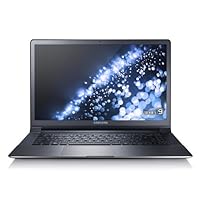
Samsung Series 9 NP900X4C-A01US 15.0-Inch Ultrabook (Ash Black)

Samsung Series 9 NP900X4C-A01US 15.0-Inch Ultrabook
Customer Ratings: 4 stars
Buy Now
****UPDATE 8/20/2013****

My job role has changed a bit in the past year and I'm traveling and doing presentations to potential clients. The thinness of the Series 9 is awesome for traveling, as is the battery life, but I decided to ditch the dreary no-frills Samsung and for an Acer Aspire R7. I'll put up a review of that whenever (if) it becomes available from Amazon.

****ORIGINAL REVIEW****

I'm replacing my 2009 model Dell Studio XPS 1640 that died on me with a bad motherboard hard drive connector :/

I'm a consultant for several clients in San Diego and I use my laptop for EVERYTHING, so not having one meant work stoppage for several days and I needed a new one QUICK. I went to best buy, frys electronics and for whatever reason, costco. I needed to try out every model I could to make a quick, but informed decision.

I went with the Samsung Series 9, mostly because the Series 7 they had at Best Buy caught my eye and nothing else I got my hands on really compared.

The Good:

Battery Life The battery isn't nearly broken in yet, I have been downloading and installing software like crazy, and I'm getting about 7 hours with brightness set to the middle setting. (See below). I'm used to about 1 hour and 45 minutes with the XPS, so 7 hours is astonishing, and when the battery is broken in I'm sure it will be a few hours longer.

Matte screen & brightness I can actually use this thing outside! It was absolutely impossible using my XPS outside because of the gloss screen and good-for-indoors brightness. OK so I'm not joking when I say this thing is bright. On full brightness it's actually somewhat painful to look at it if you're in a dark room. It's great if you're outside at high noon on a sunny day, but I don't see myself ever going above 2/3rd brightness indoors.

Weight 3.6 pounds, sounds a little hefty until you look at it with the screen closed and how much real estate it occupies on your desk. It truly is astonishingly light.

Thickness .58" thick. That's with the screen closed. I found that it is only slightly thicker than a BIC lighter laying on it's side. When you open the screen you'll be amazed at how unbelievably thin it is. It actually makes me a little uncomfortable when I open it, thinking that my meat hooks will break it. But not to worry, it's quite strong.

Build quality It's solid. When I un-boxed it I was worried because of how thin it is and my tendency to be rough on things. But the all metal body is very, very strong.

Boot time With the SSD you can expect about 14-16 seconds.

Wake from sleep With Intel Rapid Start Technology you can expect wake time to be around 2 seconds. Yeah...2 seconds. IRST uses a partition on the SSD that is the same size as your memory, (8,192MB for this ultrabook) and caches the memory to the partition when it goes to sleep. So it's ridiculously fast.

Heat I got the chassis of the ultrabook just barely warm, and that's sitting on a pillow on my lap, downloading, installing software and charging the battery. There's a silent setting on the keyboard (FN + F11) that throttles the processors so it doesn't generate enough heat to use the fans. I couldn't get the fans to turn onto a setting high enough to hear it when I was doing regular work so I'd be hard pressed to get this thing hot enough for the fans to be audible. Bottom line, it's nice typing on a keyboard that isn't +90*F, or having sweaty legs when you're using it on your lap.

The OK:

The I5 1.7 Ghz processor & video chip is ample for my needs: I use SQL Server Management Studio, Visual Studio 2010, remote desktop and of course browsing the web. It's not great for 3d applications, I use Google Sketchup Pro fairly often to design simple wireframe furniture when I'm away from my office and finish off the design on my desktop at home. But it's acceptable, but not as good as my old XPS when it was healthy.

The keyboard. I love, love, love the keyboard on my old XPS. Keys were soft, but firm when you mashed them, always quiet, and thoughtfully placed. The keyboard on this Samsung is just ok. Somewhat noisy, but not that bad, the travel is short and when you reach the limit of it's travel it abruptly stops. Granted, the keyboard needed to be thin because you have to squeeze electronics and a battery below it, so it's not a negative, just something to be aware of if you're a keyboard snob like me.

The connector on the power cord. It's tiny and metal, a little bit smaller than a standard headphone jack, but it's hollow. I have actual fear that someone will tug on the cord (trip over it, or bump into it) and break the connector. Is it possible that there is fault protection built in so that the laptop won't short out? I hope so, but I'll just keep it charged and hope that the battery lasts most of the day so I don't have to worry about it.

The bad:

I really only have two complaints, and they're equally bad.

First off, the track pad is AWFUL. It's quite large for whatever reason. It means that your palm will touch it whenever you're typing and if you're not paying attention you'll be typing somewhere you didn't intend. So it's not only horrible when you're typing, it's awful to use! As far as I can tell from using it so far, there is no pressure sensitivity setting for clicking. If you want to move the cursor around, all of a sudden you'll notice that you're dragging a selection box, or moving icons around for no reason. I probably need more time to get used to it. I have gotten better but it's still an issue. Maybe they'll come up with driver updates...

UPDATE: Been using this for a few weeks now, still not used to it. I'm better at using it, but not great, I use a USB mouse whenever possible.

UPDATE 7/28/2012: There is a driver update out for the track pad! It allows you to turn off some features that cause all the problems (tap to drag, double tap to execute). That means they allow you to take away functionality to fix a problem that shouldn't have existed in the first place. It's now easier to type without causing you to accidentally click the mouse, but you lose some of the features every other laptop on the planet has. I neither added nor removed a star for this.

And next is the screen. Yes, it's bright, yes it's matte. But the contrast ratio is ABYSMAL (I can't find the site that actually told me the value but 175:1 comes to mind). Hard number's aside, you don't need them to realize that EVERYTHING is washed out. Some website backgrounds and text (such as Samsung's drivers page) is so faint that you can barely see them on this screen. It almost looks like a watermark... It is this reason, and this reason alone that I might consider returning this ultrabook. I'm going to give it a few days of use at work and see if I even notice, after all this is a work laptop and I'm only using it to write code.

UPDATE: I just played around with the display settings and got it to look not so horrible: Right click on desktop and go to Screen Resolution > Advanced Settings > Intel Graphics and Media Control Panel > Graphics Properties... Change it to Advanced Mode. General Settings > Color Enhancement Change the Color drop down menu to All Colors, adjust the Contrast and Gamma settings until a photo looks as normal as possible. My settings are:

Brightness: 31

Contrast: 40

Gamma: .7

Hue: 0

Saturation: 5

I'm sure I'll be playing with this as I go on, but for now it doesn't look absolutely awful, just mostly bad.

Dan brought up the keyboard backlight, if you need to look at the keys to type be aware that the backlight is a green color and is ridiculously dim. There are 4 adjustment settings, the first 3 are just about worthless, the 4th (brightest) looks like it should be the 1st or 2nd dimmest setting. It doesn't bother me much since I know the keyboards backwards and forward.

Other thoughts:

I upgraded to Windows 7 Ultimate almost immediately after it's first boot. The drivers on the samsung website all installed without a hitch if you install them in the proper order: Chipset first, everything else on the Samsung drivers page, but save IRST and HECI for last. Getting IRST to actually work after doing a fresh windows install is actually a pain, and I haven't been successful getting it to work yet. Copy and paste this into a Google search for a guide on notebookreview: "660222-samsung-series-9-np900x3b-np900x4b-guide-intel-rapid-start-technology"

Apparently amazon doesn't allow you to link to external websites so you'll have to search for it.

UPDATE: I got IRST working finally. I enabled UFEI in the BIOS, restarted, opened Easy Software Manager and it actually started working. Installed Rapid Start software automatically, restarted and voila! The 8.3 GB partition created automatically and no more error saying IRST not enabled. So it Is now safe to upgrade to any version of Windows 7 and retain use of all the Samsung software. As such I am upgrading my rating from 2 to 4 stars. (It really should only be 3.5...)

It comes with a 128SSD, but has partitions that you can't see (21.7 GB for recovery, 8.3 GB for IRST) so you're looking at usable disk space of 89.2 GB. I have just about all the software I use installed and it's only occupying ~40 GB. If you want to get that space back you'll have to delete the recovery partition, but you might have trouble returning the laptop if you choose to do so.

Windows Experience Index Ratings:

Processor: 6.9

RAM: 7.6

Graphics: 6.4

Gaming graphics: 6.4

Primary Hard Disk: 7.5

Bottom line: It's no desktop replacement, but it's adequate for my needs. Being unplugged for 7+ hours is ridiculously awesome. I can't wait for taking a day off to sit at a park, cafe or beach and working on both business, and my tan, that sounds sexy enough to keep this thing around. I'll be updating this review as I use it.

Click Here For Most Helpful Customer Reviews >>

HP dv6-6c10us (15.6-Inch Screen) Laptop

HP dv6-6c10us Laptop
Customer Ratings: 4 stars
Buy Now
I am going to post a legitimate review about the actual product here. A few of the other reviews on this product were pretty much ranting and pointless. I am an IT technician, and I will sum it up as short as possible, but to the point. I bought this for my own personal use, not for work. All in all, this PC has great speed, good hibernation in and out of lid closes (hasn't locked up once yet), and fingerprint reader is actually very useful. Beats audio is marketing mostly, sounds a little better though. This PC is gorgeous aesthetically, and touchpad is useable for once. It has advanced functions (two finger zoom/scroll, etc.). Also, for those of you that don't like the touchpad light that surrounds the touchpad, (fn) function & spacebar toggles it on and off. Double tap the top left corner of the touchpad to turn it off and use a wireless mouse. Other than that, quad-core processor, 2 USB 3.0 ports and 2 USB 2.0 ports, pretty good graphics card, fingerprint reader with shortcut software included (you can setup different website shortcuts and/or system functions to access with recognition of different fingers; ie: shutdown with your pinky, or go to your 3 favorite websites with just one swipe of your index finger). It has 6 gigs of ram (expandable to 16 GB), 640 gig HDD, memory card reader, beats audio, and bluetooth, you really can't go wrong for the price. Remember, all PCs have bloatware these days pretty much, most PC support problems are dealt with through globally outsourced firms. This does suck, but it keeps their costs down for us to buy them. I suggest removing all the programs you don't want or need from add/remove programs in the control panel right away when you get it (within the 14 day store return policy), and give this computer a lot of use within that period to make sure it's for you. If you are not tech savvy, pay extra and purchase the store's extended warranty program. DO NOT PURCHASE THIS OR ANY COMPUTER 5 HOURS FROM YOUR HOUSE like one of the other reviewers did. Way too risky when spending 5 benjamins. Anyways, I hope you buy and enjoy this product. I do NOT work for HP by the way...lol. I will say that I did not buy this at Amazon unfortunately because I found it 120 bucks cheaper at a local chain store that starts with an (S******) and has a red brand theme. I would expose the store, but Amazon might not post this review. Last I looked, that deal was still going on. Hope this helps some people.

Click Here For Most Helpful Customer Reviews >>

WolVol Cheap Mini Laptop Computer 7 inch Android 2.2 Tablet

WolVol Cheap Mini Laptop Computer 7 inch Android 2.2 Tablet with Installed WIFI to access Internet On The Go Includes: Velvet Case, Charger, Mouse
Customer Ratings: 3.5 stars
List Price: $149.99
Sale Price: $119.94
Today's Bonus: 20% Off
Buy Now

I have to retype this as I lost my nearly complete review (used this device to type it)

I purchased this a little over 2 wks ago. Here is my assessment:

PROS:

1. Small, compact and light.

2. Starts up quickly.

3. Comes with about 30 apps. I wouldn't call that a "ton", however, half of them serve their purpose. The file browser app makes it easy to manage all of your applications on the device.

4. Connecting to wifi is a breeze.

5. You can get decent browsing speeds downloading Opera Mini or Dolphin (both free), although the device comes with two browsers pre-installed.

6. Three usb ports for things like flash drives.

7. Easy to set up email to read off-site.

CONS:

1. The keyboard cursor jumps around half the time to a different location when you're typing.

2. The caps lock function seems to be "hit or miss" (at least on mine)

3. Office Suite Pro 5 does not adequately tell you how to save a document. I had to find out on my own.

4. The AC adapter cord is way too short. Expect to be on top of an outlet should you need to recharge.

5. You need to charge the device at least four hours, but you only get about two hours of use from it (unplugged).

6. At the time I bought this device (just over 2 wks ago) there was no case included. I had to buy my own.

7. Included browsers struggle to play video. I found that only Dolphin was able to do it consistently and Opera not at all.

8. Page you're on can unexpectedly "refresh" or go to another site. May be a keyboard or browser issue.

9. Keyboard pops up on screen taking up half of it & there's no instructions on its functions in the manual.

10.It can be confusing to get more android apps. You need to go the android site and then through your android market app.

11.The touch pad isn't always responsive..which is a shame, as I am hoping not to have to buy a separate mouse.

Overall, I am satisfied with the machine, despite its quirks. It reminds me of an overgrown cell phone, without the calling option. Bearing that in mind, as long as you can see it for what it is and aren't expecting what you'd get on a laptop or desktop computer, you should find that the device meets or even exceeds your expectations. It's a cute little thing to have around for writing or browsing..and if the above "cons" weren't an issue, it'd be just about perfect. Now the only remaining thing to consider is: How long will this little machine last?

Only time will tell.

Click Here For Most Helpful Customer Reviews >>

Ikelite Underwater Camera Housing for the Sony DSC-W5 and DSC-W7

Ikelite Underwater Camera Housing for the Sony DSC-W5 and DSC-W7 Digital Still Cameras
Customer Ratings: 5 stars
Buy Now
I had a sony DSC-w7 camera already. This housing is pricey at $270, but the cost of buying a new camera with housing was just as much or more.

The housing allows full control of all camera features and buttons and is expandable with Ikelite strobes and lenses (filters, macro, and wide angle), so it leaves plenty of room for expansion. The housing is big, compared to some of the housings that you buy with specific cameras, but the bulk is nice for getting a good grip (especially with 5 mm gloves, necessary for Northern California diving).

All in all, it's a great housing if you already own the camera!

Click Here For Most Helpful Customer Reviews >>

Gagne Port-A-Trace 1618-3 3-Light Stainless Steel Lightbox

Gagne Port-A-Trace 1618-3 3-Light Stainless Steel Lightbox
Customer Ratings: 5 stars
Buy Now
This item is exactly as described. I'd definitely buy from this company again ! The item arrives safely and was packed very very well. I am super pleased at the light box's size as it is exactly as it was described on Amazon.

Click Here For Most Helpful Customer Reviews >>

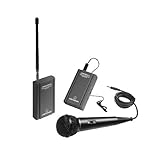
Audio Technica ATR288W VHF Battery-Powered TwinMic Microphone

Audio Technica ATR288W VHF Battery-Powered TwinMic Microphone System
Customer Ratings: 4 stars
List Price: $250.00
Sale Price: $119.95
Today's Bonus: 52% Off
Buy Now

If you are in the market for a wireless microphone setup for your video camera and like me, you don't want to spend top dollar. You may like the budget friendly Audio Technica Pro 88W/T setup. Listen in to the sound quality and judge for yourself.

Comes with connectors that are compatible with most major cameras. 9v battery for the transmitter and receiver. I found no issues getting it to work with my Canon ZR-70. For practical purposes, the sound quality was as good as anything I've seen produced on the web where I know the audio equipment being used is of much higher caliber. This device seemed to hold its own and do a very good job providing close, crisp audio in a situation where it would be nice to roam free.

The distance was not tested. I did not go 300 yards out to see how far it would go. Most videos I've done are in close proximity to the camera but would be detrimental without some kind of on-person audio setup. Having a wireless option makes this possible and enhances the video without providing so many features that is otherwise overkill for the task at hand.

I'm positive on this review as I found the setup easy and the audio quality to be very good without any noticeablestatic or interference.

Audio-Technica ATR288W Wireless Microphone System (Includes ATR35s, ATR20)

Click Here For Most Helpful Customer Reviews >>

NIKON F5 SLR Body Only

NIKON F5 SLR Body Only
Customer Ratings: 5 stars
Buy Now
I have one of every model Nikon F made from the FTn to the F5. I used to think that the F2 was God's gift to photography. Rock solid and mine is 30 years old and it still works fine. However, as good as it was, I would not want to go out on a magazine assignment with an old F2. The capabilities of modern AutoFocus cameras make my old F2 and even the F3 too limited especially with regard to invaluable tools like automatic fill flash, auto exposure, simple exposure bracketing and simple and fast film loading. I have an F4 too and in its day, it was a gem. But I shoot a lot of motorsports and the F4 was too slow for fast action. The F5 is everything the F4 was plus it focuses better and faster. The camera is a joy to hold (at least for my two hands) and is possibly the best handling camera I have ever used in my over 30 years of picture taking. As mentioned above, it focuses very well and very fast especially with the newer "S" lenses with the motors in the lens. The camera takes lithium batteries and they seem to last through many dozens of rolls of film not as cheap as alkaline but very convenient and much lighter to carry. The high eyepoint finder works great for me and my thick eye glasses. The controls are where Nikon has put them over the years so long-time users should have no trouble working fast with the F5. Mine has seen rugged use here and in Europe and it has never failed me. The only gripe I have is that the removable prism does let in dust but every Nikon I have has the same issue. It's simple to eliminate the dust with a soft brush or some canned air so it's a pretty small gripe. I think the Canon EOS 1V cameras and lenses focus a tad faster (I tend to use them more for my motor racing assignments) but the F5 is such a joy to use and the Nikon glass is so sharp that I look for assignments where I can use this camera. The F5 remains for now in the product line, despite the introduction of the new and more expensive F6. The F6 looks like a winner and handles well too. But its $2400 price tag and the fact that the majority of the market for a high powered pro camera has already turned to digital, makes me wonder who but a serious amateur with deep pockets will pony up the bucks for one. My final warning to you camera junkies out there is that once you handle the F5, you will not want to put it down. And that's not a bad thing.

Click Here For Most Helpful Customer Reviews >>

Panasonic 8mm f/3.5 ED Fisheye Lens for Lumix G Micro Four

Panasonic 8mm f/3.5 ED Fisheye Lens for Lumix G Micro Four Thirds  Digital Cameras
Customer Ratings: 5 stars
List Price: $799.95
Sale Price: $639.95
Today's Bonus: 20% Off
Buy Now

This is a great lens but also a niche lens. The construction on this lens is first rate. It is a lot like the Panasonic 7-14mm f/4.0 Micro Four Thirds Lens for Panasonic Digital SLR Cameras. The lens is extremely small and light for a fisheye lens. Panasonic claims it is the smallest in the world.

This lens is really good for an incredibly wide field of view and for the neat distorted look that gives the lens it name-fish eye.

There are 3 types of wide angle lenses:

Panasonic Ultra Wide Angle Rectilinear 7-14mm114 deg

Panasonic Diagonal Fisheye 8mm -180 deg

Circular Fisheye 180 deg

The Rectilinear lens while still having some barrel distortion, basically tries to remove it as much as possible to portray the image in a square or true to life fashion. However, by removing the distortion, the field of view is decreased. As listed above the Panasonic 7mm lens gives 114 deg field of view.

The 8mm `diagonal' fisheye give a 180 deg field of view despite being 1mm longer. It does this by allowing for massive barrel distortion. Basically, the only straight lines that will be straight pass through the center of the lens. The `diagonal' fisheye utilizes the entire rectangle of the frame. Whereas, the `circular' fisheye has a circle picture with the corners being black from being completely underexposed. This Panasonic 8mm is a `diagonal' fisheye which I personally prefer.

The reason this is a niche lens is that while the effect is cool, it will start to get old very quickly if used over and over again. It would be nice for shooting weddings but only for 2 or 3 photos. The same thing would go for birthday parties or sporting events.

For video the same thing goes. You could use it for a few segments in a clip but if you tried to shoot a whole video, even 3 min video, people would become fatigued and bored by it very quickly.

So, while, this lens has fantastic construction and great optics and would be a good quiver in many a toolkit, it should not be one of the first lenses you buy. Given the choice between this or the 7-14mm, the 7-14mm is going to be the better choice most of the time. If you are looking for a fisheye to expand your capabilities and you want the smallest with great optics this is the lens for you.

Pros

1) Great construction -Plastic but sturdy

2) Incredibly small and light (< 6 oz !)

3) Great optics

Cons

1) Only 7 bladed aperture instead of 9 -Not a big deal because an 8mm fisheye will have almost nothing out of focus. Still for this price 9 blades would be better.

2) Niche lens

3) Panasonic wasted time and money on this when they could have made 25mm f/1.4 or the even more needed the 300mm f/2.8

Update 24 Oct 2010

I've been shooting this fisheye extensively for the past week on a trip to Egypt. I carried a G1 and GH1 and the two lenses that stayed on my camera were the 14-140. and the 8mm. This is a great travel lens. There is no doubt about it. When touring around there is always a need for a super wide lens. The cool thing with a fisheye is that you get 180 deg. Yes you get distortion but as you can see on my photos sometimes that is good. The other thing to note is that the distortion can be fixed in post. While you do lose some of the photo when you do this you don't lose as much as if you were shooting a rectilinear lens. So for an update on this I would make the following recommendations concerning this or the 7-14mm.

If you are a working professional or semi-pro then you will most likely need both. However, if you can only have one then the 7-14mm would be first followed by the 8mm.

If you are a hobbyist then I would recommend the 8mm first. You can fix the distortion in post. It is ~.5 stops faster and it is incredibly useful for all sorts of travel and everyday photography.

Click Here For Most Helpful Customer Reviews >>