Showing posts with label canon digital camera price. Show all posts

Panasonic Lumix DMC-FZ35 12.1MP Digital Camera with 18x POWER

Panasonic Lumix DMC-FZ35 12.1MP Digital Camera with 18x POWER Optical Image Stabilized Zoom and 2.7 inch LCD
Customer Ratings: 5 stars
Buy Now
As a serious amateur, I've been fortunate enough to own a number of point and shoots including Panasonic, Fuji, several Nikon's, & a couple of Canon's. All have had their strong points and I'm not a brand loyalist by any means, but after a couple of weeks, I must say I absolutely love this camera.

My first impressions were ones of pleasant shock. The camera seemed smaller than in the pictures and if it seemed smaller, it seemed doubly more so in terms of weight. Compared to my SLR this thing is an absolute lightweight but very well built and certainly heavier than the smaller 'in your pocket' point and shoots. A great balance...although I wouldn't want to drop it. Some strategically placed silicone on the housing would make this a bit more rugged without much if any impact on cost. Powerup is about as fast as you can bring the camera up to your face amongst the best of the point and shoots. Controls are easy to use and I like the mini joystick for making on the fly adjustments in manual and scene modes. The menus are fairly well laid out although some items I had to resort to the manual to find their location for the first time.

The iA or Intelligent Auto function gave consistently above par picture quality, although I was always able to tweak it better myself (this could have been as much preference as anything). The AVCHD and HD movies worked absolutely flawless with my Transcend 16 GB SDHC Class 6 Flash Memory Card TS16GSDHC6E [Amazon Frustration-Free Packaging]. (NOTE:Make sure you lowlevel format these SDHC cards a COUPLE of times BEFORE first use). I do wish that you could use the normal shutter release instead of the dedicated movie button on the back face when in movie mode. I kept forgetting and tried to stop the movies using the shutter button instead of the record button. Minor nuisance, but will be overcome as I get my brain wrapped around the change in button locations.

The battery worked well past 300 stills and about 35 clips, so I am very pleased with it with the LCD display being used for most of the shots. I purchase another spare battery;Lenmar DLP006 Lithium-ion Digital Camera/Camcorder Battery Equivelent to the Panasonic CGR-S006A Battery, also available here at Amazon, and it appears to be working about as well as the original Panasonic (a great buy). The EVF or Electronic View Finder was very handy, although most of the overlaid information is very hard to distinguish in the small EVF. I CAN'T BELIEVE PANASONIC DIDN'T INCLUDE A RUBBER BOOT FOR THE EVF! Please someone, anyone, make it as an accessory.

The EZ or Extra Zoom function is quite handy. Using this feature, you can shoot at lower resolutions and get more effective zooming power out of the camera...over 30x and it works very well. The LCD screen is clear and crisp, but its performance in high ambient light is about average. Thank goodness for the electronic view finder mentioned above.

Image stabilization is the absolute best amongst my camera collection and is especially noticeable in low light and full zoom. I was pleasantly surprised how well I could take indoor pictures at night with a simple tweak of the exposure. Far better than any of my other point and shoots, although nowhere near my SLR.

The standard 3picture burst mode was fairly standard and unimpressive, but the 10pics per second for speed priority and 6 pics per second in image priority burst mode worked well for catching difficult shots like geese landing on the water and children jumping out of swings, but I still wish the resolution and picture quality was better in these modes. Still, for a point and shoot, it's ability to catch the fast action is at the top of it's class.

The lens cap interferes with zoom, but the camera will kindly remind you that you have left it on with a 17,000 volt discharge...just kidding...it will tell you on the LCD screen.

UPDATE: A new megazoom runoff was conducted by Digital Photography Review in June of '07 and can be seen here: or you can cut to the results here:

To say the FZ35 stacked up well would be an understatement, but as they point out in the above review, you will likely not be disappointed with any of the other fine cameras in the pack. The review, however, will help you to pick one that works best for your needs and preferences. (I'm still super happy and winning contests with my amateur photos).

LIKES: Ease of use, picture quality, zoom and extra zoom, HD movie, lightweight, stop action. BEST Point and Shoot I've ever owned ! ! !

DISLIKES: (all minor) No eyepiece boot for EVF, lens cap interferes with zoom, tripod mount interferes with battery/memory door when in use. Only 10 sec. max on the built in timer.

Click Here For Most Helpful Customer Reviews >>

Nikon D5200 Digital SLR Camera & 18-105mm VR DX AF-S Zoom Lens

Nikon D5200 Digital SLR Camera & 18-105mm VR DX AF-S Zoom Lens with 55-200mm VR Lens + 64GB Card + Case + Battery + Grip + Tripod + Filters + Remote + Accessory Kit
Customer Ratings: 5 stars
Buy Now
I'll begin by saying I've own the Nikon D80 Camera Kit bought through Amazon. I'm a return customer.

The Nikon D5200 Camera Kit, I researched this unit extensively. I now knew the featured I wanted in a digital camera.This kit had very thing I was looking for, including at auto focus and anti vibration features. Also the dual battery holder. I brought the Nikon to a family reunion.Everyone complimented me on the looks. My brother-in-law approached me and asked where I bought the components. He had bought a Nikon D7000 with two lenses only now he was looking to buy everything else. He was surprised when I told him I buy through Amazon. The only problem I have now is that I'm being invited to all the family functions to take pictures.

Click Here For Most Helpful Customer Reviews >>

Tamron 70-300mm Di Macro Lens with Hood + UV Filter + Accessory

Tamron 70-300mm Di Macro Lens with Hood + UV Filter + Accessory Kit for Sony Alpha A37, A57, A58, A65, A77, A99 Digital SLR Cameras
Customer Ratings: 4 stars
Buy Now
Overall a decent lens, I use it on my Minolta Maxxum 4, mostly for nature photography. You do need to remember to support the lens when shooting or you will end up with blurry images. If you can remember to hold the lens steady(even when using a tripod), the photos turn out fine.

Click Here For Most Helpful Customer Reviews >>

Sigma 17-50mm f/2.8 EX DC OS HSM FLD Large Aperture Standard

Sigma 17-50mm f/2.8 EX DC OS HSM FLD Large Aperture Standard Zoom Lens for Canon Digital DSLR Camera With Cleaning Kit, Flash Bracket, Micro Fiber Cleaning Cloth, Card Wallet, Hoya UV Filter!, Lens Cap Cleaner and more!
Customer Ratings: 4 stars
Buy Now
so far happy with this lens dxo rated higher than canons 17-40mm had it about 8 months but now there is something wrong with the auto focus it has been searching in and out I need to get it checked out.

Click Here For Most Helpful Customer Reviews >>

Canon Ef-s 18-200mm 18200mm F/3.5-5.6 Is Lens + 16gb Supreme

Canon Ef-s 18-200mm 18200mm F/3.5-5.6 Is Lens + 16gb Supreme Accessory Kit for Canon EOS 20d, EOS 30d, EOS 40d, EOS 50d, EOS 60d Dslr Cameras
Customer Ratings: 4 stars
Buy Now
This is the lens I use 90% of the time. After a trip to Ireland and constantly changing lens, I decided there had to be something easier. I am new to photography so the research started and I ran across this lens. The reviews were good so I decided to try and have not regretted it. I use it on a Canon T3i. The cost of lens fit my budget better than many others enabling me to have the 200mm. Do note that with that the 5.6 isn't great in low light situations. At the time I ordered it I didn't understand what that meant. It has been a great growing lens for me and I would recommend for anyone who can't buy the $1000+ lens. Having the Canon product quality is great too.

Click Here For Most Helpful Customer Reviews >>

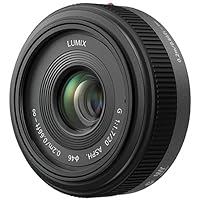
Panasonic LUMIX G 20mm f/1.7 Aspherical Pancake Lens for Micro

Panasonic LUMIX G 20mm f/1.7 Aspherical Pancake Lens for Micro Four Thirds Interchangeable Lens Cameras
Customer Ratings: 5 stars
Buy Now
I recently purchased an E-P2 as a portable option to complement my DSLR setup. I've been very happy with its performance in most respects, however it has no flash and the kit lens is slow; this means that indoor usage results in painfully high ISO and noise that is impossible to clean. That lead me to purchase this lens, which is the fastest thing going for M4/3 currently.

First off, this thing is wonderfully compact. Much thinner than the M.Zuiko 14-42mm kit lens, although a bit bigger in diameter, and it makes the E-P2 even more low profile when it's mounted. It balances well on the E-P2 and it looks right at home to me, even though it lacks the signature PEN silver accents. It has a massive manual focus ring which is a pleasure to use (once you get the hang of the micromotor manual focus mechanism, which it shares with the 14-42).

Unlike the newer, smaller Panasonic Lumix 14mm f/2.5 pancake, this guy has some very large lens caps that make it more bulky than it should be. A lens this size begs to be slipped into a pocket, but the huge caps just get in the way; you might want to look for aftermarket replacements.

As for IQ... well, you can read the charts, but suffice it to say that this is a very good performer. Unlike the M.Zuiko kit lens, this guy is sharp wide open, with perhaps only minor improvements by stopping down. This lens can really show what M4/3 is capable of from an IQ perspective in a way that the kit zooms just can't.

Autofocus is at least as accurate as any other lens I've tried on this body, and low light AF accuracy especially is quite good (thanks, no doubt, to the large aperture). AF speed though is mediocre at best, and it's also a good bit louder than would be ideal. The aperture also makes a very noticeable clicking sound, which is a little obnoxious with the E-P2 (which constantly fiddles with the aperture when you're using live view). Neither focus noise nor aperture noise is a real issue for stills, but they might cause some problems if shooting video with the internal mic.

There is one issue with using this lens specific to Olympus bodies: they don't do the software distortion compensation that Panasonic bodies do with Panasonic lenses. This means that, on Olympus bodies only, light falloff is visible towards the corners when shooting wide open (it goes away by around f/4). In practice it's not much of a problem, and the corners aren't that big a deal in most shots anyway, but if you're a PEN shooter you should be aware of it and stop down accordingly if/when the corners do matter.

I should mention that I also own the Olympus 17mm f/2.8, which many would consider an alternative to this lens. If you're new to photography and you're considering owning only one, I highly recommend the Panasonic, whose aperture advantage and longer focal length combine to give you much better options for DOF control. I still enjoy the Olympus (and indeed, it's even *smaller* than this lens), but I think for most people in most situations this is a better choice.

Bottom line: if you own a m4/3 body without a flash and care at all about low light shooting, stop reading and buy this lens right now. For everybody else, you're presumably here for IQ, f/1.7's narrower DOF, and portability, and on all counts this lens delivers. It's a great all around performer and the cost, although high, is not totally unreasonable for something of this quality.

As a side note, if you're used to 50mm as "normal" from the film era, I think you'll find 20mm quite pleasant; I've shot a lot with my 28mm prime on APS-C, and the Panny 20mm here provides a similar FOV to that.

** Update, 5/21/2010 **

My initial thoughts on this lens have proven to be spot on. This little guy spends much, much more time on my camera than the kit lens; the faster aperture is a godsend, and the smaller size is wonderful for portability. Image quality is impeccable and the light falloff is almost never a problem in real world scenarios. If you only buy one lens for your M4/3 body, make it this one.

** Update, 8/7/2011 **

Panasonic has announced a µ4/3 native version of the Leica-branded Panasonic 25mm f/1.4, which should clock in at about twice the price of this lens. I own (and reviewed) the regular Four Thirds version of that lens, and early accounts imply that the µ4/3 version should be nearly the same optically as its full sized cousin.

The 25mm f/1.4 is certainly better, but not by much; only half a stop faster, barely any sharper, and still suffering from corner softness and vignetting wide open. The focal length is a more traditional normal, which (combined with the aperture advantage) makes it more suitable for isolating your subject, but... at twice the cost and twice the size? Those advantages seem difficult to justify.

As far as I'm concerned, the 20mm f/1.7 here remains the first lens you should buy for a µ4/3 body. It plays to the strengths of the system without breaking the bank.

** Update, 1/23/2013 **

I've finally taken the plunge and purchased both the Olympus OM-D E-M5 and the Panasonic Micro 4/3 25mm f/1.4 to go with it. I can now directly compare this lens to the native 25mm f/1.4.

I can honestly say the 20mm f/1.7 holds up incredibly well. The biggest advantage of the 25mm is probably its autofocus performance, which is both much quieter and somewhat faster than the 20mm (primarily when "hunting," which is when the 20mm slows down). The minor aperture advantage of the 25mm is really not very significant (especially with the E-M5, which has impressive high ISO performance).

Oddly, perhaps, I still end up preferring the 20mm simply due to how much smaller it is. The 25mm is superior, but it's relatively large, which means I'm just less inclined to carry it with me. So if you're considering these two lenses for yourself, you really must decide how much you value portability. The 25mm f/1.4 is "better," but the size difference is real.

Click Here For Most Helpful Customer Reviews >>

Sony HDR-CX200 High Definition Handycam 5.3 MP Camcorder

Sony HDR-CX200 High Definition Handycam 5.3 MP Camcorder with 25x Optical Zoom
Customer Ratings: 4.5 stars
List Price: $319.99
Sale Price: $245.99
Today's Bonus: 23% Off
Buy Now

I've had this model for about 6 months now, so I've used it enough to give an informed opinion by this point. I bought this only to capture memories of our kids growing up. I did not buy this for extensive or special editing, special effects, etc. I just wanted something that is good quality, is 1080 HD, etc. where I can watch our kids growing up and capturing memories. I am pleased with this camcorder, and offer a few comments for those considering this model:

1) I have no complaints about picture quality it works well for what I need, under indoor and outdoor conditions.

2) Very easy to use open the screen and it comes on and boots up quickly.

3) It's very light compared to my older Sony Handycam (which used tapes). Sometimes I think too light and somewhat cheap feeling, but everything has gotten so small now, I guess that is the way of things particularly in this price range.

4) I selected this model because I did NOT want internal flash memory like the next model up (the 210). If the internal memory were to go bad in time, I would rather it be a card that I can throw away rather than having something go bad inside the camera. I can always get a new card. The next model down (the 190) does not have the touchscreen input, nor the spot-focus, nor the HDMI cable to connect to your HDTV.

5) VERY IMPORTANT Sony (and some other manufacturs too I think) have what is called "Direct Copy". What this means is that I can connect my portable 1 TB hard drive straight to the camcorder, and not need a computer. I can then access all the videos on the hard drive in full HD and connect the camcorder straight to our HDTV with the HDMI cable. So over time, you can use the portable hard drive to store the videos, and use the camcorder to access them and play them on the HDTV using the camcorder software. I cannot stress how important this is, at least to me, because this solves the storage issue and eliminates the need for a computer or laptop in-between, and not having to use special software, etc.

Not all hard drives will work. I use a 1 TB Western Digital My Passport, USB 3.0 Western Digital My Passport 1 TB USB 3.0 Portable Hard Drive WDBBEP0010BSL-NESN (Silver). Also, you must use the Sony cable VMCUAM1 Sony VMCUAM1 USB Adapter Cable to connect the USB cable to the hard drive. If you don't use the Sony cable it won't work, even though the ends may fit properly.

I have a 32GB card, which good for about 6 months give or take. What I do is transfer the videos to the hard drive, and then back up the hard drive using our network storage.

Anyway, I don't mean to get too wordy about this but this really is a big deal and I think it should be noted. Not having to have a computer is a big deal, IMO. As long as you don't max-out your memory card it doesn't matter, but once you have too may videos for the card to store, that is when this matters the most.

Note that two other reviews here talk about the built-in projector. The CX200 does NOT have this feature.

I would certainly recommend this, and I would purchase this again.

Click Here For Most Helpful Customer Reviews >>

InFocus X2 Multimedia DLP Projector

InFocus X2 Multimedia DLP Projector
Customer Ratings: 4 stars
Buy Now
Bottom line best major purchase I have made since I bought a home with a finished basement!

I got the projector and mounted it on the ceiling in my basement projecting on a light-brown wall. I expected that I would need to paint the walls white, or get a screen, but was shocked by the amazing picture quality. Here are the details:

1) Comcast Cable with HiDef Box. Hidef program is so amazing it makes me want to cry. Sports programing blows the mind away. I even enjoy watching boring hi-def shows with the wife, like the Oscars, just because I am so amazed at how crystal clear the picture looks. You feel like you are there! Regular TV looks surprisingly great too, but setting it up right is critical. Make sure to change the aspect ratio back to Native (vs 16:9 when watching hi-def channels). Ensure that the HDTV cable box has the following settings:

Aspect Ratio (controls regular programming) = 4:3 letterbox

Output Type (controls High def programming) = experiment with 720P vs 1080i

4:3 overide (controls regular programming)= 480p.

I am also using the expensive $99 monster DVI cable to connect to the cable box. This is essential to make regular TV look great vs grainy. Get the DVI to M1 connections, wires and adaptors you MUST budget this into your overall budget or the projecter will not be a great buy (see my "problem" section below).

2) X-Box. I purchased the Hi-Def cable/wire from Microsoft for $20. Once you buy the cables, you can go into the Xbox dashboard settings to allow for 720p and 1080i. Most games are in 480p and 16:9 format. The few Games in highdef look fantastic! You can check hdtvarcade.com to see the exact resolution of every game.

3) DVD player: Since the Xbox only outputs in 480i, I wanted to try the upconversion DVD players. I first tried the Denon 1910. That did NOT work when using a DVI cable!!! It might have been because it was refurbished or possibly it was because the Infocus X2 is not HDCP compliant?? I'm not sure, but the 1910 warns against non-HDCP compliant units and InFocus says that x2 is non-compliant so that's my best guess. Next I tried the TOSHIBA SD-5970. That worked, and I hooked it up using the $99 Monster HDMI to DVI cable. I'm not sure if it was worth it, because DVD's look great, but NOT Amazing compared to HiDef Comcast programming. The verdict is still out, but I have never seen any of the DVD's like Finding Nemo that supposedly look MUCH better with progressive scan DVD's. I can't tell much difference between when DVD is set to 720p vs 1080i HDMI output.

Once again, everybody that comes over, including the sceptic wife, is shocked by our basement they all say its like a full-scale theater, much bigger and clearer than a regular big screen TV and I don't even have surround sound yet that'll be my next big purchase. Infocus X2 is highly recommended, but be sure to check out the problem section below:

Problems

1) My InFocus X2 does not have any component inputs. That means to get premium quality, you must come through the M1/DVI input. If you have a DVD, Cable box and Xbox like me, it is a real pain to switch the cable in the back (especially with a ceiling mount). I got myself a step ladder to make it easier. The DVI switcher for 4 DVI cables is TOO expensive, almost $400.

2) Be prepared to spend at least $3-400 after you get your InFocus to purchase DVI cables for the cable box, possibly HDMI cables if you buy a progressive scan DVD player, as well as adapters to connect your DVI cable to the M1 computer port... Its definitely worth it, but just be prepared. In my opinion, the progressive DVD player is optional (saves you approx $150), but the cables are mandatory.

3) No way to turn off unit with remote (and yes it is still a little noisy in whisper mode, but once the movie starts you can't hear it anymore). I have it set-up so that after it cools/powers down I just turn off the entire unit on the wall switch since it is ceiling mounted.

Click Here For Most Helpful Customer Reviews >>

Nikon D800 36.3 MP CMOS FX-Format Digital SLR Camera (Body Only)

Nikon D800 36.3 MP CMOS FX-Format Digital SLR Camera
Customer Ratings: 4 stars
List Price: $2,999.95
Sale Price: $2,796.95
Today's Bonus: 7% Off
Buy Now

I know that the D800 is not really the replacement model over the D700. Nevertheless, it did replace my old D700 and the D800 is, I believe, better suited for my photographic needs than the D700, i.e., studio, portraits, and landscape.

The D700 was and still is an outstanding DSLR. The D800 is of course better, but in a very perceptible way, which was quite a surprise to me.

I have done over 5000 shots since my purchase on 24 March. So far, no issues to report: no green cast from the LCD and no problems with the CLS system.

Nikon has really outperformed with this new DSLR and the clear improvements are:

Much improved Dynamic Range, which was my main problem since my first DSLR

Better colors straight off the camera: deeper and richer

Better AF in low light ***UPDATE*** After comparing with older Nikon DSLRs, this improvement is minor and only perceptible on cross-type AF points.

Highly detailed photographs at full res, 100% magnification and also when down-scaling the photos.

Let's not forget a proper and useable HD video feature at broadcasting quality. ***UPDATE*** Perhaps not broadcasting quality, but close enough.

On the negative side (there has to be some):

The zoom in and zoom out buttons are reversed from the old models, which is now more logical, but I am used to the old wrong way! it's a minor problem of course.

D4 has backlit buttons, why not on the D800? This can't be that expensive to include.

Very expensive Battery pack, this is a major drawback for me. But yes, the D800 is well priced at $3000. I just hate ridiculously priced accessories.

still wonder the point of having 1 CF slot and 1 SD slot. 2 CF slots would have been superb. But I guess if you come from a SD card DSLR, that would be practical for you.

Left AF points can suffer from front/back focusing issues on wide angle lenses, but this can be fixed at a Nikon repair center under warranty ***UPDATE***

One crucial point that has to be considered when acquiring a 36MP DSLR: storage will be an issue. I just purchased a 4TB ext hard drive. A 14-bit RAW file (uncompressed) coming from the D800 will average 75MB.

I just shot a wedding, and I consider the D800 to be an excellent choice for the job. All the complains about shots being more blurry at 100% magnification are irrelevant. One has to be precise with his/her settings, at the right exposure and optimal shutter speed, results can be absolutely mind-blowing. And since most won't need 36MP for wedding photographs, down-scaling images will certainly eliminate slight camera-shake or noise.

One particular aspect that I appreciate is that my Nikkor 85mm f/1.4G is now tack-sharp at f/1.4. I had a front focusing issue with my old D700 even with the fine-tune option set to max. Since I'm no techie geek, I still don't understand why the D700 gave me problems with the 85mm.

Anyway, I used to be one of those people saying that digital photography will never replace film photography. The D800 has changed all that.

Click Here For Most Helpful Customer Reviews >>

HP dv6-6c10us (15.6-Inch Screen) Laptop

HP dv6-6c10us Laptop
Customer Ratings: 4 stars
Buy Now
I am going to post a legitimate review about the actual product here. A few of the other reviews on this product were pretty much ranting and pointless. I am an IT technician, and I will sum it up as short as possible, but to the point. I bought this for my own personal use, not for work. All in all, this PC has great speed, good hibernation in and out of lid closes (hasn't locked up once yet), and fingerprint reader is actually very useful. Beats audio is marketing mostly, sounds a little better though. This PC is gorgeous aesthetically, and touchpad is useable for once. It has advanced functions (two finger zoom/scroll, etc.). Also, for those of you that don't like the touchpad light that surrounds the touchpad, (fn) function & spacebar toggles it on and off. Double tap the top left corner of the touchpad to turn it off and use a wireless mouse. Other than that, quad-core processor, 2 USB 3.0 ports and 2 USB 2.0 ports, pretty good graphics card, fingerprint reader with shortcut software included (you can setup different website shortcuts and/or system functions to access with recognition of different fingers; ie: shutdown with your pinky, or go to your 3 favorite websites with just one swipe of your index finger). It has 6 gigs of ram (expandable to 16 GB), 640 gig HDD, memory card reader, beats audio, and bluetooth, you really can't go wrong for the price. Remember, all PCs have bloatware these days pretty much, most PC support problems are dealt with through globally outsourced firms. This does suck, but it keeps their costs down for us to buy them. I suggest removing all the programs you don't want or need from add/remove programs in the control panel right away when you get it (within the 14 day store return policy), and give this computer a lot of use within that period to make sure it's for you. If you are not tech savvy, pay extra and purchase the store's extended warranty program. DO NOT PURCHASE THIS OR ANY COMPUTER 5 HOURS FROM YOUR HOUSE like one of the other reviewers did. Way too risky when spending 5 benjamins. Anyways, I hope you buy and enjoy this product. I do NOT work for HP by the way...lol. I will say that I did not buy this at Amazon unfortunately because I found it 120 bucks cheaper at a local chain store that starts with an (S******) and has a red brand theme. I would expose the store, but Amazon might not post this review. Last I looked, that deal was still going on. Hope this helps some people.

Click Here For Most Helpful Customer Reviews >>

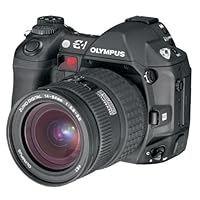
Olympus E1 5.5MP Digital SLR Camera Special Kit

Olympus E1 5.5MP Digital SLR Camera Special Kit
Customer Ratings: 5 stars
Buy Now
I've been using E1 with Zuiko Digital 14-54 f/2.8-3.5 for several months now, and I must report that I am thoroughly pleased with its operation. It performs flawlessly, without any glitches, and is a solid, well built and reliable photographic tool. It is a joy to use in the field.

Image quality is nothing short of excellent. A3 sized prints from E1 easily match my best slide scans from 35mm film. The images are clean, vivid, sharp, with beautiful colors, which reminds me of Kodak emulsions. Once I made a beautiful, clean A4 print from a small cropped segment of a portrait; at this enlargement, the entire picture would exceed A2 paper size. 5 megapixels yes, but 5 megapixels of extreme signal quality. Unlike Canon, Kodak didn't put hardware noise reduction on its sensors, so with help of NeatImage or Noise Ninja, one can make very clean prints even at ISO 800. However, ISO 1600 and 3200 display banding artifacts, and are useful mostly for black&white images. Those B&W images, however, respond very well to noise reduction and produce very good A4 prints. As for the 14-54 lens, it is very sharp from f/3.5-f/11, has very good but not excellent bokeh, has extremely useful range from moderately wide to moderately tele (28-108mm in 35mm equivalents), and works best at the long end. There it really shines as a portrait lens. However, it displays some vignetting at the long end, and some cyan fringing in the corners at the wide and.

So, the strong points of this camera are its absolute image quality, color fidelity, buid quality and ergonomics. On the minus side, however, there is autofocus, which leaves much room for improvement. It is slow and of little use in low light. Also, the buffer could clear faster, especially with microdrive, whose full potential isn't utilized.

Conclusion: it's an excellent camera, whose real competitor is Canon 20D. Canon has a solid resolution advantage, produces good images, and works better at high ISO values. However, E1 is better built, it has an excellent kit lens which is every bit as good as Canon L zooms and rivals good primes, has built-in sensor cleaning, is splash-proof and an excellent overall package. Choice between them is a matter of individual preference and taste. What made it for me was the range of focal lengths. With Olympus, I can cover my needs with just two lenses, and 14-54 is designed just right. It's wide enough and long enough for me not to need anything else for most applications. With a 35mm legacy and 1.6x crop factor, Canon's lens range is just inconvenient. Most lenses are either not wide enough or not long enough or cover the wrong range. With Olympus, I still didn't feel any desperate need to buy a second lens; 108mm equivalent is just right for portraiture, and 28mm is just wide enough for the kind of landscapes I usually shoot.

Click Here For Most Helpful Customer Reviews >>

Sony Xperia Acro S LT26w Black Factory Unlocked International

Sony Xperia Acro S LT26w Black Factory Unlocked International Version by New Generation Products LLC.,
Customer Ratings: 4.5 stars
List Price: $579.99
Sale Price: $346.07
Today's Bonus: 40% Off
Buy Now

I bought this phone in early August, however from another online retailer. Most have commented already on the pros, so I'll focus on the cons because every product has its flaws. The Acro S is a great phone due to optimized performance (compared to other Snapdragon S3 phones), good ICS UI/customizations, and being waterproof, the main selling point. Battery life is also slightly better than average, on the most part, I can fit in 2~3 hours of talking time, some moderate usage (mostly Wifi internet browsing, Pulse, emails, WhatsApp, text messages). Having both ample storage space (16GB) and an easily removable micro-sd slot means you can cram pretty much anything you want into it.

The HDMI port is also a standard micro plug, unlike some others where they are combined with the USB port. Talking about ports, the largest downside to this phone is that due to it being waterproof, all its ports have a plastic cover. This cover makes listening to music on this phone impossible on the go. If you were to leave it plugged in with a headphone in a pocket, it will very likely snap off. Therefore, getting a bluetooth unit is pretty much required for listening on the go (like the Sony MW600, Samsung HS3000). The other is that, continuous opening and closing of these ports will also wear them down. There is a rubber layer under it that protects the phone from water. Therefore, USB transfers/charging should be done only if needed, it is why a dock is provided on these waterproof phones.

The other major issue is the camera. Yes it does have a high MP count, but on 100% crop, noise issues are very noticeable and quite bad. They are still great pictures, lots of details, good color reproduction, and fairly sharp, just that there is quite a bit of noise (even on ISO100 in bright sunlight). This shouldn't be an issue for most people because the pictures themselves look absolutely great when uploaded to FB and others (downsized). The front camera is alright for video calls, and is 720p. The phone's hardware is 100% the same versus the Xperia S, only waterproof and the inclusion of a micro-SD card slot (advanced users can even flash custom XS's roms onto the Acro S directly, only micro-sd doesn't work). This means the screen really is one of the best ones. It is fairly accurate in colors (not overly saturated), has good viewing angles, and looks very sharp (highest PPI in phones).

During normal usage, the first issue would be the capacitive buttons, you actually hit slightly above the icons, but you should quickly catch on after a day or two. The second thing is that quick capture doesn't always work, and that the Bravia Engine option is currently not working as well after the ICS rollout (but this should be sorted out later on with more software updates). The last issue I have had with this phone is that there is a slight creaking sound when you hold the phone at the bottom and top corners of the top battery cover (sounds a bit confusing I know). These looks like weaker points in the construction simply because there are button cutouts next to it, making it a bit less sound. However, it only does it if you hold it a bit firmly, and it does still feel secure. In the two months+ I've used it, I haven't dropped this phone yet, but have used it daily and pretty much just stuffed it into a pocket everyday. It has held up fine, no scratches anywhere (even the included screen protector), and the text on the back and button icons haven't rubbed off yet (they will eventually though...). I've only had the phone crash by itself two times, which for a smartphone, is pretty good (My old X10, and iPhone 4 would crash 2~3 times a week). GPS is fairly quick to get, though Wifi signal seems to be a bit weaker (not sure if it is a bar display difference, have no actually checked the true db values). All phones side by side in a room, the Acro S displays the only 2 to 3 bars (out of 4) versus 3 to full on the X10, solid full signal on a laptop. I personally have not tried the bluetooth (range) and NFC yet, so I cannot comment on those.

Audio quality is good, headphone output is clear. Call volume isn't super loud, but it is acceptable. Microphone is fairly clear and reduced background noise, but any wind will still silence you.

The other thing to remember is, the battery is sealed! If you need to travel long distances, carry a portable battery charger (already do, so this didn't concern me). The battery inside is not user serviceable even if you open the back lid, it has been sealed with waterproof film, unlike the XS. On the bright side, it is a 1840~1900mAH one that holds up fairly well.

Also any advanced users out there will have to know that the development community (XDA) on the Acro S is not as active due to late entry into the US market, however, there are many mods still available for it (as it works with any XS mod). Root can be done with literally 2~3 clicks should you worry about that.

Most people should know that this phone does NOT work on Tmobile's (or Verizon/Sprint) 3G network, at least for now and most places. There ARE some places that you can get 3G, though mostly in the large cities. You can check their progress (unofficial) on airportal.de , which shows areas where the 1900/2100 band has been spotted (means iPhones and other international phones can work on 3G!).

Overall, this phone is great. Its very well optimized (Sunspider, and other benchmark scores are quite ahead of other similar hardware phones), designed, and so far, seems fairly sturdy and well built. Like I said before, if you use your phone as your main music device, you might have to consider either using a bluetooth unit, or look away because the cover is flimsy and will snap off if you stuff it in a pocket and go jogging with it. Also don't expect this to replace your main camera other than for quick FB posts because there are quite severe noise issues (but they still look good). I really enjoy using this phone.

For whoever is also looking at the Xperia V (I was), the successor to this phone, the V at the moment (October) does not look like it will enter the US market because the "h" version with US 3G bands has not been announced yet. The normal LTE version does not have LTE or 3G bands that the US can use (only Europe/Asia). Also it has 8gb internal memory instead, a VGA front camera, and no dedicated camera button. Similar camera sensor (13MP, but still same Exmor R, not RS), though with the S4 chip instead. You trade off some features to get a bit more speed and slightly better battery life (just a speculation as the S4 is more energy efficient but the Xperia V comes with a smaller, replaceable battery). If you are holding off on this phone for now to wait on the V, it is a tough choice since there are quite a good amount of trade offs, plus the Acro S's price has dropped now.

Update December : 4 Months, though I dropped it a few times, no chipping at the chrome paint (or the body) yet, still waterproof. No new bugs/issues to report. Latest version of fw is .55, which you will have to use XDA's method of flashing (Flashtool) in order to keep root (no longer possible to use the old simpler method).

Update Jan : After winter vacation my parents dropped my phone while trying to take a photo. There is a slight dent (nearly invisible, and you can hardly feel it) in the plastic housing but nothing major. It was about a meter drop onto solid marble. It is still waterproof. I forgot to say that Bravia Engine is working if anyone cares about it. Furthermore, after spending time home with a DLNA TV/BD Player, I've tested the Media Remote and Media Server (Connected Devices app). The app works flawlessly and while there is obvious room for improvement, nicely for a HX750 and a S590 player. It replicates the remote functions, can act as a keyboard input, and stream music and videos quickly to the television or to the player.

After messing around with quite a large number of apps installed so far I have suffered only one freeze, but it was recoverable after about 10~15 seconds. The phone has not reset itself yet.

Click Here For Most Helpful Customer Reviews >>

Glidecam 2000 Pro Hand-Held Stabilizer

Glidecam 2000 Pro Hand-Held Stabilizer
Customer Ratings: 4 stars
Buy Now
I KNOW THIS REVIEW IS LONG, BUT IT IS HELPFUL... READ ON:

I recently bought the Glidecam because i was looking for smooth footage for my films, and I made the right choice. After spending more than one whole hour just trying to balance the stabilizer, I tested it out, and when the gib doesnt rotate all by itself, the camera gets some pretty smooth footage, now here are some things you should know:"

1. I tested this stabilizer in my apartment, which with all the mess, does not have much running space, so my shots are too short to really judge to detail

2. If you have one of those small DV cameras like the panasonic NV-GS250, or basically any camera thats smaller than the one in the picture then THINK TWICE BEFORE YOU BUY THIS becasue you WILL have a rough time getting the stabilizer to work. When the camera is too light, the gib in the middle (where the handle is) rotates on its own, and since the counterweights provided are only multiples of one amount of weight (eg. so many pieces of 1/2 pound weights) then adjusting the "camera to counter-weight" ratio is difficult.

3. The stabilizer is VERY VERY sensitive, i balanced it out with the camera attached (a DVD is provided to teach you everything about stabilizing the Glidecam) and when i flipped open the camera's lcd screen the whole thing became unbalanced, and i had to balance it again, which is time consuming.

4. This stabilizer revolves 360 degrees from side to side, and rotates 360 degrees so you can stand still and have the camera get a shot of everything in the room around you instead of you rotating around.

Now DO NOT PRESS THE BACK BUTTON JUST YET! It is time consuming to set up the stabilizer, but (according to the DVD provided which has many many shots taken using the stabilizer) the shots that you will take with this stabilizer are 99% perfect, your video will turn out so smooth it will appear like the camera IS ACTUALLY flying... I actually managed to shoot like 3 or 4 seconds worth of smooth footage before the camera started rotating because of the camera's light weight. I personally plan to either find a bigger and somewhat heavier camera, or buy light enough weights to add to the counter-weights till the stabilizer is prefectly balanced....

OVERALL: If you are looking for a Stabilizer for a good price, totally go for it, if you are looking for something more professional, Glidecam has many other products for more professional use.

Hope this was helpful

Enjoy :)

Click Here For Most Helpful Customer Reviews >>

Samsung NX300 20.3MP CMOS Smart WiFi Compact Interchangeable

Samsung NX300 20.3MP CMOS Smart WiFi Compact Interchangeable Lens Digital Camera with 18-55mm Lens and 3.3' AMOLED Touch Screen
Customer Ratings: 4.5 stars
List Price: $799.99
Sale Price: Price Unavailable
Today's Bonus: 13% Off
Buy Now

I made the following review of the white NX300 and just wanted to share it here since it's the same camera and lens...

First off, if you want an extensive review of this camera go to cnet, dpreview, etc. That's where I head when doing research before buying a camera. This camera is an upgrade from my NX210 that I purchased last year. On my Amazon review of the NX210 I wanted to give it 4 1/2 stars. I thought that the mediocre focusing system subtracted 1/2 star. After reading the positive reviews of NX300 and noting the several awards it already won I just had to have one. I decided on the white one and wow am I glad I did. It is one fantastic looking device. I was initially contemplating the more compact 20 50 mm kit lens but ultimately went with the 18 55 mm lens. The latter not only offers a wider focal length, but also features optical internal stabilization. I can definitely notice that the focusing system is an improvement over the NX210. It's the quickest, most accurate focusing camera I've ever experienced. I'm also happy to report that the focusing system is no longer audible during video playback. The articulated touchscreen is a nice upgrade as well. The touchscreen is responsive and makes the camera easier-to-use overall. Otherwise, it takes the same "SLR quality" photos the NX210 takes but with a much higher chance of being in focus. This is the first time I felt comfortable giving a camera five stars and recommending it to family and friends without hesitation.

Click Here For Most Helpful Customer Reviews >>

Nikon SB-700 AF Speedlight Flash with Softbox + Diffuser + (4)

Nikon SB-700 AF Speedlight Flash with Softbox + Diffuser + Batteries & Charger + Tripod + Accessory Kit for D40, D60, D3000, D3100, D5000, D5100, D7000, D300s, D3 &amp, D3s Digital SLR Cameras.
Customer Ratings: 5 stars
Buy Now
Great purchase, love it the SB700, I have a SB600 that I'm using sincronized wirelees witn the SB700 as a master, work good, great price for the accesories that comes included, thank's cameta.

Click Here For Most Helpful Customer Reviews >>

Canon EOS Rebel T3i 18 MP CMOS Digital SLR Camera with EF-S

Canon EOS Rebel T3i 18 MP CMOS Digital SLR Camera with EF-S 18-55mm f/3.5-5.6 IS II Zoom Lens & EF 75-300mm f/4-5.6 III Telephoto Zoom Lens + Wide Angle/Telephoto 16GB Deluxe Accessory Kit
Customer Ratings: 5 stars
Buy Now
I must say I am happy to receive my products that I'd purchase ,after reading one of the reviews I was a little wary about the purchase ,I wish the seller would of made a comment to ease others on their business practices .. I'm glad I came back and reviewed the items and decided to to deal with this company one on one ,the products is exactly as I expected and will come in handy as we teach our kids in our park to use take up photography .... Look forward to purchasing more products as our program grow .....

Click Here For Most Helpful Customer Reviews >>

Canon GL2 MiniDV Digital Camcorder w/20x Optical Zoom

Canon GL2 MiniDV Digital Camcorder w/20x Optical Zoom
Customer Ratings: 3.5 stars
List Price: $2,999.99
Sale Price: $2,199.99
Today's Bonus: 27% Off
Buy Now

I own this camera, and it's my best friend. Well not really, but it's the most amazing camera I've ever had. You get what you pay for, and you get a lot from this camera.

This is however, NOT a camera that the general public should buy. It's far to expensive, and really wouldn't be worth it to someone who will be using this for filming say a birthday party. There are many features on this camera, which make it as wonderful as it is, but these features would likely be unused by someone new to video cameras. So if you are in this boat, save your money and get a different camera.

What's great about it? The image quality is better than anything I've seen before. With 3CCD, it's good. Unlike the XL-1S, the GL2 has a 2.5 inch color LCD. However, I rarely use this. It takes up more battery power, and you can't see it when there's sunlight. I love the audio controls, and how it's not only stereo microphone, but you can control the levels of your left and right audio, right there, on the camera. I love to convert analogue video into digitial video, and it's almost too easy using the GL2. It's great for getting your older stuff into a digital format, and being able to easily get it onto your computer.

What's bad about it? Really not a whole lot. The 1.7-megapixel photo mode is really uneeded. 1.7-megapixels really isn't that good. The included 8MB card for these pictures isn't enough. If you're going to want to take digital pictures, then get a digital still camera, and don't use the GL2 as a still camera.

But I can't stress enough that if you aren't going to use this for more professional projects, then you really shouldn't get this camera.

Click Here For Most Helpful Customer Reviews >>