Showing posts with label nikon d80 slr digital camera. Show all posts

Olympus PEN E-PL3 14-42mm 12.3 MP Interchangeable Lens Camera

Olympus PEN E-PL3 14-42mm 12.3 MP Interchangeable Lens Camera with CMOS Sensor and 3x Optical Zoom
Customer Ratings: 4 stars
List Price: $399.99
Sale Price: $249.99
Today's Bonus: 38% Off
Buy Now

The axiom that is so true: The best camera for you is the camera that is with you! Grew tired of backaches while hiking with my Nikon DSLR gear, which increasingly never left the house. Bought an Olympus XZ-1 as a camera that could always be with me ... and was so impressed with it that I wanted its "big brother" for better image quality when on walkabouts or hiking. The Olympus P-3 seemed a bit too much; the PM-1 seemed a bit too little; the PL-3 seemed just right (especially with the tilting screen). The form factor and menu navigation features of the XZ-1 and PL-3 are very similar. The XZ-1 is pocketable; the PL-3 is not due to the protruding lenses. Getting some of the best photos of my life with both the XZ-1 and the PL-3 ... because they are with me.

There is another side to this, and that is that people often appear uncomfortable around people taking photos with large DSLRs with large protruding lenses. I feel none of this discomfort using either the XZ-1 or the PL-3 in public places.

Exploring capabilities with the Olympus 14-42mm kit lens and the Panasonic 20mm f/1.7 pancake lens (have the new Panasonic "X" lenses and the Olympus 45mm lens on order). The Panasonic 20mm is incredible small, making the PL-3 feel and operate like a small rangefinder camera. The f/1.7 lens allows one to take natural light photos in places impossible with slower lenses. The Olympus 14-42mm kit lens appears to be of high quality, although it does have a plastic lens mount (please manufacturers ... charge us the extra cost and ban plastic lens mounts!). The SLRgear website is an excellent place to compare lens quality with its graphs and metrics, and the Olympus kit lens fairs better than comparable lenses with metal mounts with respect to center and edge sharpness across the zoom spectrum.

On the downside, the PL-3 menu structure is difficult to navigate. One must do considerable research to become familiar with the options. Also, the LCD screen is excellent in all but bright sunlight. An Electronic Viewfinder (VF-2 or VF-3) is a necessity to do more than guess what you are photographing in bright sunlight. The add-on flash in the PL-3 kit is so small that it is only good for fill in or firing a larger flash such as the Olympus FL-36R via the RC flash capability. Wish that Olympus had something similar to the excellent Nikon SB-400 mini-flash for the Pen-series cameras. Finding it difficult to get the almost perfect bounce flash effect that the SB-400 provided in the FL-36R/add-on camera flash combination.

The movie quality in the PL-3 is excellent compared to my Nikon D5000 (in my experience "live view" in DSLRs tend to be a joke). The tilting LCD screen is proving especially handy for movies. As others have commented, the new Pen-series auto focus for movies tends to hunt but in my experience this happens only when when the subject is moving quickly or I fail to keep the camera steady (cameras belong on fluid-head tripods to take quality movies).

I've been a photo enthusiast since 1973 when one needed a SLR or medium-format camera to get acceptable image quality for 8x10 and 11x14 prints. I've followed and experienced the technology from film through the DSLRs to, now, the new ILCs. I'm amazed at the quality one can get from something the size of the PL-3!

Click Here For Most Helpful Customer Reviews >>

Canon 430EX Speedlite Flash for Canon EOS SLR Cameras - Older

Canon 430EX Speedlite Flash for Canon EOS SLR Cameras - Older Version
Customer Ratings: 5 stars
List Price: $400.00
Sale Price: $319.99
Today's Bonus: 20% Off
Buy Now

The 430 is plenty of flash for many photographers. and makes a nice walkaround flash, backup, or outstanding slave flash for someone who gets bitten by the photo bug in a serious way. The only current flash model that can compete is the Canon 580EX, which costs about a hundred bucks more. Forget the Sigma flash. The 580 is a much better unit (I'll explain in a sec), but it is bigger, heavier, and again, more expensive. The 430 can do most of the important things a 580 can do that an amateur is likely to use, and then some.

Here are the important differences... The 430 is pretty powerful, but the 580 is much more powerful than the 430 (GN 58 vs GN 43 (meters)). That's a lot of extra reach, or extra bounce capacity. Again though, the 430 is plenty strong in it's own right. The 580 has a fun strobe feature that the 430 does not have. The 580 has much greater manual control than the 430, by virtue of being able to adjust it's output in double the number of increments compared to a 430. The 580 has 14 custom functions, while the 430 has 6. The 580 has an easier to use function wheel than the 430's "button wheel". The 580 head can rotate 180 degrees in either direction, and be set to less than 90 degrees to the lens axis, while the 430 can only rotate to 180 degrees in one direction, and cannot dip below 90 degrees to the lens axis. The 580 can control other 580's, and 430's as slaves via it's infrared optical control transmitter/reciever. The 580 covers all focus sensors on EOS cameras up to the 45 points used by the pro bodies. The 430 covers up to 9 sensors, which is fine until you get beyond the 5D body (the Rebel line, 10D, 20D, and 30D are fully covered). Both flashes include a pull out wide panel that will cover a lens as wide as 14mm on a full frame body, or as wide as 10mm on a 10,20,30D, or Rebel body, but the 580 also has a pull out "catchlight" panel designed to put sparkle in the subjects' eyes when using the flash in bounce mode. There are a few more things, but that should cover the big ones.

OK, the 580 is the knockout champion, so why did I rate the 430 with 5 stars? Because it deserves them. Canon was wise enough to pack very good power, and a FULL feature set into the 430 without screwing the prospective buyer by leaving out one or two important features that would force them to spend the extra bucks on a 580. The 430 is built well, looks sweet, works like the fine instrument it is, and is significantly smaller than the 580. The fact is, I use the 430 as my preferred flash more often than not. A trip to the car races, a birthday party, general photo fun, family stuf, etc. It is more flash than most people will ever need, at a good price. For those times that I need more, or want to use multiple flash units, the 580 heavy artillery is brought out, and the 430 becomes a second unit under the control of the 580. Both units come with a clever little "foot" that allows you to position them on any flat surface, so you can set up your scene lighting without having to use tripods to hold your slave flash units.

If the photo bug bites you, you will end up owning both flash units. Get the 430 first. If you never get into serious multi flash setups, the 430 will serve you just fine. I you do, you will end up buying it anyway :).

By the way, someone complained about cycle time on the 430. That was nonsense. Either it was a defective unit, or the reviewer was on the cheap, and used alkaline batteries. All flash units are very current hungry when they recharge after a full blast of light. Alkaline batteries are not capable of delivering high current levels more than a few times when they are new. Internal resistance builds up, and they begin to deliver such small current rates that you could sing an entire opera between flashes (no matter what brand of flash). Always use a high current technology battery like NiMH in a flash unit. You can buy a set of four 2700 MAh rechargeable batteries at WalMart for about seven bucks, or buy a brick of 24 of them online for about a buck each, and get a good charger for cheap too. With the right batteries, your 430 will recover from a full power flash in less than 4 seconds (about 2.5 in real life), and for less than full power shots (fill flash, etc.), you can take several shots in one second. Alkaline batteries will work in a pinch, but that is the only time you should use them. Lithium is a good technology for flash units too, but is still rather expensive. Buy NiMH for now.

Click Here For Most Helpful Customer Reviews >>

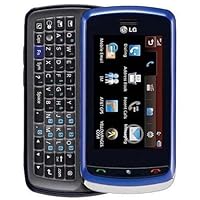
LG Xenon GR500 Unlocked Phone with QWERTY Keyboard, 2MP Camera

LG Xenon GR500 Unlocked Phone with QWERTY Keyboard, 2MP Camera, GPS and Touch Screen
Customer Ratings: 3 stars
Buy Now
I have had this phone for about 6 months now and have had NO problems out of it. I read reviews that talked about the screen freezing up but this has never happened to me. I would recommend this phone to anyone.

Click Here For Most Helpful Customer Reviews >>

DIGITAL WATCHDOG DWCB1363D Digital Bullet Camera, Star-light

DIGITAL WATCHDOG DWCB1363D Digital Bullet Camera, Star-light
Customer Ratings: 5 stars
Buy Now
Funny how I ordered a bullet camera I got a dome camera and after returning the dome camera to the recording store. they refunded my money and acted like I returned the item I ordered rather than returning a camera worth $ 100.00 less than I paid that they sent instead.

This place takes a long time and they are not like California people, that take care of business. My experience is that they make a mess of things then blame you for their actions.

Click Here For Most Helpful Customer Reviews >>

Apple MacBook Air MC966LL/A 13.3-Inch Laptop (OLD VERSION)

Apple MacBook Air MC966LL/A 13.3-Inch Laptop
Customer Ratings: 4.5 stars
Buy Now
*2012 Pro and Air models are available but the designs remain the same meaning the physical aspects covered below are the same as well.

The primary features of the 2012 13" MacBook Air are:

Ivy Bridge processor + HD 4000 graphics (60% better performance)

USB 3.0

720p webcam

2x SSD read speeds. Write speeds didn't change.

$100 price drop

I've owned the machine for 10 months now and have simplified the review for your convenience.

Things I like:

+ Light weight; 2.9 lbs (1.3 kg). You can easily hold it with one hand the MBP 13" is noticeably heavier at 4.5 lbs.

+ Solid build quality like the MBPs. Chassis is rock solid, no keyboard flex, screen housing is rigid with minor flex in the middle.

+ Better ergonomics than the MBPs; the palm rest edges don't dig into your wrists like the edges on the MBPs do.

+ Same fluid multitouch trackpad and the backlit keyboard makes a return.

+ The screen is a pleasure to use with it's high resolution (1440 x 900) and semi-gloss finish.

There is no glass cover so there will be dramatically less reflections compared to the screen of the MBPs

I personally chose the Air over the Pro because of reduced glare.

+ 18 second boot ups and 3 second shut downs. Resumes from sleep within 3 seconds.

+ The two USB 2.0 ports are on opposite sides of the laptop (less clutter than MBP)

+ Speakers are surprisingly loud; they can fill up a small room.

+ Runs extremely cool and it's so quiet that you'll wonder if the fan is running at all.

I can definitely feel heat ~ 87 degrees F on the MPB 13's underside after 6 hours of use

where as the MBA 13's underside stayed relatively cooler.

+ Runs Windows 7 just as cool and quietly. (I installed Windows 7 via flash drive)

+ Performance is almost identical to the MBP 13" 2011 on everyday tasks because the Core i5

CPU can turbo boost to 2.7 GHz and the SSD allows for instant application launching.

+ Gaming: it has the same Intel HD Graphics 3000 as the MBP 13" 2011. I was able to run

Starcraft II smoothly at low settings on native resolution. Medium settings also ran nicely but

you get less FPS during large battles. League of Legends ran smoothly at medium settings

30 FPS flat) on native resolution.

_______________________________________________________________________________________________________

Things I don't like:

*IMPORTANT* Wifi drops have been less frequent in the wake of more updates from Apple.

The keyboard is shallower and has less travel than the MBP keyboards (you'll get used to it

within a few days)

The screen has less color gamut than the MBP 13's screen. This screen covers only 46% of

sRGB color spectrum where as the MBP 13's screen covers 77%. For image editing,

I would use an external monitor.

The vertical viewing angles aren't so great. One minute tilt of the screen causes colors to shift

dramatically (for example: a purple color can change from lavender to light blue as you tilt

the screen backward or forward). Again, I would use an external monitor for tasks in

which accurate colors are mission critical. For everyday use it's not noticeable and is

actually easier on the eyes than the glare-prone screens of the MBPs.

Not all models come with the same SSD. There are 2 variations; a Samsung SSD and a

Toshiba SSD. The Samsung SSD significantly outperforms the Toshiba SSD in

benchmarks (check the AnandTech review)

To check what SSD you have, click on the Apple logo -> About this Mac ->

more info/system report -> then look on the left hand side and click on "SerialATA".

If your SSD's serial number starts with "SM" it's a Samsung and a "TS" means it's a

Toshiba.

I personally get 5 hours of battery life max on a single charge while surfing with 10+ tabs open on safari; I got

~7 hours doing the same tasks on the MPB 13 2011. My activities included watching

YouTube videos, viewing flash content on tech and news sites, reading/writing email,

and using AIM.

No FaceTime HD Camera (720p) as on the MPBs. The quality difference is, unfortunately,

very noticeable.

The integrated microphone is located on the side of the laptop instead of on top of the keyboard

as on the MBP. During Skype calls, my buddies told me that my voice sounded muffled

when using the Air. Using a headset with a mic, I was able to improve the sound quality.

The base of the machine developed a creaking noise within the first week of use. I suspect this to be

caused by uneven tension in the screws.

after 5 months of, a white cluster of stuck pixels developed in the bottom left corner of the screen.

The machine has been handled with care so it's not accidental damage.

_________________________________________________________________________________________________________________________

Conclusion: Which one should you get?

As a college student, I would recommend the Macbook Pro 13". The Air is more than capable of being a primary machine because

of it's superb performance and overall very good screen. For everyday tasks, it should be snappy and an ease to use.

However, students will get a $100 discount on the Pro while the Air only provides a $50 discount. This means that there is a price

difference of $150 for students. The storage space on the Air is imited to 128GB or 256GB while the Pro comes standard with 500GB.

Plus, you can always add a SSD to the Pro later on. The Pro will be the better choice for creative students because it's screen has more color

gamut than the Air's. Lastly, you are getting a full voltage processor which can make a differencein video encoding or other CPU intensive tasks.

If you are not a student:

If you value the extra ports (Ethernet, Firewire, optical drive), a high gamut screen (although more reflective), a 720p webcam

(it's a lot better), and the ability to upgradelater down the line go for the Pro.

If you prioritize portability (light weight), higher screen resolution, fast boot ups/shut downs, and less reflections go for the Air.

In everyday performance the Air feels faster when booting up and launching applications because of its SSD. In CPU intensive tasks,

the Pro will have a slight edge but not much. (the two CPUs are actually pretty neck to neck on GeekBench benchmarks). They both

have the same graphics chip but note that the Pro will get better battery life (1-2 hours more) than the Air because the Pro has a bigger

capacity battery (63.5 watt-hours vs. 50 watt-hours)

Unfortunately, my unit is affected with a wifi drop problem. I don't know if you will encounter the same issue but if you buy an Air from

an Apple Store, make sure to test the wifi out by using it on multiple networks. If you encounter any erratic wifi drops within

the first 14 days demand a refund or an exchange.

_________________________________________________________________________________________________________________________

Update December 27th, 2011

After installing the 10.7.2 and a firmware update, the wifi connections in my dorm room became more reliable.

However, after taking it home I experienced drops as before on the home network. I DOUBT it's a problem with my

router because ALL other connected devices work fine. The 2011 MBP 13" I previously owned worked flawlessly on my network.

This is most likely a problem with the Air's drivers. 5 months after product launch, I don't believe Apple

has acknowledged the issue or either chose to IGNORE it as other users on the official forums continue to

have similar complaints even to this day.

Hardware wise, the casing held up well except for a scratch on the side. The lid is frighteningly thin and I've read

reports of the screen's fragile nature cracking at the slightest bump by another object. I would handle with care.

Want to know something funny? With the machine off, I can see through the Apple logo on the lid if there's light

behind it it's that thin.

Software wise, sometimes the machine would run hot with fans blazing full throttle when watching HD YouTube videos

and would remain that way even though I close everything. Very odd. A quick reboot solves the problem.

A creaking sound developed within a week of purchase. When I lift the machine up, press on the palm rest or type on it

there would be a creaking noise produced. I suspected the screws of the bottom to be loose so I decided to tighten them.

Note that you'll have to order a pentalobe screwdriver to do this the screws aren't the typical type.

_____________________________________________________________________________________________________________________

January 9th, 2011

A cluster of 4-5 stuck pixels developed so I went to get a screen replacement. The Apple genius confirmed it was

4-5 pixels which qualified me for a screen replacement. Service was prompt and I got the machine the next day.

However, the new screen had 2 clearly visible dead pixels in the center of the screen. I tried using it for a few days

but they were an absolute distraction.

Dissatisfied, I took it back to another genius only to be met with rude service. I stated that the dead pixels hindered

functionality as they were visual distractions. He snidely responded with, "Where? I don't even see them" and remained

adamant about not replacing it because I didn't qualify for the "minimum of 5 dead pixels for a replacement" policy.

It was an unpleasant experience to say the least and didn't help.

_____________________________________________________________________________________________________________________

March 11th, 2011

I've learned to live with the two dead pixels on the screen and Apple has released an update (10.7.3) to address the

wireless card. I've noticed that with Bluetooth off, the connections are pretty stable around campus and at home.

I've not yet tested this with Bluetooth it makes me curious because people on the official forums report wifi drops when

enabling Bluetooth. Anyway, After 7 months of ownership I would say most of the initial bugs have been remedied and

the Air is a pleasure to use. However, I speculate that the Pro and Air lineup will be updated to Ivy Bridge in the summer

(along with the rumored redesign of the Pros). Buy now if you need it but if you can waiting might be better.

Cheers!

Click Here For Most Helpful Customer Reviews >>

ASUS VK246H 24-Inch Widescreen LCD Monitor - Black with Webcam

ASUS VK246H 24-Inch Widescreen LCD Monitor - Black with Webcam
Customer Ratings: 4.5 stars
Buy Now
I bought this even though I saw a lot of people complaining about getting the WebCam working. I am happy I did. As part of the install, you must attach the included USB cable to the monitor. This will allow the WebCam to be recognised by the PC. In XP, the WebCam worked just fine without installing any additional software. I decided to try the ASUS software anyhow, and it includes a bunch of nice extras (special effects, overlays, etc...) I am positive that all of the negative reviews regarding the camera had to do with not attaching the USB cable.

The monitor itself is great. Now we play Lego Star Wars II at 1920x1080.

Update 12-2010:

After upgrading to Windows 7 Professional, I downloaded a new version of the software and it did not want to work anymore. I was receiving the same error that told me it is only for a LapTop.

Luckily, I had an older copy and once I installed that, it worked.

Click Here For Most Helpful Customer Reviews >>

Yamaha R-S300BL Stereo Receiver (Black)

Yamaha R-S300BL Stereo Receiver
Customer Ratings: 4.5 stars
List Price: $329.95
Sale Price: $279.95
Today's Bonus: 15% Off
Buy Now

If you love classical music CD's this is for you. Power, clarity, timbre and atmosphere; puts my old Marantz to shame. Makes my 30 year old Technics speakers sound like a state of the art system. There's also receptacles for a second set of speakers in another room. Unless you have a really huge house I don't see why you'd need an s-r700.

W/respect to FM reception; if the signal is a bit weak, it'll go on mute rather than play static interference. I may have to hook up an outdoor FM antenna.

Click Here For Most Helpful Customer Reviews >>

HP Pavilion dv7-4060us 17.3-Inch Laptop

HP Pavilion dv7-4060us 17.3-Inch Laptop
Customer Ratings: 4 stars
Buy Now
I just purchased the HP dv7-4060us on Tuesday. There are so few reviews right now on this because it is such a new system. Right out of the box, this is ready to go. East step-by-step setup will guide you through personal settings, and setting up your wireless network.

The dv7 starts up very quickly. With the Quick Web feature, which I haven't tried to use yet, allows the user to access the Internet without having to start up Windows! This can be set up as the default setting when the unit is initially turned on. Since it doesn't have to boot up Windows, you can literally get online in 1/3 the time. Nice time saver.

Windows 7 took a little bit getting used to. I am switching from an XP Pentium M laptop, so it will take a little time to get acclimated. Should be no trouble, however, for most people. I like the feel of the chicklet style keys, with the full number pad too. 1GB of dedicated graphics, which supports DirectX 11, makes this machine good to great for most mid-to-high levels of graphic intense programs. I should be able to run AutoCAD with shading on this machine flawlessly. The high-performance ATI 5650 GPU can be switched off when operating on battery power, or when there isn't the need for the dedicated graphics. This saves battery usage and overall power consumption. HDD speed is 7200. Often, this is an upgraded charge in many laptops. 4GB DDR3 memory, expandable up to 8GB, should fulfill most needs. The display is brilliant, although not up to 1080P, but for a 17.3", you probably won't notice any issues. The screen does attract fingerprints. It has a large touchpad, however, I use a USB mouse. Use the fingerprint reader if you need the extra security. The webcam is easily viewable, and is very fluid in motion. Wireless card can be enabled/disabled by pressing a button on the keyboard. There are 4 USB ports (2 on either side) and an HDMI port too. The power cord plug is on the right side. This may get in the way slightly if you use a mouse. I didn't have any issue with that in the short time I have owned it. Also has a 9-cell battery, which for some systems, is an up-charge as well.

The specifications and rankings of this dv7-4060us Triple Core processor with 1GB of dedicated graphics, for the low price of $699 really can't be beat. Yes, you can spend another $200-300/minimum and get a little bit beefier machine if you are into heavy duty gaming and whatnot, but for the average to advanced user, this will certainly suit your purposes. For me, I couldn't justify paying the extra amount for more power that I wouldn't even use, for the most part, and I think you will find that to be the same.

Click Here For Most Helpful Customer Reviews >>

Nikon D5100 16.2MP CMOS Digital SLR Camera with 18-55mm

Nikon D5100 16.2MP CMOS Digital SLR Camera with 18-55mm f/3.5-5.6 AF-S DX VR Nikkor Zoom Lens and Sigma 70-300mm f/4-5.6 SLD DG Macro Lens with built in motor + 16GB Deluxe Accessory Kit
Customer Ratings: 5 stars
Buy Now
This review is aimed at people who are new to photography, as I am in the same boat. There are much more thorough reviews on Amazon for people who are already serious photographers.

General Impression:

Wonderful camera gives you control of parameters (such as f/stop, ISO, shutter speed) when you want to play with them or get creative and will auto-select them when you just want to take pictures. This was important to me as I am still learning to adjust them to my liking but don't want to miss out on pictures because I'm fumbling around with buttons.

Construction/Feel:

After going to Best Buy to physically hold the Canon T3i and Nikon d5100, I immediately decided on the Nikon. It felt much better in my hands and just looked better in general. Both were fairly light which is nice but also means they are made from quite a bit of plastic not a problem though as this keeps the price down and I don't drop things.

Controls:

I have been pleased with the placement of the physical buttons on the camera as well as the menus. I mainly shoot in the A, S, and M modes and the little wheel you turn to adjust the shutter speed/aperture is right where your thumb falls. If you're in M mode, there is an aperture button to hold down just behind the shutter button which is also easy to reach with the camera up to your eye. Lastly, the Fn button can be programmed to control the ISO level so you can hold it down while spinning the wheel to change that without putting the camera down. I have heard people complain that the Live View switch is annoying to get to but have found it intuitive.

There are a few controls that I wish were changeable without having to dig through a menu though. For instance, to change the focus mode from area to single point requires you to have the LCD screen turned around, then press the I button, then scroll around to change it. This is the case for a few other things like metering, shutter mode, etc. I can't really complain, though, because those are features that go on a serious photographer's camera that costs about twice as much as this model.

Auto Focus:

The 11-point AF on this camera has been a dream to use. I almost always keep the camera set to single point servo autofocus so I can select the point I want it to focus to. As long as you have some contrast, it is very quick and accurate to focus. This camera does not have a build in focus motor which means the lens must have it built in. As a result, older lenses or those build for the professional Nikons may not allow for autofocus. This hasn't been a big issues as most of the lenses I would want already have the motor built in, and if they don't, people survived for a long time manually focusing it probably builds character. I was torn between getting the Nikon 10-24mm f/3.5-4.5G ED AF-S DX Nikkor Wide-Angle Zoom Lens for Nikon Digital SLR Camerasand Tokina AT-X116PRDXN AT-X PRO DX 11-16mm Ultra-wide Angle Lens for Nikonand ended up sticking with the Tokina even though it would not autofocus on this camera. I haven't had any issues with focusing manually with it as the ultra-wide angles are easy to focus anyway.

Noise:

A lot of the reviews I read before purchasing this camera talked about how well it shot in low light I would have to agree. Looking at pictures from my old point and shoot at ISO 800 have horrible noise while I can shoot this at 1600 without any, and can go up to 3200 with only minimal touch ups in Lightroom needed. This has to be the single biggest advantage of digital over film being able to change ISO on the fly and still being able to get great pictures at ISO 3200 is wonderful.

Image Quality:

I won't offer too many opinions in this section, but I have not seen anything but great quality in the RAW pictures I've taken. Basically I understand that if a picture doesn't come out right, the fault lies with me and not the camera. The camera is capable of much better pictures than I am capable of taking. When I do everything right (which is becoming a little more frequent) I am amazed of the result. Great colors, great contrast, low noise, etc.

Battery Life:

I purchased an extra battery before I went on a few business trips just in case, but ended up never being close to needing it. The battery just lasts and lasts and never seems to drain. For instance, last weekend I took 381 shots (some using live view) and the battery meter was still at 75%. No complaints in this department.

Flash:

The built in flash is pretty puny, which seems to be par for the course. It does provide some nice fill lighting if you're outside taking pictures where there are some shadows on your subject, but for shooting inside it's marginal at best. I bought the very reasonably priced Nikon SB-400 AF Speedlight Flash for Nikon Digital SLR Cameras and have been very pleased with the combo. The external flash adds the ability to bounce light off the ceiling and not waste the camera battery while doing so. This camera does not have the Nikon flash commander ability, but I don't think that should be expected in a camera at this price point. If I ever start buying 3 remote flashes for studio shooting, there is a good chance I will have already upgraded cameras.

I'll end by saying that this has been an absolutely wonderful camera to learn to shoot on. Before I purchased it or started shooting, I ordered and read two books,Complete Digital Photography, 6th EditionThe Digital Photography Book, Volume 1 so I would have some clue what I wanted in a camera. They are both wonderful books and should be required reading for all new photographers.

As a disclaimer: up till 3 months ago I was never in to photography, never owned an SLR and never had any real interest to. So know that everything I say in this review is based on very little experience.

Click Here For Most Helpful Customer Reviews >>

Canon Speedlite 600EX-RT Flash with Canon Tripod,Soft

Canon Speedlite 600EX-RT Flash with Canon Tripod,Soft Box,Diffuser,4 Batteries and Charger,Accessory Kit
Customer Ratings: 5 stars
Buy Now
This is an amazing Flash...

I'm still learning more about this Flash unit... by the way, my first experience with Speedlite 600EX-RT was brilliant!!!

I use this with my Canon EOS 7D

I recommend... =)

Click Here For Most Helpful Customer Reviews >>

INTOVA Digital Waterproof Camera + Deluxe Kit

INTOVA Digital Waterproof Camera + Deluxe Kit
Customer Ratings: 5 stars
List Price: $499.99
Sale Price: $439.99
Today's Bonus: 12% Off
Buy Now

Great deal for the price. Easy set up. Takes good pictures and video. Control buttons are easy to use even with gloves on. I have recomended it already to other divers in our group. We've taken it on 4 shore dives to 40 ft with no problem, it is rated to go to 180 ft. so I can't see where it can't go anywhere a diver would want to go. Strap on the camera case makes it easy to move without holding onto it when your in the water. Wish I could post a few of the pictures and video that we've taken so you could see for yourself!

Click Here For Most Helpful Customer Reviews >>
Samsung NX300 20.3MP CMOS Smart WiFi Compact Interchangeable

Samsung NX300 20.3MP CMOS Smart WiFi Compact Interchangeable Lens Digital Camera with 18-55mm Lens and 3.3' AMOLED Touch Screen
Customer Ratings: 4.5 stars
List Price: $799.99
Sale Price: Price Unavailable
Today's Bonus: 13% Off
Buy Now

I made the following review of the white NX300 and just wanted to share it here since it's the same camera and lens...

First off, if you want an extensive review of this camera go to cnet, dpreview, etc. That's where I head when doing research before buying a camera. This camera is an upgrade from my NX210 that I purchased last year. On my Amazon review of the NX210 I wanted to give it 4 1/2 stars. I thought that the mediocre focusing system subtracted 1/2 star. After reading the positive reviews of NX300 and noting the several awards it already won I just had to have one. I decided on the white one and wow am I glad I did. It is one fantastic looking device. I was initially contemplating the more compact 20 50 mm kit lens but ultimately went with the 18 55 mm lens. The latter not only offers a wider focal length, but also features optical internal stabilization. I can definitely notice that the focusing system is an improvement over the NX210. It's the quickest, most accurate focusing camera I've ever experienced. I'm also happy to report that the focusing system is no longer audible during video playback. The articulated touchscreen is a nice upgrade as well. The touchscreen is responsive and makes the camera easier-to-use overall. Otherwise, it takes the same "SLR quality" photos the NX210 takes but with a much higher chance of being in focus. This is the first time I felt comfortable giving a camera five stars and recommending it to family and friends without hesitation.

Click Here For Most Helpful Customer Reviews >>

Sony HDR-CX290 8GB Embedded Memory HD Handycam Camcorder

Sony HDR-CX290 8GB Embedded Memory HD Handycam Camcorder with 27x Optical/ 50x Extended Zoom and 2.7-inch LCD Screen in Black + Sony 16GB SDHC + Replacement NP-FV50 Battery + Micro HDMI Cable + Sony Carrying Case + Accessory Kit
Customer Ratings: 4.5 stars
List Price: $379.99
Sale Price: Price Unavailable
Today's Bonus: 22% Off
Buy Now

This camera rocks. It's EXACTLY what I wanted but to make it 5-star worthy there's all the stuff that came with it. I was going to buy this exact same camera at BestBuy for the same price, but there is easily $80 or more worth of add-on's in this bundle that don't come with the one at BestBuy. The spare battery and 16GB SD Card alone make this a great buy but then add the little gig bag (which is suuuper nice) the lens cleaner and cloths, the mini tripod, the sd card holder, the HDMI cable AND screen protectors?! This is just too good a deal to pass up and it's all really ace quality stuff. VERY happy with this purchase. Highly recommended.

Click Here For Most Helpful Customer Reviews >>

Canon EF 50mm f/1.8 II Standard AutoFocus Lens - Gray Market

Canon EF 50mm f/1.8 II Standard AutoFocus Lens - Gray Market
Customer Ratings: 5 stars
List Price: $225.82
Sale Price: $111.14
Today's Bonus: 51% Off
Buy Now

The reason this lens is selling for less than the same item listed at http://www.amazon.com/Canon-50mm-1-8-Camera-Lens/dp/B00007E7JU/ref=sr_1_2?s=electronics&ie=UTF8&qid=1350244710&sr=1-2&keywords=canon+lens

is because the item here is a direct import item (What is commonly referred to as Grey market. Meaning, it was manufactured with the intention of sale in a country other than the USA.

The seller stated in an email to me:

"There is no restriction on a retailer to purchase these items for sale in the US. However, manufacturer's, by way of serial number tracking, are aware of which models were intended for sale in the US, and thus often refuse warranty service on the imported model.

In lieu of the manufacturer's warranty on these imported products, Unique Photo offers our own warranty to support what the manufacturer will not, so that the customer can make their decision with piece of mind. This warranty would be for a period of one year from date of purchase (limited to manufacturing defects)."

Therefore, if you trust the warranty of the Unique Photo Team to be identical, or as good as, the one directly provided by Canon, you can buy this lens, an imported item. Personally I prefer to spend the extra $10 to obtain a warranty directly from Canon, as I have had no prior dealings with The Unique Photo, and have no basis to think that their one-year warranty can compete with Canon's one-year warranty.

Click Here For Most Helpful Customer Reviews >>

Canon EOS Rebel T3i Digital SLR Camera Body & EF-S 18-55mm IS II

Canon EOS Rebel T3i Digital SLR Camera Body & EF-S 18-55mm IS II Lens with 75-300mm Lens + 16GB Card + .45x Wide Angle & 2x Telephoto Lenses + Tripod + Case + Battery + Remote + Filters + Accessory Kit
Customer Ratings: 5 stars
Buy Now
The camera and the 18-55mm lens are great, but the 75-300 lens isn't. The Backpack fell apart after a couple of months of LIGHT use. There's a lot of junk, meaning low quality things in this bundle. Good price isn't good when the quality is low.

Click Here For Most Helpful Customer Reviews >>

Lorex LW2110 Wireless Digital Security Camera

Lorex LW2110 Wireless Digital Security Camera
Customer Ratings: 3 stars
List Price: $159.95
Sale Price: $89.99
Today's Bonus: 44% Off
Buy Now

Customer review from the Amazon Vine Program My husband installed this security camera on our front porch and the receiver on our Samsung TV. The installation was reasonably simple once the RCA adapter was found inside the box. The biggest concern with installation was finding a power source for the camera on the outside of my house. For many people the need for a power source near the camera will be a deciding factor as to whether or not to buy a wireless or wired system. (Wireless systems require a power source near the camera to run the wireless transmitter.) The receiver is located in the center of my house with the signal traveling through several walls and a brick facade. Despite this, the picture is still clear on my TV. The video only refreshes a few times per second giving a choppy display as you would expect from a security camera and not a webcam. There is no audio included with this system; however, if you're looking for a wireless digital security camera with good range and picture quality and connects to most devices, this camera may be a good choice for you.

Click Here For Most Helpful Customer Reviews >>

Sony DSC-WX300/B 18.2 MP Digital Camera with 20x Optical Image

Sony DSC-WX300/B 18.2 MP Digital Camera with 20x Optical Image Stabilized Zoom and 3-Inch LCD
Customer Ratings: 4.5 stars
Buy Now
Customer review from the Amazon Vine Program The Sony DSC-WX300/B 18 MP Digital Camera with 20x Optical Image Stabilized Zoom and 3-Inch LCD is a strong entry from Sony against other cameras in this market segment and price point. It meets and beats several features of competitors, but also fails to be quite as much as it seems to be at first glance. Nevertheless, anyone considering what to take along for photo making on holiday should seriously consider the Sony DSC-WX300.

First let me say that I am a long time fan of Sony digital cameras, and that I have owned many different CyberShot models in the past, and that I am an avid user of the Sony NEX cameras. Superficially, the Sony DSC-WX300 looks like a tiny NEX model. The controls are laid out using very much the same wheel and button system on the back to access the menus, and the styling is very similar. The all metal body conveys a feeling of quality and looks great.

Aside from the controls and family resemblance, they Sony DSC-WX300 is at heart a CyberShot, the Sony line aimed squarely at point and shooters, not at serious amateurs (whatever that is; a good photographer who is not paid any money for his pictures, instead of a mediocre photographer who is?). It is packed with features appealing to sophisticated but casual users. But it is a JPEG image only camera. It does not output RAW image files. It also lacks multi exposure bracketing. Although it would be easy to assume that the Sony DSC-WX300 is a possible competitor to the Canon PowerShot S110 or the Panasonic LUMIX LX-7, the Canon and LUMIX cameras are both more "serious" point and shoot, "pocketable" cameras, with RAW output and more comprehensive PSAM modes.

All that said, the Sony DSC-WX300 has some very interesting features that make it a serious camera for holiday, snapshot and webcentric photo making. The main selling point for the Sony DSC-WX300 are its very small size, it really is "pocketable", combined with its rather amazing 20X optical zoom range, a mind boggling 40X zoom range using optical + digital. The image quality from the lens appears to be quite good. But in the end the image quality is both driven by and limited by the size and sophistication of the tiny thumbnail sized sensor and the electronics. This is the Achilles heel of all digital cameras, and very much the weak point of all pocket cameras. At the end of the day, especially with micro sized sensors used in pocket cameras, no matter how sophisticated, as ISO speed increases there's just no way to not have image quality start to suffer as heavy noise corrections start to be applied to the image by the camera.

Sure enough the Sony DSC-WX300 produces rather amazingly good looking shots up to about ISO 800. But, as with all pocket cameras, the image starts to soften after that. As is the case with almost all digital cameras these days, it's hard to tell just what part the quality of the lens, the limitations of tiny sensors and the alchemy of digital lens and image correction in the camera play in making the final result.

The Sony DSC-WX300 features excellent movie capture specs. But, as with most still cameras that also double as video cameras, the length of any one recording is limited not by storage but by the ambient temperature and other factors that impact how quickly the sensor will heat up while recording continuously. If it gets too hot it will shut down. The Sony DSC-WX300 is rated for video recording up to twenty-nine minutes. I made a ten minute test video without any problems. But, on a hot day, or if your hands have warmed the body already, or the camera starts out hot for any reason then the maximum recording time may be reduced quite a bit. It's not a movie/video camera, it's a still camera that you can capture video clips with. Still, in such a tiny size, the quality and video feature are pretty amazing.

The menus are traditional Sony CyberShot: concise easy to navigate, and without too many options. The Wi-Fi connection worked well for transferring files to and from both a smartphone and a PC, although it requires installing the Sony PlayMemories app. Of course all the devices have to be networked together, a task that's easy if you have little to no router or device security but which becomes an escalating pain as your standards for device security and interoperability increase. Still, it works.

Battery life appeared to be as advertised: rather good. You plug the charger directly into the camera rather than removing the battery and charging it alone. As seems to be the norm for these kinds of cameras, there are a zillion "scene" modes. Why it's assumed by camera makers that someone will have the presence of mind to parse, understand and select the correct scene mode but is assumed to not be organized enough to use PSAM modes is a mystery. The only thing lacking is a "two people being hit on head by coconut while standing in front of blast furnace mode" or maybe a "Batman in white cape snow boarding" mode. But, if you have time to investigate all the modes, and the memory to remember which one does which, it's an asset.

The camera has three different auto modes, but no easy direct PSAM control. About the 18MP sensor: mega-pixels alone are not a good guide to picture quality. An image from a 10MP APS-C sensor with a mediocre lens can easily look better than a picture from an 18MP micro sized sensor with an excellent lens. And let's not forget that with digital images that a large part of what you see in the image has passed through numerous digital processing and correction stages in the camera. The skill of the programmers and the processing power of the camera play an important role.

All that said, the Sony DSC-WX300 delivers some serious value, with a few compromises, and has a number of outstanding and well implemented features. It will easily beat the image quality from even the best smartphone cameras, it is almost as pocketable as a smartphone, it will produce full HD 1080P movie clips, it will network with social media picture sharing via Wi-Fi to your smartphone or tablet, and it has an extraordinary optical zoom range that should cover just about any picture situation.

If you don't need features like RAW file output, exposure bracketing and PSAM type controls that are offered by cameras like the Canon PowerShot S110 and Panasonic LUMIX LX-7, and are after a super portable high quality point and shoot for holiday and family snapshots, then the Sony DSC-WX300 is a serious contender and well worth buying. RECOMMENDED.

Click Here For Most Helpful Customer Reviews >>