This is a great camera. All the functions are the best to take a great photos in your vacations. All the accessories are so helpful. I recommend this bundle because its all you need to take the best photos.
Showing posts with label canon cameras slr. Show all posts
Showing posts with label canon cameras slr. Show all posts

Canon EOS 60D DSLR Camera Kit with Canon EF-S 18-135mm Lens
Im new to DSLR and i love this camera it does everything i want and more so far no issues everything worked without flaw someone commented the case is to small to leave lens on and thats not true it has removable dividers.the shutter release works great from 10 feet away i have already taken some great pics love this camera i would buy again


KONOVA Slider K3 80cm (31.5-Inch)
I made a video review because I was having difficulty finding a good visual review of this slider when I was considering purchasing it. In the video I give closeups of what comes with it as well as the little benefits of the slider that really make it great. Oh, and how well it actually slides.
The main competitors to the slider (that I have had experience testing) were the Cinevate Atlas 10 and Kessler Crane Philip Bloom Pocket Dolly. I find this slider matches (and exceeds in some areas) the quality of the Cinevate Atlas 10 and matches the Kessler Crane Philip Bloom Pocket Dolly in many areas. This is all accomplished with a product that sells for roughly $350 and arrives from Korea in 3 days.
*My 1/3 of the price claim was an average of the Cinevate Atlas 10's current cost of $630 (all terrain legs add-on) with the Kessler Crane Philip Bloom Pocket Dolly at approximately $1,200. Not exact but I didn't want a review title of "As Good As Cinevate and Kessler for 1/2 and 1/3 of the price respectively in regards to both companies equivalent offerings." :)
I'm excited to see what other accessories Konova comes out with and will update this review or post new ones once they are released.
Panasonic Lumix DMC-ZS30 Digital Camera (White)
I have had the Panasonic ZS30 about a week now. It is my 5th TZ/ZS Panasonic camera I've owned, including the excellent ZS20. However, the ZS30 is the best yet. I'm not a beginner. I've been making pictures since the 1960s or before with all kind of cameras, and I've sold a few pictures over the years too. Currently I have the ZS30, the ZS20, a couple of "enthusiast" compact cameras, and a fairly nice and complete DSLR set up one of several I've owned. The DSLR gathers dust for the most part too heavy with a bunch of lenses and other photographic "stuff."
Getting right to the heart of things: The ZS30 is a great little camera takes great pictures in good light and also in low light. It also has a plethora of fun and useful features, and a great Leica lens. You can shoot on full automatic or take control with aperture, shutter, or full manual priority. There are 14 or so "art filters, plus about 16 "scene" modes. For the younger generation there is WiFi, and NFC, and, of course there is GPS. The camera is easy to carry, excellent build quality and, did I mention, takes excellent pictures. I highly recommend it.
Some people may worry about the high pixel count (18 MP). Don't! The improvements in the sensor and the processor pretty much take care of that, and pictures are certainly as good as the ZS20, which I also have, and better than the other, older Panasonic super zooms that I have had. It is not a DSLR, but the pictures good light and low light are certainly very good for this type of camera up to about ISO 3200 (Yes, there is some noise, but pictures are certainly "usable" for what most people who buy this kind of camera will use them for.) Generally speaking though, I'd use a top end ISO 1600 and below for normal, everyday use. I usually have it set to ISO 200 works fine.
Everyone is worried about blurry pictures. Left to its own devices the ZS30 does not give blurry pictures. It is quite a capable little camera. That's not to say you can't take blurry pictures with the ZS30. You certainly can. Here are some ideas to minimize blurry pictures with the ZS 30 or any other camera for that matter: Most important of all Be sure the image stabilization is ALWAYS turned ON unless you are on a tripod then turn it off. Then: 1. Neither the ZS30 nor the subject should be moving when you take the shot i.e. hold the camera still, and shoot when the subject is not moving (some exceptions when using very high shutter speeds, the tracking focus mode, fireworks, moving water, and other "creative" stuff). 2. To hold the camera still, hold on to it like you own it and are proud of it, with BOTH hands, and not with just the thumb and forefinger only. 3. Keep your elbows tucked in to your sides. 4. Lean against a wall, a table, a chair, and/or look for something to rest the camera on. 5. Shoot with the reciprocal of the lens extension for a shutter speed, i.e. At full extension of 480 mm (in 35 mm terms) (You can estimate it if not at full extension.), keep the shutter speed no lower than 1/500 second OR 1/125 second (2 stops) if the image stabilization feature is turned on. If you have a REAL steady hand, maybe you can cheat down to 1/60 second. (You can adjust the aperture, the ISO, and/or the lens extension to achieve these shutter speeds, but anything less will almost undoubtedly result in a blurry picture.) 6. Wait for the camera to focus when you hear the beep (if turned on) or when the focus area boundary turns green on the LCD. It doesn't take long with the fast Panasonic focus speed, but I've seen some folks beat even a DSLR to focus. 7. Press the shutter button gently, don't "stab" at it. 8. Don't let the camera pick the focus point. Do it yourself. I mostly use the center point only smallest one unless using tracking focus mode. 9. Shoot on aperture priority and set the widest aperture available (ZS 30 will adjust it as you zoom.) or shoot in "sports" mode to assure the fastest shutter speed for the ISO set and the light available. 10. Don't shoot ANYTHING with a shutter speed of less than 1/30 sec unless the camera is "braced." 11. Walk closer to the subject if you can, and retract the lens to fill the frame at the new, shorter distance. Long lenses, fully extended are much harder to hold still than "shorter " ones. Note: The 30X Sony HX50 may not be such a bargain at full extension unless braced or on a tripod a 700 mm something lens, handheld REALLY?! and about that atmospheric haze... Note: You can easily have a 30X lens equivalent with th ZS30 either by slightly lowering the number of pixels used (best way all optical lens magnification) or by using the "extended" optical lens mode at full resolution. I like the first way pictures seem sharper, and there is still plenty of resolution for high quality prints. 12. If all else fails, use a tripod (Heaven forbid!).
Added November 22, 2013 13. Panasonic's "light speed" focusing is very fast and pretty much eliminates shutter lag. It is a FAST camera. Secondly To eliminate blur from pictures of moving subjects as in sports, if iA mode is not doing it for you, shoot in "Sports" mode, and the camera will set the fastest shutter speed for the settings you already have on your camera (i.e. ISO, aperture for the zoom extension you are at, etc.) If you still get blur, or if the exposure icons on the LCD are showing red, increase the ISO or shoot in "Shutter priority" mode and set a fast shutter speed up to 1/2000 sec. (Try 1/500 sec first.) Again, you may have to increase the ISO to get a properly exposed picture (green exposure icons) when you increase the shutter speed. Finally, in either case, set the focus mode to continuous/tracking, and shoot in burst mode. (Set these up before you go to sports or shutter priority) (I mostly use 5 fps burst speed allows for focus on each shot in the burst.)
Added July 6, 2013 One more little thing (OK,OK. I forgot it!) 14. Shoot within the focusing distances of the AF setting you have set or you WILL have blurry pictures. "Standard" AF mode at full lens extension is about 6 1/2 feet to infinity. Closer than 6 1/2 feet and the picture WILL be blurry. With AF mode set to "Macro Tele" you can focus from a little over 3 feet to infinity at full lens extension. At "Super Macro" AF mode your focus distance is limited from about 2 inches to about 3 feet, ans it will NOT focus to infinity. The macro modes are found at the "down" press of the rotary dial. Hey! it's easy, but if you are having trouble focusing, check that you are in the "correct" AF mode.
Flash is another "scary" thing for many people. First remember the flash is only "good" to about 10 feet, so "be within range." You cannot adjust the flash output on the ZS30, but the camera will do that for you if using "fill" flash mode (always on) or full auto, within certain parameters (Read the manual.) The "sync speed" about 1/200 sec will "freeze" most "portraits," but if the subject is moving, you may still get a blurry picture. For best results, use "slow sync" or night portrait mode, just watch that the shutter speed doesn't get below what you can comfortably handhold, AND tell your subject not to move for one full second after the flash goes off. You can use the flash in bright sunlight also to reduce the dark shadows that are characteristic of photos taken in bright sunlight. To get even better flash shots, use a diffuser two or three layers of facial tissue held over the flash will do wonders just make sure your fingers are not covering the flash. Another hint: Set the camera to "manual" mode, and set the correct exposure for the background. Turn the flash on normal or "always on" i.e. "fill" flash mode. In this case, NOT slow sync or you will overexpose the background). Then take your picture. The background will be nicely exposed, and most likely, so will your subject if in range of the flash. Use the diffuser trick, and things should be really good.
Back to the ZS30. The ZS20 and the ZS30 are fairly comparable, but the ZS30 has some significant improvements IMHO. Better LCD 920k dot resolution compared to 460k for the ZS20, and better touch screen capability. 18 MP compared to 14 MP for the ZS20 Yes, there is more detail in the ZS30 picts. Cancel playback mode and return to shooting mode with a touch of the shutter button something Panasonics' have needed for years. More movie choices. Added number of "art filters" These are kind of fun. High Speed video shooting. Easier access to panorama mode. Better image stabilization 3 way in stills, 5 way in video. "Starry Sky" scene mode back. good for shooting fireworks and other creative stuff. The ZS30 can take a 13.5 MP still picture during video, compared to a 3.5 MP one with the ZS20. Longer lasting battery. In short, the ZS30 is just a more "complete" camera, although the ZS20 takes wonderful pictures also.
Both the ZS20 and the ZS30 have Panasonic's "light speed" AF. Solves a MAJOR problem with earlier compact cameras. Both cameras have no purceptable shutter lag, and being able to adjust the size of the focus area, not just the focus points is a big plus. Of course there is face detection/face recognition, and tracking focus mode, now with up to 5 frames per second WITH focus for each frame or up to 60 fps with initial focus and lower megapixels. Both cameras have vastly improved white balance compared to earlier Panasonic cameras. Both have in-camera editing kind of hit and miss though, but fun. There are other neat things too many to mention. Handheld night shot works wonders on both cameras as does HDR scene mode. Build quality of both cameras is excellent.
Yes, you CAN blur the background with a compact set "macro telephoto" mode, largest aperature (smallest f/ number), extend the lens to maximun extension, move in as close as you can so that the camera still focuses, make sure the background is "some distance" behind the subject, etc. or shoot wide angle, lens fully retracted, f/3.3 (smallest numbered f/ stop largest lens opening), set super macro mode, and move in to where the camera will just focus, background again "some distance" behind the subject, etc.
For travel, easy carry, long lens, and good pictures, the ZS30 really can't be beat. ZS30 has LOTS of travel features.
Finally, the best camera, as always, is the one you have with you. The Panasonic ZS30 is idealy suited for that, and it takes very good pictures on its own settings, and even better ones if the photographer is knowledgeable enough to adjust some of the settings to suit the situation and light. (Hint: Read the manual.) Beware of putting much stock in the review of anyone who simply blasts away in full auto mode (the camera picks the focus points in full auto, and it can't read your mind YET as to what you really want in focus.), and then condemns the camera. What shutter speed was used? If it was 1/60 second or less at full extension (480 mm equivalent) and no bracing, pictures probably will be blurry with ANY camera, even a DSLR.
The Panasonic ZS30 is compact enough to carry easily, has an incredably long, compact Leica lens, more than enough low light capability for most people unless you are a pixel peeping nerd or a pro who has to make a living off of his/her talent as a photographer, and it has more neat features that most people will ever use. Is it a DSLR? NO. Is it a darned good compact camera? Yes. Is it an excellent, full-featured, long lens travel camera? Absolutely, yes! Remember, taking "good" pictures is a duel effort between the camera and the photographer. Don't always blame the camera. Figure it out! Read the manual. Get the most out of your camera. It has lots to "give." Relax, quit worrying, and enjoy your ZS 30. Thus ends the "War and Peace" review.
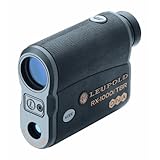
Leupold 112179 RX-1000I TBR W/DNA

List Price: $499.99
Sale Price: $398.17
Today's Bonus: 20% Off

I spent several months looking at Laser Rangefinders. I am an Oregon Master Hunter and hunt year round. I hunt in the mountains of Oregon where the animal you are hunting is both illusive and quick. I needed a rangefinder that was easy to use, quick to range, account for slope and weight of projectile, and easy to read results. It also had to be rugged and waterproof. After trying many many rangefinders I selected the Leupold RX-1000i, it met all of my criteria and has all of the features I wanted. There are some more expensive and some cheaper, but with this one is well worth the price and has all of the features any hunter needs. I liked it enough I bought a second one for my Son who hunts in Texas and here in Oregon with me. I would recommend the Leupold RX-1000i TBR, DNA to anyone.
Sanyo Xacti VPC-CA6OR 6MP MPEG4 Weatherproof Digital Camcorder
The CA6 was not available in any local stores so I researched the smack out of this video camera on the web before I bought it from Amazon. I thought I knew exactly what I was getting but the box contained a big surprise. I was expecting something small and utilitarian. Instead, I got a beautiful little jewel. It is delightful to look at and fun to hold. Grant you I am always fascinated with unusual design and shape.
The camera was a Christmas gift for my wife and I wanted to set it up before Christmas day so she could unwrap it and start filming (film?). The Instruction book is as impressive as the camera itself. Not for design but for its volume and it is all in English. I still haven't managed to digest but a few sections.
Video quality is excellent for our purpose. There are six different video resolutions and a variety of photo resolutions available in the easy to use menu system. The SHQ TV resolution is really stunning when you consider the miniscule sized gizmo that created it. We took the camera to Key West last week and recorded in SHQ WEB (320x240 / 30fps) resolution (perfect for making videos for sharing on the web). Every time you start and stop recording, a new MPEG4 file is created on the SD memory card. Using the photo function creates a high resolution JPEG file. At the end of the trip we had a couple of hundred files to download onto the Mac. We are currently editing the files into a movie with iMovie. At the smaller video resolution I was able to get about three hours of MPEG4 files and forty-two high resolution JPEG (2816x2112) files on less than half of the 2gb SD card. The same memory card holds about an hour and a half of video at the highest resolution setting (640x480 / 30fps at minimum compression).
Image stabilization works well enough for moderate hand movement but it didn't keep up with rough water on a sailboat around Key West. I wish the zoom range had more field of view on the wide end but it is tighter than I expected on the telephoto end. This is not a camera for long distance tight shots of wild animals or beach bunnies. It has no tripod mount so the telephoto power is just long enough for the image stabilizer to cope with when hand holding the camera on steady ground.
My hands are really too large for the controls but I found ways to adapt. It fits my wife perfectly. The CA6 is supplied with a hand strap to keep the camera tethered to your body and supply leverage for one handed use. I use the strap mostly for accident prevention and use my left hand to stabilize the camera by holding the outside of the frame of the view screen while delicately mashing the controls with my fat thumb on my right hand. Even with the hand tether attached to the camera we easily carried the camera and tether in our pockets without any problems and I was able to do some incognito filming on Duval Street. The relatively large (and very bright) view screen can be folded back against the camera while recording (folding the view screen back to the camera while not recording or reviewing shuts the camera off) for "shoot from the hip" filming.
Along with a small carrying pouch and a 2 or 4gb High Speed SD memory card, I recommend an additional battery as a necessary accessory. The tiny battery powers the camera in video mode for an hour or so but using the built in flash for photos knocks the small cell down in hurray. Reviewing and messing with the menu also cuts into battery duration. The lithium ion battery is physically smaller than my cell phone battery and recharges in less than two hours. In use it is completely enclosed inside the camera. The Sanyo OEM battery is easy to find on the web and there are a number of less expensive, alternative brands made to fit the Xacti cameras. Also, gentle use of an absorbent lens cloth will keep the view screen and the lens window clean.
The CA6 lacks convenience features that would make it larger and susceptible to problems from dirt and water. There are no ports, jacks or connections on the outside of the camera. The Battery, memory card and USB port access are located under a well designed, seal tight door on the bottom of the camera. A minimal control panel increases durability but somewhat limits easy access to the many system features. All adjustments are made by navigating through the menu on the view screen via the use of your right thumb and the tiniest joystick I have ever seen. It turned out to be much easier to use than I though it would and there is a provision to program favorite settings into some "short-cut" moves on the control stick. Above the menu control is a button for starting and stopping the video recording and another for making photos. A half-inch space and small ridge separates the two controls. Between the exposure / record buttons and the menu control are tiny buttons that activate the menu system and select the mode (puts the camera in record or playback).
Considerations for design and purpose aside, I have some issues that Sanyo should consider. The camera needs an accessory cradle of some sort that would allow it to be placed on a mounting thread. There are a number of features offered on the camera that are next too useless unless I innovate some method of remotely stabilizing it. Gaffers tape works for fastening it on a mounting clamp, monopod or walking staff but I hate putting anything sticky on the beautiful little frame. While Sanyo designs a mounting system they should also make a remote control.
Focusing and exposure are controlled by a sophisticated, multi-pattern, through-the-lens computer program that works well with a polarizing filter (I used my sun glasses) for enhanced image quality. So why is there no provision to thread a small diameter filter over the round lens window opening?
The sound recording quality is very good and the selectable noise filters work better than I expected but I don't see the point to using up the data space for stereo sound when the separation between the left and right channel microphones is a few millimeters. I haven't digested all 166 pages of the instruction book but so far I can't find any provision for recording in mono sound mode. Finally, motor noise from the zoom lens is noticeable in low noise situations. Even though I seldom use the zoom function while recording and I realize this is a common issue in small video cameras but it still bugs me. We usually strip away most the recorded sound and replace it with music or dubbing when editing videos anyway.
Brandishing the CA6 in a crowd will attract attention. As soon as people realize it is a video camera they are on it like flies on poop. My wife likes the attention but I prefer to be unhampered with other people's curiosity.
Sanyo supplies a suite of video/photo editing and DVD burning software for PC users. The CA6 lacks FireWire connectivity for live editing on Macs and there is no Mac compatible software supplied but the camera syncs well as a card reader with my Mac through the USB port for downloading the files to the hard drive. Any Mac owner savvy enough to edit video files and burn DVD's already has the software to accomplish the task. The camera also possesses surprisingly extensive onboard-editing capability through the viewing screen or on your television. Sanyo supplies a cord that plugs into the USB connection and provides a composite video and stereo sound output for your television system where you can view and edit your video and photo files utilizing the camera's amazing menu array. I have no idea about battery duration for this purpose and there is no external power input to the camera (the battery has an external charging cradle). Be aware that lower resolution video file settings look fine on a computer but they are nasty on your television.
Overall the camera is beautiful, reliable and fun to use with lots of features. It is tiny, easy to hide, fast starting, durable, water and dirt resistant. The images are very good. I am delighted with the Exacti CA6 so far (when I can get it away from my wife).
Zoom R8 R 8 Track Multi-Channel Digital Studio Recorder
It had a very nice condenser mic and I don't feel I need an external one.
Also drum machine has a lot of patterns which I liked a lot.
In addition, it has a tuner and it can be used as an audio interface between your laptop and your instrument and voice.
This is all-in-one machine.
If you don't need 8 channels of simultaneous recording this is a perfect machine!! (this can do 2 channels of simultaneous recording)
Bower SLY85N High-Speed Mid-Range 85mm f/1.4 Telephoto Lens

List Price: $399.99
Sale Price: $268.98
Today's Bonus: 33% Off
This is a very nice lens. I bought it for use on my Panasonic AF-100 with a Nikon adapter.
The lens is great for low light work as it steps down to f1.4 and focusing is accurate and
has a nice throw to it, so you can more accurately focus. The lens has a manual aperature
ring which has very good tactile stops to it and is very smooth. Overall this is a quality lens
that is well worth the price.
Samsung LN32D550 32-Inch 1080p 60Hz LCD HDTV (Black) (2011 Model)
I chose this model over other 32-inch LCDs because I'm a sucker for things like network streaming, a 5-band equalizer, picture-in-picture, and firmware updating. It also has a semi-documented headphone jack in the rear -just turn off the speakers for it to work. Also, the power cable detaches, so you can replace that yourself.
One might dismiss this TV altogether since it doesn't have LED edge lighting, but that tech does not appear to be earning its price premium so far, considering a higher percentage of panel defects, and a black level so intense that detail often gets lost. 60Hz is also not a deal-breaker, since 120Hz tends to only show its strength with sports programming.
The picture quality is ultimately subjective, of course. But I found it well above average. Unfortunately, you can't completely disable Dynamic Contrast. The TV will tell you that it's off, but some enterprising Internet detectives at televisioninfo.com have determined that this is a ruse, which leads to some unavoidable light trailing and somewhat crushed blacks. DVDs look surprisingly good, and standard-definition signals look very solid but not outstanding.
Dynamic Contrast, Black Tone, Shadow Detail, Edge Enhancement and the noise filters should probably be turned off. Unfortunately, these features can create more problems than they solve; use them sparingly. Like Spider-Man once said, "With power comes responsibility."
I have a Roku box connected through HDMI, an Xbox 360 via component, and clear QAM cable TV through the RF antenna jack in the rear. These hookups are going straight into the TV inputs -no receiver. I figure that this eliminates a testing variable or two. Picture quality and sound was great from all three sources. When I streamed Netflix over Xbox Live, the Xbox appeared to upscale to 1080i. I could not get my 720p Roku box to do this over HDMI.
(Edit: I have also now tried a third-party VGA adapter for the Xbox 360. It looks quite good using the console's "Expanded" reference level; at least on par with component, and upscaled DVDs look quite good, but not as good as Blu-ray.)
Audio is in a better boat, since the SRS functions can actually be turned off (as far as we know). There's also that 5-band equalizer. I thought the TV did surprisingly well for two downward-facing 10-watt speakers, but they won't quite replace dedicated external audio.
The D550 doesn't do Internet apps, but this feature is becoming increasingly redundant. As for network sharing, you are not limited to Samsung's proprietary, Windows-only "PC Share Manager" software, either. There's a variety of free, multi-platform software that handle networked media libraries. Unfortunately, Samsung appears to have not implemented DLNA according to spec, so you may have trouble getting third-party software to work properly. I had the best experience with TVMobili, which is thankfully free and compatible with Windows, Mac, and Linux. Serviio is also good.
In its promotional material, Samsung swears that its Wi-Fi "LinkStick" dongle is *required* for wireless networking (and it is not bundled with this TV). This is simply not the case. You can just use a wireless-N Ethernet "game adapter," which can be had for as little as $30 if you shop around. Dongles are also only compatible with a few devices from one manufacturer.
(Edit: It's come to my attention that an Intellinet 523974 *might* also work in place of Samsung's official dongle. I cannot directly confirm it, though. It is also reportedly 2.4Ghz, while the dual-band Samsung model adds a 5Ghz option.)
The "E-manual" built into the TV's menu system isn't very good and is difficult to navigate. The PDF version on their website is... a PDF version of the e-manual. Which is white text on a black background. So much for printing it out...
Also, the two-piece pedestal requires a Phillips screwdriver. That's not bad, but the screws required quite a lot of torque to get them all the way in. Also, you need to attach the top part at a certain angle, or else it won't be flush with the base.
A note about shipping: Amazon Prime does not currently provide 2-day or next-day shipping for this unit; "3-5 business days" is the official line. This is not unusual for products of this size and weight. However, the unit arrived at my door less than 48 hours after I ordered it. So I appreciate Amazon's and UPS's fast service! But your own experience will vary according to your distance from the warehouse and other factors.
(Update 4/25: This item is not currently shipped from and sold by Amazon, nor eligible for Amazon Prime. "Video & Audio Center" is handling the item instead. I am not familiar with their service, so the previous paragraph does not apply to the current purchase experience. "3-5 business days" is still the official shipping time, but I don't know how long it may take this third party to process the order before shipping. It may take a few hours, or a few days. Just a friendly heads-up.)
Despite this TV's quirks and poor documentation, I think it gets 5 stars for a really good picture and above-average sound (as long as you tweak that equalizer for some bass). I guess that's what matters most in the end, right?
Please leave a comment if I've left you with questions, and I'll answer to the best of my knowledge.
--Edit Jan 13 2012--
Just reporting in to say that the unit is still performing just fine. It's performed quite well as an interim computer monitor -just make sure to label the input as "PC." I don't recommend using it as a permanent computer display, because pixel density at this screen size is sub-optimal. (At desktop distance, you don't want larger than 24 inches, assuming a maximum resolution of 1920x1080.) But with some cool-looking wallpaper, its presence is not unwelcome :)
However, LG has been pricing their LCDs very aggressively lately, so I recommend researching those units as well.
Plantronics M50 - Bluetooth Headset - Retail Packaging - Black


List Price: $49.99
Sale Price: $26.87
Today's Bonus: 46% Off
Customer review from the Amazon Vine Program This headset is the closest to perfect I've used.
Features:
* Dedicated sliding on/off switch.
* Streaming of music, audio, podcasts, etc.
* Long battery life
* Noise and wind cancellation
* Voice notifications
Pros:
* Connects instantly to phone. No missed calls due to on/off delay.
* Small size.
* Light weight.
* Loud, crisp, audio.
* Battery lasts a LONG time.
* Standard micro-USB charging jack.
* Can stream music or other audio from phone to headset. Great for listening to talk radio, podcasts, etc.
* Great Bluetooth range.
Cons:
* Single volume button rather than up/down volume.
* Noise cancellation not as effective as some other headsets.
* At max volume, it can crackle at times.
Review:
I have used about a dozen different Bluetooth headsets and this one is now my favorite. It's not perfect but it is the closest to perfect I've used. I've always been torn between the Moto and Plantronics brand headsets. The reason is the Moto headsets turn on instantly when you open the boom. They are also very comfortable. The problem is that the boom hinge breaks over time or if you put the headset in your pocket. Also, the battery life is okay but not great. Last, while the early Moto headsets had great voice quality, the newer ones are muffled sounding.
The Plantronics headsets get louder then other brands and they last. I have 4 different models and I've never had one of them break. They are rugged! Some aren't very comfortable though. Their battery lasts a very long time so I don't have to carry another charger when I travel for a day or two, which is good since Plantronics uses a proprietary charger. I always wondered why they don't use a standard mini or micro USB jack like everyone else. While I always liked Plantronics best, there was lots of room for improvement.
Enter the Plantronics M50. First, it has a slide switch for power. One of the most annoying things about most Bluetooth headsets is you must press and hold the power button for several seconds to power on the headset. By the time you do this, your call may be missed. This headset powers up instantly with the slide of the power switch. No delays and no missed calls. It is so small and light, you barely notice it is on your ear. It fits securely so I don't worry about it flying off my head if I bend down, turn my head quickly or I'm running to catch my flight. It gets plenty loud, which is a big complaint with other brand headsets. And, it uses a standard micro USB charging jack so I can charge it with my phone's charger. It includes a charger as well. The unit has 3 controls: a power on/off slider, a volume button and an answer/hang up button. It also has a status LED. The LED is red when charging, blue when talking, flashing red/blue for pairing and off when streaming audio. To pair the unit, turn it on, press and hold the answer button for a few seconds until the LED toggles red/blue and then follow your phone's pairing procedure.
When in operation, the headset gives you status messages through the earpiece so you aren't wondering if you turned it on or off, etc. When you switch the headset on, it speaks, "Power On, Battery High, Connected". When you switch it off; it says, "Power Off". The unit uses a single volume button that toggles between 3 volume settings. Each push toggles to the next setting high/med/low/med/high. With each push of the button, you hear a tone that gets louder or lower with the volume setting. When you reach maximum volume, the headset says, "Maximum Volume". As the battery gets weaker, the headset will give a voice prompt of "Battery Medium" and "Battery Low". At maximum volume, the audio did crackle sometimes but it was very loud so that is to be expected. While the headset only has 3 volume levels, you have finer volume control using the phones volume buttons.
The range of this headset is excellent. Most headset crackle if I have the headset on my right ear and the phone in my left front pocket. No cracking from this headset. While this headset claims to be noise and wind canceling, I didn't find the cancellation feature to be as effective as my Voyager 520. That said, the outgoing voice quality is excellent; crisp, clear and loud. Even with background noise present, my voice punched through.
Now for the best feature of all. This headset allows you to stream audio from the phone to the headset! You can listen to music, stream radio, podcasts or GPS directions directly to the headset. I have a radio app and a police scanner app on my Android phone and it is great to be able to listen privately through the headset. Don't expect high fidelity but it is fine for voice and okay for music if you are not too picky and don't care that it is not stereo. The LED is not illuminated when using the streaming function, so you do not attract unwanted attention. If the phone rings while you are listening, you get a tune in the earpiece as well as ringer or vibration on the phone. Just press the answer button and you can answer the phone. The streaming audio is silenced. This part isn't perfect and it caused a force close on one of my Droid apps. I'm not sure if that is a headset or app problem. It was a minor nuisance but the important thing is I was able to take my call. One note about the answer button... There is no visible button. You just press the outside surface of the headset where it meets you ear. It was easier than many headsets that have a protruding button.
This headset has a feature called "Multipoint" that lets you pair it with 2 phones and allows you to answer either phone. I have no use for that feature so I did not test it.
Conclusion:
This is a great little headset that combines all the features I want and need. It is small, light, loud and comfortable. It charges with my phone's charger and it streams audio. What's not to love?
Adobe CS6 Master Collection Student and Teacher Edition

List Price: $999.00
Sale Price: $995.99
Today's Bonus: $3.01 Off
I replaced CS3 and take college classes and Lybda classes to use the software. It has become so powerfull that you really do need training. The days of intuitive software are long gone as it has become so powerfull and feature rich. I am amazed at the power of Photoshop. Audition is a joke. I had soundbooth, I have certified trained in Music Tech and Protools and was looking forward to having Audition for support of VST instruments. Audition does not support VST instruments just effects. So I still can use it and VSTs to master tracks I make in Protools but I have not needed to yet. The iZotope multiband compressor is great, but they seem to have dropped the iZotope EQ that was native in Soundbooth. Auditions mastering Reverb, well I have learned Protools so well that I just don't need to polish my mixes anymore outside of Protools. I look forward to using PremirePro again..... IF you are going be be using more than three programs I recommend Master Collection. It will cost the same and you have many more programs in your arsenal as the need arises.
Tamron SP Autofocus 17-35mm f/2.8-4 Di LD Aspherical (IF) Lens

List Price: $817.95
Sale Price: $499.00
Today's Bonus: 39% Off
I've read in many articles about how amateurs blow thier budget for lenses on two or more instead of blowing on a solid lens. I took the advice to buy the best that I can afford for one, an I'm truly delighted. This lens is a step up from the kit lens you would get with the K100/110/10d's, and performs much better.
Pros:
- Max aperture of 2.8 is nice to get more focused on your subject, and for lower light situations. Most kit lenses have a max of 3.5 or more.
- Good for moderate wide angle shots.
Cons:
- It's a bit heavier then the kit lenses.
Canon EOS Rebel T3i Digital SLR Camera Body & EF-S 18-55mm IS II
The camera and the 18-55mm lens are great, but the 75-300 lens isn't. The Backpack fell apart after a couple of months of LIGHT use. There's a lot of junk, meaning low quality things in this bundle. Good price isn't good when the quality is low.
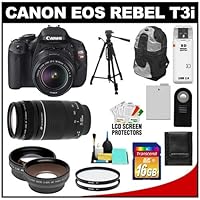
Canon EOS Rebel T3i 18 MP CMOS Digital SLR Camera with EF-S
I must say I am happy to receive my products that I'd purchase ,after reading one of the reviews I was a little wary about the purchase ,I wish the seller would of made a comment to ease others on their business practices .. I'm glad I came back and reviewed the items and decided to to deal with this company one on one ,the products is exactly as I expected and will come in handy as we teach our kids in our park to use take up photography .... Look forward to purchasing more products as our program grow .....

Sony DSC-RX100 RX100 RX100B DSCRX100 20.2 MP Exmor CMOS Sensor

List Price: $684.00
Sale Price: Price Unavailable
Today's Bonus: 20% Off
There are a bunch of bundled packages that you can buy for this camera and I found this to be the most useful and practical bundle with Prime shipping. The most valuable addition are the two "Wasabi" brand batteries (1600mah) with in wall charger and an adapter for a 12v car lighter. When the battery is fully charged, the led light on the wall charger changes from yellow to green. The batteries claims 1600mAh (vs 1240mAh on the Sony battery) but they look identical in every dimension other than the packaging. Having the extra batteries and external charger is almost a must for this camera.
Also valuable was the 32GB SDHC UHS-I Class 10 card which gives 156 min of 1080p 60fps video (highest quality) or 3291 17M 16:9 fine JPG or 1469 20M RAW pictures. There's also the Sony LCS-CSW case which fits the camera okay and you have a little inner pocket where an extra battery can be stored with the camera or an extra SD card.
The rest of the stuff (Zeikos card reader, mini tripod, cleaning kit, cleaning cloth and screen protector) was of marginal value to me. You get two screen protectors and as another reviewer mentioned, if you use the cardboard bubble scraper, you're going to scratch the plastic screen and deem it unusable. I think that's why they give you two. You also need a very sharp scissor or cutter to make nice straight cuts. When using the small tripod, the SD card and battery slot cannot open.
At the time of my purchase, here's the breakdown of the valuables in the bundle:
Wasabi 2 batteries + charger $19.99
32GB Sony SDHC card $19.29
Sony LCS-CSW case $7.49
Zeikos 57 in 1 memory card reader $2.85
Mini tripod
5 PC. Deluxe Cleaning Kit
2 PC. Cleaning Fiber Cloth
Bower Universal Screen Protector
Prime shipping is great. I was planning on using this camera for a planned vacation the week after I bought it but rather than purchasing at a local brick and mortar store, I essentially got the extra batteries, 32GB SD card and a Sony case with the camera for the same price (actually $1.99 cheaper).
Last but not least, the camera is fantastic. The photos it takes are amazing for a point shoot but you can read about that in other reviews.
Boston Acoustics TVee One TV Speaker Base with Bluetooth

List Price: $349.99
Sale Price: $299.00
Today's Bonus: 15% Off
I looked at ZVox and Bose speakerbases and was ready to purchase the ZVox (the Bose was a bit to bright sounding for me) when I came across the TVee One at Amazon. It had literally just came out 2 days prior and the dimensions were perfect for my new 55" Sony. Yes, I said 55" and it fits perfectly under it. You can put up to 60lbs on it and as long as the base for your TV is less than 22" wide it will fit. My TV only weighs in at 46lbs.
Sound is amazing and there is enough bass to warrant your buying decision plus it is good looking in lines of the Bose. You also get controls for 5 different soundfields and a nightmode. An added bonus is that it has Bluetooth and it took all of about 30 seconds to hook up my iPhone 5. If your in the market for a pedestal style soundbar and don't want a lot of clutter, put the TVee One on the shortlist.
Canon PIXMA MX452 Wireless Inkjet Office All-In-One


List Price: $99.99
Sale Price: $79.99
Today's Bonus: 20% Off
Updated August 3, 2013....I recently purchased the Canon PIXMA MX522 wireless color all in one office printer. I also wrote a review for it as well. There wasn't anything that was major or wrong with this printer but I really just wanted an upgrade with more features. I still like this printer, but I love the MX522!
July 21, 2013....Updated review.....After owning this printer for some time I wouldn't recommend this printer for a business or home office. I had to print up 70 pages recently for a project and even though it printed well it did take some time for the pages to print. But it is still a good printer for home use if you just need to print a few pages daily. I still feel that the scanner features still needs more tools. I do have a Visioneer scanner and I use the Paperport software that came with it. So if I need major editing tools Visioneer is my go to scanner. It would be nice if Canon put some time into the scanner features then I wouldn't have to drop a star.
This Canon printer is nice. I also own the Canon PIXMA IP100 Mobile Photo Printer since Feb 2009. I love that printer because it was mobile, small and printed beautiful photos as well as documents. But lately is started to have a few problems (going to have it repaired) that I had to put it on the shelf for this new Canon MX452. I really wanted something that was 100% wireless without sending it a cloud. This printer does everything that is says it will do and more. Printing, scanning, and faxing is a breeze! And it really is 100% wireless! I installed the software (CD) that came with the printer on my Windows 8 PC with no problems at all. There are a few programs that are helpful that work well with your printer. The Canon website also has the software on line, but then you have to install each program individually.
I had to use the printer USB cable that came with the printer in order for me to connect wireless. But you may or may not need to use the cable like I had to in order to set it up. The software and cable came in handy and connected me right away. After 1 minute the printer recognized my network. I put in my network password and connected and then the installation CD asked you to remove the printer cable to then go wireless. The only cord that is used is the power cord and the telephone cord for the faxing. Best part is I can print now from anywhere in the house from my laptop or tablet and even my Android cell. Goggle play has a Canon app, but it's really not needed since mostly every program or web page has a print button to click on. Just make sure you don't turn off the printer power button. When the printer is not in use the printer will just go to sleep to reduce the power. But as soon as you click print or any other feature the printer will wake up immediately.
Printing documents is sharp and clear. This printer uses 2 ink tanks (color & black). Most printer brands these days use 5 or more inks cartridges. So it really depends on how much color printing you use to notice any cost savings in using 5 tanks verses 2 tanks. So far the ink that came in the box is still going strong and has not run out. We use the printer for personal use everyday. The only thing I wish Canon would of spent more time in perfecting this printer is adding more tools to the scanning features of the printer. Needs work, but will get the scanning job done. This printer even has an area just for scanning photo negatives. Photo printing is really nice, but I didn't really purchase this for my photos. But overall for the low price and for everything that this printer does it is a purchase that I still recommend. But just make sure you do a comparison shopping before getting this one. I highly recommend the MX522 over this model.