Showing posts with label best low light digital cameras. Show all posts

Seagate Momentus 1 TB 5400RPM SATA 3Gb/s 8 MB Cache 2.5-Inch

Seagate Momentus 1 TB 5400RPM SATA 3Gb/s 8 MB Cache 2.5-Inch Internal Notebook Hard Drive - Retail Kit STBD1000100
Customer Ratings: 5 stars
List Price: $119.99
Sale Price: $81.99
Today's Bonus: 32% Off
Buy Now

I purchased this to replace the original 500GB disk in my MacBook Pro.

Fairly simple process to replace, if you have the right cable.

In this case, I purchased an exteral USB-SATA cable, and used the standard process of creating a new boot volume on the new disk, and then did a copy/clone of the internal disk to the new disk.

Once the disk copy is completed, eject the new disk, shut down the laptop, remove the screws to open the case, 2 screws to remove the drive, unplug the SATA connector, swap the 4 screws from the old to new disk, plug it back in, button up the case and boot.

Done. Simple process. Seems to work fine.

This is a 5400RPM disk, the old 500GB disk I had was a 7200RPM. There is a noticable difference in speed when copying a lot of sequential files. For "normal" use, opening apps, saving files, etc, no speed difference.

Click Here For Most Helpful Customer Reviews >>

Sony BRAVIA KDL42EX440 42-Inch 1080p LED HDTV (Black)

Sony BRAVIA KDL42EX440 42-Inch 1080p LED HDTV
Customer Ratings: 5 stars
Buy Now
Received this Sony 42" LED HDTV last week and I already own the 32" LED HDTV 1080p so I knew it would be just as great. Well it is better than I hoped it would be. Set up was super easy. The screen is sharper than my 32" size. You can watch this TV in a dark room and it adjusts to its environment. Same with a bright light on. From every angle you can see this TV clearly. This is in our living room. Perfect size. Highly Recommend this TV.

Click Here For Most Helpful Customer Reviews >>

Dell UltraSharp U3011 30" Monitor

Dell UltraSharp U3011 30' Monitor
Customer Ratings: 4.5 stars
Buy Now
Before the U2711 fans start flinging their darts, I do agree that image-wise the 2711 is a stunning monitor, and for the 6 months I owned it, I was ecstatic with the image quality and I know the new owner will be also. But here's a few thoughts for those trying to decide between U2711, U3011 and the HP ZR30W. Those are the three I researched starting 6 months ago, and now have a happy answer and ending. But first let me mention where I'm coming from because when I searched for reviews, they mostly covered gaming attributes. If you're a gamer, continue your search elsewhere, I can't help you there. For the photo and video editor who also does printing and works with a calibrated display (I use the Spyder3Elite), this review is for you. I use the Adobe Production Premium Suite mainly with this monitor, so my review will be weighted on that experience. Let's quickly cover the big questions:

HP ZR30W

The HP uses S-IPS panels versus the Dell's older H-IPS panels. The newer S-IPS is arguably more accurate on paper, but I don't see it. The Lamborghini Aventador is arguably faster than the Aston-Martin V12 DBS Coupe, but at that level of precision, does it matter? The big push for monitors is for LED, but if you do image editing, I dare say the CCFL Dells will calibrate better and more accurately. Also, the HP has only two inputs, and a few years down the road I may get a new monitor and have plans for the U3011, and I'll certainly want the AMAZING array of inputs on the Dell. So, the HP is out at least for me.

(UPDATE, 10-22-2012: I got a reply on this review from RAN today that said the Dell's H-IPS panel is actually the newer technology. I checked it out and they were right! One more plus for the Dell. Thanks for pointing that out!)

(UPDATE, 3-6-2013: good reply from Tracy Bolte who pointed out that latency specs are better on the HP if you do gaming, and that the HP might use a CCFL backlamp after all. I researched HP's site and they don't actually specify the type of back lamp. Will research further. If anyone knows for sure, please reply. Retailers' specs are NOT always accurate!)

White Sparkle/Anti-Glare Matte Finish

This subject is as controversial as global warming, but there is a fairly easy answer. Yes, the matte finish does introduce a sort of grainy filter that's noticable where whites show. Obviously whites would be gorgeous white without that, but to survive with a glossy monitor you really need a scenario where there is NO bright light source behind you. Great scenario if you have that! Anyway, some people say they don't see it, others say it's gross. I discovered that as you make the monitor brighter, the dirty goes away. For photo and video editors in a darkened studio (how I work), lowering your brightness is a given, but there's a threshold where if it gets too low your whites will get a bit yucky. My U2711 was that way: it came set at a brightness of 50 out of the box, but my calibration unit wanted it set at 17 based on ambient light. After calibration my colors on that U2711 were spot on, but whites were not so great. I pushed brightness up to 27 and then it looked very good, to the point where you don't really notice, and other than snow scenes and B&W high-key portraits, how much pure white do we have in an image? As for my new U3011, this was a big advantage over the U2711, the whites are cleaner and brighter. After calibration the software wanted my brightness down to 12, and leaving it there it looks great, like the U2711 after pushing it up to 27 to achieve the same clean whites. Don't get me wrong, the U2711 is equally great once adjusted and for most that's no problem. But if you do large format printing at home like me, a monitor set brighter than the suggested level at calibration will give you darker prints, so you have to compensate (not difficult, just another step to perform). So the U3011 wins here, looks great without boosting brightness. Side note: if you like a really bright monitor, the "sparkly dirty whites" are a moot point, you probably won't see it.

Image vs Text

I got the U3011 and sold the U2711 for two reasons: I do like a 16:10 ratio of the 3011 over the 16:9 ratio of the 2711. Photoshop and Premiere Pro need all the real estate they can get (and RAM!), so 16:10 on the U3011 is a clear winner. But also, the U2711 has a 109 pixels per inch where the U3011 has 101 pixels per inch. That means that images on the U2711 will be the most incredible because of having the most pixels per inch, but that makes text incredibly small. Squinting and leaning forward to read text on a web page gets a little old. Younger eyes will probably be fine, plus you can always boost Text Size in Windows and Mac, but if you do graphics with text and web layouts that can cause some issues. The U3011 with its 101 pixels per inch makes the text just right. I was concerned if that would make images look any less great, but it's only an 8% decrease in resolution, and you do NOT see any less quality on screen. The U3011 wins there again.

Uneven Screen Colors/Hues

I see complaints from time to time on that, but both my former U2711 and my new U3011 are even and gorgeous to my eye. I imagine that this technology is difficult to master but it seems by 2012 we've gotten it down pretty good. Therefore it's best if you get a U3011 that's the latest Rev A07 because it's the older units that many seem to have issues with. I ordered my straight from Amazon and the sticker on the back says A07, MFG date, July 2012. Doesn't get much newer than that and it helps that Amazon moves a lot of stock, therefore always getting new units in.

Wide Gamut and Calibration

If you do a lot of post production work, no doubt you use a colorimeter and will want to calibrate the U3011. There are factory presets that will set the monitor up quite nicely for those who don't calibrate, this thing looks amazing right out of the box. But for post production where we need to ensure Pantone 2747 blue really is that hue, calibration is necessary. I made the mistake initially with the U2711 of cal'ing it after Resetting All Settings in the OSD like we normally do. The calibration looked horrendous afterwards, and I've seen several people complain about that in reviews. That's because resetting to Factory Defaults installs the "Standard" profile, it does NOT remove it! Therefore, after the global reset, then go to Presets and set it to Custom Color. A Type Choice box pops up after you do that, just close and ignore it. But now you'll be in custom mode which allows calibrating to work properly.

3-Year Warranty

I started a Chat with Dell Customer Service and asked them about the 3-year warranty, because I'm buying it here, not Dell directly. Turns out the warranties are in Amazon's name when they are shipped to Amazon's warehouse. The Dell CS rep then transferred the warranty into my Dell account, done! So, make sure you head to Dell's site and start a Chat and request the transfer of Warranty after you get the monitor delivered and are sure all is well. Another reviewer claimed it's only 12 months but that isn't the case, just start a Chat and Dell will transfer it. Right after the transfer, my account showed the monitor right away, but it did say the warranty remaining was 365 days, so while still on the Chat I asked about that, and she said to let the system update, it should show within 24-48 hours. Well, I just looked even though it's only been 12 hours, and sure enough, the full warranty is there. In fact, they gave me an extra 100 days, it expires in November 2015. BTW, while on the chat, I asked if I could transfer my original U2711 warranty to the person who bought it, and they took care of that too, all they needed was address and phone number. SO, make sure you hop on and get your transfer going if you get this monitor.

Bottom Line

After working with the Dell 2405, U2711 and now the U3011, I'm totally pleased with Dells' image quality for post production work (and overall gorgeous imagery!). The HP models are surprisingly limited with input options which is no small thing these days. If you do all image editing or you do that and other work and have great vision, the U2711 is a superb choice. But if your budget allows and you hit the right sale (got mine for 1078), the U3011 is the clear winner, no contest IMO. It has it all, and the only con that actually matters to me is sticker shock, but once you pull the trigger and actually see this drive-in movie screen on your desk and experience the image quality, you'll heal quickly, lol.

Click Here For Most Helpful Customer Reviews >>

Vtech 6.0 2-Line Expandable Cordless Phone with Digital

Vtech 6.0 2-Line Expandable Cordless Phone with Digital Answering System and Caller ID
Customer Ratings: 4 stars
List Price: $79.95
Sale Price: $54.95
Today's Bonus: 31% Off
Buy Now

I am running a business with 2 phone lines for many years now and phones have always been a problem for me. I found that all cordless phones degrade or stop working after a couple of years, so I went through several different brands and models which I can repport here for you. My comment on the VTech is the last paragraph.

Starting 1999 I had a 2.4 GHz Siemes Gigaset and that was the best phone I had, it was stylish, very well organized and functioning. Unfortunately, wireless computer networking exploded shortly after and swamped this frequency band that no cordless phone at 2.4 GHz worked well any longer. Features included phone book copy amongst the different hand sets.

I had two sets of different Panasonic 5.8 GHz phones, and all were really bad. Voice quality was horrible and something stopped working in a short time. One is tempted to buy Panasonic because they have the largest selection of models. But don't be fooled by that! I could not buy Siemens because they retracted from the 2-line analog phone market, they only offer VoIP stuff, but I am not ready for that yet.

I had a Motorola 5.8 GHz for a couple of days and let me tell you, this was the worst phone I ever had, it was even much worse than all Panasonics. There would be not enough space on the Amazon server to write down all the details :-)

Then I had a 5.8 GHz AT&T phone and I really liked voice quality and workmanship. But all hand sets had different numbers in their phone book because you cannot transfer the phone book between them; I just could not keep up with this. Also, the functionality was not very intuitive.

Finally I got his VTech phone, and I must say that I am impressed. I wanted to have a DECT 6.0 phone because I believe this is the best frequency band for cordless phones. This phone looks great, has excellent voice quality, has an intuitive menu setup, and it has a very competative price. And what I like most which no other phone ever had: You program a number into your phone book and it is available instantaneouly in all hand sets. Only thing, they should have memory for more than 50 numbers. I have this phone and 4 hand sets since Dec 2009, and the only thing I hope is that it will be reliable. As soon as I have an issue I will update this review, so if you don't see an update, that is more points for this phone.

Click Here For Most Helpful Customer Reviews >>

Adobe Premiere Pro CS6

Adobe Premiere Pro CS6
Customer Ratings: 3 stars
List Price: $799.00
Sale Price: $669.95
Today's Bonus: 16% Off
Buy Now

I personally own CS5.0, CS5.5, and CS6.0. I was quite pleased with the CS5.x series, so I upgraded to CS6.0 as soon as it became available. What a big mistake! It doesn't work properly. The video frames froze or displayed solid colors or blocks of solid colors. I tried to import projects made with earlier versions of Premiere Pro that performed properly with those earlier versions, and they did not function properly with CS6.0. I tried to recreate those projects from scratch with CS6.0, and had similar dismal results. I reported my unsatisfactory and dismal results to Adobe in bug reports.

Since I own CS6.0 I will spot check Adobe's progress in fixing the bugs in CS6.0; however, I will not hold my breath waiting for an Adobe fix update that works. I will continue to do all serious work with CS5.5 as it does work properly now. On the plus side, I can run both CS5.5 and CS6.0 side by side. If Adobe does decide to fix CS6.0, I will update this report to reflect that progress.

Update

I just installed the latest software update and retested Premiere Pro. Nothing that I reported on here initially has changed as a result of this software upgrade.

Updated 2012-0917

I just installed the V6.0.2 software update and retested Premiere Pro. I tried recreating from the ground up those projects that worked perfectly with V5.0 and V5.5 and failed miserably with the newly released V6.0. The stuff that failed miserably still fails miserably the same way with V6.0.2. The stuff that worked, still works. Importing projects into V6.0 from V5.0x are the same. Things that failed before still fail. Things that worked still work.

I did contact the Premiere Pro design team about the problem. They have an attitude-superiority problem. I am just a "mere" individual customer not worthy of a response. Being a an experienced design engineer, this total lack of engineering professionalism turns me off totally about the product. I still use CS5.5 as I can rely on its working properly with my projects.

Updated 2012-0928

I just installed the V6.0.3 software update and retested Premiere Pro. Nothing new. I recreate everything from scratch to avoid carrying production errors caused by previous bugs forward into the realm of the new release. Still broken as expected. Still unusable.

I have been so concerned with the horrible video drop-outs and bad video previews, that I have observed that I did not report on the audio dropouts. They are there too. CS6 is seriously broke in many respects. It is bad enough to be technically deficient, i.e., have software bugs, but to not care about correcting those technical defects is inexcusable. Other Adobe divisions take quality defect correction (bug fixes) very seriously. Premiere Pro does not.

And based on my limited contact with Adobe Premiere Pro engineering and many years practicing engineering, Adobe seems to have amassed a Premiere Pro engineering team that considers itself too important to have to care about technical defects in existing released product, i.e., so important that they can spend their time working on "fun" stuff and not waste time on mundane bug fixes of existing product.

Stick with the CS5.x series.

Updated 2012-1001

By accident and playing around, I discovered a mechanism to circumvent the Adobe Premiere Pro CS6 bug that created many video and audio dropouts. This discovery also defined exactly the Adobe Premiere Pro software bug that caused my problems and needs to be fixed. Unfortunately, the Adobe Premiere engineering folks are much too "high and holy" to communicate with just a mere low individual mortal customer like me, so I do not know to whom at Adobe, a person who cares about bugs and bug-fixes, to communicate my bug fix. It would be nice to see the fix incorporated in the next update release. Is there someone at Adobe who cares? I would raise the rating from zero stars to many stars if it were fixed !!!

Click Here For Most Helpful Customer Reviews >>

Seagate Backup Plus 1 TB USB 3.0 Portable External Hard Drive

Seagate Backup Plus 1 TB USB 3.0 Portable External Hard Drive STBU1000101
Customer Ratings: 4.5 stars
List Price: $94.99
Sale Price: $76.95
Today's Bonus: 19% Off
Buy Now

I recently purchased a Seagate BackUp Plus 1 TB USB 3.0 Portable Drive and have been impressed with this sleek, compact, quiet running drive that does its job admirably. Many thanks to the many user comments which helped in my decision making process. This review will focus on Styling, Setup / Ease of Use, Performance, Reliability and Value

STYLING / STURDINESS (5/5): The Seagate Backup Plus 1TB Drive arrives in a 8" x 10" cardboard box (not much bigger than the dimensions of the actual drive) and includes just the bare essential components the Portable Drive itself, 1 USB 3.0 connector cable, 1 Warranty Booklet and 1 Setup Instruction Guide. The Portable Drive itself (reviewing a red 1 TB version) weighs no more than a current generation dataphone (iphone etc) and boasts a brushed metallic red finish on the top / cover plate which is aesthetically pleasing, as well as functional in that it feels sturdy to the touch and does not seem to attract fingerprints. Given that this drive is not advertised (and not priced) as a 'Rugged' or 'Drop resistant' portable drive, I did not 'Stress test' the drive and plan to treat it much as I would any other portable electronic gadget eg. a laptop. The included USB 3.0 cable is 12-15" long (definitely portable, but admittedly on the short side) and of good quality with thick protective coating along the entire cable. The cable ports are USB 3.0 (backwards compatible with USB 2.0) on one end and a proprietary Seagate port on the side which plugs into the drive which might irritate some buyers. The only drawback of this proprietary port is that you will have to buy a replacement / extra cable from Seagate and not any electronics retailer so you lose some of the convenience aspect to replacement but given Seagate's reputation for reliability this should not be an issue for most folks.

SETUP / EASE OF USE / SOFTWARE (5/5): The Setup Instruction Guide includes 2 steps plug the included cable into the Seagate portable drive, and plug the other end into your computers USB port. It really is that simple as it should be hence my perfect score on 'Setup and Ease of Use'. Once you plug the drive into your computer (I used Win 7), Windows will automatically detect the drive and download the latest driver software to allow you to access it. This usually takes less than a minute and once this process has completed (you are notified via a popup window), you can access the drive by going to 'Start My Computer' which will list all the available drives including your new Seagate Portable Drive. The drive is now ready for use Two Step Simple Incredible! Once you access the drive itself you will see the pre-installed files for the Seagate Dashboard Backup Software Double click the Seagate Dashboard Installer icon to start installation of the backup software. I have traditionally preferred to not be tied to third party proprietary software and like to manage my backups manually so did not install it and cannot comment on that part of the product. If you do not want the software, do not double click on any icons but instead either delete the software files or create a new folder and dump all the pre-installed software files into that folder in case you change your mind on using the software later. The drive is otherwise ready for use and you can create folders / drag and drop your files as needed. One point of note a 1TB drive comes with only 930 Gigs of useable space out of the box the rest taken up by the Seagate Dashboard software / formatting etc. Losing 7% of your capacity from the get-go is kind of annoying but similar to pre-loads on a new PC.

PERFORMANCE / SPEED TESTS: (4.5/5): My PC is not USB 3.0 equipped so please note that my speed tests were based on USB 2.0 and therefore not indicative of the true performance capabilities of this product. Nevertheless, I was able to achieve transfer speeds PC to Portable Drive of 1.8 2.0 Gigs per minute while transferring ~150 Gigs of content in little over an hour. Additionally, the Seagate Portable drive has a white indicator light on one end that lights up when the drive is plugged in and flashes slowly while in use. The drive does runs slightly warm after an hour or so of continuous use (eg. during my initial transfer) but again this is something which is pretty common for most external drives and other portable electronics.

RELIABILITY (N/A): Will not be able to comment on product reliability until I have consistently tested / used the product for 6-18 months, but based on the consistency of previous user comments and Seagate's stellar reputation as a bellweather in the industry, I expect this drive to hold up well over time. I will of course be sure to loudly voice my displeasure if this is not the case :)

VALUE (4/5): This was one area where I felt Seagate could improve but $100 $110 for a 1TB drive is in-line with the market / competitors in 2012. There are cheaper options (eg. WDs Passport 1TB for $90) and more expensive options (HP or LaCie 1TB for $125 to $175 range) and Seagate's BackUp Plus runs right along the mid range between the two. One important point to consider plan to get the highest capacity drive you can afford / or want to spend on storage, as the higher capacity drives present the best value for example Seagate's 500GB drive is $90, 1 TB is $110 and 2 TB is $150. On a pure dollar / GB basis it is hard to ever recommend the 500 GB drive when for $20 more, you get double the storage capacity....and so on.

SUMMARY (PROS / CONS):

PROS:

Seagate Brand / Reputation for Reliability

Aesthetically Pleasing

Compact yet Sturdy Build

Super Easy Set-Up (2 step Process)

No forced use of Software / Bloatware

Runs Quiet and Good Performance (in line with competitor read/write ranges)

Future Proofed (USB 3.0 standard, Backwards USB 2.0 Compatible and Future Proofed with removable Adapter options)

Mac OS and Windows Compatible

Decent Price Point

CONS:

'Nothing Special' Backup Software (its free for a reason)

No Password Protection / Security Option

CONCLUSION:

In conclusion, I compared a number of drives from different manufacturers before deciding on Seagates BackUp Plus including drives from WD (Passport series), LaCie, HP, Buffalo Technology, Silicon-Power Rugged etc. This drive does not include some notable and desirable features of some other competitor drives like Security / Password protection, Drop Resistance etc and everyone will need to weigh which features are indispensible / most important to them. But for me, Seagate's combination of stellar reputation in the industry for reliability, included features, overall ease of use, overwhelmingly positive user comments (or alternatively the glaring lack of mixed to negative feedback as some other products have), aesthetics and price point proved to be a winning combination. Very Highly Recommended A ++

Click Here For Most Helpful Customer Reviews >>

HTC Flyer 7" Android Tablet, 16 GB

HTC Flyer 7' Android Tablet, 16 GB
Customer Ratings: 4.5 stars
Buy Now
There are many specifications-based reviews out there on the Flyer, so I won't repeat those, and instead base this write-up off of my experience with HTC's device over the last few weeks. I have to start this review by saying that I've been a tablet PC user for years, and have found many recreational and business related uses for computers that have active pen input. But even my current tablet PC, an HP Touchsmart, can get tiresome to carry around all the time. I work with kids, and needed a backup device that was small, quick to turn on, and could be loaded with fun activities for children. That's where the Android tablets come in. I rooted a couple of Nookcolors, and instantly fell in love with the 7" form factor. So when I learned that HTC was going to be releasing a 7" tablet with some kind of active stylus, it sounded like the best of both worlds (small android tablet with pen input), and I knew I had to check it out.

I have to say that when most people think of a stylus, they think of that plastic stick that they used to poke their old palm pilots with. That is NOT what this is, nor is it intended as a replacement for touch input. This pen input is intended as a replacement for pen and paper, as you might use when you draw or take handwritten notes. When you're talking about active pen input, you're looking for 3 things: Precision, pressure sensitivity, and palm rejection. I hate to be this blunt, but if you can't view a stylus as being anything other than that dead plastic stick from the old days of resistive screens, then this type of device just simply isn't for you.

When I learned that the Flyer used N-Trig technology instead of the Wacom digitizers I'm used to, I was initially hesitant. I do a lot of artwork and handwritten notes on the Touchsmart, and while it's not perfect on the HP, the Flyer would have a lot to live up to. I knew I had to test it first in a store before I bought it, because if it didn't work well, I might as well stick with the rooted Nooks which did many of the same things and were half the price. The local Best Buy had the Flyer on it's release date and so I tried it out.

I'll be the first to say that the pen experience on the Flyer is NOT up to the quality of the wacom tablet PCs. I don't know if it's the sensors, the N-Trig technology, or if it's simply how the Android OS handles pen input. It's not the size, as I have a Motion Computing slate that is near the same size, and the pen accuracy on that device is far better. However, having said that, it is worlds better than using a regular capacitive stylus on an ipad, galaxy tab, or other similar device. I tried using a nice capacitive stylus with my Nooks and it was no better than using my finger. The Flyer is a far better inking experience, and I feel comfortable drawing or taking notes with it. It only has a couple of levels of pressure sensitivity (thick and thin) as far as I can tell, but you can make a decent sketch with it if you concentrate. If you'd want it rated on a scale, I would say a finger is a 1, capacitive stylus a 2-3, tablet PCs a 7-8, and the Flyer would be a 5.

Obviously I liked the inking enough to actually buy a Flyer even though I already had the Nooks and the Tablet PC. And since purchasing it, it continues to impress me. It's responsive, versatile, and durable. I can use it for games, drawing, notes, word processing, watching movies, streaming music from home, and just about everything else I could need from a media-consuption device. Better yet, many things listed as cons by others who have reviewed it have actually turned out to be related more to device settings (e.g., a washed out screen is because the autodimmer is set to low by default) and inadequately documented capabilities (e.g., standard microusb cables *do* work).

As much as I like the Flyer, it's not perfect. Unfortunately much of that stems from the pen use...the main thing that sets it apart from the flood of other android tablets out there. The preciseness of the pen tip can only be used in a small range of preloaded apps that HTC included (the opposite end can be used as a regular capacitive stylus, but again, it's like fingerpainting). For notetaking, there's the Notes app, and for drawing you can either use the Notes app or the Kid Mode app through Zoodles. They're decent apps, but they're not great. Perhaps I have been spoiled by programs like Onenote and Autodesk Sketchbook on the PC. But even on android, there are better apps out there for drawing or notes, and yet the pen will not work with them at this point. I'm sure HTC had a reason for limiting the pen this way, but I've yet to hear what it is. Luckily, this is software based, not hardware based, so HTC and other developers may release apps and updates that would allow the pen to be used in a wider range of applications. And since the Flyer is so new, I would imagine that these kind of advances are right around the corner. So I could see the Flyer's "good" inking experience go to "great" pretty quickly if it's given the right kind of attention.

Overall, it's a great little tablet. But, if you are not someone who likes to sketch or take notes, I would strongly suggest you look elsewhere. That's not to say that the Flyer is not a great all-around tablet. It is. It's fast, has a nice screen, great battery life, and a decent camera. But the main point of the Flyer is the pen. If you don't plan on using it for that purpose, you'll probably be happier with something else.

Cheers!

UPDATE 8-10-2011

HTC has just released their SDK to the public/developers which includes the Pen input. This means that other developers can now start integrating pen input into their apps, and we are likely going to see some of the well known drawing apps, like Sketchbook Pro, be updated soon. One developer, the author of the Fresco drawing app, started working on it shortly after it came out. This change might easily earn the Flyer another star.

In another development, it looks like HTC is working on a slightly larger Scribe-enabled tablet known as the Puccini, and it looks like it will ship with Honeycomb. Also, Lenovo is just about to release a Thinkpad Tablet (also with N-trig and Honeycomb), and by all appearances, the stylus appears to work across all apps as a form of input (not sure about the pressure sensitivity, though). My hopes are that the Flyer will get Honeycomb somewhere around the same time as the Puccini, and this update will allow the functionality of the Flyer's stylus to jump as it did with the Thinkpad.

UPDATE 10-4-2011

Well, I had hoped that I'd be able to update this with a description of how much more Honeycomb unlocks the potential of this little tablet. Unfortunately it's been two months, and the official build of Honeycomb for the flyer hasn't been released yet. However, I'd never post an update if I had nothing good to say. For those who are adventuresome, there is a leaked build of Honeycomb that you can install on your Flyer. The process doesn't look terribly hard, but it's not for the casual user either. Personally, I've decided to wait til the official version comes out.

BUT, in even better news, the Flyer has dropped in some places (like Best Buy) to $299! I'm hoping this will mean that a lot more people can enjoy the tablet, and that will lead to greater interest in it by developers...which ends up being better for everyone.

UPDATE 1-8-2012

The official Honeycomb update was released last week. What can I say...for me, this is what the Flyer *should* have been when it was released over half a year ago. Now the pen works across all apps at least the same as your finger, and in a wide number of apps, you have features like pressure sensitivity and palm rejection. One of these HC apps, Quill, does such a fine job of smoothing the ink that it nearly rivals the experience of a Wacom digitizer.

There are pros and cons for going over to Honeycomb, so for those Flyer owners who haven't done it yet, definitely weigh the benefits (the XDA Developers website is a great resource for this). It really depends on what you use your Flyer for. I would imagine that if you're a heavy pen user like I am, it will be a much easier decision.

Click Here For Most Helpful Customer Reviews >>

Pentax SMC DA* 55mm f/1.4 SDM Prime Standard Lens w/ Case

Pentax SMC DA* 55mm f/1.4 SDM Prime Standard Lens w/ Case for Pentax Digital SLR Cameras
Customer Ratings: 5 stars
Buy Now
I am a pro-amateur photographer and this is the first prime lens I've ever purchased. I currently own an all-Pentax system, including a K200D body with all the other SMC DA* lenses except the 200mm. My intention in buying the 55mm was to have a razor-sharp lens for candid and formal portrait photography. I've shot close to a hundred pictures with this wonderful lens over the course of the past couple of weeks, and it's ability to capture images in low light is awesome at f/1.4, but not quite as sharp as when set to f/2.0. It has marvelously creamy bokeh in the low f-stop range, including a truly magical ability to capture shading and colors not perceived by the human eye. Although I really love this lens, it probably gets a little less time on my camera than others, due to the fact that I still like the flexibility of zooms (the SMC DA* 50-135mm being a magnificent example!)

I highly recommend this for anyone wanting to experience the minimalist pleasures of a prime lens. That is, if you're willing to shell out for the SMC DA's amazingly quiet motor and superior build quality as compared with it's less glamorous brother, the 50mm f/1.4. Believe me, after trying both, the SMC DA* is worth the expense, and it capably delivers absolutely gorgeous image quality in the right hands. Five stars all the way, and kudos to Pentax.

Click Here For Most Helpful Customer Reviews >>

Plantronics M50 - Bluetooth Headset - Retail Packaging - Black

Plantronics M50 - Bluetooth Headset - Retail Packaging - Black
Customer Ratings: 4.5 stars
List Price: $49.99
Sale Price: $26.87
Today's Bonus: 46% Off
Buy Now

Customer review from the Amazon Vine Program This headset is the closest to perfect I've used.

Features:

* Dedicated sliding on/off switch.

* Streaming of music, audio, podcasts, etc.

* Long battery life

* Noise and wind cancellation

* Voice notifications

Pros:

* Connects instantly to phone. No missed calls due to on/off delay.

* Small size.

* Light weight.

* Loud, crisp, audio.

* Battery lasts a LONG time.

* Standard micro-USB charging jack.

* Can stream music or other audio from phone to headset. Great for listening to talk radio, podcasts, etc.

* Great Bluetooth range.

Cons:

* Single volume button rather than up/down volume.

* Noise cancellation not as effective as some other headsets.

* At max volume, it can crackle at times.

Review:

I have used about a dozen different Bluetooth headsets and this one is now my favorite. It's not perfect but it is the closest to perfect I've used. I've always been torn between the Moto and Plantronics brand headsets. The reason is the Moto headsets turn on instantly when you open the boom. They are also very comfortable. The problem is that the boom hinge breaks over time or if you put the headset in your pocket. Also, the battery life is okay but not great. Last, while the early Moto headsets had great voice quality, the newer ones are muffled sounding.

The Plantronics headsets get louder then other brands and they last. I have 4 different models and I've never had one of them break. They are rugged! Some aren't very comfortable though. Their battery lasts a very long time so I don't have to carry another charger when I travel for a day or two, which is good since Plantronics uses a proprietary charger. I always wondered why they don't use a standard mini or micro USB jack like everyone else. While I always liked Plantronics best, there was lots of room for improvement.

Enter the Plantronics M50. First, it has a slide switch for power. One of the most annoying things about most Bluetooth headsets is you must press and hold the power button for several seconds to power on the headset. By the time you do this, your call may be missed. This headset powers up instantly with the slide of the power switch. No delays and no missed calls. It is so small and light, you barely notice it is on your ear. It fits securely so I don't worry about it flying off my head if I bend down, turn my head quickly or I'm running to catch my flight. It gets plenty loud, which is a big complaint with other brand headsets. And, it uses a standard micro USB charging jack so I can charge it with my phone's charger. It includes a charger as well. The unit has 3 controls: a power on/off slider, a volume button and an answer/hang up button. It also has a status LED. The LED is red when charging, blue when talking, flashing red/blue for pairing and off when streaming audio. To pair the unit, turn it on, press and hold the answer button for a few seconds until the LED toggles red/blue and then follow your phone's pairing procedure.

When in operation, the headset gives you status messages through the earpiece so you aren't wondering if you turned it on or off, etc. When you switch the headset on, it speaks, "Power On, Battery High, Connected". When you switch it off; it says, "Power Off". The unit uses a single volume button that toggles between 3 volume settings. Each push toggles to the next setting high/med/low/med/high. With each push of the button, you hear a tone that gets louder or lower with the volume setting. When you reach maximum volume, the headset says, "Maximum Volume". As the battery gets weaker, the headset will give a voice prompt of "Battery Medium" and "Battery Low". At maximum volume, the audio did crackle sometimes but it was very loud so that is to be expected. While the headset only has 3 volume levels, you have finer volume control using the phones volume buttons.

The range of this headset is excellent. Most headset crackle if I have the headset on my right ear and the phone in my left front pocket. No cracking from this headset. While this headset claims to be noise and wind canceling, I didn't find the cancellation feature to be as effective as my Voyager 520. That said, the outgoing voice quality is excellent; crisp, clear and loud. Even with background noise present, my voice punched through.

Now for the best feature of all. This headset allows you to stream audio from the phone to the headset! You can listen to music, stream radio, podcasts or GPS directions directly to the headset. I have a radio app and a police scanner app on my Android phone and it is great to be able to listen privately through the headset. Don't expect high fidelity but it is fine for voice and okay for music if you are not too picky and don't care that it is not stereo. The LED is not illuminated when using the streaming function, so you do not attract unwanted attention. If the phone rings while you are listening, you get a tune in the earpiece as well as ringer or vibration on the phone. Just press the answer button and you can answer the phone. The streaming audio is silenced. This part isn't perfect and it caused a force close on one of my Droid apps. I'm not sure if that is a headset or app problem. It was a minor nuisance but the important thing is I was able to take my call. One note about the answer button... There is no visible button. You just press the outside surface of the headset where it meets you ear. It was easier than many headsets that have a protruding button.

This headset has a feature called "Multipoint" that lets you pair it with 2 phones and allows you to answer either phone. I have no use for that feature so I did not test it.

Conclusion:

This is a great little headset that combines all the features I want and need. It is small, light, loud and comfortable. It charges with my phone's charger and it streams audio. What's not to love?

Click Here For Most Helpful Customer Reviews >>

Gini Rigs Advanced Extreme 17

Gini Rigs Advanced Extreme 17
Customer Ratings: 5 stars
Buy Now
I can't tell you how amazing this rig is.

Just outstanding.

I still would pay twice as much for this rig.

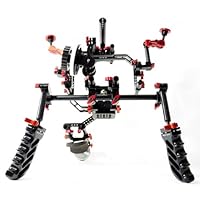
Instead of buying piece by piece ....this package comes with a follow focus, counter weight, cheese plate, construction, design, and the grips are just so beautiful....I mean look into this rig.

Just SOLID!!

Click Here For Most Helpful Customer Reviews >>

AmScope 3.5X-90X Trinocular LED Boom Stand Stereo Microscope

AmScope 3.5X-90X Trinocular LED Boom Stand Stereo Microscope + 8MP Camera
Customer Ratings: 4.5 stars
List Price: $2,700.00
Sale Price: $659.98
Today's Bonus: 76% Off
Buy Now

I purchased around 5 different digital microscopes over the years for the company i work for. Finally i ran across this one. I did end up purchasing the cover and additional light source (both a must have for this unit. there are some minor issues i did not like on this unit but the things i liked out-way them.

PROS:

1: at 0.5x setting i can put a part about 4 inches from the lense and it will allow me to focus at different depths depending

what i need to shoot.

2: the focus on the eyepieces are nice and clear.

3: once i figured out the lever that you need to pull far out on the left side to close off the left eye piece i got

great shots from the digital camera. (pulling this lever part of the way out only gives you blurry images at best in the digital camera).

4: the head unit can be tilted for angle views. and the height can be adjusted for larger or smaller parts.

CONS:

1: the manual, well is horrible. i was able to setup the unit by going to the web site and review the multiple photos

then assembling them together.

2: the screw mount (plastic) that attaches to the lense and holds the circular led is not threaded correctly. it hangs

literally by a thread. and can strip very easy when switching the lenses.

3: after some use on tilting the microscope the clamps do not hold and will move the arm that holds the head unit.

4: i purchased the Nikon camera attachment because at first the digital camera was shooting horribly bury images. i discovered with no help from the manual that the lever on the left side of the unit has to be pulled a lot farther out. feels like your going to pull it off. when doing this the digital camera shoots excellent. i found that the lever needs to close off the left eye piece before the digital camera is clear.

5: at the default setting the camera comes out bury, the mount that the unit rests on needs to be unscrewed about 1/8 before the digital camera comes into focus with the eye piece. there about 3/4 to 1 inch travel before the mount is totally unscrewed.

CONCLUSION:

it does what we need to use it in Engineering for and plan on purchasing another unit for the Quality Control Department.

Click Here For Most Helpful Customer Reviews >>

Samsung 12MP Dig Camera 4.6X Opt 3 In LCD Red

Samsung 12MP Dig Camera 4.6X Opt 3 In LCD Red
Customer Ratings: 4 stars
Buy Now
First off let me say that the reviewer that said it is hard to delete your photo's right away simply does not know what he/she is talking about! Obviously they have not read the manual, researched the camera before buying it, or did not spend as much time with it as maybe they should have.

All you have to do to delete a photo or movie clip "right away" is, with your finger make an "X" on the screen (Touch Screen) over the picture, a delete button pops-up you press it and the picture is gone. It literally takes 2 seconds, if that.

Below is my review of what I have discovered so far, mind you I DO NOT Personally own the Camera yet, mine is on the way, but I have toyed with it for probably almost 3 hours already at Best Buy (Went to Best Buy again today just to toy with this Camera some more, Twice! Once by Myself, another with my daughter). I have done extensive research on the TL225 and the TL220 (an incredible amount). The review below was written by me a couple days ago for a different web-site to educate folks on this camera.

Here ya gooo...

I went to Best Buy yesterday and played around with the TL220 (st500 and st550 in Europe and Asia, and is the same cam as the TL225, just less features) for over an hour (no kidding, an employee told me to "Just buy the thing already"lol), and I can not express how much I LOVE this thing!

I have never had so much fun playing around with a camera before! It is sooo user friendly, I picked it up and knew everything within a couple of minutes!

The Pictures it took where pretty good, it didn't do so well with close moving subjects, much blurr, but still pics where clear and the colors where vibrant. I found a Korean site to where a gentleman who bought this Cam posted a TON of Pic's, they all looked wonderful as-well. He also stated that this was a "Very Very good Cam".

My favorite feature that sent me over the top was the "Beauty Shot" mode and front LCD feature! I have scars on my face due to acne (pretty bad scaring), and I went into Best Buy looking greasy and very sweaty (just got off of work). The pictures I took of myself in Beauty Shot mode made me look like a Model!!! I am not kidding, my face went from greasy and nasty in regular pics I was taking of myself, to looking like I belonged on a runway for a photoshoot once in Beauty Mode!!! I was SHOCKED at how perfectly complected my face looked, you could not see one acne scar or blemish, it was amazing! I did not expect this feature to work so well!!!

I took probably 80 or so pic's of myself, I absolutely love the front screen! Yes, I took pics of myself before, but only for web-sites a forum purposes. With this, it was a BLAST!!! I had so much fun with this camera, I did not expect myself to care to much for the front screen, but I will be using it all the time once I pick-up this cam!!

All I was looking for was a decent point and shoot that had great HD video and good quality Pic's for vacationing, and playing with this cam for as long as I did sent me over the edge with all the features it has, I REALLY LOVE IT! I would like to note that my fiance owns the Nikon D90 and I use it often, so I have some decent knowledge on how pictures should look. I also own my share of P&S cams.

The girl at Best Buy told me they Sold Out right away and have the cam on back-order, and that she hears nothing but good things about it (she is actually going to school for photography and said she thinks the cam is a really good buy, and she was not saying this because she works there, I have known her for atleast a year already (from Best Buy) so we are more friends then me being just a customer to her.

I also tested the HD video and it was WONDERFUL! Someone posted 3 test vids on YouTube using the tl220, the new compression format makes it look like HD even when choosing not to watch in HD! Never seen such great quality Vid before in a camera!!! It is also REALLY REALLY cool how you can Pause when recording, and then resume play when you decide to, this way all recordings are on the same file. You can also edit the vid in camera by trimming the vid, meaning takeout parts you don't want and keep what you do want.

I will be getting the TL225 instead of the TL220. It has a bigger screen, metal back instead of the Tl220's plastic back, HDMI inputs (for viewing your Pics and Vid on an HD TV) that the TL220 does not have, and I believe the TL225 has 2 more modes that the TL220 does not have. One is Action mode (which may fix the blurr in moving subjects, it should), and another mode I have which to identify. The TL225 shows 16 different modes in "Smart Capture" mode, and TL220 shows 14. The TL225's also has haptic feedback, which vibrates the screen slightly so the user knows when he/she selects a command, TL220 does not have this. The TL225 also wieghs a half-ounce more then the TL220 due to the choice of displays. One more thing to note is that the TL220 3.0-inch LCD screen resolution has 230,000 dots, while the TL225 has much much higher resolution at 1,152,000 dots on it's 3.5-inch LCD, the highest ever resolution on a Point and Shoot Camera (for you newbe's the higher the resolution the clearer the screen will be and you will be able to see more detail on whatever it is you are taking a picture of). To me, the extra $50 for the TL225 is well worth it if you can offord it.

Note that both Cams (TL220 and TL225) look identical other then the back screen being bigger on the TL225, and the colors they come in. I do wish the TL225 came in Red and Blue, but the orange will have to do for me. I will also be posting this same review for the TL220 for people looking to get that since thats the actual Cam that I toyed with.

I have done sooo much research on these cams in the past 2 weeks it is ridiculous!!lol I will give a more extensive review once I have this puppy to play with for longer then just a couple of hours.

All I have to say is I LOVE THIS CAM and can't wait to get it, it def exceeded my expectations thus far! :)

Click Here For Most Helpful Customer Reviews >>

Pentax K-Mount DA 18-270mm f3.5-6.3 ED SDM Interchangeable Lens

Pentax K-Mount DA 18-270mm f3.5-6.3 ED SDM Interchangeable Lens
Customer Ratings: 4.5 stars
List Price: $799.95
Sale Price: $596.90
Today's Bonus: 25% Off
Buy Now

It is exactly what I was looking for, THE zoom! With it I am no more in the need to change lenses and can take only the camera with me in my excursions, very confortable ...and no risk to let the dust enter the camera.

I read on forums this zoom isn't of a great quality...I do not agree, I've found it good and accurate , maybe it isn't the top, anyway it is a "good choice" considering its focal lenght.

The only negative point is the price, anyway on Amazon is the lowest I've found and considering the exchange rate (I'm in Europe and pay in Euro) it is "good enough" and I have no regrets at all.

Click Here For Most Helpful Customer Reviews >>

Canon EF 8-15mm f/4L Fisheye USM Ultra-Wide Zoom Lens for Canon

Canon EF 8-15mm f/4L Fisheye USM Ultra-Wide Zoom Lens for Canon EOS SLR Cameras
Customer Ratings: 5 stars
Buy Now
What a great joy to own and use this lens every day!

I almost ordered this lens last year when I saw it first listed on B&W website for pre-ordering. But I was hesitant at that time, wondering how useful this specialty novelty lens can be on daily shooting. After some time-consuming research, I finally went for it... It was in a pizzeria store in Las Vegas while I was waiting for my pizza that I first opened the Amazon package containing my brand new copy of the lens... Wow! As soon as I put it on my camera (5D3) and started to shoot with it, I was awed! I tried to shoot nearly everything and everybody with it, a lot of photos and videos. And it stayed on my camera for the rest of my Las Vegas trip (2+ days).

Here, I'm not writing a full review or anything close. I just want to point out a few things about the lens (or my copy of the lens).

== On my 7D ==

It won't give me a full circle image, not even something close. Instead, it becomes a super wide zoom lens with fisheye distortion. To me, the distortion is not more annoying than that from a regular super wide lens, and is typically as acceptable (or similarly unacceptable in the case I don't like the wide angle distortion).

== On my 5D ==

It offers a full circle image at 8mm, and a very interesting (somewhat bizarre) image at 15mm. I have almost only used this lens on my 5D, and typically at 15mm only. On my 5D, the lens is

1) super sharp: I think it's sharper than my 16-35mm/f2.8L, 24-105mm/f4L, and 70-200mm/f2.8L. And it looks like even sharper than my 24mm/f1.4L II.

2) it focuses super fast: nearly every time, instantly. Even in a dark environment, as soon as it can see a bit light, it can focus lock on it.

== Two things I don't like ==

One is the lens cover repeatedly falling off the hood. Yet, to prevent the lens from hitting any hard object while it's hanging on my shoulder, I still have to somehow protect the front glass that protrudes from the lens barrel. The coating on the lens glass seems very special that I can easily wipe dusts, water drops, or fingerprints off from it. But it's much easier to get hit, even with its hood on, than all other lenses I have.

The other is the color distortion on the circular edge of its circular image. But I think this is unavoidable. It's not much of a concern to me, though, for I don't shoot many circular images.

== My conclusion ==

This is a great walk around lens (to me), especially for shooting indoors or on busy streets. When and where I typically would go for my 16-35mm, I now would rather use this lens, except when I only want (relatively) distortion-free images.

In places where space is super tight, this is the about only go-to lens that can capture a most usable widest wide shot with a Canon DSLR camera.

This is a great lens for expressing an uplifting sense of humor. A great lens of choice for shooting active kids, playful pets, funny players, or for covering certain dancing or sports, or for capturing just about everything or anybody that you want to look happy, exciting, exaggerating, and so on.

=====

Hopefully my experience is helpful to someone who's considering the lens. Happy shooting!

Click Here For Most Helpful Customer Reviews >>

Samsung 16mm f/2.4 NX Ultra Wide Pancake Lens (Black) with 32GB

Samsung 16mm f/2.4 NX Ultra Wide Pancake Lens with 32GB Card + Tripod + 3 UV/FLD/CPL + Accessory Kit for NX200, NX210, NX300, NX1100, NX2000 Digital Cameras
Customer Ratings: 5 stars
Buy Now
*** This review is for the lens itself only and not the bundle ***

OK, so this lens has some mild vignetting, some softness in corners when wide open (but cured by stopping down to f4), and so on. Compared to the 20mm and the 30mm, it is generally the lowest rated overall of the three (though it seems to be moving up the ranks lately). But...it has something they don't -a very wide field of view! It's center sharpness is excellent, by the way, and it compares very well to other manufacturer's 16mm lenses (beating most, if not all, in a similar price range, and even a few more expensive competitors). Plus it's the fastest (at f2.4) 16mm available currently. Overall it is very good to excellent, I'd say.

So, for someone like me, who shoots a lot of landscapes, street scenes, flowers, insects, sometimes at weird angles, and some far shots, again at a creative angle usually, this is an interesting tool. As someone who likes to be able to cover a wide angle of view in his compositions and who can live with the very minor shortcomings noted above...this lens is a good choice. Especially if you can find a good used one at a low price, as I did.

It also makes your NX1000/NX1100 a slimmer, nicer looking camera which is great for walk-abouts and quick off the cuff shots. So, as pretty much the only choice for a really wide angle prime for your NX1000/1100, I give this 4 stars. As I gain more experience with it, I will come back and update with comments on actual image quality in real life situations.

*** Update: Raised my rating to 5 stars as I am very pleased with the shots I am getting. Also, the AF (Auto-focus) is faster than the 20-50mm Zoom (and less finicky) and the manual focus works well. Overall, I like the handling better than the (excellent) 20-50mm Zoom and I very much like the more compact profile. But the big win remains the wider field of view. I am enjoying that aspect very much. This is the lens that will be mounted on my NX1000 by default.

*** Update: It was a beautiful, sunny day this past Sunday and I had a chance to take my Samsung NX1000 and this new lens to a local park for some test shots. I've uploaded a few (in "customer images" and downsized for web) to give you an idea of the field of view you get with this lens. I loved every minute shooting with it. These are posted under my review for the lens itself here: Samsung 16mm f/2.4 NX Ultra Wide Pancake Lens (Black)

*** Update: I continue to be very happy with this lens. It's a true joy to shoot with. More versatile than I expected. I get good close-ups and gorgeous landscapes. I am having a blast with it and that's what it's all about, right? This lens opens new doors in terms of composition and really broadens the creative options at my disposal.

Click Here For Most Helpful Customer Reviews >>

Fujifilm XF 23mm F1.4 R Wide-Angle Lens

Fujifilm XF 23mm F1.4 R Wide-Angle Lens
Customer Ratings: 5 stars
List Price: $899.95
Sale Price: $899.00
Today's Bonus: $0.95 Off
Buy Now

I've own several 35mm equivalent (mirrorless) lens and this Fujifilm 23mm f/1.4 is the best of them all.

This is a well built, sturdy lens. Similar in style to the Fujifilm 35mm f/1.4 lens.

It's quite big actually, the filter size is 62mm. It weighs 300g so it's going be slightly front heavy on the camera but I've found that handling is comfortable so the weight is not an issue.

On the barrel, there's still the aperture ring. Additionally, it comes with a distance indicator and a depth of field scale on the barrel. You have to pull back the focus ring to reveal that. When the focus ring is back, the camera also engages the manual shooting mode automatically.

Focusing is internal, so there aren't moving parts.

The petal-style lens hood included is huge. In the X-Pro1 OVF, it blocks off 1/8 of the frame at the bottom right. It can be an issue because there are three focus cross hair there. I bought a third party metal hood (the round kind) and it blocks off even more. If you're shooting with EVF, then there's no blocking, of course.

At wide open f/1.4, the optical performance is close to perfection. It's sharp centre to edge, images are contrasty, has low to no vignetting, slight chromatic aberration (colour fringing). It's seriously good. Easily deserves 5 out of 5 stars.

Bokeh is nice creamy in most situations. I've read online some comments saying that bokeh can be busy. I see that sometimes especially with foliage in the background. Creamy and busy seems to be a bit contradicting but it really depends on what you're shooting. I don't really have an issue with it.

Depth of field is shallow enough that when you frame a full height standing person, you can still get a nice blurred background, and subject isolation.

If you've used the X100 before, which people say packs a wonderful lens, well, the 23mm f/1.4 lens is better in every aspect except the weight. It's also better than every one of the Micro Four Thirds lens I have that can shoot at or close to 35mm field of view. This 23mm f/1.4 lens is SIGNIFICANTLY better. I've not used full-frame 35mm lens before but I never will because of their size and weight.

Focusing is fast, not DSLR-instant fast, but fast enough, close or similar to the Fujifilm 35mm f/1.4 lens. I'll not be using this lens to shoot running subjects.

It's definitely value for money. Most highly recommended.

It's pricey, relatively speaking compared to other Fuji lens. But have you seen the prices of Canon and Nikon 35mm f/1.4 lens, and their weight?

Other notes -

I've included some photos I took, and other reviews I've found in the comments section below.

If you want to get an ND filter, get the 8X for 3 stops, e.g. Hoya 62mm HMC ND8 Filter

Click Here For Most Helpful Customer Reviews >>

Digital DSLR Shoulder Mount Rig with COUNTER WEIGHT and Follow

Digital DSLR Shoulder Mount Rig with COUNTER WEIGHT and Follow Focus for Camcorder Steady DSLR Video Cam Camera WYRL02SET
Customer Ratings: 3.5 stars
List Price: $599.99
Sale Price: Price Unavailable
Today's Bonus: 68% Off
Buy Now

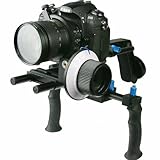
When I first saw this pop up on amazon I was very skeptical, I know you usually get what you pay for. After getting this I realized when you spend $500-$1000+ on a rig and follow focus you pay for the brand name (red rock, zaucto, etc).

This rig/follow focus seems very sturdy. When I took it out of the box I was expecting a very light cheap set up, but the whole thing has a very high quality feel. The only thing that I could see maybe breaking years down the road are the blue thumb tightening screws since they are plastic.

The follow focus is very nice, the whole system has no play. The final gear to the lens has a SMALL amount of play nothing I am concerned about. The gear for the lens stays in place and I have not had any issues, I just need one for each lens now. I trimmed about an inch off the end so I didn't have as much hanging off the end and I can still get around all the lenses I have.

The mounting block has 4 tripod mounting holes and is made of nice solid metal. All the rails are very high quality and seem very sturdy.

The only part of this that is not amazing is the shoulder mount, I didn't expect it to be amazing from the pictures. It really needs the shoulder and either a mono pod or a 2nd support for the torso.

Overall if you are an indie HD DSLR film maker or are looking for a cheap non DIY follow focus rig this is a nice high quality rig that I will be shooting with for years to come. I would highly recommend this to a friend.

Click Here For Most Helpful Customer Reviews >>