Showing posts with label canon camera lens. Show all posts

Defender SN301-8CH-X 8 Channel H.264 Smart DVR Security System

Defender SN301-8CH-X 8 Channel H.264 Smart DVR Security System with Coaching iMenu
Customer Ratings: 4.5 stars
List Price: $449.99
Sale Price: $353.49
Today's Bonus: 21% Off
Buy Now

I'll write a longer review when I have time.

The Swann DVR I had just died after almost 2 years. And I'm so happy it did (read my review on the Swann DVR)

I have had this DVR about a month now and I'm blown away by how much better it is.

I have not set up the internet access yet, so I'll update my review when I do that. But in every other way this DVR is better than the Swann.

I was very surprised to to see the picture was sharper than the Swann on my monitor. Which seemed strange since it has the same cameras.

The playback sharpness is MUCH SHARPER on this DVR. This is because the compression method used must me MUCH BETTER. The live feed and the playback look the same actually, you can't even tell it's a recording. Even on the the Swann's highest setting the playback looked like garbage.

This DVR comes with a mouse! So using the system is much like using a computer. You have cursor on the screen icons, which is really, great.

the remote on this one actually works. On the Swann you had to hold the remote about a foot away from the DVR. And even then you might be fast forwarding a 2x speed, hit pause and have the speed go to 3x, hit stop and the speed would go up to 4x.... really the the Swann was a piece of garbage.

The search is MUCH better on the Defender. You can check only 1 camera at a time, instead of having to review every single camera.

The record options are MUCH MUCH better. For EACH camera you can set it to record all the time, motion, or not at all. On the Swann, you have not choice how you set 1 is how they are all set. On the Defender, you can set them each individually.

The motion detector actually WORKS on the Defender. I think it has some kind of pre roll. When you playback sometimes there will be no movement for a second (and you might think the motion detector was set off by mistake), then someone will suddenly enter the frame so as I said, it must have some kind of pre-roll function built in. On the Swann, sometimes you would only see someone just after they were leaving the frame, you would see a shoulder, but no way to identify the person, even though they had walked down the hall 15 feet straight towards the camera!

The Defenders Motion detector goes off ONLY WHEN THERE IS MOTION! On the Swann I had to constantly tweak the brightness and contrast to keep the motion detector from going off every 10 seconds sometimes. (Literally, not set right the motion would go off every 10 seconds in a hall with no windows. Then the florescent bulb in the hall would go out and be replaced, I would have to set it up all over again.)

The Defender still records while you are in playback mode! The Swann stops recording in playback mode :(

I really could go on, but don't have the time at the moment, after I set up the remote network access I will finish the review.

UPDATE:

May 8,2011

I forgot until now to finish the review!

When I originally set up the network access (remotely from my laptop) There was a slight error but I called the tech support who helped me put the "something" outside the "something range" (I forgot exactly what we did) and since then it has worded flawlessly. I just checked it after not using it for months and I'm still connected! I have not set up use on my iphone yet because I'm still running OS3 and have not updated to OS4. I've been too lazy to clear all my photos and videos off my phone. So I'm not sure how the iphone app works....

This is a great machine. I just learned that I can set it to show all 8 cameras but when there is motion in one camera it will fill the screen on that camera for 10 seconds (or longer if you want to set it that way). This is a nice setting because after a while you don't notice movement in the tiny frames. But when suddenly you have 9 squares (only 8 cameras) and the screen jumps to full screen mode you notice that, so you notice the movement in the frame. Great for when a delivery person comes to the door and you have headphones on.

UPDATE

Feb 2013

The product still works great but Defender no longer seems to have phone support. The live chat is what live chat always is.... you sitting there waiting for someone to respond when they do eventually respond it's pretty clear they have forgotten your particular problem since they are chatting with many people at the same time. It took me 45 min to get a very, very simple problem resolved. I can't recommend their customer service anymore and am knocking off 1 star I almost want to knock off 2 but I have had a good experience with this product until today. I hope the company wises up.

I do now have an iphone OS that allows use of the system. But you can only monitor not playback.

Click Here For Most Helpful Customer Reviews >>

HTC One, Black (AT&T)

HTC One, Black
Customer Ratings: 4.5 stars
Buy Now
EDIT (11/28): Another four months later, I'm still very happy with my purchase. I haven't had a single problem with the phone, and it's just as fast as ever. Seems fitting to post on Thanksgiving because I'm definitely thankful for such a great phone.

EDIT (7/17): Two months later, I'm still in love with my HTC One. The build quality is amazing and haven't got a scratch on it yet (no case but I'm very OCD when it comes to electronics). BoomSound (could have perhaps picked a better name) still gives you the best sound quality out of any phone currently available. My phone still has the same zip from day one. Swiping screens, opening and closing apps, etc. still butter smooth. The lag and jitters the Galaxy S4 sometimes experiences was a big turn off to me, which is why in terms of everyday use, the HTC One is much faster and more responsive. If anyone has any questions, leave a comment and I'll definitely reply back.

Original Review:

It came down to the Galaxy S4 or the HTC One, and I'm definitely glad I went with the HTC One. HTC truly outdid themselves with this phone, both in design and quality. I'm coming from an iPhone 3GS, but even if you're coming from an iPhone 5 or a Galaxy S4, this phone is impressive. I'm mainly comparing the HTC One against the iPhone 5 and the Galaxy S4, because I've had hands-on experience with both and also because I don't think any other phones even come close.

Design:

The HTC One not only looks amazing but has one of the best builds I've ever seen on a phone. Its build quality is only rivaled by the iPhone 5 (I'd still say HTC wins). It's not featherlight, but the slight heft you feel when you hold it only makes it that much better. It's the perfect mix of premium quality, great design, and the intelligence to actually put it all together without screwing it up. The Galaxy S4 in terms of build quality can't even compete. Don't get me wrong, the Galaxy S4 feels solid in your hands, but the HTC One brings that experience to a whole new level.

Screen:

Simply stunning. The HTC One currently has the highest pixel density of any phone with 468 ppi, followed by the Galaxy S4 with 441 ppi, and finally the iPhone 5 with 326 ppi. I love the fact HTC went with an SLCD 3 display versus SAMOLED. While SAMOLED displays offer truer blacks and usually better color saturation, this comes at the price of often times over saturating colors and not being as crisp and clear as an SLCD display. Both the Galaxy S4 and the HTC One offer full HD 1080p displays, but I'd still go with the HTC One despite the slightly smaller screen. Colors are simply more accurate and text is crisper, clearer, and easier to read whether indoors or outdoors.

Hardware:

The Galaxy S4 has a slight advantage on paper when it comes to processing power, but you'd never guess it by using the two phones. The HTC One is actually a lot faster in everyday use. I was amazed the Galaxy S4 still experienced lag and stutters when it came to simple things like switching screens or opening/closing apps. While almost every benchmark you see gives the edge to Samsung, it really only proves that Samsung is better at... you guessed it: benchmarks. In terms of raw processing power, the Galaxy S4 clearly wins, but in the real world benchmarks mean next to nothing, and HTC shows this pretty convincingly. I'm not saying the Galaxy S4 doesn't have any edge because it does, but processing power alone is misleading. In the words of another reviewer, "In terms of performance, this phone is pure butter out of the box," and I couldn't put it any better myself.

Camera:

HTC shows you don't need a high megapixel count to experience amazing pictures. I've never seen a camera take pictures as well in low light as the HTC One. The detail and quality you get are ridiculous. The Galaxy S4 is great in bright light, but if you're like me, most of your pictures are not in perfect lighting, which means the low light capabilities of the HTC One are much more valuable. The Galaxy S4 also tends to over saturate colors, so while pictures may seem brighter, they're not true to color. The colors and contrast on the HTC One are more accurate. The HTC One is also quicker at taking pictures than the Galaxy S4. If you're someone who spends a lot of time outdoors (in the sun) and wants a high level of the detail when zoomed in, the Galaxy S4 would work best. If you're someone who spends most of their time inside or out at night, the HTC One would be a better fit. I'd probably put the iPhone 5 somewhere between the Galaxy S4 and the HTC One.

Sound:

Beautiful. The dual front speakers with built-in amps sound better than any phone I've ever heard. There's really not much else to say. The sound is crisp and clean even with the volume up. Since the speakers are on the front rather than the back, the sound isn't muffled when it's lying down. It also doesn't sound tinny like most phones. Both the Galaxy S4 and the iPhone 5 have a single speaker and simply can't compete with the HTC One in terms of sound quality.

Software:

There's been some fuss over the HTC One being released with Android 4.1.2 instead of the latest version (4.2.2). I couldn't care less for a few reasons. First, there's not many differences between the two versions to begin with. Second, HTC is probably holding out for the KLP update and simply skipping 4.2.2 altogether. If you're someone who always needs the most up-to-date version, the Galaxy S4 is probably a better choice (ships with 4.2.2). I have to give credit where credit is due, and Apple wins hands-down when it comes to update releases (not necessarily talking about quality). All iPhones regardless of carrier receive updates at the same time. Some argue Android has become too fragmented due to all the different versions currently running on phones and tablets, which in the end tends to hurt Android.

HTC offers their UI called Sense while Samsung has their own called TouchWiz. Here's where personal preference is going to come into play. HTC's Sense 5 UI has been stripped down and takes a simple approach and design concept. Samsung on the other hand has a lot more bells and whistles. I'd say once again Apple is somewhere in the middle. If you're someone who loves using a lot of apps and features, Samsung certainly has a lot more to offer in this area than HTC and Apple combined. When it comes to what I'd call useful features, however, I think that comparison is much closer. I like HTC's "stripped down, no nonsense approach" versus Samsung's "throw everything at a wall and see what sticks." If you're someone who likes to mess with things, the Galaxy S4 is more geared toward you. If you're someone who enjoys simplicity, the HTC One is probably more your style.

Battery/Memory:

The Galaxy S4 has a larger battery than the HTC One but in real world testing performed about equal, so the extra 300 mAh doesn't give too much of an advantage (you could argue because of the Galaxy S4's larger screen but it's hard to say). The main difference is the HTC One doesn't have a removable battery (much like iPhones) while the Galaxy S4 does (I've never been one to use multiple batteries, so it doesn't bother me). There's another slight difference that usually goes unnoticed. HTC chose to go with a Li-polymer battery versus the normal Li-ion (Galaxy S4 and iPhone 5). Li-ion batteries suffer from "aging" or losing capacity even when not in use. Li-polymer batteries, however, can hold a much better charge over time.

The fact there's no microSD card slot on the HTC One might be a deal breaker for some, but I don't think it should be. First, the HTC One starts out at 32 GB, which is double the Galaxy S4. Second, the OS takes up less memory on the HTC One than on the Galaxy S4. Roughly half of the 16 GB on the Galaxy S4 is reserved, which means you're already down to close to 8 GB before you download a single app. It seems as if Samsung is literally forcing customers to buy a memory card, and worse yet, apps can't even be stored on them (only internal memory). Out of the box, you either start with a little over 8 GB with the Galaxy S4 or close to 26 GB with the HTC One. The HTC One is also currently about $40 less than the Galaxy S4 (AmazonWireless). Apple wins again though when it comes to OS size with iOS taking less than 2 GB.

The HTC One to me is the perfect blend of design, practicality, and power. While it might not be perfect for everyone, I honestly think it's currently the best phone out there. Perhaps the Galaxy Note 3 or the iPhone 6 will change this, but for now the HTC One is king (or rather the one :P).

Click Here For Most Helpful Customer Reviews >>

Sony Alpha NEX-5 Silver 14.2MP HD Digital Camera in Silver

Sony Alpha NEX-5 Silver 14.2MP HD Digital Camera in Silver with Sony SEL16F28...
Customer Ratings: 4 stars
Buy Now
The Sony Alpha NEX 5 is an amazing HD Digital Camera. Even if you keep the setting on "Auto" it knows the correct settings. I use the wide angle lens for picture of homes and rooms for my real estate business and it takes great pictures of the whole room, with no wierd warped looks to picture. The panoramic setting is also amazing. I would suggest this camera for all of your digital needs...small but powerful!

Click Here For Most Helpful Customer Reviews >>

Think Tank Glass Limo, Long Lens & Camera Backpack, Black Nylon

Think Tank Glass Limo, Long Lens & Camera Backpack, Black Nylon - With FREE Think Tank DSLR Battery Holder(4)(a $16.50 Value)
Customer Ratings: 5 stars
Buy Now
Canon should sell their large zoom lenses with this backpack instead of their (suitcase) case. Works perfectly when I have to hike. I love the Think Tank systems and this is a no brainer. Worth every penny!

Click Here For Most Helpful Customer Reviews >>

Sony Cybershot DSC-T1 5MP Digital Camera with 3x Optical Zoom

Sony Cybershot DSC-T1 5MP Digital Camera with 3x Optical Zoom
Customer Ratings: 4 stars
Buy Now
Although I have much experience with cameras, camcorders, and digital images, I have never owned a digital camera before. My main camera has been a Nikon 6006 SLR, so I am pretty picky about quality.

After extensive research, I settled on the DSC-T1. It is exactly what I expected, and almost exactly what I wanted, but allow me to elaborate because it may not be exactly what YOU want.

I was tempted by larger digital cameras (and I will eventually get one of those too). For example, the Panasonic Lumix is few bucks cheaper and has more controls, a BIG lens, great image stabilization, and 12x optical zoom (digital zoom is meaningless). It is even possible to get a medium size 5MP digital camera with 5x optical zoom and better pictures than the dsc-t1 for much less. However, I concluded that I would rather have a good camera with me 24x7 than leave a great camera in the car or at home. I was SO right. I have already captured SO many photos I would have missed. I carry the camera at all times in one of those silk bags that come with Oakley sunglasses.

I considered other small cameras like the Casio Elixim Z4, but it does not have video in US versions. The Canon S400 is very good, but it is slower and thicker with a much smaller LCD, and a newer version is coming out April 30th. No ultra compact that is clearly better than the DSC-T1 is on the horizon.

In addition to ultra compact size, I wanted at least 4MP, at least 3x optical zoom, quality video ability, speed, ease of use, and flexible shooting modes. This camera has 5MP, 3x optical zoom, excellent 640x480 video mode, speed, ease of use, and shooting modes flexible enough to accommodate everything from action to night images.

Video is in MPG files, which can be played back on the free Real Player. It is not possible to zoom while shooting video, but it is possible to zoom before recording begins or when recording has been paused.

I haven't tried the software that comes with it yet. I run Windows XP, and I just place the dsc-t1 in the cradle, turn it on, and it appears as another disk drive in Windows Explorer. I can copy files from it and paste them onto a hard drive. I can then delete the image files from the camera to free up the space on the memory stick just as if I were deleting files from any Windows folder.

Apparently slowness is a problem with all digital cameras except for a few of the most recent ones, and the DSC-T1 seems fast to me. This may be the result of the newer and faster Duo Pro Memory Stick technology. Get the 256MB Duo Pro Memory Stick. The 512MB stick costs three times as much. Don't bother with a spare battery. They are too expensive, and the battery life is OK. You don't want to be frequently opening the delicate little battery/memory doors on digital cameras anyway.

Don't worry about having no optical view finder. They just make cameras bigger. The 2.5 inch LCD is bigger than any other digital camera and is quite sufficient.

Such a small camera is a little tricky to hold SECURELY without getting in the way of the lens, so if you tend to drop things, then you WILL eventually drop this unless you use the wrist strap at all times, which partially defeats the convenience aspect. I still haven't attached the wrist strap because I am extra careful, but someone could still bump into me while shooting. On the other hand, I don't want to overstate this problem because the camera is quite durable/graspable when the lens cover is closed.

Almost every indoor picture with the kids has at least a hint of red eye. I consider about 60% of them to have too much, but I still get more quality shots than I have time to email, so I really can't complain. BTW, 5MP jpeg files are about 2MB each, which makes email a challenge. Less than one out of ten indoor pictures seems grainy. It is actually possible to take decent pictures in total darkness when using the flash because the auto focus works in the dark, which is not true for every camera.

It is possible to use one of the modes that forces the camera to 100 speed to guarantee maximum resolution (0% graininess), but you may have to brace the camera well for the slow shutter speeds that result. In fact I took some good pictures from my front porch at NIGHT by bracing the camera, but this will take more practice. Note that such pictures did not use a flash because a flash is useless beyond a few yards away, and only works WELL up to 6 feet away.

One pleasant surprise was the excellent sound quality. I carried a digital voice recorder 24x7, which would fill up until I had time to manually transpose my notes and delete them forever to free up memory on the recorder again. Before that I used the very expensive little Pearlcorder L400. It was less convenient to transpose from a tape, but at least I could keep the tapes forever. Sound quality on all of them was poor. Whereas, with the DSC-T1, I discovered I could take hours of VIDEO notes in 160x160 mode with perfect sound quality and then just copy these files onto my hard drive to keep forever. This is when I knew I was keeping the DSC-T1.

Click Here For Most Helpful Customer Reviews >>

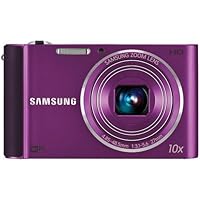
Samsung ST200F Long Zoom Smart Camera - Plum (EC-ST200FBPLUS)

Samsung ST200F Long Zoom Smart Camera - Plum
Customer Ratings: 5 stars
Buy Now
I got this for my sister for her birthday because it had Built-in Wi-Fi capability, and you can send photos to Facebook(tm), Picasa(tm), Photobucket(tm) or email directly from the camera. You can also upload videos to YouTube You can also save the images to your PC by just one click with Auto Backup. No searching for the cable, and while it is a long (10x) zoom camera it is not bulky but fits in her pocket (it's about 19mm thick)...and for traveling, which she will be doing this summer, it has Live Panorama, that creates 180ยบ panoramic images.

Finally since she isn't the best at manuevering all the dials, this baby has Smart Auto 2.0. that has scene detection technology identifying up to 16 different shooting conditions, instantly analyzing key elements of the composition, and then adjusting to optimize settings for every individual situation. Other things are Magic Frame which has 12 background templates such as Wall Art, Full Moon, Magazine and Holiday that let you easily create poster-quality art and Artistic Brush which is like your own in camera pixlr that takes any portrait, landscape or candid and turn it into a black and white sketch and Split Shot where you can merge up to three different images to create an artistic statement!

I personally liked the Optical Image Stabilization(OIS) that helps you get still shots whether you are or not (moving cars, shaky hands, ferris wheels) . It comes in black, silver and hot pink....she loves it and I liked the fab price. Highly recommended.

Click Here For Most Helpful Customer Reviews >>

Nikon D60 10.2MP Digital SLR Camera with 18-55mm f/3.5-5.6G AF-S

Nikon D60 10.2MP Digital SLR Camera with 18-55mm f/3.5-5.6G AF-S DX VR Nikkor Zoom Lens
Customer Ratings: 5 stars
Buy Now
I've been using Canon PowerShot point-and-shoot digital cameras for the past 6 years, and because they're so small, portable, and unobtrusive, I've ended up taking a lot more photos that I ever did, because I had my camera with me. The good thing is that I've taken a lot more pictures, and most of them have been very good (the camera gets much of the credit here). But the bad thing is that I started to reach the limits of what a point-and-shoot camera can do.

The biggest problems I had with my compact point-and-shoot camera was the lag between shots and the generally poor performance in low-light settings. For most shots, these weren't big problems, but when they were a problem, they were a huge problem, and there's not much you can to solve it without moving to a better camera. I don't think I'm the first person to reach a brick wall when using compact digital cameras, which is why there are now some excellent options that don't cost a fortune.

After reading a lot of reviews for digital SLR cameras online, I narrowed it down to two choices: the Sony A300 or the Nikon D60. I love my compact Canon, but I wasn't all that impressed with the Canon dSLR's that I looked at, either in terms of price or features.

The Sony is priced very competitively and offers some great features, such as auto-focus and image stabilization built into the camera itself, not relying on the lens. The A300 also has live preview on the LCD screen, which the D60 doesn't offer (live preview is what you get on a compact camera: you see what you are shooting as you take the picture). Finally, the A300 has more focus points than the Nikon. I spent a long time in several stores doing side-by-side comparisons of these two cameras. After many test shots, I finally chose the D60 for the following reasons: it felt more compact and less heavy than the Sony, I liked the way the lens felt when I was zooming, its LCD menu system was much clearer and more intuitive, and the Nikkor family of lenses is unbeatable. With a dSLR, it really gets down to which line you want to commit to for future lens purchases. I wasn't sure I wanted to go with Sony, when Nikon is well-known for quality optics.

I ordered the D60 from Amazon and I'm glad I did, since they have a 30-day price match policy. If the price of the camera decreases within 30 days of your purchase, all you have to do is email Amazon, and they'll credit you with the difference. The price of the D60 went down three times after my purchase (it's even lower now, but I've passed my 30 days), and Amazon was fast to process the refund for each decrease. Please note that it's your responsibility to check on the current price. Amazon will not notify you that the price has gone down, and why should they? So if you do buy this from Amazon, be sure to check every couple of days to see what the current price is.

As for the camera and the lens, I couldn't be happier. I love how it feels and how easy it is to use, at least for basic shots. Of course it won't fit in my pocket the way my point-and-shoot did, but it's not nearly as huge or heavy as I'd expected. The kit lens has VR (vibration reduction) which is a good thing to have, and it's well balanced with the compact body of this camera. In other words, the camera doesn't point down under the weight of the lens. Everyone who has tried out my new camera has commented on how compact and ergonomic it feels.

The camera works extremely well in low-light settings, with or without flash (you can defeat the flash if you want, and I find that in many situations, I get better results that way). The flash is a lot more powerful than what you get on a compact camera, and the coverage is more even.

So far, I've mainly used the "auto" mode, but I've taken some pictures in macro mode. It's graat to be able to take pictures in rapid succession, without having to wait the way you do with a point-and-shoot. Most important of all, the image quality is outstanding. The difference is noticeable and consistently better than what I was getting with my point-and-shoot.

The LCD menu is intuitive and visually appealing. That was one of the reasons I went with the Nikon in the first place, and I haven't been disappointed. By pressing the right button as you move the mode dial, you can see a description of what each mode does, which is very helpful. It's sort of like having a "help" system built into the camera, without having to carry around the instructions. Having said that, the instruction manual is really quite good. It won't teach you everything you need to know about digital SLRs, but it does a good job of explaining the camera's features. Nevertheless, I recommend buying a more extensive guide book which is specific to the Nikon D60 (there is one by David Busch which is currently available, and several more are scheduled to appear within the next couple of months).

So, I love this camera, especially at the very reasonable price point. However, there are some things that you should consider before making a final decision. First, the D60 will only provide auto-focus with Nikkor AF-S lenses. That means that most Nikon "prime" lenses will require manual focusing. That wasn't a big deal for me, but it is a limitation. Second, the D60's 3 focus points put it at the low end for this feature. Third, the D60 uses SD cards, while the Sony uses Compact Flash cards, as do many higher-end dSLRS. This isn't really a plus or minus, since SD cards are generally less expensive than Compact Flash, but some users say that Compact Flash cards may be more durable in the long run (they're larger and thicker). Finally, unlike the Sony, the D60 does not provide live preview. In other words, you don't see the image on the LCD until after you have taken it.

With all of that, I'm very pleased with my decision and I am having a lot of fun with my Nikon D60. If you're ready to move up from your point-and-shoot to a dSLR, you cannot go wrong with the D60.

Click Here For Most Helpful Customer Reviews >>

Nikon 200-400mm f/4G AF-S SWM SIC ED IF VR II Nikkor Super

Nikon 200-400mm f/4G AF-S SWM SIC ED IF VR II Nikkor Super Telephoto Zoom Lens for Nikon Digital SLR Cameras
Customer Ratings: 5 stars
List Price: $8,400.00
Sale Price: $6,749.00
Today's Bonus: 20% Off
Buy Now

I've been using the AF-S NIKKOR 200-400mm f/4G ED VR II for a little over a month now and have been extremely pleased by the results I've had. I'm a photo hobbyist/ enthusiast and have never had as large a lens as this before but it is quickly becoming a favorite. In the short time that I have had the lens, I've mainly taken wildlife photos. What has impressed me most is how quickly the lens focuses and how spot-on the focus is. People are amazed when they see the detail the lens provides. I've actually handheld the lens using the VR II feature and the images were just as sharp as the tripod-mounted photos. Very impressive!

All-in-all, I'm very pleased with the results and have no buyer's remorse whatsoever. I would recommend this lens to anyone looking to jump into the high power zoom category.

Click Here For Most Helpful Customer Reviews >>

Nikon 18-105mm f/3.5-5.6 AF-S DX VR ED Nikkor Lens for Nikon

Nikon 18-105mm f/3.5-5.6 AF-S DX VR ED Nikkor Lens for Nikon Digital SLR Cameras + 3 Piece Filter Kit + Pen Cleaner+ Cleaning Kit White Box-New
Customer Ratings: 4.5 stars
List Price: $389.95
Sale Price: $349.00
Today's Bonus: 11% Off
Buy Now

Very pleased.item arrived on time and in perfect condition. I use it every weekend sense it arrived.i highly recommend this product and pleased with the fast service.

Click Here For Most Helpful Customer Reviews >>

Acer Aspire One AOD270-1410 10.1-Inch Netbook (Espresso Black)

Acer Aspire One AOD270-1410 10.1-Inch Netbook
Customer Ratings: 3.5 stars
Buy Now
The recent Amazon sub 239 tariff keeps this form factor relevant, as does the battery life, but be sure to check out the Acer Aspire One AO756-2808 11.6-Inch Netbook (Ash Black) as well, at least when Amazon has it back in stock for 3 bills or so. 7-19-12 note

The best reasons for buying the Acer AOD 270:

* One of the best netbbook screens pretty evenly illuminated, and sufficient latitude in viewing angles so that when you are centered, none of the corners or edges are showing signs of diffracting.

Don't laugh, on some netbooks and even notebooks, the viewing angles can be SO limited that even if your head is centered relative to the screen, some part of the screen will be shaded, washed out, or diffracted.

Videos look pretty good on the AOD270 (but not as good as on a flat screen tv).

(If you want "great" video, you will probably have to move up to the much more expensive Macbook Air or shift to a completely different experience in the form of an iPad with its multi-angle IPS display.)

* Very thin design, very light, especially with the 3 cell battery, which can be purchased separately if you start with this 6 cell version. Note that this netbook and almost all non-Apple laptops come with somewhat short-lived batteries, good for two to four years (depends on charge cycles) before the loss of battery life drives you to buy a new battery (which you can replace yourself, cheaply, which helps compensate for the battery mortality). (Since the review I took the 6 cell battery off an earlier Acer netbook and put in on this newer unit, and it works fine and adds a couple of hours of battery life; it doesn't stick out for the bottom too much.)

* Screen tilts back far enough so that you won't have viewing angle problems if using this on a kitchen counter while standing up.

* Larger keys with acceptable spacing. Intuitive "break" on the keys so tactile feedback is there that your keystroke was accepted. (A little noisy though.)

* Plays 480p (DVD quality) video smoothly, with fewer minor glitches with downloaded vs. streaming content (since streaming imposes an additional processing overhead)

* HDMI port lets you hook this up to your (modern) flat screen tv to play Hulu content, which you can't get on a Roku (without paying a subscription fee, although the fee includes additional video content).

* Great alternative to an iPad if you are on a budget, or a great supplement to an iPad if you type a lot. Despite the many accessory keyboards for iPads, the keyboard on most netbooks is superior. Pros for the iPad? Instant on, superior viewing angles, incredible screen on the "new" or "3" iPad, incredible battery life. Cons won't run Windows programs (huge if you have wordprocessing and other office needs, or want to run a blog).

* Great alternative to a Macbook Air if you are on a budget, if you worry about theft or damage (netbooks are priced so low as to be a "no worry" item), or if you worry about getting the wrong type of attention. Of course the Macbook Air weighs the same but has a larger screen, larger keyboard, and the keyboard is back-illuminated for easy typing in low light or the dark, making it the ultimate production netbook (even though Apple denies it is a netbook, LOL).

Finally, this Atom N2600 netbook is incredibly zippy once you clean out some of the bloatware and install a leaner antivirus program (Microsoft Security Essentials is completely free and very efficent, both in detecting threats and having a small footprint in RAM).

Here is my routine for setting up a new netbook (this applies to versions from other makers as well):

1. Don't accept the offer to install the commercial antivirus program which has a "free" trial offer. It's designed for computers with a lot more memory and processing power, and is the number one cause of sluggishness in netbooks. Don't worry about the "unprotected" messages you will get because you will fix that right away.

2. After booting up the first time, open Internet Explorer and say "no" to the guided tour and any other options, then enter "download Google Chrome" into the search box (or Chrome Beta, which has always been stable for me). Note how much space Internet Explorer wastes on the top of the screen, when Chrome opens you will see a much cleaner but highly functional browser window).

3. Install Google Chrome just follow the simple on-screen instructions.

4. In the Google search box (Google lets you choose among search engines when you install it, I like Google best although Bing from Microsoft is also quite good) search for "download MSE" which will take you to the Microsoft page to download Microsoft Security Essentials. Select the 32 bit version if offered a choice.

5. Install and run Microsoft Security Essentials. I would run your first scan later, after cleaning up your new netbook. When asked if you want the firewall turned on, say yes.

6. While waiting for the above downloads, right click on the desktop and select Properties and select the option to relocate your Taskbar from its default location at the bottom of the screen to a new location on the left or right of the screen. This gives you extra vertical screen space, which is more valuable than the horizontal screen space since the netbook comes with a pretty short horizontal screen space. You'll see what I mean when you work in your web browser plenty of text left to right but you won't get as much top to bottom as text as you will probably want without using a minimalist browser like Chrome plus moving the Taskbar.

7. Download PC Decrapifier (pcdecrapifier dot com) and run it. Although you can run it is a single pass, I find that pops up too many option windows at the same time. McAfee Antivirus in particular is somewhat convoluted to uninstall, so I recommend un-checking the uninstall boxes so that only McAfee is left, and uninstalling it using the cleanup program first. Then run PC Decrapifier a second time and let it uninstall all programs, including all Acer programs. None of them are needed, even the webcam (Google Talk and Skype have their own programs to run the webcam), and if you suffer cleaner's remorse later, just go to the Acer website (support dot acer dot com) and reinstall them, it's easy. DON'T uninstall Microsoft Security Essentials! Don't stress about the dire warnings you will get from McAfee as you uninstall it. MSE is there, direct from Microsoft, to take care of you.

8. After rebooting once or more times to complete the uninstallation, download "CCleaner" from FileHippo (Google download CCLeaner, go to the Piriform website, select the free option, and download). When installing, uncheck every installation option box EXCEPT the desktop shortcut box at the top.

9. You can ignore all menu options in CCleaner except the blue "Registry" icon in the left-most column. Click on that. (The little brick building.) Then click "Scan for Issues" on the bottom off the white box. Then "Fix Selected Issues". "Save Registry" (your computer won't explode if you forget to do this). "Fix All Selected Issues." Then, scan again because often it takes two or three passes to catch and fix all issues. Reboot.

10. Click on the Start Menu, then Computer (far right column), then right click on the hard drive and select "Properties." Unclick the "file indexing" option at the bottom of the Properties window, when it asks "subdirectories too" include subdirectories, and let the un-indexing go to work. This will take some time.

11. Go to the Control Panel (Click the globe in the Start menu, or tap the Windows flag key in the lower left of your keyboard.) Then use the search box in the upper right hand corner of the Control Panel window to search for "defrag". Click on the "Defragment your hard drive" option and select the schedule option; when selected, select "never defrag." You can run this yourself manually every six months.

Indexing and defragging run in the background but slow down your netbook. They aren't necessary for a good Windows experience.

12. This is optional. Go to Sourceforge dot net and download Foobar200, a simple but lean music player, and VLC, a simple but lean video player.

13. If you are brave, turn off automatic Windows updates. I set the option to "notify me and let me choose when to install" so my netbook doesn't suddenly get bogged down at a cafe. I do the updates later, at home, when I can switch to working on a desktop. I won't tell you how to do this, it's easy, but if you can't navigate Windows to this extent, you probably should just suffer through the sluggishness while Windows installs updates while you are working, rather than risk an out of date, and hence vulnerable, machine.

14. No matter how many times Windows Updates offers to install Bing Desktop, it is safe to ignore.

15. Tweaks dot come has a Windows logon screen changer. Search their site for "logon" or go to (Replace "dot" with . and close the space to make the link work).

I hope this helps. It is faster than it reads, and makes a huge difference in performance. Look at it this way you just saved the difference in price between a Macbook Air and this Acer.

Please check the Acer website for their complete list of Acer AOD270 models and the list prices. While Amazon never charges more than list price, occasionally vendors will, for models that are discontinued or in short supply.

___________________

For the mechanically minded: Adding an extra gig of memory SLIGHTLY improves performance with more windows, or browser tabs, open. [8-20-12 update I got bold and stuck a left-over 4gb RAM stick in the D270 Control Panel recognized the entire 4gb of RAM, but Windows 7 Starter is only 32-bit so the operating system would only recognize and use 3gb of that. That was a REAL 3gb for WIndows itself, though, since whatever RAM is being set aside for the video doesn't count against that (Task Manager reports 3gb available, where before, with 2gb, Task Manager reported only about 1.7 gb available since the rest being used by video). Now that memory has dropped down so low in price, you MIGHT want to consider replacing the 1 gb RAM module with a 4 gb module instead of a 2 gb. I was afraid the BIOS or chipset might be incapable of addressing a 4gb stick, but based on my experimentation this is NOT a problem. WEI scores DROPPED to 3.2, 4.6, 5.6, 3.2 and 7.8 on the first test run, and improved slightly to 3.3, 4.7, 5.6, 3.2, and 7.8 on the second test run (I have an SSD which is why the HDD component is so high). In my experience the first time you run a "re-fresh" the scores on WEI are unreliable, you have to run the full, slower re-assessment after the "re-fresh" is finished to get stable scores. I have no idea why both video scores dropped, but in practice Hulu is rock-solid and if anything, desktop video effects (opening and minimizing windows etc.) seem snappier. Maybe there is just more video memory for the chipset to use now, and while that is good in practice, it means more to move around for the WEI test. Please comment if you know what might be going on.]

To access the memory slot, first remove the battery, then the keyboard by locating the four small tabs at the top of the Function key row that are holding it in. These tabs are released, one by one, by pushing back, not down, and you need to be ready with a thin bladed screw driver or something thin like a nail file to pry the keyboard up, tab by tab. Once the tabs are released, you will see the keyboard has a flat ribbon connection to the body. You can either lay the keyboard out of the way and remove the FIVE screws, each marked "back cover", then push your screwdriver into the square hole marked "cover release" to start releasing the back cover. Then being careful with the ribbon connector and the keyboard, turn the netbook over and gradually work the back panel off, it has snap tabs, start at the section that you opened slightly from the front side. Memory replacement is then easy. To replace the back panel, slide the edge nearest the battery compartment in FIRST, then snap around the edges to seat the other sides. Replace the screws, lay the keyboard back in, then snap it down along the top front edge. NOTE: you can also disconnect then reconnect the ribbon to the keyboard. To do this, note the dark gray, almost black, plastic bar lying across the top of the ribbon where it enters the connector on the panel under the keyboard (on the netbook body). On some ribbon connectors, such a clamp will slide towards the ribbon to relieve pressure, but on this design, it swings up and off the cable, so just use your finger nail to flip it up. When reassembling, be sure to push the ribbon in evenly so the black line aligns with the clamp, then close the clamp.

*** on 8-1-12 I replaced the stock hard drive with a 128gb SSD this netbook takes a 9.5 mm high drive. You can use one of the emerging 7.0mm high drives BUT be forewarned that the hard drive does NOT screw into the bay, it relies on "perfect fit" to keep everything in place! So if you use a 7.0 mm drive, you risk it shifting around unless you fabricate a space. For this reason I recommend a 9.5 mm drive like the Crucial 128 GB m4 2.5-Inch Solid State Drive SATA 6Gb/s CT128M4SSD2. After installing, the WEI for the hard drive shot up from 5.9 to 7.8, a very significant increase, and disk intensive operations like virus scans run much faster. If you decide to replace your drive, you remove the old one by looking for the end with the connector, then lifting up the OTHER end. Then, without disturbing the connector's connection to the motherboard (use your finger to hold it down, in place!) just wiggle/pry the hard drive off the connector. To install the new SSD, just push it onto the connector until fully mounted then lay the drive into the hard driver slot and close up the cover. For software, you have 3 choices: cloning software, recovery disks, or new install. I believe if you download the Acronis disk clone software from Western Digital, it will also work on this drive, but I used the version that came with an old Kingston SSD so I can't guarantee it. For recovery disks, you either buy a set from Acer for about $15 including shipping beforehand, or generate your own set by using the included Acer utility program (which you can easily download and reinstall from the Acer Support website). New installs are complicated I have done them from recovery disks from other netbooks, then re-entered the code from the bottom of my netbook, it is hard to get Win 7 Starter install media. The one work around I used once was to upgrade to Home Premium first, write down the new license number, use a Home Premium 32 bit disk to install, then entered my old unit's upgrade license number. I understand that Windows recovery disk images are available from Microsoft Support online for free (since they won't work without entering a license number off your old unit), but you would need to track those down.

___________________

CAUTION regarding video driver update: I am a big believer in applying all driver updates presented on the manufacturer's website. Especially the video drivers for this new Atom N2600 chip which is running the new Intel GMA 3600 video chip (very similar video chip to that used in the iPad). HOWEVER when I updated to the .1075 driver on the Acer website, my videos became choppy. As soon as I returned to the earlier VGA driver (.1065) on the Acer website, all my graphics problems went away. The other driver updates on their website are running fine on my machine. YMMV, so don't hesitate to switch the two drivers around to find one that works best for you.

I purchased my AOD270 from Target for 249, which is the list price for the 3 battery cell edition.

Click Here For Most Helpful Customer Reviews >>

HTC Flyer 7" Android Tablet, 16 GB

HTC Flyer 7' Android Tablet, 16 GB
Customer Ratings: 4.5 stars
Buy Now
There are many specifications-based reviews out there on the Flyer, so I won't repeat those, and instead base this write-up off of my experience with HTC's device over the last few weeks. I have to start this review by saying that I've been a tablet PC user for years, and have found many recreational and business related uses for computers that have active pen input. But even my current tablet PC, an HP Touchsmart, can get tiresome to carry around all the time. I work with kids, and needed a backup device that was small, quick to turn on, and could be loaded with fun activities for children. That's where the Android tablets come in. I rooted a couple of Nookcolors, and instantly fell in love with the 7" form factor. So when I learned that HTC was going to be releasing a 7" tablet with some kind of active stylus, it sounded like the best of both worlds (small android tablet with pen input), and I knew I had to check it out.

I have to say that when most people think of a stylus, they think of that plastic stick that they used to poke their old palm pilots with. That is NOT what this is, nor is it intended as a replacement for touch input. This pen input is intended as a replacement for pen and paper, as you might use when you draw or take handwritten notes. When you're talking about active pen input, you're looking for 3 things: Precision, pressure sensitivity, and palm rejection. I hate to be this blunt, but if you can't view a stylus as being anything other than that dead plastic stick from the old days of resistive screens, then this type of device just simply isn't for you.

When I learned that the Flyer used N-Trig technology instead of the Wacom digitizers I'm used to, I was initially hesitant. I do a lot of artwork and handwritten notes on the Touchsmart, and while it's not perfect on the HP, the Flyer would have a lot to live up to. I knew I had to test it first in a store before I bought it, because if it didn't work well, I might as well stick with the rooted Nooks which did many of the same things and were half the price. The local Best Buy had the Flyer on it's release date and so I tried it out.

I'll be the first to say that the pen experience on the Flyer is NOT up to the quality of the wacom tablet PCs. I don't know if it's the sensors, the N-Trig technology, or if it's simply how the Android OS handles pen input. It's not the size, as I have a Motion Computing slate that is near the same size, and the pen accuracy on that device is far better. However, having said that, it is worlds better than using a regular capacitive stylus on an ipad, galaxy tab, or other similar device. I tried using a nice capacitive stylus with my Nooks and it was no better than using my finger. The Flyer is a far better inking experience, and I feel comfortable drawing or taking notes with it. It only has a couple of levels of pressure sensitivity (thick and thin) as far as I can tell, but you can make a decent sketch with it if you concentrate. If you'd want it rated on a scale, I would say a finger is a 1, capacitive stylus a 2-3, tablet PCs a 7-8, and the Flyer would be a 5.

Obviously I liked the inking enough to actually buy a Flyer even though I already had the Nooks and the Tablet PC. And since purchasing it, it continues to impress me. It's responsive, versatile, and durable. I can use it for games, drawing, notes, word processing, watching movies, streaming music from home, and just about everything else I could need from a media-consuption device. Better yet, many things listed as cons by others who have reviewed it have actually turned out to be related more to device settings (e.g., a washed out screen is because the autodimmer is set to low by default) and inadequately documented capabilities (e.g., standard microusb cables *do* work).

As much as I like the Flyer, it's not perfect. Unfortunately much of that stems from the pen use...the main thing that sets it apart from the flood of other android tablets out there. The preciseness of the pen tip can only be used in a small range of preloaded apps that HTC included (the opposite end can be used as a regular capacitive stylus, but again, it's like fingerpainting). For notetaking, there's the Notes app, and for drawing you can either use the Notes app or the Kid Mode app through Zoodles. They're decent apps, but they're not great. Perhaps I have been spoiled by programs like Onenote and Autodesk Sketchbook on the PC. But even on android, there are better apps out there for drawing or notes, and yet the pen will not work with them at this point. I'm sure HTC had a reason for limiting the pen this way, but I've yet to hear what it is. Luckily, this is software based, not hardware based, so HTC and other developers may release apps and updates that would allow the pen to be used in a wider range of applications. And since the Flyer is so new, I would imagine that these kind of advances are right around the corner. So I could see the Flyer's "good" inking experience go to "great" pretty quickly if it's given the right kind of attention.

Overall, it's a great little tablet. But, if you are not someone who likes to sketch or take notes, I would strongly suggest you look elsewhere. That's not to say that the Flyer is not a great all-around tablet. It is. It's fast, has a nice screen, great battery life, and a decent camera. But the main point of the Flyer is the pen. If you don't plan on using it for that purpose, you'll probably be happier with something else.

Cheers!

UPDATE 8-10-2011

HTC has just released their SDK to the public/developers which includes the Pen input. This means that other developers can now start integrating pen input into their apps, and we are likely going to see some of the well known drawing apps, like Sketchbook Pro, be updated soon. One developer, the author of the Fresco drawing app, started working on it shortly after it came out. This change might easily earn the Flyer another star.

In another development, it looks like HTC is working on a slightly larger Scribe-enabled tablet known as the Puccini, and it looks like it will ship with Honeycomb. Also, Lenovo is just about to release a Thinkpad Tablet (also with N-trig and Honeycomb), and by all appearances, the stylus appears to work across all apps as a form of input (not sure about the pressure sensitivity, though). My hopes are that the Flyer will get Honeycomb somewhere around the same time as the Puccini, and this update will allow the functionality of the Flyer's stylus to jump as it did with the Thinkpad.

UPDATE 10-4-2011

Well, I had hoped that I'd be able to update this with a description of how much more Honeycomb unlocks the potential of this little tablet. Unfortunately it's been two months, and the official build of Honeycomb for the flyer hasn't been released yet. However, I'd never post an update if I had nothing good to say. For those who are adventuresome, there is a leaked build of Honeycomb that you can install on your Flyer. The process doesn't look terribly hard, but it's not for the casual user either. Personally, I've decided to wait til the official version comes out.

BUT, in even better news, the Flyer has dropped in some places (like Best Buy) to $299! I'm hoping this will mean that a lot more people can enjoy the tablet, and that will lead to greater interest in it by developers...which ends up being better for everyone.

UPDATE 1-8-2012

The official Honeycomb update was released last week. What can I say...for me, this is what the Flyer *should* have been when it was released over half a year ago. Now the pen works across all apps at least the same as your finger, and in a wide number of apps, you have features like pressure sensitivity and palm rejection. One of these HC apps, Quill, does such a fine job of smoothing the ink that it nearly rivals the experience of a Wacom digitizer.

There are pros and cons for going over to Honeycomb, so for those Flyer owners who haven't done it yet, definitely weigh the benefits (the XDA Developers website is a great resource for this). It really depends on what you use your Flyer for. I would imagine that if you're a heavy pen user like I am, it will be a much easier decision.

Click Here For Most Helpful Customer Reviews >>

Canon EOS Rebel XS (a.k.a. 1000D) SLR Digital Camera Kit (Black)

Canon EOS Rebel XS SLR Digital Camera Kit W/ 18-55mm IS Lens & Canon 75-300mm III Lens + Lowepro Digital Gadget Bag + Spare LP-E5 Battery + 58mm UV Filter + Transcend 16GB SDHC Card + Willoughby's Accessory Bundle
Customer Ratings: 5 stars
Buy Now
My students and I had to sell a lot of ads to be able to purchase this camera, but we are so glad that we did. The camera is easy to use, takes exceptional pictures and I can't imagine publishing our paper without it. It is a bit heavy, but that's the only complaint I can think of.

Click Here For Most Helpful Customer Reviews >>

Canon EOS 5D Mark III 22.3 MP Full Frame CMOS Digital SLR Camera

Canon EOS 5D Mark III 22.3 MP Full Frame CMOS Digital SLR Camera with EF 24-105mm f/4 L IS USM Lens Essentials Bundle Featuring The Sandisk 32GB Extreme , Canon custom gadget case , Extra battery , And 3 Piece Filter Kit
Customer Ratings: 4.5 stars
Buy Now
Canon does a great job with this Canon 5D Mark III full frame camera. I called it a mini 1D, since it has the 1D AF system which is fast and lock focus right away. I can use all the old full frame EOS lens and third party lens without issue. Thanks for the effective micro focus adjustment. High ISO is usable all the way to 12800, which is smoother than the ISO 800 of 5D mark I! The jpeg output is very amazing, sharp and vivid. I am not the one who have the patience to do post-processing in front of the computer for hours. 5D mark III allow me to get the perfect shot right from the camera without processing. 100% viewfinder, speedy AF, 61 points AF tracking, mouth-opening high ISO performance, continuous shooting like a machine gun, super-fast digic processor that save photos in top speed. It also has the right weight to support those heavy L lens and the grip and handling are perfect. The quiet mode for shutter is a plus. The only thing that distract me is the Rate button, that I feel is not needed. However, I remember I can program it to do something else. The Custom C1,C2,C3 setting in the shift-protecting knob are very sweet, so I can save 3 set of customized settings. The vivid LCD screen is high-end and crystal clear and crisp. Video mode is also super nice, and I hate the lens AF for me, because I don't want motor-noise. From the outside, it may look like a Mark II, but inside it is a mini-1D for me without the bulk! Nice upgrade, built with quality, solid semi-professional DSLR which is a work horse for sure. Does it worth $4200, I would say yes :) I found this bundle deal with some goodies including a must have Sandisk 32gb extreme and Canon gadget bag , for about the same price this is the right way to go

Click Here For Most Helpful Customer Reviews >>

Nikon COOLPIX P520 18.1 MP Digital Camera with 42x Zoom (Dark

Nikon COOLPIX P520 18.1 MP Digital Camera with 42x Zoom + TWO EN-EL5 Replacement Lithium Ion Battery w/ External Rapid Charger + 32GB SDHC Class 10 Memory Card + Mini HDMI Cable + Carrying Case + Full Size Tripod + SDHC Card USB Reader + Memory Card Wallet + Deluxe Starter Kit DavisMAX Bundle
Customer Ratings: 5 stars
Buy Now
I was a little bit afraid being the first person buying this package, but I am very satisfied with the product and delivery time. My only recommendation is to have a better picture of the camera bag, because I preffer rubish bags. The product is wonderfull, and the camera is all what i want, excellent pictures, amazing zoom, and easy to use it.

Click Here For Most Helpful Customer Reviews >>

Dell Inspiron Mini 10 10.1-Inch Obsidian Black Netbook

Dell Inspiron Mini 10 10.1-Inch Obsidian Black Netbook with Integrated TV Tuner - Up to 6 Hours 20 Minutes of Battery Life
Customer Ratings: 4 stars
Buy Now
Note: I use computers for my work but don't pay much attention to details about them. I'm sometimes willfully ignorant of the details of my work computers, so this review (for better or worse) will not be a super technical one focusing on specifications and related details. I wanted a simple computer to use outside of work, and that's what I got here. I received this Dell Netbook a few days ago and wanted to share my initial impressions of it.

I do a great deal of writing for my job and need to have frequent email access. I have a Dell Notebook but find that it's a bit of a hassle hauling it around anywhere, so it ends up staying at home most of the time. When I saw this Dell's Netbook on sale, I thought it might be ideal for my needs. In particular, I wanted something very lightweight that would allow me to access the web, answer email, access PDF documents, and edit documents. This Dell does all that and much more.

My job buys all my computers (the last computer I purchased myself was a Commodore 64 when I was a kid!), so I was a bit nervous purchasing it. I checked out reviews here and elsewhere and they seemed to indicate that the Dell Netbook would work well for my needs. However, I was concerned by some accounts of netbooks being slower than laptops and having many of other deficits. Fortunately, my concerns were unfounded (it isn`t slow and I have low needs for extensive computer memory anyway). I've never had to unpack a computer before (the IT people at my job have that honor), but it couldn't have been easier. I was literally using my new Netbook within minutes. Everything was preloaded and ready for use.

I was hoping that it would come with Microsoft Word, but it instead includes Microsoft Works Word Processor, which I`d never used before. When I tried to open a Word document from my email, I was prompted to download Word Viewer. The two programs are compatible, but it is a bit of a hassle converting documents back and forth. Otherwise, I'm extremely pleased with my purchase. The Netbook is not slow in accessing the net even with numerous programs open at the same time. It is super lightweight -not much bigger or heavier than a large hardback book. The battery in the back does stick out a bit, although that actually helps make it more stable on a flat surface. Even straight out of the box, the battery lasted well over 5 hours. Other features include a webcam, adobe, media player, explorer -all the standard items you'd expect. As I mentioned, I don't pay much attention to computer specifications and whether it has this feature or not. I simply don't use my computers for anything too complicated. However, for what I need, this Dell Netbook more than exceeds my expectations. The Netbook's portability make it ideal for carrying it around and travel. I think it would also be a great starter computer for kids and teens.

Click Here For Most Helpful Customer Reviews >>

Eye-Fi Share 2 GB Wi-Fi SD Flash Memory Card EYE-FI-2GB (OLD

Eye-Fi Share 2 GB Wi-Fi SD Flash Memory Card EYE-FI-2GB
Customer Ratings: 4 stars
Buy Now
A few things to consider after getting the card:

1) Warm up time. If you haven't used the card for awhile or move to a different Access Point/Wireless router. It will sense it can't get a connection and goes through the access point list until it gets a connection if you have multiple WPA-TKIP entries it will add to this time. Hence the slowness of getting it started. Once it knows which AP to talk to. Uploads start within a few seconds after you take the picture.

2) As i tested it. It has the maximum security of WPA/2-TKIP. It can't do AES ecryption. They say WPA/2-PSK but don't mention at what level. It may frustrate some users trying to set it up. I spend 2 hours of pain until i reduced security on my wireless router.

3) The client is only required to setup the card. Afterwards the only reason why you need it is to recieve files onto a computer or setup more wireless access point.

4) Here's the big one. It always requires an internet connection. It always has to call home to the eye-fi service. Transfer to your computer is limited to you line's UPLOAD bandwidth. What it does is uploads your photos to the eye-fi service. The eye-fi service then sends it to your online service and then waits for contact from the eye-fi Client on your computer. Once the client connects it'll start downloading the image to the computer. So you can turn your computer off. Take a bunch of pictures. Turn your computer on and it'll start downloading all the pictures.

----------------

Almost 1 YEAR UPDATE

What can i say. The company is awesome. They've kept up with updates so early adopters can "upgrade" their cards to the newest features.

In fact all the new cards are the same card in reality just priced differently because of the features.

So with all the updates My old Problems #3 and #4 have been somewhat solved.

#3 You still need to pre-configure the card. But now you can now pay $15 dollars a year for Hotspot access. So now you can go to a closed hotspot service and it'll connect. Check Eye-fi to see what hotspots you can use.

#4 With the Eye-Fi Home edition they introduced the feature where it uploads to your computer first. And with the "Share"(original) and "explore"(geotag+hotspot 1 year subscribtion included) versions it'll upload to your internet spots afterwards. So now you can setup your computer and wireless router in a room. Take pictures and after a few seconds it'll show up on your computer. Also provided that you have the card setup with the access point and computer ahead of time. You can now shutoff the internet connection and it'll still work. Eg. Cheap man's wi-fi camera without internet connection. So if you bring a laptop and Wireless router (anything with DHCP enabled). You can shoot wirelessly directly to the laptop in the field even with zero internet connection. The coolest update.

You many have noticed there are various versions of the card. In reality ALL the cards are all the same. You can future upgrade even the most basic one. It'll end up costing nearly all the same. All it needs are firmware updates.

On another note. I never wrote about this but i was kinda mad that once you registered the card you couldn't tranfer the card to another address. I honestly thought i'd get rid of the card. But i didn't. Whats really nice. If you camera gets stolen and you have enough "open" access points pre-configured and maybe even the hotspot service. You might even catch the criminal like this lady did.

As they can't re-register the serial numbered card. And maybe you'll even get your pictures too.

Click Here For Most Helpful Customer Reviews >>

Sony HVR-Z7E (HVRZ7E, HVRZ7, HVR-Z7) handheld HDV 1080i

Sony HVR-Z7E handheld HDV 1080i camcorder with interchangeable 1/3inch zeiss lens
Customer Ratings: 4 stars
Buy Now
We order the HVR-z7E, since we wanted the Pal system, but instead recieved HVR-Z7U/Z7N. After 2 weeks of frustration and writing back and forth, we learned that the model, which was sent to us had both functions. It is working both Ntsc and Pal. The only problem it was not stated on their site and the passport, which accompanied the camera. It clearly stated that is only NTSC and we allmost sent it back. Luckily we managed to switch it to PAl. It is just not really right thing to publish one thing and send the other.

Click Here For Most Helpful Customer Reviews >>