Showing posts with label newest canon digital camera. Show all posts

Denon DBT-1713UD 3D Ready Blu-ray disc, DVD, Super Audio CD

Denon DBT-1713UD 3D Ready Blu-ray disc, DVD, Super Audio CD Player with Networking
Customer Ratings: 5 stars
List Price: $549.99
Sale Price: $499.00
Today's Bonus: 9% Off
Buy Now

Denons DBT-1713UD Blu-ray loads faster than their previous model. I had the DBT-1611UD and it was slow to go from placing the disc on the tray to actually playing the movie. Don't get me wrong, it was a great player. But it's not the DBT-1713UD. The DBT-1713UD has clean video and the audio is superb. The streaming of Netflix and Vudu is quick and painless. I'm not a big Hulu fan but it will stream it plus YouTube. If you like 3D, place Avatar Blu-ray in the player and you will be amazed at the clarity of the picture. If you have invested in a nice surround sound system you will reap the rewards. Is the cost of the player pricey, yes. But, if you want a audio visual experience that will leave you grinning from ear to ear, then this player is for you. The DBT-1713 doesn't have wireless capability to connect to the internet. So your going to have to hard wire it using an Ethernet cable. That's not a deal breaker for me. This player is not a miracle worker. If you are connecting this player to a lesser quality receiver and TV, well your wasting you money. Keep that in mind before you purchase this player. Am I happy with this player, you bet. Denon has done it again and kicked up their game. Thank you Denon!!!

Click Here For Most Helpful Customer Reviews >>

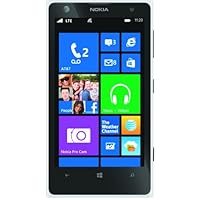
Nokia Lumia 1020, White (AT&T)

Nokia Lumia 1020, White
Customer Ratings: 5 stars
Buy Now
Great camera that happens to be an awesome phone too. Carrying this should replace all your gadgets: smart camera, smart phone, and great music player. No longer do I worry about capturing the perfect photo with all of my friends, nor do i debate with self anymore whether to bring my camera (Cannon S90) Now, I just bring my NL 1020, no stress about missing the most epic facebook photo shot, or having the perfect shot turn up less than perfect afterview. Plus, the screen is beautiful and sharp. When I set it next to the NL 920, the NL 1020 screen is much brighter and crisper.

Enough, about the camera. Windows Phone OS has came a long way. It's a great fresh OS.

It's a great phone, and the perfect companion to those that never want to miss the perfect picture.

Click Here For Most Helpful Customer Reviews >>

Olympus 300mm f/2.8 Super Telephoto ED Lens for Olympus Digital

Olympus 300mm f/2.8 Super Telephoto ED Lens for Olympus Digital SLR Cameras
Customer Ratings: 5 stars
Buy Now
I spend a lot of time photographing birds. They don't cooperate. You need a lot of lens and a lot of light to get a decent shot. This lens is simply terrific at both. The colors are excellent, the pictures are crisp across the entire image and there is no chromatic aberration anywhere.

The four thirds system provides very quick auto focus, crisp and responsive manual focus and relatively light weight. I say "relatively" because this is a big lens. You'll need a tripod or monopod to use it in all but the brightest conditions.

The lens is amazingly sturdy in the field. It was undamaged by a fall that cracked two of my ribs. It works consistently and reliably in very hot (90 degrees plus) and extremely cold (-45 F) conditions. I've carried it outdoors all day at temperatures below zero and never had a problem.

Highly recommended.

Click Here For Most Helpful Customer Reviews >>

Panasonic HC-V500K Full HD SD Camcorder (Black)

Panasonic HC-V500K Full HD SD Camcorder
Customer Ratings: 4.5 stars
List Price: $449.00
Sale Price: $333.00
Today's Bonus: 26% Off
Buy Now

After reading the poor reviews listed, I wanted to put in my two cents worth. I got this camcorder a few months ago and took it on a week long vacation. It has the ability to increase the brightness of the LCD display so it can be seen in bright sunlight. I purchased a Canon camcorder that does not have this ability. In low light, there is a built in light that can be used to light the scene. Works well up to 5 or 6 feet. Not going to light up a whole room, but it does quite well for what it is intended to do. I did not have any problem with the software on a Windows computer using XP or one using Windows 7. One nice feature is the image stabilization even at zoom ranges. (Much better than the Canon) I also like the fact you can get third-party batteries that the camcorder recognizes (Unlike the Canon) so you know how much power is left. Video quality is excellent, and you can record at full 1080p at 60 fps. Uses a lot of memory, but the image is great. Sound quality is quite good with the built in microphone. Overall, I would recommend this camcorder to anyone looking for a good, mid-priced consumer-friendly model

Click Here For Most Helpful Customer Reviews >>

Archos 5 160 GB Internet Tablet with Android

Archos 5 160 GB Internet Tablet with Android
Customer Ratings: 3 stars
Buy Now
I have to say that I went against my gut when purchasing this device, as it looked really nice, and really, I wanted it for watching movies, listening to music and checking the internet quickly when I am on the run in airports.

The movie portion worked really well. For that, I give this device 5 STARS...I actually downloaded movies to my Amazon Unbox, then hooked up the Archos and bam, instantly on my new Archos 5 (well, after the movie downloaded to my unbox in 1.5 hours).

The music portion also works flawlessly. Not really any hiccups there, and the sound was good, but could be better. For that, I would give it 4 stars...

SO FAR SO GOOD RIGHT?

WRONG

First, I had the reset this device 5 times in 2 days because it just plain froze up. I would get multiple error messages when I was connected to internet, dropping the connection frequently (and yeah, I'm pretty skilled at making that work). TERRIBLE TERRIBLE TERRIBLE.

And I don't want to hear how a simple patch or download will fix this issue. If it doesn't work out of the box, than DON'T SHIP IT!! I've been reading that apparently, Archos is getting slammed with this stuff after only a week.

FOR THAT, it gets 1 STAR and should get ZERO stars!!

Second, the Appslib was never installed on this device. I called customer service, was talking to someone in 5 minutes, who then put me on hold for 45 MINUTES!! After 45 minutes (I only stayed on hold that long cause I was watching NFL game so I had nothing else to really attend to at the time), the phone rang for 10 more minutes, and then, line went dead. PATHETIC!!!!

I am reading that some software update added actually might have been the reason for the Appslib to never appear, and if you look at Amazon site, they pulled the 160GB version.

For that, I give it NEGATIVE STARS...TERRIBLE service and TERRIBLE that this device did not come preloaded as advertised.

I am sending it back and will use my Toshiba Netbook to watch movies on the plane rides for now. I'm really disappointed. The device itself was really nice and sleek looking. The interface was nice.

The resistive keyboard was kind of annoying as it took a pretty good finger press to make it respond, but worked well enough. I learned to type pretty well on it in 2 days.

I'm ANNOYED!!!

I would have bought the ZuneHD but the screen is too small for movies, as well as the Ipod touch..

I'm now considering the Viliv ex70 as I've heard great things and it's gotten favorable reviews.

I've read Archos history but wanted this device to work...The Android platform has a lot of potential and anything google touches pretty much works as advertised.

Now, I'll have to shop around a little.

I can tell you one thing...unless people start giving this device 4-5 stars when the bugs are worked out, I'll never buy another thing from this company.

EDIT TO REVIEW:

I have downloaded a new firmware update and the device is no longer needing to be reset constantly. It also does not lag any longer and seems a little more snappy and responsive. I'm going to hold on to it for now and see how this plays out over the next 3 weeks. I'm actually flying to CA for a sales meeting next week and so it'll be tested well. If I find it is just needing more debugging it's going back and I'll also update again.

I have 2 movies that I just loaded to it from Unbox. Wolverine and The Dark Knight...Both look very good, although I'd love to get my hands on a HD version of these movies to push to the device.

I'm nervous, however, to buy the HD plugin because I've read somewhere that it does not work or does not read that you have purchased it.

One last thing:

I also just read now that on the Viliv you can actually run Windows 7. It has a camera, and if that is the case, you can snap photos and then ink on them which I do when I'm on job sites taking photos and marking up buildings and plans. That seems practical to me. However, it's expensive (around $800-$900) and this device would be GREAT if these bugs go away.

Let me also so, GET THE 32GB NOT THE 160GB model. The 32GB runs SSD and it very snappy. It's also half the weight and thin.

I'd say it's as thin as my wife's iphone and as heavy as holding a large starbucks coffee. It's light and thin.

I have yet to try the GPS software but plan on downloading it from the disk provided to get the 7 day trial out of it. I'd LOVE that to work. Has a lot of potential when the 3D maps are available for the US in 2nd quarter of 2010.

BEWARE, not matter how much you want something...BEWARE

UPDATE #2: Done with it. It is going back NOW. I did the firmware update and it did NOTHING to help this machine. At first it appeared to make the system work faster, but then, it has frozen up 2 more times. Furthermore, I tried to install the GPS 7 day trial using the disk and the device again froze up. Sorry, but I cannot believe that these people would let these go out the door KNOWING it has issues. How the hell can they NOT know? If everyone here but one person has given this thing pretty poor marks, are they only using fully functional and perfectly tested devices?

Literally, look at the reviews and you will see what I am talking about. It's amazing to me that a company would do this. Yes, large companies have devices that periodically are returned defective. But at the rate that these people are getting complaints, you have to wonder how this could go on for the period of time that it has.

So, Archos will never get another dime from me, unless of course they come out with a fully functional non brick like device that people are raving about. I believe my next device will be a Viliv. I have read review after review on those devices and they are almost all positive. The machines perform the way they were intended to, unlike this one.

And it's too bad...this is such a nice looking and feeling device. The screen is nice, it feels really easy to use in the hand...It's a shame it just does not perform.

Click Here For Most Helpful Customer Reviews >>

Tokina 11-16mm f/2.8 AT-X116 Pro DX II Digital Zoom Lens (AF-S

Tokina 11-16mm f/2.8 AT-X116 Pro DX II Digital Zoom Lens
Customer Ratings: 4.5 stars
Buy Now
Yes this is the MK II version that was only released in Japan I called the company (Gigabargains) to verify, and they managed to get a few in stock from the distributor. Auto Focus works GREAT on my d5000 (told you it was the MK II!) very quick, very snappy. And since it focuses as close as 12 inches, you can take some VERY abstract fun photos/portraits with this lens (in addition to all the other reasons to get glass like this). New coatings seem to hold down flare and ghosting as well. Tokina did a fantastic job updating this already great lens. It's still SUPER sharp across the frame at f/5.6, and very respectable at f/2.8. Also, in terms of design, the push/pull focus ring I think is far superior than the switches found on Nikon lenses more intuitive and much quicker to operate. Although I don't think it's worth upgrading if you have the older version, if you don't have an ultra-wide in your kit, this is the one to get! Worth noting that I have shot with Nikon's 10-24, and despite the shorter range, the Tokina's construction is much stronger, and operation of focus rings is far smoother. Given that ultra-wides have HUGE depth of field, I think being able to get down to 2.8 is worth more than people typically give it credit for. Given that this version has a focus motor, it's no contest against the Nikon. Thank you, Tokina (and Gigabargains)!

Click Here For Most Helpful Customer Reviews >>

Canon Pixma MX410 Wireless Office All-In-One Printer (4788B018)

Canon Pixma MX410 Wireless Office All-In-One Printer
Customer Ratings: 4 stars
Buy Now
Customer review from the Amazon Vine Program I got this printer not as a replacement, but a supplement to the brother laser printer I already have. It also pretty much replaces my old Epson scanner, which is showing signs of aging.

PROS: Amazingly easy to set up. I own a Mac, and it's basically plug n play like most Mac compatible products. My OS immediately recognized the new hardware and prompted to download the necessary software which is very intuitive and easy to understand.

The onboard display is VERY easy to understand and most of the commands can come from the printer itself without having to open any programs on your computer. For example, you want to make a simple copy of something press "COPY" and it will do so within seconds. Scanning, same thing but it will automatically open the appropriate program for you after you press "SCAN" ... it works in reverse as well, so you can always open up the program manually.

It does seem to be an amazing value for getting a 3-in-1 deal. I have not used the fax feature yet, but I imagine that it would deliver similar results to the scanner and printer.

Scanning quality looks good. I do some pretty basic scans for web-view type of imagery so I think most scanners suffice for this purpose. If you plan on scanning things for larger blow up or printing, then this probably won't do it for you. The scan area is only a little bigger than letter size.

CONS: As far as amazing resolution, this printer will not necessarily give you that. For standard copies and documents it will get the job done and then some. If you are looking for a printer that can give you really nice images (something that you will use specifically for photo printing) then you might as well splurge and get something that will give you amazing resolution. While this printer is not bad at all, you will be much more satisfied with splurging a little more for DOPE resolution.

So, this combo is very nice. I honestly don't see myself using it to print (as in word documents) as much as I will use the copy and scan features. But, if you have a small office or even want this for your small business it seems like it will do the trick for you. At this price, it seems really hard to beat.

I own a fair number of Canon products now, and they all have stood up to their reputation. They are durable and seem to have lasted all this time without breakage. You can probably expect this one to last you quite a while.

Click Here For Most Helpful Customer Reviews >>

Acer Aspire One AOD270-1410 10.1-Inch Netbook (Espresso Black)

Acer Aspire One AOD270-1410 10.1-Inch Netbook
Customer Ratings: 3.5 stars
Buy Now
The recent Amazon sub 239 tariff keeps this form factor relevant, as does the battery life, but be sure to check out the Acer Aspire One AO756-2808 11.6-Inch Netbook (Ash Black) as well, at least when Amazon has it back in stock for 3 bills or so. 7-19-12 note

The best reasons for buying the Acer AOD 270:

* One of the best netbbook screens pretty evenly illuminated, and sufficient latitude in viewing angles so that when you are centered, none of the corners or edges are showing signs of diffracting.

Don't laugh, on some netbooks and even notebooks, the viewing angles can be SO limited that even if your head is centered relative to the screen, some part of the screen will be shaded, washed out, or diffracted.

Videos look pretty good on the AOD270 (but not as good as on a flat screen tv).

(If you want "great" video, you will probably have to move up to the much more expensive Macbook Air or shift to a completely different experience in the form of an iPad with its multi-angle IPS display.)

* Very thin design, very light, especially with the 3 cell battery, which can be purchased separately if you start with this 6 cell version. Note that this netbook and almost all non-Apple laptops come with somewhat short-lived batteries, good for two to four years (depends on charge cycles) before the loss of battery life drives you to buy a new battery (which you can replace yourself, cheaply, which helps compensate for the battery mortality). (Since the review I took the 6 cell battery off an earlier Acer netbook and put in on this newer unit, and it works fine and adds a couple of hours of battery life; it doesn't stick out for the bottom too much.)

* Screen tilts back far enough so that you won't have viewing angle problems if using this on a kitchen counter while standing up.

* Larger keys with acceptable spacing. Intuitive "break" on the keys so tactile feedback is there that your keystroke was accepted. (A little noisy though.)

* Plays 480p (DVD quality) video smoothly, with fewer minor glitches with downloaded vs. streaming content (since streaming imposes an additional processing overhead)

* HDMI port lets you hook this up to your (modern) flat screen tv to play Hulu content, which you can't get on a Roku (without paying a subscription fee, although the fee includes additional video content).

* Great alternative to an iPad if you are on a budget, or a great supplement to an iPad if you type a lot. Despite the many accessory keyboards for iPads, the keyboard on most netbooks is superior. Pros for the iPad? Instant on, superior viewing angles, incredible screen on the "new" or "3" iPad, incredible battery life. Cons won't run Windows programs (huge if you have wordprocessing and other office needs, or want to run a blog).

* Great alternative to a Macbook Air if you are on a budget, if you worry about theft or damage (netbooks are priced so low as to be a "no worry" item), or if you worry about getting the wrong type of attention. Of course the Macbook Air weighs the same but has a larger screen, larger keyboard, and the keyboard is back-illuminated for easy typing in low light or the dark, making it the ultimate production netbook (even though Apple denies it is a netbook, LOL).

Finally, this Atom N2600 netbook is incredibly zippy once you clean out some of the bloatware and install a leaner antivirus program (Microsoft Security Essentials is completely free and very efficent, both in detecting threats and having a small footprint in RAM).

Here is my routine for setting up a new netbook (this applies to versions from other makers as well):

1. Don't accept the offer to install the commercial antivirus program which has a "free" trial offer. It's designed for computers with a lot more memory and processing power, and is the number one cause of sluggishness in netbooks. Don't worry about the "unprotected" messages you will get because you will fix that right away.

2. After booting up the first time, open Internet Explorer and say "no" to the guided tour and any other options, then enter "download Google Chrome" into the search box (or Chrome Beta, which has always been stable for me). Note how much space Internet Explorer wastes on the top of the screen, when Chrome opens you will see a much cleaner but highly functional browser window).

3. Install Google Chrome just follow the simple on-screen instructions.

4. In the Google search box (Google lets you choose among search engines when you install it, I like Google best although Bing from Microsoft is also quite good) search for "download MSE" which will take you to the Microsoft page to download Microsoft Security Essentials. Select the 32 bit version if offered a choice.

5. Install and run Microsoft Security Essentials. I would run your first scan later, after cleaning up your new netbook. When asked if you want the firewall turned on, say yes.

6. While waiting for the above downloads, right click on the desktop and select Properties and select the option to relocate your Taskbar from its default location at the bottom of the screen to a new location on the left or right of the screen. This gives you extra vertical screen space, which is more valuable than the horizontal screen space since the netbook comes with a pretty short horizontal screen space. You'll see what I mean when you work in your web browser plenty of text left to right but you won't get as much top to bottom as text as you will probably want without using a minimalist browser like Chrome plus moving the Taskbar.

7. Download PC Decrapifier (pcdecrapifier dot com) and run it. Although you can run it is a single pass, I find that pops up too many option windows at the same time. McAfee Antivirus in particular is somewhat convoluted to uninstall, so I recommend un-checking the uninstall boxes so that only McAfee is left, and uninstalling it using the cleanup program first. Then run PC Decrapifier a second time and let it uninstall all programs, including all Acer programs. None of them are needed, even the webcam (Google Talk and Skype have their own programs to run the webcam), and if you suffer cleaner's remorse later, just go to the Acer website (support dot acer dot com) and reinstall them, it's easy. DON'T uninstall Microsoft Security Essentials! Don't stress about the dire warnings you will get from McAfee as you uninstall it. MSE is there, direct from Microsoft, to take care of you.

8. After rebooting once or more times to complete the uninstallation, download "CCleaner" from FileHippo (Google download CCLeaner, go to the Piriform website, select the free option, and download). When installing, uncheck every installation option box EXCEPT the desktop shortcut box at the top.

9. You can ignore all menu options in CCleaner except the blue "Registry" icon in the left-most column. Click on that. (The little brick building.) Then click "Scan for Issues" on the bottom off the white box. Then "Fix Selected Issues". "Save Registry" (your computer won't explode if you forget to do this). "Fix All Selected Issues." Then, scan again because often it takes two or three passes to catch and fix all issues. Reboot.

10. Click on the Start Menu, then Computer (far right column), then right click on the hard drive and select "Properties." Unclick the "file indexing" option at the bottom of the Properties window, when it asks "subdirectories too" include subdirectories, and let the un-indexing go to work. This will take some time.

11. Go to the Control Panel (Click the globe in the Start menu, or tap the Windows flag key in the lower left of your keyboard.) Then use the search box in the upper right hand corner of the Control Panel window to search for "defrag". Click on the "Defragment your hard drive" option and select the schedule option; when selected, select "never defrag." You can run this yourself manually every six months.

Indexing and defragging run in the background but slow down your netbook. They aren't necessary for a good Windows experience.

12. This is optional. Go to Sourceforge dot net and download Foobar200, a simple but lean music player, and VLC, a simple but lean video player.

13. If you are brave, turn off automatic Windows updates. I set the option to "notify me and let me choose when to install" so my netbook doesn't suddenly get bogged down at a cafe. I do the updates later, at home, when I can switch to working on a desktop. I won't tell you how to do this, it's easy, but if you can't navigate Windows to this extent, you probably should just suffer through the sluggishness while Windows installs updates while you are working, rather than risk an out of date, and hence vulnerable, machine.

14. No matter how many times Windows Updates offers to install Bing Desktop, it is safe to ignore.

15. Tweaks dot come has a Windows logon screen changer. Search their site for "logon" or go to (Replace "dot" with . and close the space to make the link work).

I hope this helps. It is faster than it reads, and makes a huge difference in performance. Look at it this way you just saved the difference in price between a Macbook Air and this Acer.

Please check the Acer website for their complete list of Acer AOD270 models and the list prices. While Amazon never charges more than list price, occasionally vendors will, for models that are discontinued or in short supply.

___________________

For the mechanically minded: Adding an extra gig of memory SLIGHTLY improves performance with more windows, or browser tabs, open. [8-20-12 update I got bold and stuck a left-over 4gb RAM stick in the D270 Control Panel recognized the entire 4gb of RAM, but Windows 7 Starter is only 32-bit so the operating system would only recognize and use 3gb of that. That was a REAL 3gb for WIndows itself, though, since whatever RAM is being set aside for the video doesn't count against that (Task Manager reports 3gb available, where before, with 2gb, Task Manager reported only about 1.7 gb available since the rest being used by video). Now that memory has dropped down so low in price, you MIGHT want to consider replacing the 1 gb RAM module with a 4 gb module instead of a 2 gb. I was afraid the BIOS or chipset might be incapable of addressing a 4gb stick, but based on my experimentation this is NOT a problem. WEI scores DROPPED to 3.2, 4.6, 5.6, 3.2 and 7.8 on the first test run, and improved slightly to 3.3, 4.7, 5.6, 3.2, and 7.8 on the second test run (I have an SSD which is why the HDD component is so high). In my experience the first time you run a "re-fresh" the scores on WEI are unreliable, you have to run the full, slower re-assessment after the "re-fresh" is finished to get stable scores. I have no idea why both video scores dropped, but in practice Hulu is rock-solid and if anything, desktop video effects (opening and minimizing windows etc.) seem snappier. Maybe there is just more video memory for the chipset to use now, and while that is good in practice, it means more to move around for the WEI test. Please comment if you know what might be going on.]

To access the memory slot, first remove the battery, then the keyboard by locating the four small tabs at the top of the Function key row that are holding it in. These tabs are released, one by one, by pushing back, not down, and you need to be ready with a thin bladed screw driver or something thin like a nail file to pry the keyboard up, tab by tab. Once the tabs are released, you will see the keyboard has a flat ribbon connection to the body. You can either lay the keyboard out of the way and remove the FIVE screws, each marked "back cover", then push your screwdriver into the square hole marked "cover release" to start releasing the back cover. Then being careful with the ribbon connector and the keyboard, turn the netbook over and gradually work the back panel off, it has snap tabs, start at the section that you opened slightly from the front side. Memory replacement is then easy. To replace the back panel, slide the edge nearest the battery compartment in FIRST, then snap around the edges to seat the other sides. Replace the screws, lay the keyboard back in, then snap it down along the top front edge. NOTE: you can also disconnect then reconnect the ribbon to the keyboard. To do this, note the dark gray, almost black, plastic bar lying across the top of the ribbon where it enters the connector on the panel under the keyboard (on the netbook body). On some ribbon connectors, such a clamp will slide towards the ribbon to relieve pressure, but on this design, it swings up and off the cable, so just use your finger nail to flip it up. When reassembling, be sure to push the ribbon in evenly so the black line aligns with the clamp, then close the clamp.

*** on 8-1-12 I replaced the stock hard drive with a 128gb SSD this netbook takes a 9.5 mm high drive. You can use one of the emerging 7.0mm high drives BUT be forewarned that the hard drive does NOT screw into the bay, it relies on "perfect fit" to keep everything in place! So if you use a 7.0 mm drive, you risk it shifting around unless you fabricate a space. For this reason I recommend a 9.5 mm drive like the Crucial 128 GB m4 2.5-Inch Solid State Drive SATA 6Gb/s CT128M4SSD2. After installing, the WEI for the hard drive shot up from 5.9 to 7.8, a very significant increase, and disk intensive operations like virus scans run much faster. If you decide to replace your drive, you remove the old one by looking for the end with the connector, then lifting up the OTHER end. Then, without disturbing the connector's connection to the motherboard (use your finger to hold it down, in place!) just wiggle/pry the hard drive off the connector. To install the new SSD, just push it onto the connector until fully mounted then lay the drive into the hard driver slot and close up the cover. For software, you have 3 choices: cloning software, recovery disks, or new install. I believe if you download the Acronis disk clone software from Western Digital, it will also work on this drive, but I used the version that came with an old Kingston SSD so I can't guarantee it. For recovery disks, you either buy a set from Acer for about $15 including shipping beforehand, or generate your own set by using the included Acer utility program (which you can easily download and reinstall from the Acer Support website). New installs are complicated I have done them from recovery disks from other netbooks, then re-entered the code from the bottom of my netbook, it is hard to get Win 7 Starter install media. The one work around I used once was to upgrade to Home Premium first, write down the new license number, use a Home Premium 32 bit disk to install, then entered my old unit's upgrade license number. I understand that Windows recovery disk images are available from Microsoft Support online for free (since they won't work without entering a license number off your old unit), but you would need to track those down.

___________________

CAUTION regarding video driver update: I am a big believer in applying all driver updates presented on the manufacturer's website. Especially the video drivers for this new Atom N2600 chip which is running the new Intel GMA 3600 video chip (very similar video chip to that used in the iPad). HOWEVER when I updated to the .1075 driver on the Acer website, my videos became choppy. As soon as I returned to the earlier VGA driver (.1065) on the Acer website, all my graphics problems went away. The other driver updates on their website are running fine on my machine. YMMV, so don't hesitate to switch the two drivers around to find one that works best for you.

I purchased my AOD270 from Target for 249, which is the list price for the 3 battery cell edition.

Click Here For Most Helpful Customer Reviews >>

Sima SMP-1C Monopod- Silvery White

Sima SMP-1C Monopod- Silvery White
Customer Ratings: 3.5 stars
List Price: $29.99
Sale Price: $18.88
Today's Bonus: 37% Off
Buy Now

"You get what you pay for"

Most of the time that cliche is true, but there are products out there that break this rule. The Philips DVP642 is one of them, a great quality, versatile product selling at a bargain price. This is not.

I was hoping the same of this product from all the "glowing" reviews on here. However, this quality of this monopod is very disappointing. First of all, you have to ask yourself, why do you need a monopod over a tripod? For myself and most, it's because we need some stability and portability for our telephoto zoom lenses. However, telephoto zooms are long and heavy so the monopod should be designed strong and solid to live up to the task. This monopod doesn't even come close.

Here are it's bad points:

-The aluminum construction is very cheap quality. The leg segments wobble laterally when you extend and close them. It feels like thin, cheap aluminum and the monopod feels it could break in half like a toothpick at any time.

-The head is very cheap and not solid. No matter how tight I tightened the head, my camera would slope down. The workmanship of the head is so cheap that at any point, you think that you're going to break the PLASTIC tightening screw if you tighten it too much. I think we've all experienced that in the past.

-The leg locks are not tight. When you push down on the monopod, the leg segments slide back into themselves.

In the end, it was a risk I took hoping that I could get a high-quality product for a cheap price. Sometimes, you can get away with that. Walmart sells a very decent functioning tripod for only $30. In this case, I should've bought a REAL monopod. Oh well, I wasted $16 that I could've used to help pay for a higher quality monopod.

Click Here For Most Helpful Customer Reviews >>

Polaroid Studio Series Ultra Wide Angle 8mm f/3.5 Circular

Polaroid Studio Series Ultra Wide Angle 8mm f/3.5 Circular Fisheye Lens For The Canon Digital EOS Rebel T4i, T3, T3i, T1i, T2i, XSI, XS, XTI, XT, 1D C, 6D, 60D, 60Da, 50D, 40D, 30D, 20D, 10D, 5D, 1D X, 1D, 5D Mark 2, 5D Mark 3, 7D Digital SLR Cameras
Customer Ratings: 4 stars
Buy Now
I've had the lens a few days, which is a Polaroid-labeled Samyang lens that comes in a number of other brands and camera mount systems. On the Canon EOS Rebel T2i, it has a 167% lens angle, which gives a clear and wide fisheye image. Like the other Samyang lenses in this class, it produces a rectangular image without vignetting, which I prefer over a circular fisheye view.

The lens is solid, although the lens cover feels a little gimmicky. The aperture ring feels a little loose, but it's not a problem for it to stay put. The mount works perfectly with my Canon T2i. The images are clear, and while the lens is strictly in manual aperture mode on the T2i (and manual focus!), the camera meters the light very well through the lens. The results, in Tv mode or full manual mode, are excellent as long as one pays attention to the meter or uses the LCD view on the camera when setting up the shot. After a a few indoor and outdoor shots, I'd say that the lens is more useful for longer-range shots, but I did did some shooting in a large cathedral and got some stunning results.

Most wide-angle DSLR lenses will cost at least twice this much. This lens requires more work in determining shutter speed and setting the focus, but most photographers serious enough to add a wide-angle lens already know how to handle this. It's a fun entry-level choice for wide-angle shooting, and I'd very happily recommend it.

Click Here For Most Helpful Customer Reviews >>

Canon EOS Rebel XS (a.k.a. 1000D) SLR Digital Camera Kit (Black)

Canon EOS Rebel XS SLR Digital Camera Kit W/ 18-55mm IS Lens & Canon 75-300mm III Lens + Lowepro Digital Gadget Bag + Spare LP-E5 Battery + 58mm UV Filter + Transcend 16GB SDHC Card + Willoughby's Accessory Bundle
Customer Ratings: 5 stars
Buy Now
My students and I had to sell a lot of ads to be able to purchase this camera, but we are so glad that we did. The camera is easy to use, takes exceptional pictures and I can't imagine publishing our paper without it. It is a bit heavy, but that's the only complaint I can think of.

Click Here For Most Helpful Customer Reviews >>

Lexar JumpDrive S73 64GB USB 3.0 Flash Drive LJDS73-64GASBNA

Lexar  JumpDrive S73 64GB USB 3.0 Flash Drive LJDS73-64GASBNA
Customer Ratings: 4 stars
List Price: $149.99
Sale Price: $39.86
Today's Bonus: 73% Off
Buy Now

Customer review from the Amazon Vine Program

I've tried out a couple USB 3.0 Flash Drives and this one does UNDERPERFORM compared to some of the other flash drives out there on the market. I knew there is a bunch of back and forth on the reviews of this drive and it's ability to maintain certain speeds, so I created this video to document my findings. If you find this video useful please click "yes".

Thanks!

Click Here For Most Helpful Customer Reviews >>
LG 320G Prepaid Phone (Net10)

LG 320G Prepaid Phone
Customer Ratings: 4 stars
List Price: $59.99
Sale Price: $25.00
Today's Bonus: 58% Off
Buy Now

I got this phone and net10 pre-paid service because I was paying over $50 a month with AT&T's cheapest plan and was only using 100 minutes a month and a handful of texts. This is a great basic phone strictly for making calls and texts. It doesn't come with any minutes (except 10 bonus minutes for activation) but you can buy these cards pretty much anywhere that sells prepaid cards. The minutes are THE cheapest of any prepaid service and your minutes roll over each month. AWESOME! The phone doesn't look cheap at all. It is shiny, sleek and modern looking. The best deal on cards is the 300 minutes for $30 and 60 days of service. Thats $15 a month. Texts only use half a minute of time! One of the best things is that Net10 uses the AT&T network so you are covered everywhere and they don't charge roaming charges! If you are thinking of getting pre-paid service go with Net10, it is the best hands down!

Click Here For Most Helpful Customer Reviews >>

Samsung Galaxy Tab 3 (10.1-Inch, Gold-Brown)

Samsung Galaxy Tab 3
Customer Ratings: 4 stars
List Price: $399.99
Sale Price: $357.99
Today's Bonus: 11% Off
Buy Now

There are too many tablets these days, right?! Samsung's third generation of Galaxy Tab series is highly anticipated and for this price point phenomenal. I have been using Galaxy Tab 2 and I will compare and contrast here. I played around with review units of all sizes and I have since returned them. My reviews are unbiased and neutral! 7 and 8" are ideal for plane trips, long journeys. I had used a 7" Tablet on a long journey to listen to songs and read epub books (Aldiko) and it was a very pleasant experience. 7" form factor is lightweight, compact and great. If you are a bit experienced and can afford it, I recommend the 8". Samsung has made 8 and 7" almost same weight. In my opinion 8" is the maximum value for the money and features and hence I gave 8" a 5 star. I gave 7" a 4 star (but no means undermining it). I gave the 10" also a 4 star because of some strange feature `limitations'. In my opinion, 8" is ideal for consumer use and 10" is marketed for specific segments in business who use for spreadsheets, presentations, remote desktop like Citrix GoToMeeting.

Samsung has introduced 7", 8" and 10.1" of the Tab 3 series. They are entering all form factors. As I know they have something in 4, 5, 6, 7, 8, 10" lines. Woo.. All of the 7, 8, 10" Galaxy Tabs come in white and golden brown color. My preference is white color. Looks pretty!

Let's start off with salient points of all of the Galaxy Tab 3 series. I will later compare this specific 10.1in model to the previous Tab 2 version.

7-inch tablet: 1024 x 600, Marvell dual-core 1.2GHz processor, 1GB RAM and 8GB storage or ROM, a microSD card slot (upto 64 GB), Camera: 3MP rear-facing, 1.3MP front-facing and weighs 10.58 ounces (300 grams). Android 4.1.2

8-inch model: 1280 x 800, Exynos 1.5GHz dual-core processor, 1.5GB ram, 16GB of built-in storage (ROM), a microSD slot (upto 64 GB, 5MP rear-facing, 1.3MP front-facing and 10.9 ounce (309 grams) Android 4.2

10.1-inch model: 1280 x 800, Intel Atom 1.6GHz Z2560 dual-core processor, 1GB RAM, a 16GB built-in storage (ROM), a microSD slot, 3.2MP rear-facing, 1.3MP front-facing and weighs 17.99 oz (510 grams). Android 4.2

I am not going into other details like accelerometer etc as they are all standard these days, Audio support AAC, AMR, MP3, OGG, WMA/ASF, 3GA/M4A, FLAC, WAV; MP3/MP4/Music Tones; Music Player; Ringtones, Polyphonic. Video support: AVI/DIVX, WMV/ASF, FLV, MKV, MP4/3GP, WEBM; Video Player; Video Streaming. Software is current of release date, and it is expected could be upgraded as next version Android 5 Key Lime Pie. (Currently targeted for Oct 2013). Key Lime Pie's one of the main touting points is compatibility to avoid fragmentation, so I can foresee, all of these models being able to upgrade if Google keeps their promise.

The 10.1" has a physical home button so are others in the series. Also has capacitive Back and Menu buttons. 64 GB SD card is awesome! With prices plummeting for 64 GB cards, it is a great boon. Put all your music, books, photos on the SD card and you have a powerful computer in hand always! I personally use the 64 GB microSD card on my mobile devices. Get this mobileUltra (SanDisk 64GB Mobile Ultra MicroSDXC Class 6 Memory Card with SD Adapter Retail Packaging.

I will compare the 10.1 Tab 3 with Tab 2. Big improvement in weight, I would like the 10in series to break lower 400 grams ground. This probably has to wait another 2-3 years. Another difference gtom previous gen is the processor. Intel Atom Z2560. Tablets are nowadays coming with Intel for their excellent power saving capabilities. Asus Fonepad was one of the first to come out with a Intel based chipset. I really am waiting for the day the 10" are even lightweight and holdable. The Tab 3 is 510 grams compared to 589 grams of Tab 2. Resolutions are same 1280 x 800 pixels, 10.1 inches (~149 ppi pixel density). The resolution is a same as in Tab 3 8" which means 8" will be sharper. I am disappointed with lower resolution on the 10". One big puzzling factor for me with the premium price the 10" has only 1 GB RAM. What the ?! Why can't they put a 2 GB RAM on this monster of a device. I really wonder what the design team had in mind. The Tab has Dolby Surround sound enhancement, it does sound good! Both have Bluetooth 4.0" and have USB Host. USB Host is one of the most under noticed features of Androids and is in my opinion one of the best features compared to iPad lines. What this means you get a USB Host cable also otherwise called OTG (On the Go) cables and plug in your USB thumb drive or other USB devices and the device recognizes it. I have used it with Alfa AWUS036H for a wireless project with Android PCAP Capture from reputable Kismet wireless. Both have same camera 3.15 MP, 2048x1536 pixels and 720p@30fps. Front facing is for skype. Again camera on 8" is better, obviously Samsung thinks no one will hold a giant 10" and take pictures. True and Point taken. Another much ignored feature is the TV-out (via MHL A/V link). 8 and 10.1in supports it, whereas 7in does not. You can connect Galaxy devices to a TV to make it truly a fantastic computer. Throw in a Bluetooth keyboard and it is awesome. Leo Laporte's TwIT TV which is Internet based show has one full episode in Know How on covering this topic. Battery is humongous Non-removable Li-Po 6800 mAh battery in Galaxy Tab 3. The one in previous model was 7000 mAh, this probably explains a slight drop in weight in Tab 3 10.1". GPS was spot on and I tried multiple GPS apps. It was bright outdoors (had to crank the brightness all the way up). I personally use Navigon from Garmin and have downloaded several apps.

For me the big downer has been screen resolution and RAM Size. Intel chipset has some weirdness as not all apps works properly. Firefox does not work on Inten based Android tablets as of June 2013. All apps are written for ARM processors. So for Intel, a layering has to be added to convert apps to work. This causes some apps to crash and has some weirdness. This is definitely not to alarm, but you should be aware of this. If an app works in 8" and not on 10" it is most likely due to the chipset difference. I would have waited for Intel to come out with their own chip based tablets, markets to stabilize on Intel chipsets and them Samsung to introduce it. I am sure Intel and Samsung struck a sweet deal.

Believe me, but don't get mired in the spec game. Samsung is creating markets for all form factors and I would consider this as an exploratory stage. Just like Ford or Toyota has cars in different shapes. Sizes and price range, so are the tablet vendors now. Remember the laptop wars, 10", 12" 13", 15, 17 and even some 19" if I remember right few years ago. We used to debate endlessly which laptop sizes are better, which has better speakers and so on. The time has come to fight it out for tablets! I would say go from budget and size. If budget is not a concern, I would say go for Samsung Tab 8". 8" is a sweet spot. If budget is a concern, Tab 3 7" is awesome, otherwise get the Tab 8. If you are business user, most likely the company will give the 10" tablet.

I tried following apps and they just worked awesome. A tablet is only as good as the apps you have how productive it makes you. It's almost like the camera/lens analogy in the DSLR space. What good it is to have a great DSLR body if you have no good lens? Same with Tablet body and apps you have.

WolframAlpha (I can go on for hours praising this. This is a truly genius app powered by hundreds of supercomputers in the background. Wofram is a computational genius). Well worth the $3 price.

Withings HealthMate. (Another remarkable app great UI/UX). I am getting the Pulse device as soon as it hit stores. I have been using Fitbit and just itching to get the Pulse as I like the integrated weight/track runs in one app)

Aldiko Book Reader Premium (absolutely love it)

Amazon Mobile

Android Status

Android Central app (great and must have for Android users)

Androidify

Angry Birds (Space/Seasons)

Asphalt 7

Amazon App Store

Battery Monitor Widget Pro (a great app)

BeyondPod (excellent for podcasts, I haven't used Pocketcast, some friends say it is very good too)

Box

Car Maintenance Reminder Pro

Chrome

CloudShark Upload

CNET TV

Despicable Me Game! And weather widget (cute for kids)

Dictionary M-W Premium

Dragonvale

NAVIGON (from Garmin offline maps)

Google Navigation/Earth/Maps using a portable MiFi box

Google Currents (nice way to read News)

Google Keep/Keboard/Drive/Search/Books/Voice/Hangouts

Draw Something

Ebay

Linkedin

Google Music (Awesome, I have now upto 10,000 songs halfway through Google's 20K Limit)

Tapatalk HD (awesome forum browsing app)

OverDrive Media Console: Library eBooks & Audiobooks

Microsoft One Note (legacy docs, skydrive of 25 GB is good)

Subsonic Music Streamer

Terminal Emulator (still need to use vi, yes this is it)

TweetCaster Pro for Android

Twit.Tv

Skype

Sphero (Awesome bluetooth ball game)

RealCalc Plus (Awesome calculator app)

Tweetcaster Pro (again awesomeness)

Plenty of Widgets

Ask questions, the reviews cannot do full justice. I will be glad to answer any questions and usually answer within 24 hours to any query.

Click Here For Most Helpful Customer Reviews >>

Fujifilm Instax MINI 7s White Instant Film Camera

Fujifilm Instax MINI 7s White Instant Film Camera
Customer Ratings: 4.5 stars
List Price: $115.99
Sale Price: $57.39
Today's Bonus: 51% Off
Buy Now

This is a great camera for on-the-go memory keeping and parties. In the video I go over the features and basic functionality. Full text review on CraftTestDummies.com.

Click Here For Most Helpful Customer Reviews >>

Huawei Ascend P6 Unlocked smartphone 1.5GHz Quad core K3V2E

Huawei Ascend P6 Unlocked smartphone 1.5GHz Quad core K3V2E 6.18mm Thickness
Customer Ratings: 5 stars
Buy Now
I got this as a Gift, I decided to replace my Samsung S3 with it.

I can say I'm really impressed about how thin, light and FAST!

Fast, most of the apps open 3x faster than the S3.

Battery seems so far the same.

Construction is High Quality, I could compare to Iphone5

Size is perfect, feel just right on the hand.

Cons: It gets more hot than the S3.

Click Here For Most Helpful Customer Reviews >>

Olympus M. Zuiko Digital ED 40-150mm f/4.0-5.6 Lens For Olympus

Olympus M. Zuiko Digital ED 40-150mm f/4.0-5.6 Lens For Olympus PEN series Digital SLR Cameras + SSE Accessory Kit. Includes: High Definition 0.45x Wide Angle Lens, 2x Telephoto HD Lens, 3 Piece Professional Filter Kit, 4 Piece Macro Close-Up Kit, Tulip Lens Hood, LCD Screen Protectors, Lens Detail Maintenance Kit & SSE Microfiber Cleaning Cloth
Customer Ratings: 4 stars
Buy Now
The 40-150mm lens is fantastic. I've hardly taken it off my camera since I got it. However, I'm not sure if it was just a bit of bad luck but both the telephoto and wide angle lenses failed immensely. The amount of distortion was quite surprising, and with just about any zoom at all, any pictures taken with those were unusable. I had a fer of my friends who are neck deep into photography try it out to make sure it wasn't a user created problem (perhaps my memory had been wiped and I lost the ability to focus the camera?) but they each had the same problem. Quite disappointing :(

I was going to return it, but as I'm overseas the cost was just too much, and considering the macro add ons (which I haven't tested too much) and the filters, it was still worth the cost for me. And I really didn't want to let the 40-150mm lens go, even for a minute.

Click Here For Most Helpful Customer Reviews >>