I purchased the squaretrade 2 year warranty for my camera purchased on E bay. The camera mal functioned after one year and square trade fixed the camera with out a problem. Afer many, many and I mean many photos taken the camera it mal functioned again, I called squaretrade to have it repaired again under the warranty, but they refused stating the cost of the repair exceeded the cost of the camera, 1st repair was $ 135.00 cost to square trade, and they would not repair or replace it again. They only thing they could do is send me a check for the difference of the original cost of the camera less the 1 st repair cost which was about $ 22.00. So read the fine print, this is not an unlimited warranty! I was a little disappointed. The rep on the phone stated that the comera should have not been repaired the 1st time because of the high cost of repair compared to the cost of the camera.
Showing posts with label canon hd digital camera reviews. Show all posts
Showing posts with label canon hd digital camera reviews. Show all posts


Canon PowerShot S110 12MP Digital Camera with 3-Inch LCD (White)
As we all know, Canon's S90 S100 models have pretty much set the bar in The Advanced Point And Shoot market for the last 4 1/2 yrs... Until recently ( With the advent of The Sony RX100). Canon sales more cameras than almost all other brands combined, this does not indicate, however; that they are the best in all categories, but that they are either the best over all, or at least in the top 5 for most classes of cameras.
I have owned many Canon Cameras and printers over the years, and I have been very happy with most of them, but I also place a lot of stock in fellow Amazon customer's reviews. For many months, I noticed that every other review, or updated one, for The Powershot S100 indicated a nasty lens error. That said, this time around researching advanced P&S's, I decided to see what other Brands such as: Nikon, Fuji, Panny and Sony were offering... What I found was this, Other brands have really took notice of The Canon S and SX line's success and or offering very stiff competition!
Sony has, IMHO, set the New Standard with the almost perfect Advanced P&S, The RX100. My coworker owns one, and it stomps all others in this now crowded class! Only problem is that it cost over $650.00, but the image quality, and low light rendering are truely amazing! Needless to say, Sony discounts its products about as often as Apple discounts its products... NEVER! The Panny Lumix LX5 and LX7, Nikon P300 and P310 and Fuji X10, are all now offering very good to excellent image quality in this class. You saw correct! I did include The Nikon Coolpix P310! Nikon has really stepped their game up with The Coolpix Line, in fact; this was the only model that came close to The Canon S100 and S110's Bang-For-Your-Buck. Price, it is $200 less than Canon S110, $450 less than The Sony RX100, while offering excellent I.Q., pocketabillity, low light performance and manual controls... Sans Raw mode. Came so close to getting The Nikon P310, before you judge me, just take a gander at the online sample shots of this camera!
In the end, I came back to The Canon S110. Chose The newer S110 over The S100 in the hopes of avoiding The Lens Error (Fingers Crossed). So happy with this camera! The S110 looks identical to The S100, but let me tell you, Canon has made some huge improvements with The 110. Canon has improved upon the sensor and auto focus speed of this model, added usable ISO, WiFi and touchscreen functionallity. Low light performance is a lot like that of The S95 and S100 combined. Allow me to explain. Sometimes The S100's colors would be a little off in low light, casting an orangish hue... as if shot in sepia. The Powershot S95 rendered sharp, detailed and very accurate colors in lowlight, but the lens was a bit slow under these conditions. I don't know what Canon did, but there is almost zero lag in AF, despite others claim that this is a slower lens or sensor than its predecessors. Color, contrast and sharpness are spot on! I predict that the next S model will have a larger sensor to be competitive with The Sony RX100's lowlight performance, but until then, I have to say that the S110 is very close in low light image quallity and will surpass the Sony, although at the cost of a higher price point and perhaps a larger form factor because of the larger sensor.
Battery life has never been an issue with me, because I rarely took over 100 pictures in a day and never used GPS tagging or logging. I also rarely shoot video clips longer than 10 min. in a day,also buy cheap aftermarket Batt.s as back-up. Canon's addition of WiFi to The S-Line is really cool and useful; I use it way more than I thought I would! It is implemented very well with this camera, much smoother and faster than using Eye-Fi's top of the line card... That's an $80 dollar value right there! Lol Also, I already own a Canon SX-230HS and many extra batteries. The S110 uses the same battery ( NBL-5) as The SX-230. Yes! Winning! WiFi connection with your smartphone or iPhone is almost instantaneous, once the App. is opened on the device, or printer turned on. GPS functions are combined with these WiFi transmissions between your phone and camera, and they are thus also instantanious.
The WiFi operates very efficently, and a cool, bright, blue LED lights up on the top of the camera when it is connected. It flashes when busy. The Camera asks if you would like to geotag or log your location while connected to your phone or computer. It is a 2 second affair, so GPS no longer drains your battery. Built-in GPS and Eye-Fi cards do not work nearly as seemless as this! I had issues when first setting this connection up, because I thought I could bypass the step where you connect the Camera to a computer via USB cable and run software CD... You have to do this step! I think you may have to also Register your S110 for it to properly set up initial WiFi.
Touchscreen: Very Responsive, and can be adjusted.... Nuff said on that.
CONS: The things I don't like about The Canon Powershot S110 are pretty much all ergonomically based. These things are true of the entire S series, and perhaps the indicative of the entire Class of these type cameras. They are not easily handled or operated... even on Auto! EXAMPLE: A friend, family memb., or pedestrian says, "Hey, YOUR NAME HERE, I noticed you are taking everyone else's picture, would you like me to take yours with the group?" You have to explain that this really tiny, hard to press button turns the camera ON. When it turns on be careful, because the flash is going to come up over here. If you want to zoom in it's the tiny switch here next to the shutter button. Now, you only want to press the shutter button halfway to compose the shot... it'll beep when ready, then you push it all the way down to take the shot. See? Some ergonomic issues have gotten better with this version of The "S".... others the same or worse. 1. Front grip is gone. 2. As on all The S Models, power button is way too small and recessed. 3.Mode wheel blocks index finger from shutter button. 4.Flash makes camera hard to handle with left hand. 5. if touchscreen shutter is on, camera will take picture if finger contacts screen before you are ready. I guess some things have to be sacrificed for a small form factor, but I feel comfortable giving anyone my Canon Elph 300HS and it is the smallest P&S ever produced!
There is no loud knocking noise when zooming in video, but there is a slight wherling sound when I zoom in video. Hard to notice and can only be heard when passage is very quiet during playback, but it's there... none the less. Wish Canon would get that worked out. All and all EXCELLENT IMAGE QUALITY and cool added features, deffinately recommended! The White is very cool looking and although glossy does not show prints as much as I had anticipated. The Black/Mat is sleek and modern looking like a stealth plane.... was a hard decision to make! UPDATE: Have now taken close to 400 shots. Still going strong! There are a few points that I should add to my review. Some I forgot, and some are new discoveries.
1. Wifi connection.: I own a Huawi Glory/Mercury Android smartphone which is still running Gingerbread. The S110 connects flawlessly with this phone, but what I found out is, you must be near an open WiFi network or hot spot for it to work. The Camera's Wifi will not work over 3G or tethered to your phones mobile hotspot. Also, The S110's WiFi will not connect wirelessly to Windows7 Basic,Starter or any OS older, such as XP or Vista. It won't work on Macs older than OSX 10 or whatever Apple's answer for Windows 7 was. I was told by a Canon Rep. that it works well with full versions of Windows 7, and extremely well with Windows 8. We will see. Waiting for Black Fri. to snag a Windows8 computer.
2. Touchscreen Shutter: Amazingly, the touchscreen functionallity of The S110
has really impressed my friends and family. It really comes in handy when I
give The S-110 to someone, in order to get in the picture myself or for
some one to swipe through the pictures, using their finger to preview.
3. Price Point: I purchased The Powershot S110 for $390 used, and it came
new, in box with all contents still sealed in plastic. Nice! The main reason
I purchased the S110 over the S100 was it was only $38 dollars more at that
time, and I felt that was a small Diff. to pay to hopefully avoid The Lens
Error. I really am happy with this little camera. The functions and menues
are very easy and quick to access with the lens ring and touchscreen. Before
I was using Auto way too much... Now, I am truely learning, in a fun easy way
about F-stops, apperature, ISO, white balance, shutter speed, etc. Things
that I already kinda knew about with my Eos T3 and even my S95, but seemed
to much trouble or laborious, are now fun and easily implemented to play
around with. I am having, "A Ha moments," where I think aaah, that's why
that turned
out good or bad with my DSLR... The S-110 is the perfect learning tool to
whip out of your pocket, purse, or Camera Case and start learning and capt-
uring. I also played around with The Canon G15 and G1X. Salesman at camera
store told me that G15 used pretty much the same sensor,lens and processor
as The Canon S100 and S110. The Powershot G1X really impressed me with its
image quality though; seemingly better than even the more expensive, Sony RX
100! I understood why when he told me it had an SLR sized sensor. The G1X is
a beast, though! Holding it, it felt the size and weight of my T3 without the
lens! Way too large, but may be Canon's answer to The New Sony, Panny, Fuji
and Olympias in this class. He offered it to me at the same price as the G15
$550 plus Uncle Sam's cut (Tax), but it still was more than I could afford.
So here I am. A happy S110 owner. Lol
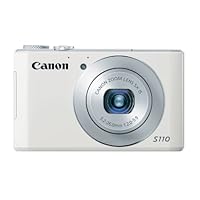
I have owned many Canon Cameras and printers over the years, and I have been very happy with most of them, but I also place a lot of stock in fellow Amazon customer's reviews. For many months, I noticed that every other review, or updated one, for The Powershot S100 indicated a nasty lens error. That said, this time around researching advanced P&S's, I decided to see what other Brands such as: Nikon, Fuji, Panny and Sony were offering... What I found was this, Other brands have really took notice of The Canon S and SX line's success and or offering very stiff competition!
Sony has, IMHO, set the New Standard with the almost perfect Advanced P&S, The RX100. My coworker owns one, and it stomps all others in this now crowded class! Only problem is that it cost over $650.00, but the image quality, and low light rendering are truely amazing! Needless to say, Sony discounts its products about as often as Apple discounts its products... NEVER! The Panny Lumix LX5 and LX7, Nikon P300 and P310 and Fuji X10, are all now offering very good to excellent image quality in this class. You saw correct! I did include The Nikon Coolpix P310! Nikon has really stepped their game up with The Coolpix Line, in fact; this was the only model that came close to The Canon S100 and S110's Bang-For-Your-Buck. Price, it is $200 less than Canon S110, $450 less than The Sony RX100, while offering excellent I.Q., pocketabillity, low light performance and manual controls... Sans Raw mode. Came so close to getting The Nikon P310, before you judge me, just take a gander at the online sample shots of this camera!
In the end, I came back to The Canon S110. Chose The newer S110 over The S100 in the hopes of avoiding The Lens Error (Fingers Crossed). So happy with this camera! The S110 looks identical to The S100, but let me tell you, Canon has made some huge improvements with The 110. Canon has improved upon the sensor and auto focus speed of this model, added usable ISO, WiFi and touchscreen functionallity. Low light performance is a lot like that of The S95 and S100 combined. Allow me to explain. Sometimes The S100's colors would be a little off in low light, casting an orangish hue... as if shot in sepia. The Powershot S95 rendered sharp, detailed and very accurate colors in lowlight, but the lens was a bit slow under these conditions. I don't know what Canon did, but there is almost zero lag in AF, despite others claim that this is a slower lens or sensor than its predecessors. Color, contrast and sharpness are spot on! I predict that the next S model will have a larger sensor to be competitive with The Sony RX100's lowlight performance, but until then, I have to say that the S110 is very close in low light image quallity and will surpass the Sony, although at the cost of a higher price point and perhaps a larger form factor because of the larger sensor.
Battery life has never been an issue with me, because I rarely took over 100 pictures in a day and never used GPS tagging or logging. I also rarely shoot video clips longer than 10 min. in a day,also buy cheap aftermarket Batt.s as back-up. Canon's addition of WiFi to The S-Line is really cool and useful; I use it way more than I thought I would! It is implemented very well with this camera, much smoother and faster than using Eye-Fi's top of the line card... That's an $80 dollar value right there! Lol Also, I already own a Canon SX-230HS and many extra batteries. The S110 uses the same battery ( NBL-5) as The SX-230. Yes! Winning! WiFi connection with your smartphone or iPhone is almost instantaneous, once the App. is opened on the device, or printer turned on. GPS functions are combined with these WiFi transmissions between your phone and camera, and they are thus also instantanious.
The WiFi operates very efficently, and a cool, bright, blue LED lights up on the top of the camera when it is connected. It flashes when busy. The Camera asks if you would like to geotag or log your location while connected to your phone or computer. It is a 2 second affair, so GPS no longer drains your battery. Built-in GPS and Eye-Fi cards do not work nearly as seemless as this! I had issues when first setting this connection up, because I thought I could bypass the step where you connect the Camera to a computer via USB cable and run software CD... You have to do this step! I think you may have to also Register your S110 for it to properly set up initial WiFi.
Touchscreen: Very Responsive, and can be adjusted.... Nuff said on that.
CONS: The things I don't like about The Canon Powershot S110 are pretty much all ergonomically based. These things are true of the entire S series, and perhaps the indicative of the entire Class of these type cameras. They are not easily handled or operated... even on Auto! EXAMPLE: A friend, family memb., or pedestrian says, "Hey, YOUR NAME HERE, I noticed you are taking everyone else's picture, would you like me to take yours with the group?" You have to explain that this really tiny, hard to press button turns the camera ON. When it turns on be careful, because the flash is going to come up over here. If you want to zoom in it's the tiny switch here next to the shutter button. Now, you only want to press the shutter button halfway to compose the shot... it'll beep when ready, then you push it all the way down to take the shot. See? Some ergonomic issues have gotten better with this version of The "S".... others the same or worse. 1. Front grip is gone. 2. As on all The S Models, power button is way too small and recessed. 3.Mode wheel blocks index finger from shutter button. 4.Flash makes camera hard to handle with left hand. 5. if touchscreen shutter is on, camera will take picture if finger contacts screen before you are ready. I guess some things have to be sacrificed for a small form factor, but I feel comfortable giving anyone my Canon Elph 300HS and it is the smallest P&S ever produced!
There is no loud knocking noise when zooming in video, but there is a slight wherling sound when I zoom in video. Hard to notice and can only be heard when passage is very quiet during playback, but it's there... none the less. Wish Canon would get that worked out. All and all EXCELLENT IMAGE QUALITY and cool added features, deffinately recommended! The White is very cool looking and although glossy does not show prints as much as I had anticipated. The Black/Mat is sleek and modern looking like a stealth plane.... was a hard decision to make! UPDATE: Have now taken close to 400 shots. Still going strong! There are a few points that I should add to my review. Some I forgot, and some are new discoveries.
1. Wifi connection.: I own a Huawi Glory/Mercury Android smartphone which is still running Gingerbread. The S110 connects flawlessly with this phone, but what I found out is, you must be near an open WiFi network or hot spot for it to work. The Camera's Wifi will not work over 3G or tethered to your phones mobile hotspot. Also, The S110's WiFi will not connect wirelessly to Windows7 Basic,Starter or any OS older, such as XP or Vista. It won't work on Macs older than OSX 10 or whatever Apple's answer for Windows 7 was. I was told by a Canon Rep. that it works well with full versions of Windows 7, and extremely well with Windows 8. We will see. Waiting for Black Fri. to snag a Windows8 computer.
2. Touchscreen Shutter: Amazingly, the touchscreen functionallity of The S110
has really impressed my friends and family. It really comes in handy when I
give The S-110 to someone, in order to get in the picture myself or for
some one to swipe through the pictures, using their finger to preview.
3. Price Point: I purchased The Powershot S110 for $390 used, and it came
new, in box with all contents still sealed in plastic. Nice! The main reason
I purchased the S110 over the S100 was it was only $38 dollars more at that
time, and I felt that was a small Diff. to pay to hopefully avoid The Lens
Error. I really am happy with this little camera. The functions and menues
are very easy and quick to access with the lens ring and touchscreen. Before
I was using Auto way too much... Now, I am truely learning, in a fun easy way
about F-stops, apperature, ISO, white balance, shutter speed, etc. Things
that I already kinda knew about with my Eos T3 and even my S95, but seemed
to much trouble or laborious, are now fun and easily implemented to play
around with. I am having, "A Ha moments," where I think aaah, that's why
that turned
out good or bad with my DSLR... The S-110 is the perfect learning tool to
whip out of your pocket, purse, or Camera Case and start learning and capt-
uring. I also played around with The Canon G15 and G1X. Salesman at camera
store told me that G15 used pretty much the same sensor,lens and processor
as The Canon S100 and S110. The Powershot G1X really impressed me with its
image quality though; seemingly better than even the more expensive, Sony RX
100! I understood why when he told me it had an SLR sized sensor. The G1X is
a beast, though! Holding it, it felt the size and weight of my T3 without the
lens! Way too large, but may be Canon's answer to The New Sony, Panny, Fuji
and Olympias in this class. He offered it to me at the same price as the G15
$550 plus Uncle Sam's cut (Tax), but it still was more than I could afford.
So here I am. A happy S110 owner. Lol

Motorola Atrix 4G MB861 Unlocked GSM Phone with Android 2.2 OS


List Price: $479.99
Sale Price: $124.40
Today's Bonus: 74% Off

I can only speak to the version sold by Accessory Distributor (there are 10 or more vendors offering "new" phones) but exactly what flavor of "new" this is I am not sure. It came in a generic Motorola box, no model number or other labels, and contained no warranty, safety, or manual documents, at all. Battery, back cover, and phone all came separately wrapped and "looked" new. But clearly this is some sort of re-packaged or perhaps re-furbished phone. Worse (as I found out when the screen started to time out and not wake up using the power button at all -battery pull and reboot required every time the screen times out for 1st time) Motorola has no intention of honoring a new warranty on these phones. After hassling for 3 days with Motorola tech support via chat messages, phone calls to some Caribbean country, and multiple case numbers, I was finally told that the IMEI for this phone had a warranty which expired in July, 3 months before I bought the phone. No Motorola service even for an out-of-box problem on a "new" phone. Motorola would not honor an Amazon original invoice. Accessory Distributors said they would grant a 30day warranty and repair the phone, with all shipping at my cost. Amazon offered arbitration with the vendor, but ultimately my only recourse was to accept having a non-authorized vendor repair the phone up to 30 days out, then I was on my own. A service plan would have cost $130 a year. OR return the phone. The only good thing about this deal is that the vendor accepted the return (not the shipping, but Amazon picked that up except for the return). My theory (no one said this) is that these are bundled unsold OEM phones from 2011(new or refurbished) bought from either Motorola or ATT, unlocked, and repackaged without an original warranty, and that Motorola has no desire to keep 1-year old models on the market cutting into their new-model Atrix sales. And ATT likely has no interest in doing favors for people who plan to use the phone with service from a competitor provider (as I did). I emailed 6 other vendors in the Amazon list selling them as new and none would include a Motorola warranty. This being advertised as "new" doesn't mean much, and there is no proof they are. So after all was said and done, I was out $6, plus about a week of hassle with Motorola, the vendor, and Amazon (latter was the only easy one to deal with -I am still an Amazon fan). Plus still looking for a non-plan smartphone
My recommendation is to avoid this particular phone deal unless you find a vendor who promises a 12-month Motorola warranty, as all new Motorola cell phones are supposed to have. I am OK with people selling used or refurb items without a warranty, but to bill these as "new" without such a warranty is deceptive consumer advertising and should be an FCC issue. I am surprised Amazon allows it, even on purchases they fulfill. C'mon guys, repair this ad. These are new phones.
Addendum: as also observed in other reviews, the phone also came with a 1500 mAH battery not the stock 1930 mAH one that came with the original phone. Whoever repackaged this shaved about $10 off the cost of the package by cutting this corner on a power-hungry dual-core big-screen smartphone
Yamaha R-S300BL Stereo Receiver (Black)


List Price: $329.95
Sale Price: $279.95
Today's Bonus: 15% Off
If you love classical music CD's this is for you. Power, clarity, timbre and atmosphere; puts my old Marantz to shame. Makes my 30 year old Technics speakers sound like a state of the art system. There's also receptacles for a second set of speakers in another room. Unless you have a really huge house I don't see why you'd need an s-r700.
W/respect to FM reception; if the signal is a bit weak, it'll go on mute rather than play static interference. I may have to hook up an outdoor FM antenna.
Bell and Howell 85mm f/1.4 Aspherical Lens for Canon DSLR Cameras
This lens is beautifulthe bokeh from it is absolutely to die for.. amazing, very silky, creamy, best that I have on any of my lenses, including more expensive canon ones. I usually use this for portraits, and I did a little bit of macro with itdid wonderful.
The big downfall for methe manual focus. This was my first manual focus lens, and I thought I could handle it, but about 70% of my images were coming out out of focus. I think you have to be really good at it and practice practice. But MAN when you nail the photofocus it like you wantits amazing. Sharp where you want it, and creamy where you don't.

The big downfall for methe manual focus. This was my first manual focus lens, and I thought I could handle it, but about 70% of my images were coming out out of focus. I think you have to be really good at it and practice practice. But MAN when you nail the photofocus it like you wantits amazing. Sharp where you want it, and creamy where you don't.
Moultrie I35 Game Spy 4 Megapixel Digital Infrared Game Camera


List Price: $179.99
Sale Price: $99.95
Today's Bonus: 44% Off
I had this camera for about 13 months and thousands of pictures. Sadly, some low-life stole it. The only drawbacks that I have found are that the night pics tend to be a little blurry and the trigger time is a little slow. I have several pictures of the back end of a deer walking by.
Sony Alpha NEX NEX5K/S Digital Camera with Interchangeable Lens

List Price: $1,030.73
Sale Price: $749.95
Today's Bonus: 27% Off
I have owned the Olympus EP-1, Panasonic GF1, also have a Nikon d90 and canon s90 so I have seen a lot of pictures from all these cameras. First I would like to say the MENU on the NEX is actually pretty GOOD. Yes, like everybody has said it would have been nice to have a dedicated button for iso, w balance etc..BUT it takes literally 1 second and you can change those settings, what's all the fuss about??? I actually find the Nex's menu LESS complicated than the EP1 that drove ME nuts! So..to all afraid of this camera because so many reviews mention the menu is horrible..to them I say what???
What is blowing me away most is the low noise at high iso plus the overall picture quality. I am one of those DSLR people who wants DSLR type quality in the smallest package possible. I admit I am NOT a pro photographer but I can change every setting on my D90 and I know how to go deep into DSLR settings and what they mean. I say this ONLY because the Nex-5 seems aimed at point and shooters moving up the quality ladder but supposedly don't know all that much about settings. Yes, the Panasonic GF1 and Olympus E-P1 seem to give you a "little more" manual control than this NEX-5 does..but it's pretty close..re: controls.
What the NEX-5 does in my opinion is especially in raw format Blow the doors off the GF1 and EP1 as to how much detail you can work with. On the GF1 in raw..often I STILL couldn't get skin tones to look right, shadows in lower light always had too much noise..and I ended up with too many grainy pictures. I am simply blown away with the NEX as to how much detail you can get back using raw...where the jpg may look like a total loss..you can often still get a great pic using raw.
For the point and shoot people..the raw conversion software that comes with the Sony is actually VERY good, powerful and EASY to use. Overall this is a SMALL camera that pretty much takes pictures in the same general ballpark as the better dslrs in my opinion. I think this may actually have less noise than my Nikon d90.
What I don't like..manually you can only choose iso 200, 400, 800, 1600 etc. I prefer a bit more control ala the GF1 where you can choose say a 640, 1000, iso or 1200 iso etc. That being said if you choose Auto iso the NEX Will at times choose isos such as 640, 1000 etc..not available manually.
Some of the gimmicks? like panorama or twilight handheld shooting where the NEX shoots about 5 pictures within about a second actually WORK and I think at times "these can give you pictures you simply can NOT get on a gf1, ep1" etc.
One other thing I am not thrilled about is overall color saturation is bit too punchy or high. This is not a problem as it takes a sec IF you want a bit less color saturation in your pics with any photo editor.
The NEX feels great in your hand. It feels solid as a brick YET seems to weigh much less than the gf1 and ep1 making the Nex easier to take with you!
There is no perfect camera and never will be. In my opinion though..if you don't need to change settings every 2 seconds..OVERALL this NEX-5 may be your best choice right now as far as mirrorless cameras go. Don't forget one huge reason the GF1/EP1 look so much better than point and shoot cams is the sensor size. Well the full sized dslr sensor in the NEX is MUCH bigger than micro Four..hence the lower noise...better overall IQ in my opinion.
UPDATE: The menu system never really bothered me, however, after updating to latest version 03 this Nex-5 is even WAY WAY better. The menu system now is downright EXCELLENT in my opinion. I am constantly blown away by how great this LITTLE camera is. What a WONDERFUL camera overall!!!
Centon 32 GB Class 10 SDHC Flash Memory Card 32GBSDHC10


List Price: $59.99
Sale Price: $32.46
Today's Bonus: 46% Off
Trust me, if you want to save your video and pictures then DO NOT PURCHASE THIS CARD! I tried to rate this 0 STARS, but Amazon wouldn't let me.
We purchased two of these cards for such a great price only a week ago. We needed extra memory for our camcorder (Sony HDR-CX150) and a higher end digital camera (Nikon D7000) that we were taking on a trip. It would have been better to have nothing than to have these worthless cards.
The first day we tried to watch the 20-30 minutes of video we had recorded just to have the camera say the memory card was not formated. I was disappointed, but just figured we had messed up, and we still had about 100+ still pictures of the day (I thought). The next day was fine, and then when I went to look through some pictures on the Nikon the next morning I noticed I was missing everything I had shot the first two days and part of the third day; yes over 300 shots that were just gone. During that day I tried shooting and then reviewed the pictures. Three seperate times that day the pictures just vanished into the memory card. The video camera: you guessed it all the video we took (over 3 hours worth) just disappeared. Needless to say this has been THE BIGGEST DISAPPOINTMENT EVER as far as any memory card problem is concerned. When we got home (30 minutes ago) I ran a data recovery program on the card, and got nothing.
I will say that if you could get 32 GBs for $40 that would be good but ours never held more than 1 GB before erasing itself. The write speed didn't seem to be class 10 because when I tried to shoot in continuos mode for my Nikon I could only get about 5 shots before it quit shooting; I get the same results from a class 2 card I used when I first purchased the camera, and I get a little better results with a class 4 card I have put back into the camera after getting rid of this one. Overall this card was unusable as you may have read. In summary this has been the worst puchase ever, and I've already got my return label printed out. SAVE YOURSELF THE TIME AND BUY SOMETHING RELIABLE!!!
Sony Cyber-Shot DSC-HX300 Digital Camera (Black) with 32GB Card
Before I start the review, I am just beginning to learn the features. The zoom is excellent in bringing things in the distance closer with clear, concise photos but if you are close to a very small item like a "peeper" (frog) which is tiny and needs enhancement, well the photo's were muddy. If I remember to push the button to release the flash, then the flash does an adequate job if the room is dark / low light. I use a background light that is strong to get the best effect since the flash alone in low light can sometimes leave a shadow. Low light photographs without the flash do not come up with clear pictures if using automatic settings at least with my understanding of this camera and may improve with more use.
Manual settings are effective and generate pictures similar but not quite like a DSL. But then this is not a DSL and shouldn't be expected to perform as such. I tend to gravitate in recent years to cameras with automatic settings. I noticed that while using the automatic settings that the camera will automatically pull out peoples faces but if they are at different distances from each other, some faces will be clear while others will not. I haven't tried the 3-D feature or panorama. The automatic settings (there are two) will sometimes take multiple pictures to combine into one picture on it's own. It does take a little longer sometimes to process the picture before readying itself for the next. There's probably a reason that it will process slowly on some pictures and not other's in the same lighting with no movement but it seems arbitrary.
I put it at 15 mega pixels since I list items through auctiva which does not easily accept the 20 mp. The nice feature this camera has is the option allowing one to take 20 mp, 10 mp and 5 mp, vga, 15 m and 2m. HDTVs and printing up to A3+ (13" to 19")is 15 mp and 3 mp. Although I have read that the 20 mp is not a true 20, it certainly provides clearer pictures than my Canon IS which is a 14.5 mp. The movie function appears to work well on facebook if HD is pressed before playing the video (on facebook) but really does it's best with a tripod which is not always an option.
If you buy the camera without a kit, the camera will only have a computer connected charger and not one you can plug into the wall which was a disappointment. The card-reader does not look like the picture (short and black) and the battery is not an OEM Sony battery. The editing software that comes with the camera is inadequate. I'm not a professional photographer but editing is very important. I use Picasa 3 which is adequate and best of all; free. The tripod works but not the quality I use. The 32 gb memory is adequate but not the best memory card for movies/video. The bag is compact with compartments for accessories and helps to protect the camera while traveling. The other items in this kit are helpful and helps to stop the nickel and dime costs for each of accessories one would purchase.
Sony DEV-3 Digital Recording Binoculars, Black
I got the DEV-3 from a different site, but do most of my electronics research from reading amazon opinions. Although it comes with proprietary software, you can view the video shot in Windows Media and the photos are in jpeg format both of which are a big deal to me. I bought the binos for surveillance and I can read a license plate from about 100 yards away, even at dusk. Although the product states you can see in low light, it definitely is not night vision. The video eats up memory like crazy. A 12 minute video shot in 3D is about 2.3 GB. The nice thing about this product is, when you are shooting continuous video it breaks it into 2 GB segments so you don't have to worry about a file that is too large when you want to burn it to a DVD. The auto adjust and stabilizers are a great feature on this. I took snap shot of a person about 75 yards way riding on a golf cart (going about 6 mph) and it was such high quality, you would be able to identify him from the photo. There was no blurriness and the facial shot came out great.
Unlike the DEV-5, the DEV-3 does not come with a lens cover or eye cups, which is silly (Sony trying to justify the extra $600). The lens is a large surface area and without a lens cover I worry about scratching it. When you are looking into the eye pieces, you can see the reflection of your eyes without the eye cups. The product is shipped with a cheap eye piece cover. At the end of usage, the eye pieces have to be adjusted or the cover doesn't slide properly over the eye pieces. As of today (12/4/11) Sony does not sell these lens cover or the eye cups (they told me to call back in 1 month and see). The DEV-3 also does not come with a carrying case. If you plan to abuse it like i do, i recommend the Pelican 1500 carrying case due to the depth and durability. It's a little more expensive but offers a piece of mind for an expensive electronics device
The nice thing is that it accepts a sony hd pro-duo flash card and a sdhc card (half the price). I tested both of them and i can't tell a quality difference. I also can't tell a transfer rate difference when you burn it to your hard drive. I am sure there are technical geeks out there to dispute this but i am just writing my observations. So save your money and go to the sdhc (about 1/2 the price). Also unlike on a camera there is no zoom toggle switch on the binos to zoom in on a particular picture you just shot. (maybe there is and i have not found it)
I wish they would sell the binos in a local store so i can see if the 20X zoom is worth the extra $600. The 10X zoom is nice, but leaves you wanting a little more, however I would buy these again as i think they are worth the money.
Dell XPS 27 20XPSo27T-2143BLK 27-Inch All-in-One Touchscreen

List Price: $1,799.99
Sale Price: $1,699.99
Today's Bonus: 6% Off
Customer review from the Amazon Vine Program NOTE!! Amazon Vine sent me model XPSo27T-714BLK and NOT the one this review is attached to! Unfortunately, I cannot return it or review under the one they sent me, but they require this review to be written anyway. This -2143BLK model comes with a faster processor, a 'Thunderbolt' port, and double the memory of the one they sent. The -714BLK model I review below is otherwise identical. If you want to see the specs of the one I am reviewing, look here: http://www.amazon.com/Dell-XPSo27T-714BLK-27-Inch-Touchscreen-Desktop/dp/B00F4MEAYG, or this one is the same but with the added Thunderbolt port: Dell XPS XPSo27-715BLK 27-Inch All-in-One Touchscreen Desktop (Piano Black)
-------------
Just a little of my background so you know where I'm coming from: I am a professional computer programmer and technician. I usually research on forums and computer 'geek' sites and then build my own PCs from parts I buy online. I feel like I know PC hardware and software pretty well.
With the evolution of the Desktops, Laptops, Smartphones and Tablets, we have come full circle back to the desktop computer with the "All-in-One". This computer is the combination of a very large (TV-size) tablet with a touchscreen and apps, and an immobile desktop computer for gaming, browsing and home/office computing. Can it do the job of both and do it well? Is it practical as both? Let's see...
Setup was quite simple and it was quickly usable. I plugged in the A/C power cord (the standard IEC plug no wall wart or inline brick transformer) and connected an Ethernet cable to my network. The wireless keyboard and mouse come with (Duracell!) batteries. The power button brings up a setup screen to help configure Windows 8 that comes with it. (Remember to update to v8.1 later when you are online!) It attempts to connect to wireless networks at this point, if you want to set that up as well. Beyond that, there is not much else to do. You can sign in with your Windows Live ID/password and it will link to your online account right away. Once Windows starts up, you are left at the typical "app" screen on a tablet or smartphone this is the new Windows 8 "Start Menu". The computer then functions like a tablet or smartphone from here -you touch, click or swipe the screen to scroll through your apps and touch/click the one you want to run. It will run multiple apps at once.
For the purist or typical desktop user, you must start the "Desktop" app and then your screen will look like a typical Windows desktop with the wallpaper, Recycle Bin, taskbar, etc. I prefer this app only because I am used to it. You can use the mouse to click/drag on apps or the desktop as normal, although some activities are easier by touching or swiping the screen directly. There is even an on-screen keyboard if you want. This can become tiring on a 27" screen at arm's length, though. OK, enough about Windows 8. How about this particular incarnation of the Dell desktop computer?
Overview: As a desktop computing center, it seems a bit unnecessary to have a touchscreen, but maybe it will come in handy as I 'convert' from the typical desktop. I can see the use for maybe 'signing' your name or other handwriting, occasional 'swiping' type activities, for creative uses like drawing/painting, or for enlarging or thumbing through photos. The only drawback with such a large screen as far as touching is that it must be within comfortable reach, but it's large enough that you need it a comfortable distance away to see everything.
Hardware: The included chiclet keyboard is just OK -about the size of a typical laptop keyboard with a number pad. It's useable, but as a programmer who types about 8-10 hours per day, it would get uncomfortable fast. I was able to plug in my Microsoft Natural Ergonomic Keyboard 4000 and the drivers installed automatically. The mouse is OK as well, although I use a trackball mouse to minimize carpal tunnel issues...and it installed fine too. There are 4 USB 3.0 ports on the back, an HDMI out and HDMI in port, and the Ethernet cable port. On the left side are 2 more USB ports, a mic and headphone jack, and a memory card reader. On the right is a DVD/CD drive and the power button. It has typical laptop type stereo speakers, which are adequate for Windows sounds, voice chat, casual music listening. If you want good sound for music or movies, you will need to use an external sound system to plug into the USB or headphone port. The screen's touch sensitivity is very good without any skips or mis-touches. Fingerprints do not seem to smudge the screen. The surface of the screen is glass-like, making it quite reflective, so you will need a dark background behind you. Mine came with the Intel quad-core i5-440S @ 2.80GHz, 8GM RAM, 1TB 7200RPM hard drive, and built in HD webcam and microphone. This ad specifies an Intel i7 processor and 16GB RAM, so please contact Amazon to make sure you are getting what you expect!!
Software: The computer comes with Windows 8, Cyberlink Media Suite Essentials, all of the usual plethora of Dell update, backup, recovery, utility software, the usual Windows software, and a trial version of Microsoft Office.
How does this compare with other Windows 8 tablet/desktops available? If portability is an issue (which this 27" all-in-one is NOT), then you might opt for the Acer Iconia W700-6499 11.6-Inch 128 GB Tablet (Silver), with its docking system, although you sacrifice computing power and ports. The Microsoft Surface Pro 2 with 128GB Dark Titanium is also an option for the 10" size. If you are looking for a laptop with tablet features, you might also consider the ASUS Taichi 21-DH71 11.6-Inch Convertible Touch Ultrabook, which comes with a better keyboard and bridges the gap a little better between a laptop and tablet, as well as the Dell XPS 12 12.5-Inch Convertible 2-in-1 Touchscreen Ultrabook.
If you are really sold on an All in One desktop computer that will not move from your desk, then this XPS 27 is a fine performer if you can adapt to its chiclet keyboard and/or prefer to mostly use the touchscreen. You should also consider the VIZIO CA27T-B1 27-Inch All-in-One Touchscreen Desktop with a slightly slower processor but a smaller price. Finally, even cheaper is the Acer Aspire AZ3-605-UR23 23-Inch All-in-One Touchscreen Desktop (Black), slightly smaller at 23" and a slightly slower processor, but plenty of power to run your apps and entertainment media.
Hello Kitty 87009 5.1 Megapixel Digital Camera


List Price: $89.99
Sale Price: $46.42
Today's Bonus: 48% Off
I bought this for my 9 yr old daughter. I thought with the higher pixel count it would take a decent picture but not so. You could have twice the pixels and would still take a lousey picture because there is no image stablization software. Even if she holds it as still as possible we have a hard time getting a decent image.
Zoom H6 6 Track Portable Digital Recorder

List Price: $499.99
Sale Price: $399.99
Today's Bonus: 20% Off
Zoom H4n is now obsolete with the release of this device.
I have been a long term user of the H4n and I swore by it in the field to record solid audio for my DSLR video work as well as quick mix downs when doing live audio recordings for my business. This device was a godsend when it released and I have been using it for years. I always thought, how could you make it better than it is today, and the H6 addressed all of my issues that I had.
Pros:
* The mic pre-amps in this device are far superior to the H4n. The noise floor is lower and my post work after shooting video with my DSLR is much better, the audio sounds warmer and clearer and it appears that the signal is a lot cleaner at low dBs
* 4 channels of XLR right out of the box! I love it! Now I can do a backup recording or record 4 XLR's at the same time! I can't tell you how many times I would have loved to push up the pre-amp just a bit to drive out the noise but I couldn't becuase of clipping. Now this is not a concern as you have individual compression on each channel and the ability to do a dual recording with a backup with less gain.
* Yes this does fit in the H4n SKB waterproof case. As soon as I got the device, I pulled the H4n out of the case and put this right into it, with all of the accessories with no problems. The H6 without the mics attached is exactly the same size as the H4n
* The gain dials are smooth and a perfect addition. Much better than the push button gain control on the H4n
* Pad switches right on top. Perfect
* Full Color Display is way better on the eyes and great in low light, and now the display dims to save battery versus turning off the backlight completely. Try turning the H4n light back on in a dark room. Not happening!
* Very solidly built. It is a solid piece of hardware. There are no squeaks and the buttons are solid. The record button is recessed and absolutely silent, so when making track markers you don't get that click sound in your recordings when using the device on top of a camera.
* Two headphone outputs is awesome addition. Now you can direct monitor and send a line out at the same time
* Now theres a track mixer onboard. After recording or even monitoring the sound you can mix the tracks on the fly and run those thru the line out into you camera rig.
* Interchangeable mics are AWESOME!
Cons:
* Menus are now buried. The H4n had quick access to changing bit rates, Folders, File Format, and Speed. I miss that and some thought should have been given to keeping a least the file format and folder buttons as quick access keys. It would have been awesome
* Takes more batteries, but what do you expect with a device with 2 more inputs available
* Select/Enter button is not consistent. Sometimes you have to push the side switch in and other times you have to press the record button to select items in the menus. Don't know why this is not constant. This could be improved in a firmware upgrade.
* Select button has to be pressed very far in. Button could have used a shorter throw.
Overall:
This is a killer device. Where else can you get a six track ultra mobile recorder with 24 bit 96k recording capability. The preamps are better, and footprint is about the same as the old version. This device is a must buy for any DSLR filmmaker or if you have pro setup and need more than 2 audio inputs. If you already have an H4n then and never find yourself needing more than 2 inputs then you might want to pass. But for all others this is an awesome device!
Samsung UN60D6400 60-Inch 1080p 120 Hz 3D LED HDTV (Black)

List Price: $3,099.99
Sale Price: $1,599.00
Today's Bonus: 48% Off
After several months of using this TV, here are my impressions. Note that I'm using Antenna HD, PS3 Bluray, and DVD.
Design:
The thin bezel design and glass(stem) stand is gorgeous, it feels like the picture is floating on the stand. The thin bezel really enhances the picture by minimizing reflections. It's really refreshing to not have a thick glossy bezel shining at you when watching TV; although the bezel itself seems to get mighty hot after several hours of use. The screen is glass and it does have reflections in daylight. It will probably annoy those of you that have a lot of glare coming from windows.
Picture Quality:
HD picture quality is outstanding while SD ranges from good to OK. The SD quality really depends on your broadcasting source; higher quality SD means good SD picture. Blacks are good, but I believe the processing engine goes a bit overboard and saturates the blacks to a point where details are lost. I haven't found out how to tone down the blacks, even after shutting off all the processing. Colors seem to really pop out, if it's too much one can adjust RGB in the menus. Initially, this TV did not exhibit any noticeable clouding for several months but now I can clearly see clouding on a completely dark transition screen. I'm a bit disappointed it has developed clouding over time, but it's not bad enough that you'll notice it during tv viewing. This is an edge-lit LCD and there are inherit weaknesses. Motion picture quality is very smooth and artifacts are kept to a minimum; in fact, this is the smoothest picture I've ever seen on any HDTV.
Adjustment Controls:
This TV has quite a few options for tuning the picture. There's standard, dynamic, natural, and movie modes. Each mode has it's own saved settings. For my normal viewing, I started with the movie settings while in Standard mode and made a few adjustments to brighten up the screen. Movie mode has a "warm2" color tone that I changed to "standard" since I don't like warm colors for normal viewing. For movies, I use the movie mode where the colors and brightness are toned down, with relatively few adjustments made. The natural and dynamic modes are horrendous, don't even go there. There's some fine adjustments in each mode with backlight, contrast, sharpness, hue, brightness, color, etc.
Connections:
Has HDMI 1.4 connections, which allow 1 Audio Return and single Ethernet connections (with specific high speed compatible HDMI cables and other HDMI 1.4 devices). Has 1 composite connection and 1 component (both use supplied extension plugs). Switching between sources is a tad slow to me, wish it was bit faster. Note that the optical out connection will transfer Dolby Digital sound from the antenna input, but it will only transfer stereo sound if you are connecting a device from HDMI and outputting the sound using optical out.
Sound:
Sound comes from the back panel and these kinds of tvs always sound odd. It's definitely loud enough, but not as good as a tv with good front speakers. You can use simulated surround sound and it's not bad at all. The one annoying thing is your sound settings are kept the same as you change your input sources; even after you've configured one input source as having movie sound settings. You can use the equalizer to adjust the sound to your liking. I might buy a sound bar to accompany this tv.
Internet apps:
I took a little while to play around with the apps, they're ok but respond pretty slow. Just your standard apps, nothing impressive. It does have an app store where you can purchase more apps but I didn't try that. I found youtube to be a bit odd. I started up youtube and it showed me the annoying orange video on startup; really strange it just loaded up with that video.
Other apps:
The photo viewer is pretty decent, seems a bit slow in rendering the pictures from a USB stick. I've also played some AVI and MKV files on the TV and it looks good to me. MKV files do not seem to have subtitle options.
3D:
I bought the Samsung SSG-3100GB bluetooth glasses for 2011 3D TVs. The glasses are great and much better than the old versions I tried out on a 2010 TV. It syncs up really well and I don't notice ghosting. There is a 3D button on the remote where you can convert 2D programming to 3D; this is done on the fly using the TV's processor. The 2D-3D is applied minimally so it isn't great; you will barely notice the 3D effects on the conversion. However, watching true 3D movies is great but 46" is really small for 3D. What others say about having a 50" plus TV is true if you want to experience the depth of 3D. What truly blows me away is playing 3D games through the Playstation 3. I started Wipeout HD up and I was giggling like a silly schoolgirl for a while. It really blew my mind how the 3D enhances the fun of games.
Remote:
Remote is pretty decent. It has a your standard TV buttons as well as a way to control playback on other sources with fast forward, rewind, stop, play. Remote has a backlight you can activate.
Settings:
Here are some basic calibration settings I used.
0) Standard Mode
1) Backlight: 13
2) Contrast: 93
3) Brightness: 45
4) Sharpening: 10 (keep this low!)
5) Color: 45
6) Tint R/G: 50, 50
7) Color Tone: Auto
8) Dynamic Contrast: Low
Additionally, I nearly turned off all the processing (including motion plus)
Verdict:
Very good TV with an inherit weakness in edge-lit LED technology in that you will find some uneven lighting and clouding. This might be as good as edge-lit LED is going to get. I gave it a 4 star here but it's really more 4.5 out of 5. I won't give it a 5 because true local-dimmed LED TVs have better contrast and color consistency, but you'll be paying a lot more (unless you buy the ugly Vizio LED TVs).
Update 1/13/2012:
I upgraded to the newest firmware and noticed after rebooting it reset all my settings. I don't see anything different except I noticed how crappy the picture was. It's important you do not leave the it on the default settings as the picture quality is pretty horrendous. Use my settings as a baseline, especially keep sharpening low, turn off motion plus, and you will see the potential of this tv.
More notes:
I recently noticed that my tv was tilted down to the left a little as it sits on the supplied stand. I took out a tape measure and noticed the left end was nearly 1/4" lower than the right side. This really bugged me so i took apart the stand and slipped a piece of paper folded several times in the gap where you screw in the stand. This helped balance it perfectly.
Olympus Evolt E-450 10MP Digital SLR Camera w/ 14-42mm f/3.5-5.6
Probably too soon to review, but I'm responding to an e-mail from Amazon to review my recent purchase. This is my fifth DSLR (Nikon D50, Olympus E-300, Samsung GX-1S, and Sigma SD14) and I have to say it has the best out-of-camera jpeg image quality of any camera I've owned to date. I've long liked Olympus's auto tone correction feature in their software, and now it can be applied in-camera at the time of capture (now called shadow adjustment technology and set by choosing auto gradation in the menu). Tonal range is quite natural, with open rather than too dark or blocked up shadow areas, yet retaining good snap and contrast to make bright, sunny days look bright and sunny. The ESP metering (a multi-segment pattern) has proven quite reliable as has auto white balance. I don't like having to post-process to get image quality I like, and the E-450 has been very good in this respect.
I've also decided that I have no need to replace the 14-42 kit lens that comes with the E-450 any time soon. Based on test reports, I just don't see any other available lens providing a noticeable image quality improvement for my needs. Almost all my shots are at my favorite 25mm focal length, outdoors in daylight conditions, and I prefer deep depth of field. The kit lens gives me no perceptible geometric distortion, no vignetting, well-controlled flare and chromatic aberrations, and sufficient resolution and contrast as to be indistinguishable from the higher-priced optics (according to Popular Photography's SQF charts). Plus, its light weight balances well on the little E-450 whereas the more expensive optics would all be somewhat front-heavy.
I downgraded the camera one star for features simply because it would have been nice to have separate buttons for auto-focus and auto-exposure lock. I have set the AEL/AFL button to auto-focus for me, but that leaves metering tied to the shutter release, which wouldn't be my first choice (though the ESP metering has been so good that it's a minor quibble). One of the best Olympus features has been their sensor dust reduction system, consistently rated as the most effective currently on the market, and I've had no sensor dust issues so far with Olympus DSLR's.
Sony DSC-RX100 20.2 MP Exmor CMOS Sensor Digital Camera
This camera tales great pictures. The only problem is learning how to use all the features. I'm pretty good at this stuff but it has me fooled on some things. I wish they came with a good old fashion user manual. I did read online some features, some are never mentioned.

Hasselblad H3D-39II, Medium Format Digital SLR Camera with 39mp
I purchased this camera in lieu of paying rent on my apartment for 4 years, and believe me when I say it was worth it. I used the box that it came in as a hat and some other boxes for a home. It's uncomfortable but the pictures I've taken of my new home are so sharp that you can see the fleas on the brick I use for a pillow. I can also take high detail pictures of my children (who I am no longer able to see due to court order resulting from gross negligence) from an acceptable distance. Highly recommended!
