Showing posts with label nikon digital camera price. Show all posts

Samsung UN60D8000 60-Inch 1080p 240 Hz 3D LED HDTV (Silver)

Samsung UN60D8000 60-Inch 1080p 240 Hz 3D LED HDTV
Customer Ratings: 4.5 stars
List Price: $4,299.99
Sale Price: $2,197.00
Today's Bonus: 49% Off
Buy Now

This review is a little long winded. Skip to the bottom for just the pros and cons. Or, keep reading to waste 10 minutes of your life.

Over the last 5 years, I have been using a 58" Panasonic Plasma TV. Not a bad TV, but not the greatest either. It was only 1080i, it got hot pretty fast (which made the room hot and the air condition kick on too often), and the dimensions were weird (I looked at entertainment centers that should fit a 60" TV, but the TV still wouldn't fit.). I felt an upgrade was in order.

I'll have to admit, shopping for a TV was pretty fun. A lot of work though. The research was overwhelming at times. Websites upon websites, magazines, books, different people's inputs, salesmen trying to sell you different things depending on which store you went to, etc. I narrowed it down to one of many Sony HDTVs or a Samsung C or D series. After narrowing it down to those 2 brands, it was a little easier. I went to about 4 different Fry's Electronics and 7 different Best Buys to check it out in different situations. After that, it came down to the UN55D8000 (boy, did I memorize those numbers). To make the decision easier, I was looking on Amazon, and to my amazement, they had it for $500 less that everyone else, plus free shipping. Score!

With the free shipping, it usually takes a little longer. I would say, from the time the order was placed, until it got to my front door, it took about 1.5 weeks. It came delivered from Home Direct, USA and had no issues with delivery. They were going to set up the TV, but I told them not to, since my entertainment center hadn't come in yet. I opened up the box, put the TV on a soft cloth (our bed's comforter) and installed the stand. Eight screws, piece of cake. I connected the Directv receiver and a PS3. There are a few settings you will set in the beginning when the TV turns on. Takes about 2 minutes, literally. After that, the fun begins! Going from 1080i to 1080p is a huge difference! I had a recording of Chuck on the DVR and it almost looked live. I also watched some regular satellite programming and even the non-HD channels looked amazing.

After wiping the drool off the floor, I wanted to check out the 3D part of the TV. I popped in the free copy of Shrek the 3rd in the PS3, put on the glasses and waited to be amazed. Aside from the amazing colors, it looked exactly like 2D! WTH?! Then, I remember reading somewhere that the PS3 does indeed play 3D movies, BUT with an upgrade. I waited about 30 minutes for the upgrade to finish. After that, loaded up the dvd again, and there was the movie with that funky 3D image. Hey wait, I have 3D glasses on, how come I see that. Oh, oops. Batteries need to be installed in the glasses. Finally! The 3D image was awesome! Seriously, watching TV in 3D is amazing. I can't wait `til there's more media in 3D. As it stands right now, the only real movies in 3D are either documentaries or cartoons, with the exception of a few regular movies (i.e. Resident Evil, Step Up 3, etc.)

I just set it up last night, so I can't give you a whole lot more information. But, even if I did have more time, I don't think I can give you the detailed specs that you might be looking for. I'm not an expert on home theater. Here's an overview of pros and cons:

PROS:

* The lack of a bigger bezel really does make a difference. Not only aesthetically, but in terms of functionality, too (better 3D viewing. It looks like you're looking thru a window.).

* Images are spectacular. Whether it be regular programming, HDTV programming, or Blu-Ray.

* Price on Amazon was very good!

* Delivery was pain-free.

* A lot of settings options, so you can set up the TV to your preference and the viewing scenario (i.e. movie, standard, etc.)

* 3D movie watching is stunning! I just wish Panasonic didn't have exclusive rights on Avatar.

CONS:

* SmartTV is a cool feature. But, not a necessity. I really doubt that I'll Facebook or Tweet from the TV.

* Audio isn't great, but it's adequate. I wasn't really expecting much from a flat screen TV.

* Did not come with the touch-screen remote as was supposed to be the case in the beginning of the year.

* Have to mail in the vouchers (or register online) in order to get the 3D glasses. True, you do get a 3D starter kit with this TV, which has the glasses, but those glasses are a little different and use batteries. Also, you have to send out to get the free copy of Shrek Forever and Megamind. I really shouldn't complain, though, since these are free.

* Needs a more detailed manual on how to use most of the features. The manual it comes with is thick, but it's just because it's the same thing in different languages.

Sorry for the long review. Us Yelpers write a lot of gibberish, don't we?

UPDATE: After playing around with the TV a little more this weekend, I noticed that the top of the screen had some light flickering (around where the bezel meets the screen and it was about 1/16" tall and went almost across the whole TV. I'm hoping it's not the "edge lighting.") It only did this on some channels on Directv. Most channels were fine and Blu-Ray was fine. I'm thinking it's either the receiver or possibly the cheap HDMI cable. I have a Monster M1000 series cable coming in later this week, so I'll switch it out and update.

Also, there has been talk all over online about people having problems pairing the remote. I had zero problem and did it about 5 feet away from the TV.

One last thing, one of the glasses in the free 3D kit didn't seem to work. I changed out batteries and nothing. Then, the next morning, I tried it again, but this time turning off the bluetooth in my phone, and it worked. Whether this had an effect on it, I don't know. But, just thought I'd throw that out there.

BTW, this weekend, I watched Tangled in 3D and played MLB2K11 on the PS3...... WOW! I'll have to admit, I liked 3D, but I thought it was just a novelty. No way. 3D is much different now than when we had those blue and red glasses. It changes the whole experience.

UPDATE #2: Didn't have to do anything to get the line gone. It just went away one day.

Also, I finally got the 3D glasses from the voucher that's in the TV. Unfortunately, they are the 3300s and not the 3700s that I kept seeing from people at CES. I won't knock the rating down, but I am a little disappointed that the glasses and the remote that were advertised earlier in the year didn't come with the unit, nor even thru mail. Also, the charger for the glasses is $199! No, thanks. I'll just charge it using the USB cable.

Click Here For Most Helpful Customer Reviews >>

Pentax WG-3 Shock & Waterproof GPS Digital Camera (Green)

Pentax WG-3 Shock & Waterproof GPS Digital Camera with 32GB Card + Helmet & Handlebar Mounts + Battery + Case + Flex Tripod + Accessory Kit
Customer Ratings: 4 stars
Buy Now
Camera itself is a brute tough, durable and taskes great pics. The package was not great camera bag is for big cameras and film and other junk. Camera strap with D-Ring (what is that for). Needs a strap you can put on your wrist and not drop it or loose it when underwater scuba or snorkling. FYI battery drains fast when GPS is active.

Click Here For Most Helpful Customer Reviews >>

Vivitar 650-1300mm f/8-16 SERIES 1 Telephoto Zoom Lens + Vivitar

Vivitar 650-1300mm f/8-16 SERIES 1 Telephoto Zoom Lens + Vivitar Tripod + Vivitar Cleaning Kit For The Sony Alpha DSLR A100, A200, A300, A350, A700, A900 & Minolta Maxxum Digital SLR Cameras
Customer Ratings: 4 stars
Buy Now
Package overall very good, except tripod not as secure as I would like, is unsteady in windy conditions. Also, T-mount adapter was not included as advertized with original shipment, but got excellent response and service from DBRoth, item sent out quickly. Lens does a good job for the price.

Click Here For Most Helpful Customer Reviews >>

Nikon 1 V2 14.2 MP HD Digital Camera with 10-30mm & 30-110 VR 1

Nikon 1 V2 14.2 MP HD Digital Camera with 10-30mm & 30-110 VR 1 NIKKOR Lens
Customer Ratings: 4 stars
List Price: $1,149.95
Sale Price: $1,046.95
Today's Bonus: 9% Off
Buy Now

To start with I do own the V1 and all the Nikon 1 lenses except for the 10-100 PD zoom. I just borrowed my friends V2 for the weekend and did some comparisons between the two to see if it would be worth upgrading to the new V2. These are only my initial impressions and only for still photography. I do not shoot video so I have no opinion on the video capabilities of this camera. I consider myself an advanced amateur when it comes to photography and have sold some of my work at local art shows and craft fairs. I use mainly a D3X and the D800 for my work but have come to enjoy the 1 series (it took awhile) for its light weight, compatibility with F mount lenses, and more than adequate image quality for those times when I do not want to carry a DSLR.

It seems that Nikon has not learned its lesson with the V1 and is still overpricing its top of the line 1 series cameras. Even with the $50 instant rebate the camera is seriously overpriced for what you are actually getting. At today's price of the V1; (Nikon is giving them away) of $299 there is no real reason to buy the V2. That difference in price is not getting you much more for the extra money that has to be spent; in fact you are giving up some features.

So what are you paying a premium price for compared to the V1:

Well you get:

An improved 14.2 MP sensor vs. a 10MP, not a big change in IQ but it is welcome. Base ISO has been increased to 160 vs. 100 from the V1. Just be aware the mechanical shutter has a maximum speed of 1/4000 of a second. If you shoot at large apertures this may present a problem in bright light. You may have to switch to the electronic shutter which has a maximum speed of 1/16,000 of a second. You get a better more direct way to access functions like white balance, ISO, metering, and exposure mode without going back into the menus. Image review can now be turned off if you desire. These items are much welcomed and are a big improvement over the V1.

Nikon adds yet another "silly mode" to the "smart photo selector" & "motion snapshot" called the "best moment capture" which allows you to pick the best frame of a 40 frame sequence. These are totally useless IMHO and should be ignored as should the auto exposure mode.

A redesigned body with a built in grip and flash. Also a rear command dial has been added which allows easier control of camera functions. The exposure mode dial has been relocated so that is less likely to be inadvertently changed. I have put gaffers tape on my V1 exposure mode dial to keep it where I want it. These are welcomed features and are big improvements to the handling of the camera.

The electronic viewfinder (EVF) seems different from the V1. During use objects seem to jump around almost like the refresh rate is not high enough and the color seems to be off sometimes. In low light it seems grainier and not as sharp as the V1. I wonder why Nikon changed anything from the V1 since the V1 has an excellent EVF.

HDR has been added to the shooting menu. IMHO Nikon should have added auto exposure bracketing rather than in camera HDR to allow the user to process their own images using an external program such as Photomatix or Photoshop instead of the camera processing the image on its own.

The camera will now provide 15fps vs. 5fps in AFC. There are some minor differences in the AF-C focus mode. There are now brackets in the "detailed" display of the LCD and EVF that shows you where your subject should be to acquire focus. Also the manual does not discuss any limitations of the AF system at the higher frame rates as the V1 manual does. Need to do more testing on that. Other than that the AF seems to be just as fast and accurate as the V1.

So far so good you say, but hold on; you are losing some things that you might have wanted:

No IR sensor in the back of the camera, if you want to use the IR remote you have to point it at the front of the camera now. The V1 had sensors in the front and back. This can be a real pain if you use a tripod since you now have to stand in front of the camera to use the remote.

You also lose the interval timer which is a nice feature to shoot time lapse photography, the feature was on the V1 but it looks like it has been dropped from the V2.

The V2 will only use the electronic shutter when you either put it in the silent photography mode or change your frame rate to greater than 5 FPS. So if you need a fast shutter speed say to take a picture in bright light with a large aperture to get that shutter speed greater than 1/4000 you have to go into the menus and either turn on silent photography or change your frame rate. The V1 allowed you shift from mechanical to electronic shutter by using the function button.

For all of you that own other Nikon equipment you will now have to buy yet another type of battery if you want spares. The V1 uses a battery that is used in the D600, D800, and the D7000. I guess that Nikon felt they were losing money because owners were not buying enough spare batteries and chargers so we have yet another battery to add to our collection.

The option for sound settings in the setup menu has disappeared. Now instead of being able to control the sound of the electronic shutter and autofocus/self-timer separately you now have a silent photography selection in the shooting menu which turns off both. In addition when you turn on silent photograph it automatically selects the electronic shutter. So if I want to turn off the beeps for autofocus but still have the shutter sound or keep the mechanical shutter active I am out of luck. If shooting flash with silent photography turned on I am now stuck with a 1/60 sync speed. In certain cases I like to hear the shutter to confirm the picture was taken but want to turn off the autofocus beeps because the beeps seem to disturb people more than the shutter sound. There should be way to control sound level for each function not just a master switch for all sound which also selects the electronic shutter. Nikon takes a step in the wrong direction.

So Nikon is giving some but it also taking back some with the feature set. I always thought that newer models take steps in the forward direction and not backwards.

But the real reason that the V2 is still not worth the extra money are the items that were wrong with the V1 and are still not incorporated into the V2. What are these you may ask?

The camera still does not have a standard hotshoe. This means that you will have to buy the 1 series flashes if want to use an external flash. Another thing that has yet to be incorporated is ability to use the built in flash as a remote commander. Since Nikon has not produced an adapter to use a standard flash on 1 series cameras you cannot use one of Nikons wonderful external flashes as a remote commander either.

Speaking of flashes, Sync speed is still 1/250 of a second for the mechanical shutter and only 1/60 of a second with the electronic shutter. My D40 had a sync speed of 1/500 of a second. There is no reason not to add either FP high speed sync to the mechanical shutter or a faster sync speed on the electronic shutter. The higher sync speed becomes very useful to stop motion in certain situations when using flash.

The Auto ISO feature still does not have the ability to for the user to input a minimum shutter speed that tells the camera when to increase or decrease the ISO. The thing that makes this annoying is that Nikons preset value shutter speed (seems to be around 1/30 of second) of when to increase ISO are still to low IMO for use on lenses without VR such as the new 18.5 mm 1.8. Not all of us are human tripods. The newer Nikons also take lens focal length into account when determining the correct ISO; the V2 does not seem to take this into consideration. So if you want to use auto ISO the camera now forces you to go into shutter priority so that you can maintain your shutter speed fast enough to prevent blur in your photographs.

The camera still does not display RGB histograms. This is totally unacceptable on camera in which costs this much and exposure is so critical to control noise due its small sensor size. The luminous histogram will not always show when a channel is blown out. My Canon S90 has this ability and it costs a lot less.

No programmable function button or user setting. There should be at least one function button that is user programmable for our shooting needs instead of only having only what Nikon thinks we need available. Also there should be at least two custom setting banks that allow the user to change from one bank to the other at will so that each setting does not have to be changed individually when conditions dictate a change in settings (i.e. switching from landscape to sports photography).

Also if you own the V1 you have probably have had to buy spare accessory port covers since they are small and easy to lose, well the V2 accessory port covers are also small and easy to lose and they are not the same.

Last but not least is that auto exposure bracketing has still not been added. Since this camera has a limited dynamic range, when you take a picture in a high contrast situation, HDR photography becomes important. Without this feature I am severely limited when I choose to use HDR because I must adjust the exposure manually which takes time and forces me to use a tripod. Nikons in camera HDR has limitations and is not as good as using a program such as Photoshop or Photomatix.

The worst part of all this is a lot of these things can be fixed with firmware updates, but Nikon has chosen not update the V1 and I do not see them doing it with the V2 either. So if you value these things in your photography do not expect Nikon to add features to the camera with firmware updates.

After weighing the good with the bad I feel that the V2 while a big improvement over the V1 still does not command the premium price tag Nikon has put on it. (Even with the $50 instant rebate) The V1 with its discount is a steal at this time and is a great camera once you adapt to it. Things like not being able to turn picture preview off or having to go into the menu to change ISO, WB, or exposure mode will probably annoy you at first but over time you tend to adapt to the camera. The V2 is also a great camera, better than the V1 in some respects, worse in others, but not worth the extra money you will need to spend to own it, remember most are going to have to buy spare batteries which are only used in the V2.

So in a nut shell if you are looking at a V2 should you buy it? The V1 price cannot be beat right now and the image quality of the V2 is not that much different than the V1. If I did not own the V1 already I would buy it in a heartbeat vs. the V2. Am I going to upgrade? No, not at this time, I am going to wait until Nikon discounts the camera to a price that is more reasonable as they have done with the V1 or wait for the V3.

Click Here For Most Helpful Customer Reviews >>

HP Photosmart M637 7.2MP Digital Camera

HP Photosmart M637 7.2MP Digital Camera
Customer Ratings: 4.5 stars
Buy Now
Easy to use camera. Excellent zoom. Much better than expected. Takes crisp, clear, sharp pictures. (Although having a good picture editing program helps too.) Video quality not the best but good for the price. Excellent camera overall.

Click Here For Most Helpful Customer Reviews >>

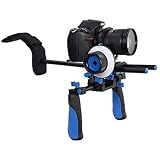
CowboyStudio RL02F+R Camcorder Steady Shoulder Rig and Follow

CowboyStudio RL02F+R Camcorder Steady Shoulder Rig and Follow Focus for DSLR Video Camera
Customer Ratings: 5 stars
List Price: $294.00
Sale Price: $285.67
Today's Bonus: 3% Off
Buy Now

I had to have this item. I just looks easy to use and comfy. I hate the ones with the plastic shoulder support or metal plate on your shoulder. There is no support. This one has a comfy cushion and fit nicely on my shoulder. I can also adjust the bar so If I need to be closer I can do,so. It also has really good grip handles for comfort for long shoots. I have really sweaty palms so I do not have to worry about the rig slipping out of my fingers. Also the gear belt is great for having to adjust the lens, it is so easy with the follow focus. It is just a really good quality product.

Click Here For Most Helpful Customer Reviews >>

Sony DSC-W710 16 MP Digital Camera with 2.7-Inch LCD (Silver)

Sony DSC-W710 16 MP Digital Camera with 2.7-Inch LCD
Customer Ratings: 4 stars
Buy Now
Customer review from the Amazon Vine Program This little Sony camera is very compact and light, and is a good starter point and shoot at this price. I take lots of pictures, so I was able to put this camera through its paces over about a three-week period. Here is a run-down:

The Good

Very light and fits in any pocket

Relatively low cost and does not "feel expensive", so I do not hesitate to just toss it in my pocket or bag

Has proven to be rugged. Has survived abuse (per the above bullet) very well

Love the "Easy" feature. It detects background light, fast action, faces, and other photo situations automatically. You can override this feature in the menus option.

Has plenty of photo-taking options such as landscapes, beach, toy, b&w. As mentioned below in not-so-good, these features are pretty cumbersome to get to.

Picture quality is very good for this price range. There is no RAW file option, so you are totally dependent on the camera's JPEG processor, which is okay but has a lot of interpolation. It is a little slow to process, but definitely adequate below $100.

Uses SD cards, not the proprietary memory stick that Sony had used in the past.

The Not So Good

Very menu-driven, so it takes time to find a photo feature (such as toy, b&w, beach, landscape, etc.) and you could miss your shot. Best to stay in Auto/Easy mode since it does a decent job of choosing for you.

You have to navigate the menu to deactivate Easy mode before other options become available to you. This will slow you down a lot and may cause you to miss some shots. Ideally they would have any Easy mode on/off button on the camera itself.

The processor is slow, so there is a noticeable pause between shots. The continuous shooting mode labors through about one shot per second.

The post-processing and photo enhancing features on the camera are of limited usefulness. For example, it has a face enhancement feature that I found was only slightly effective. You will do MUCH better using your inexpensive desktop photo software to add enhancements. IMHO, this feature on the camera is more of a gimmick with primitive algorithms.

Sony has opted to use a non-standard USB connector. I like standard connectors that can be shared between devices. For this one, you will need to carry around the cord if you want to charge the camera's battery or transfer photos using USB.

To charge, you plug in the camera. The battery is removable, but the camera does not come with a separate battery charger, so you have to use the camera as the charger. In other words, you cannot charge a spare while you are using the camera. There may be an accessory for this, but then you are spending extra $$ on a low cost camera.

Recommendation

If you want a low-cost, decent point and shoot, this is a good choice, particularly if you want to stay in easy mode most of the time. If you end up loving photography, or if you are already an experienced photographer, this camera will feel light on features and customization options pretty quickly.

Click Here For Most Helpful Customer Reviews >>

Nikon SB-700 AF Speedlight Flash with Softbox + Diffuser + (4)

Nikon SB-700 AF Speedlight Flash with Softbox + Diffuser + Batteries & Charger + Tripod + Accessory Kit for D40, D60, D3000, D3100, D5000, D5100, D7000, D300s, D3 &amp, D3s Digital SLR Cameras.
Customer Ratings: 5 stars
Buy Now
Great purchase, love it the SB700, I have a SB600 that I'm using sincronized wirelees witn the SB700 as a master, work good, great price for the accesories that comes included, thank's cameta.

Click Here For Most Helpful Customer Reviews >>

Fujifilm Finepix S700 7.1MP Digital Camera with 10x Optical Zoom

Fujifilm Finepix S700 7.1MP Digital Camera with 10x Optical Zoom
Customer Ratings: 4.5 stars
Buy Now
I do professional fine art and PR/theater photography with a Canon EOS 5D and am very experienced as a photographer for over 30 years. Not always wanting to use my main equipment, I purchased this camera for a general purpose like family events, travel/vacation etc.

I originally wanted at least a 10x-12x optical zoom, 6-8MP, video (movie mode)with 640x480 30fps with zoom while movie shooting, AA batteries, IS (Image Stablization), at least a 2" LCD screen, fairly compact (but not a necessarily a pocket camera), and simple operation. I compared to Canon S3 IS, Kodak Z 7812 IS, Panasonic DMC FZ8K and seveal others which had true IS capabilites.

The FUJI S700 was less expensive because it is not a true IS camera or lens, but uses a fast shutter speed and higher ISO to achieve its IS mode. Otherwise it met the all other specifications I was looking for in a camera.

My daughter took this camera for a two week trip to China and got very good results. She used the IS mode often and the resulting pictures were generaly good with very little "digital sensor noise" because of the higher ISO setting. She also had very good results in low-light situations where flash was not permitted, and her movie clips where good (maybe not quite as good as a dedicated camcorder but fine for general purpose). The S700 movie mode sound uses a single microphone in the camera body for monophonic sound, where some other models have stereo if this is important to you.

She shot over 1000 images and about 30 video clips on a single 4GB SD card (the S700 is SDHC compatible) and she only used two sets (4 each) of alkaline AA batteries during her trip. The S700 will run longer on rechargable NiMH (2500-2800mAH) batteries or Lithium AA batteries.

While lacking true IS, the FUJI S700 is also about $50-$100 less expensive than the above comparable cameras. The KODAK and PANASONIC have movie modes but you cannot change the zoom lens setting while in this mode. Being a long time CANON user and a big fan of my EOS 5D SLR and other EOS SLRs, I found the CANON S3 IS difficult to switch modes between shooting mode and playback. It does have zoom while in movie mode however and the newer S5 IS may correct this problem. The S3 IS does produce excellent images even with its 6MP sensor (that uses their excellent DIGIC II processor).

The FUJI S700 produces good to very good images in its 7MP Fine mode using ISO of 100-400. The digital noise begins to slightly appear at ISO 400, but is not unacceptable. It is easy to use and in the AUTO mode, that most people would use, the camera would produce good results. It does allow shutter or aperture prioirty modes plus a full manual mode, but these are for advanced users in special situations and are not as easy to set as on a prosummer/professional level camera.

I would strongly recommend this as a good gerenal purpose camera that has a good, fairly fast optics and very good image quality. It is not a "pocket camera" with their small 3-4X optical zoom lens, but the S700 is lightweight to carry and easy to hold and use even with one-hand shooting.

Click Here For Most Helpful Customer Reviews >>

Toshiba Satellite C855-S5137 15.6-Inch Laptop (Satin Black Trax)

Toshiba Satellite C855-S5137 15.6-Inch Laptop
Customer Ratings: 4.5 stars
Buy Now
The ONLY complaint I have about this computer actually has nothing to do with the PC itself, at all. The operating system that came pre-installed is, unfortunately, Windows 8. While there are a lot of mixed feelings about the OS, I am settling the score on this end and letting you all know the facts: the laptop is GREAT, the operating system bytes. However, aside from the assault from a handful of minor annoyances, your overall experience will likely be pleasing. I bought this particular laptop for various reasons, most notably for online schooling. However, I DID take some extra time to review the processor and factory graphics for this machine and I am overly satisfied with the result(s). This is a very well-rounded machine at a very generous and affordable price. This review comes from personal experience and from the collective opinion of various friends and cohorts that have had the chance to sit down and explore this laptop with me. I hope this review helps to lighten the load of the decision for all of you!

Click Here For Most Helpful Customer Reviews >>

Sony Cyber-shot DSC-RX100M2/B RX100M2 RX100M II RX100MII 20.2MP

Sony Cyber-shot DSC-RX100M2/B RX100M2 RX100M II RX100MII 20.2MP Wi-Fi Digital Camera Bundle with Sony 64GB Memory Card + Wasabi Power Replacement Battery for Sony DSC-RX1 + Sony Black Carrying Case + Wrist Grip Strap + Camera Accessories
Customer Ratings: 5 stars
Buy Now
My son, who is a pro bought this package first, he came over to show me, and I just had to get one too. Great camera and package included everything I needed to use for compact camera use when not carrying my Nikon SLR. Focus Camera offered this very complete package. Very pleased.

Click Here For Most Helpful Customer Reviews >>

Sony DSC-RX100 20.2 MP Exmor CMOS Sensor Digital Camera

Sony DSC-RX100 20.2 MP Exmor CMOS Sensor Digital Camera with 3.6x Zoom BUNDLE with 8GB Card, Case, Card Reader, Mini tripod, LCD Screen Protectors + More
Customer Ratings: 5 stars
Buy Now
This digital camera enables me to take amazing photos. Very clear, bright and close to what you actually see. Sometimes too many functions confuse me but I can always use 'premium auto' mode. It is sometimes difficult to focus on what you want in this mode, though. As I am not a 'camera guy', I need to learn more from the manual. BUT the camera case was not perfect as it is big but it was hard to take the camera out if I put other things in this case. A tripod is useful when you want to take 'perfect' night view. 8GB card was class4 so maybe it is a bit slow, I guess.

Click Here For Most Helpful Customer Reviews >>

Epson PowerLite Presenter Widescreen Projector/DVD Player Combo

Epson PowerLite Presenter Widescreen Projector/DVD Player Combo
Customer Ratings: 4.5 stars
List Price: $849.99
Sale Price: $754.99
Today's Bonus: 11% Off
Buy Now

.Epson PowerLite Presenter Portable Projector / DVD Player Combo (V11H335120)

I work in an office where 11 of us live and die by our presentations. We train, distribute information, do planning sessions and communally edit documents. We do this with 14-plus offices in four states.

In one of our 100+ people field review sessions early in 2010, lack of projectors at field sites was identified as a weakness. We also find ourselves short a projector or two in the office because we go all directions with various equipment when we travel.

I'm loving Epson products more and more. I'm sold on their printer usefulness, image and other and quality and buy more of them all the time. In my projector search, I began looking for the smallest, lightest projector around. I found the Powerlite Presenter instead. It plays DVD's, has a built in 10 watt sound system, projects almost as bright as the best projectors on the market, and has a microphone. It also has USB A & B connectors, HDMI for HD cable and satellite TV, HD-DVR, Blu-ray or HD camcorder, RCA jacks and composite video and sound. Comprehensive and impressive. Much bigger than the smallest units on the market but not heavy considering its size.

This is where Silly Me comes in. I imagined that since the machine had a USB A connection, we'd be able to bring along a thumb drive with our PowerPoints and run the presentations directly from the USB. Don't even think about this my presenting brothers and sisters, I've already done it for you. The machine will read only jpeg, MP3, WMA, DivX, MPEG 1/2/3/4 from a USB or external drive. Digital cameras connect easiy. I should have tried my camera on the machine before I wrote this review. I'm taking Tech Support and the documentation's word for it.

On our test run, we popped a training DVD into the machine and it ran great. I'm not sure how much of an audience/room the 10 watt sound system will reach, but it was hurting our ears in 12 x 12 foot conference room at a setting of 6. When I connected the laptop, the projector found it immediately and we had the image on the wall and on the laptop, no Alt-Function key tapping. More sophisticated projector settings like keystone, color, etc. are made using the remote control.

The microphone is six inches long on a six foot cable, an on-off switch and a multi-directional ball at the speaking end. A small clip-on with a longer cable would be excellent. We connected it, used it with the video off. It worked great. It was also able to talk over the video presentation as it played, no feedback as feared. We'll be able to do karaoke on those long nights in very small towns and be the life of the gathering.

The unit has a carrying handle, making it easy to move. The carrying case cradling the unit is a padded nylon case, much like a laptop sleeve. It has a flap on top that velcros shut under the handle and three pockets for supporting cables, etc. One large one across the back and two side pockets. I like carrying documentation with my equipment, so when I have the documentation, microphone, remote control, 10 foot power and 6 foot VGA cables and the USB B cable if I choose to buy and carry one, I've got a pretty large, though light, lumpy, bulging Powerlight Presenter package. It's not what I consider ideal carry on luggage. There are parts to lose externally exposed. If you like the idea of this unit, and fly lots, I'd suggest getting a Pelican or similar case, with plenty of foam space to create cable, mike and remote pockets.

I'm not the brightest light on the string. The quick set-up guide is excellent. Finding the documentation CD in the package, I tried using it. It didn't work. There is an executable and cab file for the documents that did not install. The majority of our computers are secure, and no oaf like me is allowed to run an executable file whenever we please. The laptop I used could have done it. Each projector comes with a Service Card with a phone number and PIN. I'd not registered the unit. When I called the mumber on the card and used the PIN, it did not recognize it and sent me to a tech support number manned by a human being. The serial numbers made of alpha and numeric characters for these units have a circular character that may be an O or a 0. No slashed zero, no "O" squished into a 0. Tech support said they are zeros. Tech support also told me to find the documentation on the web. My little human of unease down in my stomach was beginning to get out of its chair and wave its arms around. The people tech support is fine. Don't count on the materials provided in the packaging.

My little human of unease jumped around as I purchased these units because they are a new to market product with lots of moving parts and connections. And honestly, cheap for the features. I've had a lot of cheap, and not-so-cheap stuff give me lots of problems or fail. Globally, we seem to have forgotten the the word quality exists, substituting "profit" instead. So I ordered these items with 2 year "Fast Turn Depot" extended warranties. I don't need somebody in Remoteville Nevada or Utah with a dead projector two months from now.

I had a room full of people very excited when we played a video with good quality in a bright room and loud sound with microphone voice-over. When we got to playing a PowerPoint from the USB drive and failed, considerable air left our balloon, and we had a good projector with a DVD and sound. We can export PowerPoint 2007 slide shows as JPEGs, so there is still lots of hope that these machines and a thumb drive can be all we need to do our work on the road. To run a PowerPoint or Adobe Acrobat, the projector would need an Operating System and software burned into its tiny brains. Lots more than we can hope for with this kind of machine and price point.

We're going to distribute these machines and used them a lot. Features, slightly light; long-term quality, unknown; carrying case, OK; size and weight in relation to features, very good; ease of use, excellent. As we adapt to our new projectors, I know they will find a useful home with us.

If the link below works, you'll be taken to a page with step-by-step detail and another review.

Click Here For Most Helpful Customer Reviews >>

Sony HTSS380 3D Home Theater System

Sony HTSS380 3D Home Theater System
Customer Ratings: 4.5 stars
Buy Now
I purchased the HT-SS380 at the store after realizing that the HT-SS370 had been discontinued. I assumed that since the systems shared a common look and nomenclature that they would have the same features (with the added 3-D functionality in the HT-SS380). I was wrong.

DIFFERENCES BETWEEN THE HT-SS370 AND HT-SS380 SYSTEMS:

While the HT-SS380 does have 3-D capabilities, some other notable features are missing. The HT-SS370 had options for purchasing additional components in order to add wireless rear speaker capability. The HT-SS380 has no wireless expandability options. The HT-SS370 speakers came with wiring that featured proprietary connectors on one end for connecting to the receiver, but the speakers themselves featured standard wire clips, making them available to use with any other system that featured a standard clip design. The HT-SS380 speakers, on the other hand, still feature the proprietary clips on one end, but the other end is firmly connected to the speaker and is not able to be removed. Therefore in order to use the speakers with any other system, the wires would have to be cut and spliced to additional wire. The HT-SS380 does however contain a iPod/iPhone dock, whereas that component had to be purchased separately for the HT-SS370.

PROS:

The HT-SS380 has great sound for a minimal price. The speakers are plenty loud when it comes to filling a moderate-size room with crisp sound, and the passive sub-woofer puts out bass that you can feel. Sound quality is one of the most important aspects of the system for me, and so that's why I applied a 4-star rating instead of a 3-star rating. The system as a whole is very sleek and stylish. The included tuning microphone does a good job of setting up the speakers for optimal sound, although I ended up making tweaks and adjustments to suit my preferences. The system contains 4 HDMI connections and features BRAVIA-sync (cooperation between Sony devices such as a Sony TV or PS3).

CONS:

The LCD on the front of the receiver is small and there are elements that are practically unreadable unless you are mere inches from the screen. There are no composite connections on the receiver, so hooking up older, non-HDMI devices (like the Nintendo Wii) is difficult (you would have to purchase a Wii composite cable or a third-party Wii2HDMI connector). The tuning microphone should plug into the front of the system somewhere since once the system is tucked into a media cabinet, it becomes difficult to pull it out and re-attach the tuning microphone if you want to run the diagnostic again. And the aforementioned proprietary speaker wires aren't a deal breaker, but it would have been nice if Sony had allowed their speakers greater versatility.

Click Here For Most Helpful Customer Reviews >>

Canon EOS 60D DSLR Camera Kit with Canon EF-S 18-55mm f/3.5-5.6

Canon EOS 60D DSLR Camera Kit with Canon EF-S 18-55mm f/3.5-5.6 IS II Lens + Canon Normal EF 50mm f/1.8 II Lens + Canon EF-S 55-250mm f/4-5.6 IS Lens 16GB Package
Customer Ratings: 5 stars
Buy Now
This camera has everything for which I was looking and has been a pleasure to use:

1) Reasonably weighted (some may prefer the more expensive EOS 7D's magnesium-alloy body, body this one works fine for me)

2) 5+ FPS, perfect for shooting the kids' sports events

3) Built-in flash for times when it is not convenient to use a shoe flash

4) SD support-unifying memory card support in the household is important. The EOS 7D uses Compact Flash, which is great if you you have it or do not mind carrying multiple card types

5)Support for my old EOS lenses. Yes, my 23-year-old EOS lenses still work (I did buy new, lighter lenses, but it is good to know I have backup)

6) Interface similar to my old EOS 620, including the top LCD for quickly changing ISO, drive mode, etc. (EOS Rebels do not have this from what I have seen)

7) Articulating LCD that can turn around so that my face does not press against the glass when shooting. This is similar to that screen on the Gx series, which is a good thing for me.

Sure, some negatives may exist, but I am just delighted with the camera and do not want to dwell on them. Other reviewers have pointed out the negatives.

Click Here For Most Helpful Customer Reviews >>

Canon PowerShot G1 X 14.3 MP CMOS Digital Camera

Canon PowerShot G1 X 14.3 MP CMOS Digital Camera
Customer Ratings: 4 stars
List Price: $649.00
Sale Price: $599.00
Today's Bonus: 8% Off
Buy Now

A few years ago Thom Hogan posted a "Compact Camera Challenge" () in his excellent blog, in which he lamented the lack of compact cameras with a large sensor. Despite the development of digital photography technology for the past two decades, stated Hogan, "the camera makers simply don't have any idea of what many of their customers really want." In Hogan's view, consumers will be well served if there was a compact camera with a larger sensor that met certain standards he deemed essential for a serious photographer.

I stumbled onto Hogan's challenge as I was looking for the same thing. And since that time I have been waiting and hoping for such a camera. I use a DSLR (Canon EOS 10D and EOS Xti) almost exclusively, but grow tired of lugging the camera and those heavy lenses on each trip as well as the lens changing for those casual outings. The end result is that I now don't bother to even bring a camera with me on some of my trips. I know there are those mirror-less cameras, but the prospect of buying a whole new set of lenses and change them during shooting had discouraged me from jumping into them.

The Canon Powershot G1X is exactly the camera I have been waiting for. It has in fact exceeded all the criteria laid out in Hogan's challenge. So I immediately bought it, even though the $800 price tag is on the high side.

After playing around with it in the past few days I have gained a better picture of what this camera is (and isn't). I'm still very pleased with it. In the mean time I also feel that depending on what you use your camera for and what your level of enthusiasm is, there might be better alternatives. I'll try to summarize what I have found below in more details.

1. Image Quality (Sensor). The greatest strength of this camera is its ability to take SUPERB quality images. The lens is very sharp. The quality of images taken under low light situation (which is pretty much the case if you take indoor pictures) is UNSURPASSED by any other compact camera. I have shot several images at ISO 3200, something I had never done even with my DSLR, and the images are completely usable. In fact, up to ISO 1600 the noise level is negligible. Numerous reviews have confirmed this experience. You can find various sample images online, including a large number of them on DPReview. You may also find some of images I have taken at2. Lens Quality. So far I'm very pleased with it. It is a very sharp lens. The 28-115mm zoom is practical for most shooting situations. I find the lens to be very sharp overall. However, at the widest setting of 28mm the barrel distortion is quite evident --in fact it is very pronounced. If you shoot in JPEG at 28mm the images looks far less distorted because it has been corrected in the camera firmware. Of course, this means you do see some softness away from the center of the frame. But when you shoot in raw and open it in Photoshop (after converting it to Adobe dng format), you see the pronounced distortion. This is something most of the "official" reviews have missed.

The lens, other than at its widest setting, is quite slow. I do understand that this is a limitation of the compactness of this camera.

3. Features. As an advanced compact camera, like other Powershot G-series cameras, the G1X comes with all kinds of user controls that are essential for enthusiasts. I will not go into details. DPReview () has just posted its full review of the camera, and many features are discussed there. There are also a number of features that people who don't care for user controls will find intriguing. For example, there is a "smile detection" setting that will take three pictures automatically if it detects a smile. I have tested this feature, and it seems to work fine. If you want a camera packed with features that suit both novices and professionals, the G1X will not disappoint you. I highly recommend one to go through the full manual (downloadable from Canon website) to get to know all the features.

4. Focus. The G1X has been criticized by just about every review for its slow autofocus. But I find this to be an overreaction. I certainly have not noticed that the focus is slow or inaccurate. If anything, I find it to be quite good. Sure it is no match for an SLR, but I have used many compact cameras, and the G1X stacks up pretty well. In lab testing the G1X is slower than the state of the art compact cameras by a fraction of a second on average, but to most people, even seasoned professionals, I don't believe this is an issue. The G1X also has a very useable manual focus, conveniently controlled with a dial and viewed on the LCD with a digital "magnifying glass."

A bigger problem is its inability to focus in close range, so one must often switch between normal focus and macro focus modes. Fortunately this is not so difficult for the G1X.

5. Macro. Like everyone else had said, this is not made for it.

6. Usability/Performance. The controls are a mixed bag. In some cases they are well designed. I like the exposure compensation dial, making exposure compensations a cinch. The various exposure modes are rather conventional. However, I find myself often inadvertently touching a button and mess up the setting I had. This is extremely annoying. Some of the features take a little practice to get used to. Overall, the usability is good although not exceptional.

If you plan to use this camera to do mainly landscape or scenes that are not moving, such as shooting friends who will pose for you with their contrived smiles, this camera will not disappoint you. I would highly recommend this camera. However, if you are into sports photography this camera is DEFINITELY NOT for you. In fact, even for photographing kids this camera is woefully inadequate, and I say you should forget it. The main problem is that it takes very long to go from one shot to the next. In my test with a moderately fast SD card, shooting in raw+JPEG it takes a whopping 6.5 seconds for the camera to be ready for the next shot (the figure is about 4 seconds in JPEG only, or with a very fast SD card). This is completely UNACCEPTABLE. I don't know why no major reviews had pointed it out. Note that even after 6.5 seconds you will still need to tack on another few seconds to compose your next shot and press the shutter. So overall, from one shot to the next can take 8 seconds easily, which for many photographers is an eternity.

6. Movie/HD Video. I don't use this feature much so I don't have anything extensive to say. On a cursory examination it is quite good.

7. Battery. The battery is small, and it gives you about 250 shots. Please be sure to buy one or two extra ones. You can find them on eBay for a fraction of the cost Amazon charges (I bought two for about 7 bucks).

My overall verdict on Powershot G1X is that it is a GREAT camera (with some minor flaws) if you are photographing mainly landscape or people who will pose for you. However, it is completely unsuited for sports, and it is poorly suited for photographing kids or spontaneous scenes because of its ridiculously long lag between shots.

======================================================

Update:

I have just taken the Powershot G1X to Xian, China, to photograph the Terra Cotta Warriors and artifacts in the Shaanxi History Museum. The lighting condition was not ideal at all. In most cases it was very dark. Only in the Terra Cotta Pit 1 the lighting was not extremely dark. I took about 250 photos in those two places. In several places I had to push the ISO to 3200 and use a shutter speed of 1/20th of a second. In the end, almost all images came out tack sharp with little noise! The IS worked superbly. I must say the overall quality of my pictures has gone far beyond my expectation. In fact I went with a friend who carried the latest Sony full frame DSLR, and my G1X held up very well. As far as image quality goes, it does not disappoint.

However, the battery life was really not so great. While Canon claims 250 pictures per charge, I got about 170 (LCD on). So make sure you get at least two extra batteries (on ebay).

Click Here For Most Helpful Customer Reviews >>

16GB Extreme III Sd Card

16GB Extreme III Sd Card
Customer Ratings: 3.5 stars
List Price: $149.99
Sale Price: $17.95
Today's Bonus: 88% Off
Buy Now

Beware of MemoryMoguls. You may think you are ordering the faster SanDisk 16gb Extreme 30MB/s Edition SDHC High Performance Card (SDSDX3-016G-A31) because that's what's in the item description. But they ship the slower SanDisk Extreme HD Video 16 GB SDHC UHS-1 Memory Card (SDSDRX3-016G-A21)...which is also cheaper. Bait and switch and price gouging!

Even more maddening -the Amazon rep didn't care! Excerpt of our chat:

Me: Do you need any info about the switch they pulled?

Jayakumar: No, we don't need such information.

Me:really? then how do you prevent them from doing it to other customers? and why would I continue shopping at Amazon if you don't mind your affiliates tricking customers?

Jayakumar:I'm sorry for any misunderstanding caused. I've forward this issue to appropriate department, so that it may not happen again.

Me:Not just a misunderstanding. I've seen feedback from other customers warning of affiliates who substitute faster SD cards with slower ones, and made sure to select an affiliate without these negative comments, and double-checked the product description to ensure I was ordering the faster SD card. And I still ended up with the slower card!

Jayakumar:Yes, I made a note on it.

Is there anything else I can do for you today?

Your chat has been idle for 1 minute. If there isn't anything else I can help you with, I'm going to disconnect this chat.

Click Here For Most Helpful Customer Reviews >>