Showing posts with label digital camera for. Show all posts

Epson WorkForce WF-2540 Wireless All-in-One Color Inkjet

Epson WorkForce WF-2540 Wireless All-in-One Color Inkjet Printer, Copier, Scanner ADF, Fax. Prints from Tablet/Smartphone. AirPrint Compatible
Customer Ratings: 4 stars
List Price: $129.99
Sale Price: $89.00
Today's Bonus: 32% Off
Buy Now

Customer review from the Amazon Vine Program This unit was tested on a Windows 7 Home Premium desktop workstation.

SHORT REVIEW OF NON-SCANNING FEATURES:

Yes, this does have a small footprint, but note the extra 6 inches of height and 3 inches of depth needed when trays are extended for printing. Setup was easy, though if you know what you're doing, I recommend connecting the printer to your wireless network BEFORE you install the software on CD to your PC you can then just say "printer is already on network" when prompted during installation. I tested ALL advertised features (including AirPrint and send and receiving FAX) and was able to get them all working to varying degrees. Per page printing costs are fairly standard for an inkjet (7-10 cents per page black and white; 20-25 cents for color including nicer photo paper). Speed is "quick" and not "super fast." Big batch jobs will still require a laser printer. To keep the size of this review reasonable, I'll leave it to other reviews to supply more specifics other than scanning features.

SCANNING FEATURES:

Note that there is a less expensive version of this printer, the Epson WorkForce WF-2530 which is virtually identical to the WF-2540 being reviewed here. The one major difference in the scanning features, discussed below, is that the cheaper WF-2530 does not have an external USB interface. This means that the WF-2530 must be attached to a computer by wifi or USB cable in order to scan. Otherwise, other than the extra interface option for an ethernet connection and a slightly different control display on the WF-2540 being reviewed here, it appears to be identical in size, speed, and function.

That being said, one of the best features of this all-in-One (WF-2540) is that it does have that external USB port. This actually allows the unit to be a stand-alone, non-attached, non-networked scanning station. If your workstation breaks, your network goes down, or you run out of ink, you can still scan documents to a USB drive and take them elsewhere to print, email, or whatever. As well, you can use as a stand-alone photocopier.

The second best feature for scanning is the automatic document feeder (ADF). It can hold only 30 pages, and was a little finicky when I used thicker source paper to scan. Still, ADF's are a great feature for an inexpensive all-in-one unit like this. Note that if you scan directly from the control panel of the unit, your only choices are 200, 300, and 600 dpi resolution, and either PDF or jpeg formats only. The PDF is NOT searchable with no default of optical character recognition (OCR). The included ABBYY software cannot convert non-searchable PDFs to searchable (OCRed) PDFs. If you save scans as jpeg images the included ABBYY software CAN load and convert jpegs to searchable PDFs.

Using the workstation as a stand-alone scanner, I was able to create and store to attached USB drive a 5 page pdf document scanned at 200 dpi in color mode in 160 seconds (32 seconds/page). The same test document scanned at 600 dpi in color mode took 260 seconds (52 seconds/page). Rule of thumb would be 30-60 seconds per page depending on resolution.

Using the included EPSON Scan software, which runs on your computer, you can choose from a larger number of options than the limited ones from the control panel of the printer. E.g., you can set resolution from 60-9200 dpi, choose color smoothing, set to scan in gray scale, etc..

Scanning speed with a wireless connection varied greatly depending upon how far the WF-2540 is from your wifi router wifi connection speed and strength is critical. Using the same 5 page document and the EPSON Scan software with the WF-2540 in wireless mode, I needed 20 minutes to produce a document when the unit was 50 feet away from my wifi router. Moving the WF-2540 to about 20 feet away, the same job took about 8 minutes. Connected with a USB cable to my PC, the same job took about 6 minutes. It was STILL much slower than the direct scan to attached USB device.

Rule: scanning and creating documents via wifi WILL be slower, and with a weaker wifi connection can be unusably slow. Consider how far your WF-2540 will be from your wifi router.

I give this 5 stars for being an excellent small office solution with a lot of built in flexibility (especially the USB scan and store capability). Connect by ethernet, wifi network, USB cable, or use as a stand-alone scan, copy or fax unit and you're ready to go.

Click Here For Most Helpful Customer Reviews >>

Pentax K30 Digital Camera (Red) with 18-55mm AL Lens Kit

Pentax K30 Digital Camera with 18-55mm AL Lens Kit and 50-200mm AL Lens 32GB Package 6
Customer Ratings: 4 stars
Buy Now
I'm fairly new to Digital Photography and that is why I purchased this kit. I won't go in depth about the K-30 as I have already reviewed it on Amazon. Be it known that the Camera itself is what makes this kit worth the purchase. In this price range, the K-30 performs brilliantly!

Lenses:

18-55 This is a good lens for general shooting. Paired with the K-30's well sized APS-C sensor, I've taken some quality wide-angle photos with it thus far.

50-200 On a sunny day at the zoo, I have taken some stunningly good photos at full length (200mm) with this lens and even through fingerprint-laden windows. I've been very impressed with this kit lens.

Other Accessories:

The 32GB class 10 SD cards performs fine with the camera in 6fps drive mode.

The smaller charger is very nice for packing instead of the one that comes with the K-30.

The additional battery is also a must for a long day of shooting.

The bag was quickly out-grown but it was nice to have something initially.

The USB card reader was a feature I needed for my older desktop although it feels fragile and wants to come apart.

The tripod is small and light but it is way more realistic to carry around for recreation then a heavy-duty professional tripod. If you complain about the tripod, then you obviously want professional gear and this is not the kit you are looking for anyway. You need to spend a lot more money.

The lens filters are nice to have although I would like to have 2 UV filter (one for each lens). I'm not savvy enough to use the others effectively yet although I have played with them.

Overall, this is a great kit and Cardinal Camera was a great vendor to do business with. They accidentally sent me the wrong battery and made it right by sending me 2 in its place!

Click Here For Most Helpful Customer Reviews >>

Canon EOS Rebel T3 12.2 MP CMOS Digital SLR with Canon 18-55mm

Canon EOS Rebel T3 12.2 MP CMOS Digital SLR with Canon 18-55mm IS II Lens and Canon 75-300 Lens+32GB+2 Extra Batteries+AC/DC Charger +UV Filters+3 Piece Filter Kit+Case+Full Size Tripod+Accessory Kit
Customer Ratings: 5 stars
List Price: $1,049.99
Sale Price: $619.95
Today's Bonus: 41% Off
Buy Now

extra batteries and charger are not for the T3 and they don't sell the charger and batteries for the canon T3. BUT they quickly special ordered the charger and betteries and had them to me in a few days. Customer service was excelent!

Click Here For Most Helpful Customer Reviews >>

Nikon D5200 Digital SLR Camera Body (Black) with 55-300mm VR

Nikon D5200 Digital SLR Camera Body with 55-300mm VR Zoom Lens + 32GB Card + Battery + Backpack Case + Filter + Accessory Kit
Customer Ratings: 5 stars
Buy Now
I have had this camera for about a month, and it has exceeded my expectations as a still-photography camera. I do a lot of photography at kids sporting events swim meets, baseball & soccer games and this camera has helped me capture some really special images in the short time I have owned it. I am pleased with the ability to aggressively crop and frame action shots for maximum effect the 24 megapixel CMOS sensor is a star performer. One of my favorite tricks is to put the camera in sports mode and turn on continuous shooting; depending on the lighting conditions, it can capture up to about 5-6 frames per second. The 55-300mm lens lets the photographer get right up on the action even all the way across and Olympic-sized pool or full-size soccer pitch. I also have a 18-55MM lens that works great for indoor settings or situations where the subjects are closer (a similar lens is included in other bundles)

I have not used the camera's video capabilities enough to develop an opinion, but that is not why I purchased this camera. It seems to me that of one is looking for a video camera, that are better cheaper options among dedicated video cameras (my opinion).

The bundle was thoughtfully assembled, with a 32 MB SD card (holds 4,000 photos at normal resolution), an extra battery, a remote and a backpack to carry it all (including the two other compatible lenses I already owned).

I highly recommend the Nikon 5200 as an advanced consumer all-around camera which is particularly well suited to action photography.

Click Here For Most Helpful Customer Reviews >>

Sunpak PF30XN Digital SLR Camera Dedicated i-TTL Flash for Nikon

Sunpak PF30XN Digital SLR Camera Dedicated i-TTL Flash for Nikon
Customer Ratings: 4.5 stars
List Price: $149.95
Sale Price: $54.95
Today's Bonus: 63% Off
Buy Now

I'm a very enthusiast amateur hobbyist photographer and I used this on my Nikon D3000. I read all the time that everyone should get a flash, the on camera flash is never good enough; but of course i always thought my cameras look great(comparing to point and shoot). Over the last few months I've been looking for ways to take better pictures, i picked up a 35mm dx fast lens and it made a world of difference but while taking christmas pics I noticed there was never enough light so I decided to get a flash and after research settled on this one. let me tell you this flash is amazing; I uploaded the picture of my two year old that I took using this flash here so you can check it out yourself. that picture was taken with no lights on and one window partially open 15 feet away.

I have to say that I have read a bit about flashes prior to purchasing one and understanding guide numbers and how they are used, ttl, etc. I also looked at prices here on amazon, B&H and other random sites as comparisons and for the money I thought this flash was my best option and I was not disappointed. I have not seen any other flashes at this price or lower that performs as well as this flash.

As everyone said the one downside to the flash is the high charge time, however you can compensate for that with the proper batteries so after doing more research on the right batteries I bought Energizer Ultimate L91BP-4 Lithium AA Battery 4 Pack and it cut down the charge time to literally about 2 seconds.

this is a great flash and anyone looking for one in this price range should definitely look at this, being that Sunpak does have a history of making solid flashes plus the price point and performance I simply see it as a no-brainer for anyone in the market and on a budget. Before I ordered this one i added the SB600 to my wishlist hoping to buy it in a few months but I honestly don't know if i'll need to after using this one. That being said I don't do paid events and I only shoot for myself, friends and family.

Click Here For Most Helpful Customer Reviews >>

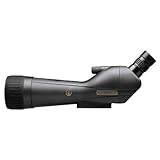
Leupold SX-1 Ventana Angled Spotting Scope Kit, Black, 20-60 x

Leupold SX-1 Ventana Angled Spotting Scope Kit, Black, 20-60 x 80mm
Customer Ratings: 5 stars
List Price: $624.99
Sale Price: $481.37
Today's Bonus: 23% Off
Buy Now

For the past few month's i have been shopping for a spotting scope for my needs: (1) range shooting to 600 yds, (2) hunting in GA/AL/SC with a maximum visual coverage of about the same (3) some deer, prairie dog and varmint hunting in my home state of TX, and (4) all together in one neat protective case. Even though I would love to have one, I don't have the money to spend thousands of dollars for a Swarovski or others in that class. After reviewing several competitors, I chose the Leupold. I have used their riflescopes and knew their optics are excellent. All the reviews I read placed the SX-1 Ventana kit ahead of much more expensive models and generally classified it as their favorite for the money and I TOTALLY AGREE WITH THEM. Good hunting!

Click Here For Most Helpful Customer Reviews >>

Canon EOS 1D Mark IV 16.1 MP CMOS Digital SLR Camera with 3-Inch

Canon EOS 1D Mark IV 16.1 MP CMOS Digital SLR Camera with 3-Inch LCD and 1080p HD Video
Customer Ratings: 4.5 stars
Buy Now
I had the Mark IV on order with Amazon since Canon's product announcement on October 20th of 2009. Since my local camera shop received the unit on Monday January 4, 2010 and Amazon still listed it as "Not Yet Received" I purchased mine from the local retailer despite the additional $464 in sales tax.

I have been a Mark III shooter since June of 2007. For my professional work, my primary subject matter is live theatrical performance which includes acting as well as dancing ranging from ballet to traditional Tango to the very fast paced ballroom, specifically shooting Burn the Floor, which is just completing their Broadway run this month. Live performance shooting has many of the same elements of sports photography, except the lighting is much lower and at times more severe due to stage lighting. My Mark III performed well in most instances although I did have occasions where the autofocus did not perform as well as I had hoped. But to be fair, I cannot say with 100% certainty that it was the fault of the gear or the user, me.

For my non professional work I utilized the Mark III for extensive street shooting in the rain, high wind and many other adverse conditions. In all cases the camera performed well enough that I could only blame myself in those instances where I didn't get the shot. This includes night shooting of high movement subject matter.

I have never been concerned about the 10.1 MP size of the Mark III having had many of my images blown up to 6x8 feet posters used on the outside of theatres and large shots used in four color programs. I had several concerns with the Mark III which I had hoped would be addressed in its successor, the Mark IV:

1. A higher ISO range with equal or less noise

2. The ability for the focus point to switch when changing from landscape to portrait orientation. Although the Custom Function allows one to change the rear wheel to adjust the focus point, I prefer to use that dial to adjust for exposure. Having to switch in a very fast paced situation caused me to miss some great shots.

3. More selection of focus points for manual focus point adjustment

Other than those three wishes, I was happy with my Mark III. In all three cases, the Mark IV met my wishes. I have done a comparison in low light, low contrast situations with both Marks at ISO 6400, which for the Mark III was considered H1. As such, adjusting the ISO from 3200 to 6400 was not possible in 1/3 stop increments. More on that later. In the comparison, the Mark IV handily beats the Mark III in terms of detail and noise at ISO 6400. Much more detail is visible which has something to do with a higher MP count, but at 100% crops, there is a marked difference. The noise on the Mark IV is less and of a different quality than the Mark III, more film like than digital.

During performances I had only used ISO 6400 in conditions which made lower settings impossible. I have always thought that a noisy shot is much better than one that is blurred beyond usage. My clients agree. One of my favorite lenses to use while shooting on stage as well as from the house is the EF 24-105mm f4.0 IS L. The focal range on a 1.3 crop sensor is just PERFECT, but the slowness of the f4.0 kept me from utilizing that lens with the Mark III unless lighting was sufficient. This will all change with the Mark IV as ISO 6400 is just fine using a f4.0 lens in my conditions.

Keep in mind that everyone needs to decide how a camera is to be used, under what conditions and it is naive to think that an investment in current glass won't influence a decision to stay or leave any brand of camera. I am heavily invested in Canon glass and all of them are L series lenses. I find that the color and sharpness of L series lenses are worth the investment, especially since I purchase most of them on the used market. There are folks who love to go back and forth on brand, pixel snooping, stats, etc. in hopes of proving themselves 'right.' I am NOT one of those people. To me a mediocre/poor/boring image is the same whether you take it with film, a full frame DSLR or medium format camera. (BTW, I'm not sure why 35mm is considered FF anyway. I consider 2.25x2.25 my idea of full frame!) My personal opinion is those who often argue ad naseum about camera stats take the lousy or boring pictures anyway.

I have NOT been able to use the camera in high movement, low light performance photography as I write this. My first opportunity for that comes this weekend. It will also be the first time I have the chance to shoot with two separate cameras with different lenses attached. That will give me a good, but not scientific comparison of the cameras, but more important for me is whether keeping both is worth the effort. I will decide if the Mark III gets a new home or not.

My advice is to base your hard earned purchasing dollars on what is right for your situation. My Mark III has performed well in the past and I'm confident after some of my own testing that the Mark IV is even better. Time will tell and as I gain more experience shooting with this new tool, I may add my insights here in the future. Best of luck with your own shooting!

UPDATE January 9 2010

Today I had my first opportunity to shoot in low light with the Mark IV. Although it was NOT as high movement/low light as I am accustomed, it was a very good initial test. I shot a choral group with musicians, so movement was nice and slow, except for the conductor. It was also the first time I was able to use two camera bodies without switching lenses. On the Mark III, I used a EF 70-200mm f2.8 L IS and on the Mark IV, I utilized the EF 24-105 f4.0 L IS. This focal range allowed me to cover all that was necessary. Obviously I used the f4.0 on the Mark IV because of its higher ISO range and noise performance.

I want to say that it will take some adjustments moving to the Mark IV. As I reviewed some images from other photographers using the Mark IV prior to receiving my own camera I had no idea what conditions the photographer's lighting conditions presented. I can say that because of the new sensor and ISO performance, it makes scenes appear MUCH more well lit than I experience with my human eye. In the past I have run -1/3 to -2/3 EV when using my Mark III to prevent blow out in highlights even using Highlight Tone Priority. Tonight I set both cameras on 0 EV to compare. The Mark IV presents a brighter image, about 1/3 stop brighter than the Mark III.

Because this was not a paid gig, I took more chances with the imagery than had it been for pay. I found that in camera Noise reduction of 1 Low suits my taste much better than -0 Standard in the Custom Settings function. There is a different quality to the noise produced at Standard over Low. I prefer Canon's Low setting, but your preference may differ. The highest I found it necessary to set the ISO tonight was at 10,000. Upon examining the images on my monitor, there is the most noise in the subtle shadow areas around the subject's chin and lower neck. This is normal in my experience along with noise in large solid color backgrounds. But the noise at 10,000 is easily much better than the Mark III at ISO 6400. In addition the detail that remains at 10,000 eclipses the detail, or lack of detail in the Mark III at 6400. I measure my detail in the hairline wrinkles around the eyes and in the forehead of my subjects. The Mark IV sustained those details where the Mark III at 2/3 stops lower ISO did not.

Also the noise produced by the Mark IV is more chroma than luminance. In my workflow, chroma noise is MUCH easier to reduce than luminance noise. The dynamic range of the Mark IV in terms of color is FAR superior to the Mark III, but I attribute this to a new sensor and new processors. Camera bodies are really just like computers, as soon as they come out they immediately begin to become obsolete. The color and white balance are MUCH better than my Mark III. It still takes some adjustment, but much less than the III.

The automatic focus point association between landscape and portrait is a God send! Also the Mark IV takes advantage of UDMA card speed. I purchased a 32gb Sandisk Extreme CF card for the Mark IV and it's rated at 60mb per second. In shooting RAW burst, the ability of the Mark IV to write to the card after the buffer is full is easily three times as fast as the Mark III, but to be fair the III doesn't have UDMA capability.

So far so good. I plan to keep my Mark III simply because shooting with two cameras with different focal length lenses is the only way to go for my work. At some point I will replace the Mark III with another IV, but that will take time and a few more clients. It will be interesting to see how the images look at high ISO in large format, which much of my work is used as with clients. I'm happy with my choice so far and anticipate that more work in my normal venues will continue to show favorable results.

My issue is now how to build up my neck to support two 1D bodies with a 70-200 on one and a 24-105 on the other! When I use my 28-70 in place of the 24-105 it's going to be a real pain!

FINAL UPDATE: January 17 2010

Tonight I had my first opportunity to shoot a theatrical performance with the IV. I can only say that Auto ISO along with AI Servo will change how I shoot theatre. The settings I used tonight were Highlight Priority On, AI Servo, single shot, Auto ISO, ISO range L to 12800. The lenses I used tonight were the EF 24-105 f4 L IS and the EF 70-200 f2.8 L IS. Anticipation is such a major part of theatrical shooting, waiting for just the right expression, gesture and moment. I was able to capture images tonight with a clarity that I have not experienced with my Mark III. Auto ISO constrained within the parameters I wanted left me free to concentrate entirely on capturing the moment while retaining a speed proportionate to the focal length. By freeing me up from keeping an eye on the shutter speed, which was set by the Auto ISO, I was able to compose my shots more accurately. Using AI Servo for my focusing also allowed me to follow the subject and keep them in focus just before pressing the shutter. I watched and anticipated their expressions like never before.

The ISO varied between a low of 800 in very good stage lighting to a high of 12800 in those scenes where it was too dark for me to know the actor's expression. I ran an EV value between -.33 to -1.0 to compensate for harsh spot lighting, so common in stage work. In those cases where the shot was very dark, where the actor's face was shaded in a very dark manner, ISO 12800's noise is very visible, but not to the point where a noise processor will bring the image back to usefulness. In those cases where light is medium, I will NOT have to use noise reduction post processing for printed images in large format.

So with my last entry I will simply say that I am pleased to have made an investment in the new Mark IV. It surpasses my Mark III in a way that will now allow me to press the limits of my ability to capture even more compelling imagery. And in my work, an image that moves the viewer is one I'm proud to produce, regardless of the equipment. The Mark IV will certainly push my own skill limits in a way I'm happy to undertake. It's a tool that will help expand the level of my own creative process.

Best of luck to all of you in whatever you decide to purchase and shoot. It's time for me to get back to work.

UPDATE February 28 2010

I'm not sure how many of you who own the Mark IV have upgraded your firmware to 1.0.6, but if you haven't, I would recommend the update. Although Canon has not released specifics about the update I can tell you that from personal experience, it helps to track objects that pause for 1-2 seconds before moving. Prior to the update I noticed that when a performer paused, the AI Servo mode hunted a bit attempting to stay on the same trajectory as the subject's last known movement. With 1.0.6, that pause causes the camera to hunt much less than before. I have now had the chance to use the Mark IV in two live theatrical performances, one publicity shoot, low light street shooting and one wedding. (My gawd I hate it when I get coerced into shooting the occasional wedding, but when my regular clients 'ask' what is a guy to do?) and the image quality along with high ISO performance is remarkable. In real world applications ISO up to 10000 is very usable for print in large format.

In addition, having studied Canon's guide for AI Servo and High ISO usage is necessary in order to customize the camera for specific applications. I highly recommend reviewing the material. You can download the PDF from Canon Rumors at this link:

You'll have to scroll down a bit for the link to the PDF.

UPDATE May 4 2010 Noise performance with Adobe Photoshop CS5

Having used this rig for quite some time now in various low light/high movement situations I wanted to comment that I have avoided the use of the higher range of ISO, specifically H1, 2 and 3. In those cases where I wished to reduce the noise levels in post processing taken at ISO 12800 I had used Noise Ninja with good results. I recently purchased Adobe's new Photoshop CS5 and decided to process some images taken at H1 and H2 through their Camera RAW noise reduction scheme.

Obviously the quality of light has a large bearing on the amount of noise in any high ISO image. But I can say that using the new Camera RAW noise reduction in CS5 now allows me to use both H1 and H2 ISO on many more 'non emergency' situations. In the past Noise Ninja did not yield acceptable results at H1 or 2, blurring the detail beyond my acceptance level. CS5 removes that obstacle and I now find that shots taken at H1 (ISO 25600) are VERY useful both in print and on the web. H2 at 51200 are also useful when run through the noise reduction program. Yes, there is noise and if one is expecting a very low level of noise I would recommend you NOT venture into those ranges. But if like me you are sometimes REQUIRED to get a shot that captures the moment in more than acceptable fashion, I highly recommend the use of CS5's Camera RAW noise reduction with the Mark IV. It is a combination that has allowed me to capture and produce imagery like never before.

Click Here For Most Helpful Customer Reviews >>

Nokia N810 Portable Internet Tablet

Nokia N810 Portable Internet Tablet
Customer Ratings: 4 stars
List Price: $439.95
Sale Price: $169.99
Today's Bonus: 61% Off
Buy Now

I bought the N810 (had been considering the N800 a long time) and this really is a great internet tablet.

I think Nokia has it right in no tmaking it a phone too (and locked down). Firstly the wifi is super on this and detects wifi better than my laptop.

The OS is very fast and spiffy and the software feels like its running on a desktop fast.

You can connect to 3G thru the phone over bluetooth (provided you have a data plan) and that gives me always connected and on status. I call my parents in India now ofrom any place using Gizmo, or Google talk . Its a great tablet for VoIP. Just have to wait some more for Skype to also work on this soon.

As a music player and Video player its superb. Great album art also included in some apps like Kagu and UKMP. Though the music quality is a wee bit lacking in comparison to a good mp3 player (like my iRiver).

It's not a PDA, so many of regular PDA apps are missing but again thanks to open source community (and to Nokia for making it an open device) you can install some basic PIM apps too.

Best of all is internet browsing for people who need access to the web a lot while being mobile THSI IS THE DEVICE. Support flash very well (and hence Youtube too).

And lastly the screen is fabulous. Very sharp and crisp and bright all web sites on the browser is very easy to read even on this small a device thanks to the screen resolution.

And lastly the GPS is good does not replace a full featured dedicated GPS device but good for a handy GPS navigation.

Click Here For Most Helpful Customer Reviews >>

Samsung UN60C6300 60-Inch 1080p 120 Hz LED HDTV, Black (2010

Samsung UN60C6300 60-Inch 1080p 120 Hz LED HDTV, Black
Customer Ratings: 5 stars
List Price: $2,999.99
Sale Price: $2,499.99
Today's Bonus: 17% Off
Buy Now

We're very happy with this TV... it's picture is surreal, I mean literally surreal, it honestly seems 3D when watching movies, not even Blu-ray but regular DVDs or even HD TV broadcasts. It actually takes a little bit of getting used to, since it is so much clearer and more 3D-ish than previous plasma screens. But we really like the effect.

We did have a minor issue when watching some broadcast movie channels that the picture seemed just a little bit "jerky", but we found a forum that talked about how some movies have a different transmission or screen refresh rate that result sin the timing being a little off, and suggested changing one picture setting on the TV. we haven't had the problem since.

I saw one review that said that the edges were darker than the middle on LED TVs of this size, but I haven't seen anything like that on ours.

UPDATE 9/6: Yes, this TV is still incredible 2 months after purchase. A user asked me what setting we were referring to that we changed in the above review: it was the auto motion plus in the "picture" menu. Haven't had any problems or any jerky screens since.

Click Here For Most Helpful Customer Reviews >>

Pogoplug Multimedia Sharing Device

Pogoplug Multimedia Sharing Device
Customer Ratings: 3.5 stars
Buy Now
I work out of town a lot and want to be able to transfer large files back and forth to a remote site. Also I collaborate with other professionals and need to share large files with them. Pogoplug is my solution. It works great. I have 2TB drives connected to it and, rather than trying to e-mail large files, I just upload to my pogoplug and share them with whoever I want. Also, whenever I have questions, the Pogoplug customer service is quick to respond and very helpful. I have been very pleased.

Eric

Click Here For Most Helpful Customer Reviews >>

Canon EOS 7D 18 MP Digital SLR Camera with Canon EF-S 18-55mm IS

Canon EOS 7D 18 MP Digital SLR Camera with Canon EF-S 18-55mm IS Lens + High Capacity Li-Ion Battery + 8 GB Memory Card + 6 Piece Accessory Kit + Camera Holster Case + Multi-Coated Glass UV Filter + Multi-Coated Glass Polarizer Filter + 3 Year Warranty Repair Contract
Customer Ratings: 5 stars
Buy Now
I just received my Canon 7D Kit, I was attracted to the Idea of getting mostly the camera + 3 year extended warranty for that price.

Everything came in its original box, everything in order and my package arrive about 3 days before I was expecting it. That feels good!!!!

Best of all, They were very professional and considerate in answering my concerns about re-arranging the kit so I get exactly what I needed and liked!

Service and support was premium. Definitely recommended!

.

Click Here For Most Helpful Customer Reviews >>

Canon EOS Rebel T3 Digital Camera and 18-55mm IS II Lens Package

Canon EOS Rebel T3 Digital Camera and 18-55mm IS II Lens Package 4
Customer Ratings: 5 stars
Buy Now
I didn't think this deal was legit, but it is. This whole package is cheaper than I cold find the T3 anywhere else. It is a new camera too. I was afraid it was refurbished or something, but it isn't.

Click Here For Most Helpful Customer Reviews >>

Panasonic DMC-FZ200 Camera + 0.45X Wide Angle Lens + 2x

Panasonic DMC-FZ200 Camera + 0.45X Wide Angle Lens + 2x Telephoto Lens + Lowepro Bag + Battery + 32GB Kit
Customer Ratings: 4 stars
Buy Now
This bundle could be an awesome deal, but it comes up short.

First the positives; The camera is awesome. I've had a Lumix FZ30 for years and my photo's have always been so beautiful, but I wanted a faster higher rez camera and the FZ200 fit the bill. The only thing I've seen that I don't like, compared with my FZ30, is the manual mode. The FZ200 adjusts the zoom and focus all from a series of buttons and switches while in manual, I'd rather it was more like the FZ30 where the lens could be twisted to zoom and focus, more like a DSLR.

Also a positive is the seller, Willoughby's. The spare battery that was a part of the bundle arrived dead and unable to be charged. I called Willoughby's and without hesitation they they replaced it. For me, that says a lot about them as a company...

Now for the negatives, in my opinion the bundle is just barely worth the extra cost. The Battery, SD, SD reader, and camera case were all fine and worth the price barely. The lenses however are disappointing. The 2.5x telephoto for example, fits well and looks high quality and does provide some magnification, but it renders the autofocus useless and causes a cloudy image. So yes it does what it says but i'll never use it because the resultant image is so poor. The aftermarket lenses are made by Zeikos.

SO if you're buying the bundle for the lenses, I'd say don't, the camera has beautiful optics.

Click Here For Most Helpful Customer Reviews >>

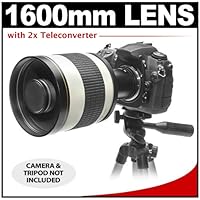
Rokinon 800mm Multi-Coated Mirror Lens with 2x Teleconverter

Rokinon 800mm Multi-Coated Mirror Lens with 2x Teleconverter for Nikon D3100, D3200, D5100, D7000, D700, D800, D4 Digital SLR Cameras
Customer Ratings: 4 stars
Buy Now
Let's get 1 thing clear. It's a piece of junk compared to Canon lenses. It's blurry at 800mm & extremely blurry at 1600mm. It's 18oz with teleconverter & EF adaptor.

The answer is no. The 2x teleconverter doesn't buy any more resolution. The fact that the 2x teleconverter has no front lens cap shows how valuable its manufacturer thinks it is.

What the 2x teleconverter buys U is sharper focusing. If your goal is focusing bright objects, use the 2x teleconverter & throw away 1/2 the frame to get better focus. It's much easier to focus this way.

It's probably no better than a 400mm L & it's probably no better than a 200mm L + 2x teleconverter for $200 in 2007. Unfortunately the Canon 2x teleconverter jumped 50% since then. It's definitely better than a 200mm L.

F/8 is a really narrow depth of field. F/8 & F/16 R not a problem when using a tripod & a modern digital camera. The Canon's focusing squares R useless. It's too blurry & dark. Unfortunately, F/16 brings out all your sensor dirt.

U need to fabricate a lens platform to mount it on a tripod. It's too heavy to hang off the camera body.

Focus guides on T mount lenses R worthless because they always go on the bottom, but it still has a focus guide.

It can make out the space station solar panels & fill 1/2 the frame with the moon. It can't see Jupiter's bands.

Click Here For Most Helpful Customer Reviews >>

Olympus Stylus Tough TG-2 iHS 12 MP Waterproof Digital Camera

Olympus Stylus Tough TG-2 iHS 12 MP Waterproof Digital Camera with 4x Optical Zoom + 7pc Bundle 16GB Accessory Kit
Customer Ratings: 5 stars
Buy Now
Awesome seller. I received my package with more than ample amount of cushion for my electronics in a big box. My social purchase was then placed in a smaller box! Not only does the purchase come with everything in the picture but the camera also comes in its original box. Inside the Camera's box was a list of set up instructions, warranty service contract, lense ring, setup Cd-rom, usb cable, usb adapter, Lithium Ion battery, and wrist strap! This is the best purchase I've made on Amazon to date.

Click Here For Most Helpful Customer Reviews >>

Kindle Fire HD Tablet

Kindle Fire HD 7', Dolby Audio, Dual-Band Wi-Fi, 32 GB - Includes Special Offers
Customer Ratings: 4.5 stars
Buy Now
I've been an iPad user since the original came out. I also have an iPad 3. I have worked in IT for the past few years so I would say I am pretty good with technology and fancy new devices. With that introduction out of the way, I will be reviewing key points that I have seen touched upon in other reviews. Here goes...

BUILD

The device feels nice and solid. I'm a little surprised at how heavy it is, but that's not necessarily a bad thing. The rubberized backing is always nice for added grip. It's not as nice as say unibody aluminum, but it's not $500 either.

SCREEN

The screen is fantastic. But my problem is the same as when iPad got Retina Display, other than the OS, most apps look rather pixelated. A lot of the games I tried are not high definition, at least not high enough to look smooth on this screen. Hopefully apps get updated to higher resolutions.

LOCK SCREEN ADS

Yeah there are ads on my lock screen. I'm not sure why this is such a big deal. How much time do people really spend looking at the lock screen? The first thing I thought when I saw the ads is WOW the pictures are really crisp! The ads are there to subsidize some of the $200 price tag. I might pay the $15 to get rid of them so I can customize it, but I might not. I feel like this has been blown out of proportion by other customers.

SOUND

The sound from the speakers is great. Much better than you would get from more expensive devices, very crisp and clean. I have the official Amazon case on and it has not affected the sound at all. Nothing much else to say, I doubt anyone will complain about this.

CRASHING

I've had two apps crash on opening. I don't know if it is the app or the OS. It's probably somewhere in the middle. Again, not a big deal for me. If it crashes, then I just tap it again and it works. I've also watched a few movies using the built in player as well as Netflix and Amazon Prime. No crashes for me at all. I'm sure OS stability will be improved as time goes on.

OVERALL SATISFACTION

Compared to my iPad 3, obviously the Fire HD is not as "good" so to speak. I mainly got it because I wanted something smaller. I also mainly used the iPad to surf the web, watch videos, and play some simple games. The Fire HD accomplishes this and does so much more. If you are expecting an iPad killer, or a desktop replacement, or a productivity machine, then you should look elsewhere.

I bought this to be a media device, and I believe that is what Amazon meant this to be. In this regard, I think this is a great device. In fact, I decided to keep this and sell my iPad 3, which will give me another $200+ to spend on other things. Just remember, this device is not for everyone. If you want a media device, you will be happy with this. Do not expect an iPad for $200.

UPDATE 9/18/12

Just wanted to add a few more things I have noticed over the past 24 hours.

Power/Volume Buttons: There are a bit hard to press, which is somewhat alleviated by having the official case. Maybe it's because I'm a longtime iPad user, but this will definitely take some getting used to.

Screen Glare: It took me a little while to notice, but I was playing a Seek & Find game while on Caltrain, with the bright Palo Alto sun shining right on me, and didn't have any trouble seeing the screen. I remembered that Amazon mentioned how the screen was changed to reduce glare, and they did an amazing job.

UPDATE 9/20/12

Two days later and I am still very happy with the device. Here are some more thoughts from me:

BATTERY LIFE

I have been playing Enigmatis (a hidden object game) for about an hour and a half each day on my commute. This drains about 15 20% of the battery with the screen brightness almost at the highest setting. Again, not iPad gold standard, but still very good.

SYNCING MUSIC

I have a Samsung Galaxy S3 and used an app called Easy Phone Transfer to get all my music from iTunes onto the phone. It transferred everything, including album covers, and I was hoping to find something like that for this device. I tried iSyncr, a $3 app, which did the job, but did not sync over album covers. I uploaded all my music into the Cloud, then downloaded it from Amazon, which increased the audio quality for a lot of my songs and added artwork, but this still did not show up on the device.

I got very frustrated getting all the album artwork over and eventually just gave up. It's not a big deal but I am kind of anal about those kinds of things. Just a heads up if anyone else out there is crazy about it like I am.

UPDATE 09/21/12

I got a call from Amazon Customer Service about this review, which surprised me very much. They advised me the best way to get the artwork to show up is have the songs in both the Cloud Player as well as the device, which I know does work fine. I was hoping to have the artwork show without needing things in the Cloud, but not a big deal any more.

I am more impressed with the fact that Amazon called me to give me advice on how to remedy the situation and ask if there were any other questions I had on the Kindle. The representative said he wanted to make sure I was happy with the Fire HD. This is one of the big reasons I went with the Kindle, and with Amazon in general. I have had great experiences with their customer service, who have always been able to handle my issues quickly and efficiently. No need to set up an appointment days later with a wannabe IT guy with a hugely overstated job title.

So this update is not really for the device itself, but sometimes it's not just the device, it's the company that offers it that makes a difference. This is why I no longer have any Apple devices, as cool as they may be. But it's not 100% gravy, as I have noticed lately that the keyboard keeps popping up randomly on screens where there is nowhere to enter text, ie. while playing a game. I just have to press the Back arrow to get rid of it, but maybe a bug the Amazon engineers want to take a look at.

UPDATE 10/05/12

So I don't know if it was always there, but over this past weekend I noticed a dead pixel on my Kindle's screen. I called Kindle Support and after a short 5 minute call, they sent me a new Kindle, no questions asked. So once again, very happy with Amazon customer service. I am still very happy with the device, and have some more thoughts on it:

HDMI CONNECTION

I bought an HDMI cable to hook up the Fire to my 46" Samsung and was quite impressed with the results. The quality was very good, not Bluray quality of course, but better than SDTV on an HD screen. You actually see every single thing you do on the big screen, like you are using a giant Kindle.

GOOGLE PLAY APPS

One of the main drawbacks in my opinion is, or should I say was, the lack of all the Google Play apps available on the Kindle. With a little research, I found out how to add apps that are not available in the Amazon store. It is pretty easy to do and works very well with the apps I tried. This greatly improves my opinion of the Fire HD.

PLASTIC AROUND THE SCREEN

The outer most edges of the Kindle are plastic. I noticed some kind of discoloration on the corner of mine, and just thought it was some dirt to scratch off. So I rubbed my thumb nail on the area, and noticed there were visible marks on the plastic. It appears this plastic can scratch some what easily, but I think this is just cosmetic as not of the plastic actually flaked. If you are not very anal about how your stuff looks, you probably won't notice it.

OS CHANGES

Here are two small gripes I have with the OS that I'm sure could be fixed with an OS update:

Battery Meter: It would be nice if the battery meter could show percentage instead of just a graphic bar. Some people have mentioned Battery HD, but you still have to swipe down to see the percentage, so this makes it easier but does not solve the issue I had.

Personal Videos: The mp4 videos I put on the device are located in the "Personal Videos" app, which shows screen shots of all the videos I put in. The problem is, all that is shown are the screen shots. You can get more info by holding your finger down on each video, but when you have multiple seasons of a show on the Kindle, it can get confusing. Ideally we should be able to look at videos in a list like our music.

UPDATE 11/15/12

Still very happy with the device. Here are some more thoughts:

LEFT HAND MODE

I did't think this would be a problem until I played a Solitaire game that DID have a left-handed mode. As a lefty who usually uses the Fire in landscape, I often have to reach across the screen to access the Settings or Home button in the menu. It's a small grievance, but can be really annoying when watching a movie or reading something. If there was an option for a left-handed layout with the menus on the left side of the device, that would be great.

PERSONAL VIDEOS APP

I had earlier complained about this app, as it did not list my movies and crashed playing a pair of them. I recently drove down to LA from SF, and put 5 movies on device, only to find that 4 of them would not play! I was pretty mad, until I remembered a simple solution, download another app. I downloaded Avia Media Player, which is not the greatest either, but it played all the movies I put on the Kindle. My faith was restored.

GOOGLE PLAY APPS

A lot of people have asked how to do this. If you are not having luck with Google searches, try this:

Click Here For Most Helpful Customer Reviews >>

Samsung NX1000 Smart Wi-Fi Digital Camera Body & 20-50mm & 16mm

Samsung NX1000 Smart Wi-Fi Digital Camera Body & 20-50mm & 16mm f/2.4 Lens
Customer Ratings: 5 stars
List Price: $799.00
Sale Price: $599.00
Today's Bonus: 25% Off
Buy Now

This is a nice kit which has the body and standard kit lens plus the superb 16mm f2.4 wide angle lens. This is exactly the kit I use, though I purchased the items individually. The current price asked is fair, but as prices change often, check for yourself! All in all this is an excellent camera and these are both excellent lenses. The 20-50mm is excellent. The 16mm is exceptional.

Samsung NX1000 Review (From my review of the White model which is identical except for color):

The main things that drew my interest with this camera were the Wifi features (I have a Samsung WB150F and the Wifi features have worked well. I find them useful and convenient, especially the PC-Autobackup which transfers movies and images to your PC), the large APS-C sensor (more image detail), the compact, mirror-less design, and the recent price drops.

The NX1100 will debut with a MSP of $599 (vs. $699 for the NX1000) and comes bundled with Adobe Photoshop Lightroom 4 and some new Wifi features namely Autoshare. But guess what? Autoshare is available for the NX1000 in the 1.13 firmware update! I already own Adobe Photoshop LR 4, and even with the lower NX1100 price, the NX1000 (basically the same camera) at current prices (340-360) is a great value. Compared to models like the 200/210 it offers the exact same APS-C sensor and is almost identical in image quality and handling. what you are giving up is the AMOLED display, metal body and a few other minor things. (The LCD display on the 1000/1100 is fine, if not quite as good as far as contrast, deep blacks, it is still very usable.)

So...how does the pudding taste? Well, I will admit my overwhelming first impression was "plastic!" though the build quality seems very good, there is an overall "plasticky" feel to the NX1000. (Thankfully, the tripod thread is metal!) The shutter and other bits are metal as well, including the lens mounts.

I use Panasonic and Olympus cameras, mostly, and even those in this price range have a bit nicer "feel" in that sense But, it's a very high quality plastic and I soon got over it except for the fact that I find the grip a bit slick and could see myself dropping this camera, so I immediately attached the strap. Not a big fan of the strap. It's OK, but I do not like the ring attachments used versus the more usual cloth through metal guides on my other cameras. I find the strap interfering with my grip due to where the attachment rings are located and this is quite annoying. I will probably remove this strap for that reason once I find a case I like. You can work around it, but I just don't like it. (Update: I'm adjusting to this and not as irritating as before.)

While we're quibbling, I'm also not a big fan of the way the Zoom lens "locks" when not in use. It does give a lower profile, but it takes some getting used to, as I've never experienced this design before. Again, a minor thing. Overall appearance is good, it looks like a serious camera. I got the white model and like the "Elvis vibe" it gives off. Also the markings are easy to read, it's comfortable to hold (with the 20-50mm lens) and the recessed mode dial is a nice touch. (It's even better with the awesome 16mm wide angle pancake lens! Much slimmer profile and very easy to hold and shoot with.)

In general, as far as controls, the design is well thought out and Samsung offers some unique and original twists such as the "Fn" and "iFn" control buttons which allow easy access to the main things you'd want to "tweak" when shooting. The controls work well and the "ring/wheel" control works very well. I was a bit skeptical, but in use I really liked it. For example, when flipping through your shots in playback mode it works very well and you can scroll through the images very quickly.

Nice to have the hotshoe, though I have not tried the flash unit supplied yet will report back on that. Videographers might note that there is an external mike that works with the hotshoe and uses no cables at all, nice!

In general, I find the NX1000 easy to use, the manual focus works well, the Smart mode seems to do fairly well, there are a great many scene modes and other (somewhat gimmicky) features (Magic filters/frames, etc.). I enjoyed playing with those on the WB150F, but they seem out of place here. There are a superb number of image adjustments, exposure tweaks, and controls of a more serious nature as well. When you want to get serious, this camera is ready. Also, some of the fun things, like the Panorama mode, do work well if you understand their limitations and keep your expectations reasonable.

As expected, the APS-C sensor renders a lot of good image detail. This is the big plus for this camera. I was very pleased with the results under good lighting conditions. I shoot a lot of landscape and street stuff, and this camera seems well suited for that. The noise reduction seems to work well up to about 1600 or so (maybe 800 for purists). Colors are accurate and not over-saturated like on many consumer cameras. If you like the "boost" many cameras give by default, there is a "Vivid" mode which will do this for you. Personally, I prefer the more realistic colors (one of the things I like about Olympus and (most) Panasonics as well). Sharpness is good in JPEGs (I have not shot RAW yet) and tones are nice and smooth (think large expanses of blue sky and clouds). I'm sure with experience my results will improve over these initial test shots, so that bodes well. If you like to print big, 16x20, even 20x30 possibly, you will be able to do so, which is very nice.

The 20-50mm kit lens is nice enough, but has a very limited range compared to what I am used to. (I am considering getting the 30mm lens which I think would make a nice compact package for everyday use.) However, the images look good, sharp, detailed, so I am happy with it. Video worked well and the zoom worked fine in video mode and was silent. In casual use, there is no need to switch the dial to video mode, you can just press the Video button on the back and after a slight pause you're in action. This is nice. Of course, dialing to full video mode gives you more options.

Wifi features worked fine, I was able to easily connect and save pics using the autobackup mode. Skydrive and others worked fine. Have not tried the mobile link and remote view finder apps yet. (Update: I tried these apps out and they worked OK for the most part. A bit flaky at times. There is a new "Smart Camera app" to replace these, but it only works with the new firmware. Since I have not yet upgraded the firmware, have not tried it.) The PC_Autobackup mode works very well for transferring pics and movies to your PC. It remembers what has been transferred and only transfers new items. Best to transfer frequently, since slower than reading from a card, but all automatic and very convenient. [You can also transfer photos to your mobile devices (phone/tablet) using the other apps (Mobile Link/Smart Camera).]

Example: You get back from shooting, you activate the PC-Autobackup on the camera (your laptop/PC and network must be on, of course), and the camera will connect and begin transferring your content. When done the camera will turn-off (unless you press a control button within 30 seconds) and you can set the PC to shutdown as well if you like. Or you can select the "open folder" choice on the PC/notenook popup dialog and view your pics and movies. All very easy and convenient.

There is a "Smart Range" feature to extend dynamic range and preserve highlights. It seems to work well, but you lose shadow detail. Might want to turn off by default, I think. (You can also shoot RAW and tweak things yourself, of course.)

JPEGS look very good to me with a lot of detail and sharpness. So good that I think shooting JEPG only is feasible with the NX1000. (You can always switch to RAW or RAW+Jpeg when needed, of course.) I think many will find the Jpegs entirely adequate for most purposes. (If you shoot a lot at high ISO's you would definitely want to shoot RAW.) You have a range of aspect ratios including 1:1, 3:2, and 16:9. This is nice and gives you flexibility in camera versus cropping later.

The 8fps burst mode worked very well, though as has been noted everywhere, there is a lag as the camera processes the shots before you can shoot again. I am a fairly deliberate photographer and don't shoot much action/sports, so the NX1000 is fine for me. The occasional lags when switching modes and after bursts or RAW shots are not an issue for me, but could be for some. It's all covered in many of the excellent online reviews, so I won't dwell on it here. Overall, I found the camera responsive and adequate for my needs.

The LCD screen is bright, colorful and has good resolution. I was pleased with it. I generally favor optical view finders (sorry, I admit to being old school here, you can't beat a good optical VF IMHO) and even EVF in a pinch, but I am getting used to the non-VF style of shooting and the NX1000 LCD is very good in this respect.

In general, I am very pleased with the image quality and the feature set and think this camera is an excellent value at current prices. Many of the features are unique, the Wifi modes are the best I've seen to date, and the APS-C sensor seems to be a good one. It's fairly compact with the 20-50mm kit lens (and would be even more so with the 30mm pancake lens), easy to carry (not heavy), and has all the controls you could ever want. The images are very good and that's the main thing.

I think it's an easy 4 stars for overall quality and especially value for the price paid.

----------------

Update: I recently purchased the Samsung f2.4 16mm wide angle "pancake" lens (Samsung 16mm f/2.4 NX Ultra Wide Pancake Lens (Black)) and it's a great addition to this camera. Wonderful for landscapes and walk-about/street photography. It's the lens I keep on the camera by default now. Quicker auto-focus, faster optics(f2.4 vs f3.5), and a more compact profile. When I have the 16mm lens on the body, I feel this is a 5 star combo. (I am leaving the rating at 4 stars with the kit lens, which is an excellent lens. I just find the 16mm to be the "magic" lens with this body. Very subjective, of course.)

Update: I did not cover video very well above, suffice to say the quality of the video is excellent for a camera in this price range and superior to many, I would guess. It is full HD 30/60 fps. You can Zoom during video shooting and it supports external microphones and stereo sound. All the basics are here and a few pluses as well. You can even use many of the special effects in video mode should you wish to do so. There is a dedicated video button for instant access, and a dial selection for more options. Videos take longer to transfer over wifi due to their size, but do transfer fine. Sound quality id pretty good for a camera of this type, in my opinion. So, if you are traveling, you have both stills and video covered. (I still feel a dedicated video camera and full fledged DSLR are optimal. But I must say, the combo capabilities here are quite fine.)

Video Format: MP4 (H.264), Compression: Movie H.264, Sound AAC

Frame Rate: 60fps (1280 x 720 Only), 30fps (1920 x 1080), 24fps (1920 x 810)

Image Sizes: 1920 x 1080, 1920 x 810, 1280 x 720 , 640 x 480, 320x240 for Sharing (Default: 1920 x 1080)

Movie Editing: Still Image Capture, Time Trimming

Update: I did not mention that the kit lens (20-50mm) does not have image stabilization, nor does the body. Has not been a problem for me (I shoot old school, bracing, etc.), but it was a consideration in buying the low cost and excellent 16mm wide angle for this body (very compact and little worries about image stabilization, larger sensor works in favor here) and dedicating this to camera to the wide end, while using my Panasonic G1 for the mid/telephoto range (as I already have excellent lenses for my G1 in this range). I still have the 20-50mm (an excellent lens) in the bag and can switch when needed. The lenses I have already for my G1 are superb, so this works out well for me.

You can buy image stabilized Samsung lenses (like the 18-55mm) if that is a concern. Shooting with the 20-50mm kit lens, I never once had any issues. However, in low light situations, it might come into play. Again, in my case, my G1 and f1.7 20mm would be my preferred choice, but I could get by with the NX1000. It has good image quality at high ISO and even ISO 3200 is usable many times. ISO 1600 is very good and ISO 800 is very clean.

For quick "grab and go" shooting, I continue to enjoy this camera very much.

Also, see my review of the 16mm f2.4 lens here: Samsung 16mm f/2.4 NX Ultra Wide Pancake Lens (Black)

Click Here For Most Helpful Customer Reviews >>