Showing posts with label best canon digital camera. Show all posts

TCL L40FHDF12TA 40-Inch 1080p 60 Hz LCD HDTV with 2-Year

TCL L40FHDF12TA 40-Inch 1080p 60 Hz LCD HDTV with 2-Year Warranty
Customer Ratings: 4.5 stars
Buy Now
I purchased this TV on sale in Dec. 2011 for under $300. It's an updated model of TCL L40FHDF11TA. It's put in a master bedroom. I'll rate each category in Amazon's system of 1 to 5 stars. My ratings are relative to how this TV stacks up against other TVs in its price range.

SETUP *** (3 stars)

The TV was well-packed in the shipping box (43.5" x 31" x 10.5") with 2 yellow nylon straps holding it together. (If your straps are missing, the shipper might have broken them while carrying and dropped the TV.) For wall mounting, you need a VESA 400x400mm compliant mount such as this, this, or this. I used the glass stand. If you're trying to fit it into a shelf, the dimensions with stand are 38.5" x 27" x 9" (without stand: 38.5" x 24.5" x 4"; note the 4" depth instead of 1.5" for an LED). The power cord doesn't have a power brick attached which is a plus. I'm using a learning universal remote which did find codes for this TV. Try 'RCA' if 'TCL' didn't work for you. I suggest using an universal remote since it's much easier to replace than to replace the original remote if you break it.

Some remote codes gathered for reference:

DirecTV: 11447

Comcast: 11447

Dish Network: 503

AT&T U-Verse: 1000

There might be a problem with the "TV powering on unexpectedly." If your 'SW Version' reads V8-0RSC801-LF1V041, you're OK. Otherwise, download the firmware update at TCL's website onto any FAT-formatted device. (I used my phone.) Remember to wait at least 10 seconds after it says "Completed" before unplugging the USB cord. (I waited 30 seconds to be safe.) I'm guessing this is where some people might have messed up and broke the TV.

PICTURE ***** (5 stars)

The LCD panel is made by Samsung with their logo visible in the back (picture posted). As with most LCD TVs these days, the screen is glossy and not matte, so you do have to watch out for glare. After powering up the TV which took about 15 seconds, I changed the preset picture setting from the default 'ECO' to 'Cinematic'. Cinematic/Movie mode is usually the setting that comes closest to a professional calibration. (If you're interested in doing your own TV calibration, check out the Disney WOW blu-ray, search "AVS HD 709" for a free one, or try my "quick picture calibration" below.) It has 5 zoom modes, with 'No Overscan' being preferred. If it isn't available, choose 'Full' for the least amount of cropping. I watched the TV from an Amazon recommended distance of about 7 to 8 feet. After hooking up my blu-ray player with HDMI (not included) and making sure it's 1080p (by pressing the 'Info' button), I tried watching some dark movies (Batman Begins and The Dark Knight) as a stress test. I didn't notice any obvious picture defects. The viewing angle is very good for an LCD. The contrast is good, with listed 4000:1 contrast ratio. I compared it to my living room LED with 10 million:1 contrast ratio. The LED has slightly better contrast with deeper blacks, though definitely not 2500 times better, so I wouldn't read too much into contrast ratios when shopping for TVs. There are a few nitpicks. There's a slight uniformity problem (light bleed) in the upper corners, noticeable in an all black picture. There's slight motion blurring due to its slightly-slow 8 ms response time (shadow trails) and 60 Hz refresh rate (jerkiness on 24 frames/sec sources). The yellow color is a little off. None of these are major problems; I've seen much worse at this price range, so no stars are deducted.

AUDIO *** (3 stars)

The two 8 watt speakers are passable for a bedroom. It has a nice equalizer menu with presets and 5 manually adjustable bars. It has Dolby Digital sound, but you definitely need to add your own speakers to take advantage of it. You can hook up your speakers via coaxial digital audio out, RCA out (white/red), or headphone out. There's no optical digital audio out (Toslink) and no ARC (audio return channel). I hooked up a Sony bookshelf system via RCA out which did improve the sound dramatically. The headphone out wasn't working on my unit, but I'm ok with it since I don't use headphones.

GAMING ***** (5 stars)

I hooked up my Xbox 360 via HDMI, changed the Xbox 'HDTV settings' to 1080p and 'Reference Levels' to Expanded, and turned off all image processing on the TV using my settings below. I tried a couple games (MW3, BF3, Skyrim, Madden 12, and Forza 4) and didn't notice any input lag. (Results should be similar with PS3 and Wii.) By the way, never hook up your gaming system with yellow composite RCA cables. LCD/LED and plasma TVs can't natively display interlaced video, so they'll need to spend time deinterlacing and therefore create additional input lag.

PC **** (4 stars)

I connected my PC with a VGA cable. I had to change my Windows monitor settings to "unhide modes that this monitor cannot display" in order to get the native resolution of 1920x1080. (This resolution is not supported for the VGA port. It might not work, so you might need to settle for 1280x720 if you have to use VGA. Or connect with DVI or HDMI for 1080p support.) For testing, I opened a Word document set to Times New Roman 6-point font and had no trouble reading it with 'Sharpness' at 0. You can use it as a big monitor as long as you don't expect it to have the clarity of a 22" monitor when viewing within 3'. (It's got the same amount of pixels spread across 3.4 times the area.) When viewed at 5' or more, clarity won't be a problem.

MEDIA *** (3 stars)

The USB port accepts pictures and music but not videos. There's no internet streaming, which I preferred. I have plenty of devices capable of streaming, so I don't want to pay extra for a feature I don't need.

RELIABILITY **** (4 stars)

The TCL FHDF11TA series has over 1000 reviews on Amazon with an average rating of 4 stars, which is probably as good as it gets for a generic brand. I also like the fact that it has a 2 year warranty instead of 1. The only concern is that the warranty is being done by A & D Electronics (the company that TCL has outsourced for its warranty claims) which has an F rating on BBB. The poor rating is a result of, I think, a shortage of personnel. If you're lucky and catch them on a low volume of repairs, you'll get prompt service; otherwise, you might need to be patient and persistent to get your TV repaired. (FYI, their number is 877-470-7766, 9AM-5PM PST, M-F.) If all else fails, try contacting Amazon. Some people did have success even after the 30 day return period. You can also add 1 extra year of warranty by purchasing with Mastercard or AmEx. And if you have Costco membership, you can purchase SquareTrade to add 3 extra years of warranty for a total of 5 for $30 (cheaper than Amazon).

PRICE ***** (5 stars)

Free shipping, free 30 day return (save the box for this), delivered to your door in 2 days for under $300 is hard to beat. Amazon also lets you do a price adjustment if the price drops within 14 days.

OTHER TVS

Here are 2 TVs I considered before settling on the TCL:

LG 32LK330 This is a good, basic, name-brand 32" LCD TV suitable for a bedroom. It only has 64% of the TCL's viewing area though.

LG 42LK450 This 42" LCD TV has good all-around performance and is suitable as a primary TV in an apartment, albeit at a price premium.

I'd be careful about getting the LG 42LV4400 LED, despite its attractive specs and price, due to its reliability problem (and hence its low ratings). Until it's resolved, check out the LG 42LK520 instead if you want 120 Hz.

MISC QUICK PICTURE CALIBRATION

1. Change preset to 'Cinematic'. After checking out some calibration patterns, I find both the default 'Brightness' of 50 and 'Contrast' of 80 to be spot on.

2. Change 'Sharpness' to 0. With a clear HD source, you shouldn't need to artificially boost the sharpness. If words look blurry, you can play around with it.

3. Change 'Noise Reduction' to low. Similar to Sharpness, you don't need much image processing with a clear source.

4. I find the default 'Backlight' of 60 to be suitable for a dimly-lit room. With most lights on, 80 looks about right. If sunlight is present, boost it to 100. Adjust it according to your room lighting and eye comfort level.

5. (optional) For adjusting colors, you normally need to use filters with a calibration disc. I like to do it by eye using my own pictures (preferably scanned studio pictures). We should all be able to pick out the nuances of our own skin tones. Alternatively, play a familiar movie and pause when you have a clear shot of a face, then adjust. I find the default 'Color' of 40 to be satisfactory. If you can't get 'Color' to look right, try changing 'Color Temperature' by 1 and then go back to changing 'Color'.

Click Here For Most Helpful Customer Reviews >>

Olympus SZ-31MR 16MP CMOS Camera with 24x Wide-Angle Zoom

Olympus SZ-31MR 16MP CMOS Camera with 24x Wide-Angle Zoom and 3-inch 920k Hi-Res LCD Touch Panel
Customer Ratings: 4.5 stars
List Price: $399.99
Sale Price: $399.00
Today's Bonus: $0.99 Off
Buy Now

I have had several Olympus cameras and had good luck with all of them. Received the SZ-31MR just before a trip to Victoria, BC in September. Beautiful weather and the city was still green with lots of flowers. This trip was really a great opportunity to test the versatility of the camera, macro for the flowers, various wide angle and telephoto for harbor scenes, legislative house by day and night, scenery pictures from a drive in the mountains, etc. etc. September is a beautiful time of the year to visit Victoria by the way. I tried out the "hand-held starlight" with impressive results. Obviously the results are better if the camera is supported, but did get some great night shots of lit buildings, street markets, etc. Impressed with the versatility of the camera, optical zoom is very impressive for something this small and light, even digital zoom is good in day light. For a fit in your pocket, light weight, pretty much do it all camera, I can't think of a better one. I have also used the "pet mode" to get some great pictures of our dogs!

Click Here For Most Helpful Customer Reviews >>

Epson Artisan 1430 Wireless Wide-Format Color Inkjet Printer

Epson Artisan 1430 Wireless Wide-Format Color Inkjet Printer
Customer Ratings: 4 stars
List Price: $299.99
Sale Price: $299.00
Today's Bonus: $0.99 Off
Buy Now

Update #2 Almost nine months after my original review and Epson STILL hasn't released the ICC profile for their Ultra Premium Luster paper. If you are using anything other than their Ultra Premium line you really aren't getting your money's worth on this printer. And as a photographer I can't give my clients work printed on glossy! Unfortunately, Epson doesn't seem to even have a timeline for giving their consumers proper ICC profiles. I just cannot understand why they have profiles for every other paper besides their most popular?

Update I am adding a few stars onto my original review for a couple of reasons. One, because Epson customer service is actually one of the better customer service experiences I've had to deal with. They are very quick and courteous with their responses. And two, because after a month the banding problem I was having has randomly fixed itself. I'm hoping it was only a problem with the printer being so new, and will not happen again. But I will certainly update my review if this is not the case.

Original Review

Let me start off by saying that if you can get this printer working correctly, it will produce some incredible prints. Epson's Ultra Premium photo paper, combined with the amazing Claria Hi-Def ink is sure to exceed your expectations on print quality. That is IF your printer decides to work properly.

Out of the box the initial installation (Mac OSX 10.6) was quite easy, and everything worked smoothly. I then tried to connect my printer to wi-fi which is when my problems began. Although I followed the instructions to a T, wi-fi just would not install on my printer, despite the fact that this printer advertises a wi-fi connection in "seconds". A few days, countless hours, and a couple phone calls to Epson did not solve the problem, I was basically told they didn't know what the issue was. Having to connect my computer and printer with a cable every time I needed to print something was a bit of a pain, but certainly not something that was worth the hassle of returning the product. I then started printing some images to complete client orders I had lined up, and I noticed banding on every single image. I followed all of the steps listed on Epson's website, as well as took the advice of a printing instructor at my school, taking every step to rectify this problem. Nothing worked. And weeks later my printer is still banding. I have changed the ink and lost a full pack of Epson Ultra Premium Photo Paper, wasting a ridiculous amount of money in the process. Now my printer will no longer even respond to the "clean the print heads" command.

Another big problem with this printer is that Epson has not completed the ICC profiles for some of their own paper, most notably the Ultra Premium Luster. This paper of course being the favorite of photographers. And if you can't print on Ultra Premium paper there's not much purpose in purchasing the overpriced Claria inks, as their full potential will not be reached using mediocre paper. I contacted Epson and they said they don't know when the ICC profile will be available.

Epson's paper is, in my opinion, the best on the market and as a photographer I hate giving my clients work printed on anything less. But nothing is worth this much hassle. Epson should invest some more time into producing quality printers that are worthy of the paper and ink they use.

*Just a note, this printer does not come with a USB cord, so if you are thinking of purchasing this product and don't have an extra one laying around, I suggest buying a USB cord along with it since your wi-fi may end up not working. Otherwise, you'll still need access to one for initial set-up.

Click Here For Most Helpful Customer Reviews >>

WD Red 2 TB NAS Hard Drive: 3.5 Inch, SATA III, 64 MB Cache

WD Red 2 TB NAS Hard Drive: 3.5 Inch, SATA III, 64 MB Cache - WD20EFRX
Customer Ratings: 4.5 stars
List Price: $179.99
Sale Price: $94.99
Today's Bonus: 47% Off
Buy Now

Here is a quote from a review at pcper.com

I'm going to let the cat out of the bag right here and now. Everyone's home RAID is likely an accident waiting to happen. If you're using regular consumer drives in a large array, there are some very simple (and likely) scenarios that can cause it to completely fail. I'm guilty of operating under this same false hope I have an 8-drive array of 3TB WD Caviar Greens in a RAID-5. For those uninitiated, RAID-5 is where one drive worth of capacity is volunteered for use as parity data, which is distributed amongst all drives in the array. This trick allows for no data loss in the case where a single drive fails. The RAID controller can simply figure out the missing data by running the extra parity through the same formula that created it. This is called redundancy, but I propose that it's not.

Since I'm also guilty here with my huge array of Caviar Greens, let me also say that every few weeks I have a batch job that reads *all* data from that array. Why on earth would I need to occasionally and repeatedly read 21TB of data from something that should already be super reliable? Here's the failure scenario for what might happen to me if I didn't:

* Array starts off operating as normal, but drive 3 has a bad sector that cropped up a few months back. This has gone unnoticed because the bad sector was part of a rarely accessed file.

* During operation, drive 1 encounters a new bad sector.

* Since drive 1 is a consumer drive it goes into a retry loop, repeatedly attempting to read and correct the bad sector.

* The RAID controller exceeds its timeout threshold waiting on drive 1 and marks it offline.

* Array is now in degraded status with drive 1 marked as failed.

* User replaces drive 1. RAID controller initiates rebuild using parity data from the other drives.

* During rebuild, RAID controller encounters the bad sector on drive 3.

* Since drive 3 is a consumer drive it goes into a retry loop, repeatedly attempting to read and correct the bad sector.

* The RAID controller exceeds its timeout threshold waiting on drive 3 and marks it offline.

* Rebuild fails.

At this point the way forward varies from controller to controller, but the long and short of it is that the data is at extreme risk of loss. There are ways to get it all back (most likely without that one bad sector on drive 3), but none of them are particularly easy. Now you may be asking yourself how enterprises run huge RAIDs and don't see this sort of problem? The answer is Time Limited Error Recovery where the hard drive assumes it is part of an array, assumes there is redundancy, and is not afraid to quickly tell the host controller that it just can't complete the current I/O request.

Here's how that scenario would have played out if the drives implemented some form of TLER:

* Array starts off operating as normal, but drive 3 has developed a bad sector several weeks ago. This went unnoticed because the bad sector was part of a rarely accessed file.

* During operation, drive 1 encounters a new bad sector.

* Drive 1 makes a few read attempts and then reports a CRC error to the RAID controller.

* The RAID controller maps out the bad sector, locating it elsewhere on the drive. The missing sector is rebuilt using parity data from the other drives in the array.

*Array continues normal operation, with the error added to its event log.

The above scenario is what would play out with an Areca RAID controller (I've verified this personally). Other controllers may behave differently. A controller unable to do a bad sector remap might have just marked drive 1 as bad, but the key is that the rebuild would be much less likely to fail as drive 3 would not drop completely offline once the controller ran into the additional bad sector. The moral of this story is that typical consumer grade drives have data error timeouts that are far longer than the drive offline timeout of typical RAID controllers, and without some form of TLER, two bad sectors (totaling 1024 bytes) is all that's required to put multiple terabytes of data in grave danger.

The Solution:

The solution should be simple just get some drives with TLER. The problem is that until now those were prohibitively expensive. Enterprise drives have all sorts of added features like accelerometers and pressure sensors to compensate for sliding in and out of a server rack while operating, as well as dealing with rapid pressure changes that take place when the server room door opens and the forced air circulation takes a quick detour. Those features just aren't needed in that home NAS sitting on your bookshelf. What *is* needed is a WD Caviar Green that has TLER, and Western Digital delivers that in their new Red drives.

End quote and back to reviewer.

I've got 5 of these in a Synology DiskStation 5-Bay (Diskless) Network Attached Storage (DS1512+). It is really a sweet setup.

The Synology software has a S.M.A.R.T. test that can do surface scans to detect bad sectors. I have their Quick Test check every disk daily and the Extended Test set to automatically run on each of the 5 disks every weekend. (The Extended Test takes about 5 hours per disk so I separate the tests by 12 hours.)

Click Here For Most Helpful Customer Reviews >>

Canon PG-210 XL CL-211 XL and 4-Inches x 6-Inches - 50 Sheets

Canon PG-210 XL CL-211 XL and 4-Inches x 6-Inches - 50 Sheets
Customer Ratings: 5 stars
List Price: $49.99
Sale Price: $39.99
Today's Bonus: 20% Off
Buy Now

I say relatively because ink cartridges are always overpriced. Having said that, this is the cheapest way to get ink for your Canon printer. First, the XL cartriges are the cheapest per mL of ink. Second, it's actually slightly cheaper to buy them both in this bundle, and the paper is essentially thrown in for free. So, unless you only need one cartridge or the other, this is a no-brainer.

Click Here For Most Helpful Customer Reviews >>

Canon EOS-7D Digital SLR Camera Body Kit, with 2 4GB CF Memory

Canon EOS-7D Digital SLR Camera Body Kit, with 2 4GB CF Memory Cards, Spare Canon LP-E6 Battery, Slinger Camera Bag, Visible Dust EZ Sensor Cleaning Kit
Customer Ratings: 5 stars
Buy Now
I traded up from the 40D and was able to continue to use EF-S lenses, take short videos (yeah!), and for less money than the 5D mark II. I've had the 7D for a month and still haven't explored all of the possibilities. The software and accessories included in the box makes it easy to take photos and publish in a short period of time.

The best part of this "kit" was the spare battery. It's my personality to always have a spare. In addition to the 7D, I purchased an extra fast Compact Flash memory card, and a DVD writer so I can save all the photos.

I am pleased with my purchase, speed of delivery by Adorama, and e-mail support from Canon.

Click Here For Most Helpful Customer Reviews >>

Nikon D3200 24.2 MP Digital SLR Camera International Model No

Nikon D3200 24.2 MP Digital SLR Camera International Model No Warranty
Customer Ratings: 5 stars
Buy Now
I was debating between the Nikon D7000 and the D3200 to replace my worn D60. For the money, I am delighted that I chose the D3200. It's light weight, and quiet.

The tutoring menu is more for beginners, and it has many pre-sets to take creative shots easily. Love the 24MP, and find no noise even shooting at 6400 ISO.

I bought it to shoot stills, but it has excellent HD video with slow motion.

You do have to run manual with the older lenses, but that has only caused me to up my game.

It's the most excellent DSLR value currently available!!

Click Here For Most Helpful Customer Reviews >>

Olympus Stylus SZ-16 iHS Digital Camera with 24x Optical Zoom

Olympus Stylus SZ-16 iHS Digital Camera with 24x Optical Zoom and 3-Inch LCD
Customer Ratings: 4.5 stars
List Price: $229.99
Sale Price: $229.00
Today's Bonus: $0.99 Off
Buy Now

It was probably a stupid thing to do, but I'm glad I did it. I'd been looking for a new camera for a while, but no matter what brand or price of camera, the reviews all had a few negative comments that made me reconsider my purchase. So when Amazon posted the Olympus Stylus SZ-16 for advance purchase months before it's release, I decided to take a chance no reviews meant there couldn't be any negative ones.

I'm really very please with the camera the zoom is amazing, the shutter is fast, it does really well in low-light situations I've rarely need the flash. Plus it has some fun features, for taking "dramatic" or "pop art" photos. Also has setting for fireworks, sports, and two pet modes (Camera automatically snaps a pic when it recognizes the face of a dog or cat I mention this because this feature amuses me, I haven't tried it yet.)

Way back in high school I bought a Pentex SLR which I used for years, and took great pictures, but it was difficult to lug it, plus the lenses and flash around, and when digital came along, I switched to point & shoot. My pictures where never as great as those taken with my SLR, and I had assumed that I had lost whatever "it" was that helped me take great photos. With my new Olympus Stylus, I have "it" back. Turns out that the right equipment helps make a great photographer. (And how lucky are my all my Facebook friends to be regularly treated to my awesome photos? Actually, I'm appreciative of their indulgence of me.)

My one little quibble is that the USB cable port is behind a small door on the side of the camera that has a rubber hinge. I'm not optimistic about that hinge lasting the useful life of the camera.

Click Here For Most Helpful Customer Reviews >>

HP H470wbt Officejet Mobile Printer

HP H470wbt Officejet Mobile Printer
Customer Ratings: 4.5 stars
Buy Now
The HP H470wbt is HP's answer to the "on the go" printer. If you haven't read the spec you will see this particular incarnation comes with a battery for on the road use. The battery is charged while on the printer much like a laptop.

The overall quality of print is passable but not top of the line nor a good choice if you want nice photo-quality prints.

However, if you need to print normal text or perhaps a page from the internet, it does fine. The pages come out at a fair pace (better than one would expect from a small printer) and the quality is acceptable.

The footprint is relatively small and if you plan to carry around with you, expect to use something like a backpack or camera style backpack for your laptop and the printer.

The blue tooth that comes with it works well enough. Just remember to install the blue tooth drivers then deal with Windows itself (in that order).

The one real caveat relates to small printer small ink cartridges. One has to realize to keep this unit small and consume little power, the cartridges are on the small side. Fortunately, they are easily found at various merchants and not an odd special cartridge(s). There is the option to get slightly larger ones but again, the larger ones are also fairly small in output.

Last on the not so good list HP insists on some of their inkjets to use flimsy mechanisms for housing the ink cartridges. In this case they have some "wires" bent to work with the install assembly of the cartridges. This is asking for trouble sooner or later.

I have not ran enough paper through to experience any paper feed problems and thus, cannot comment on this. This is an important part and as those who have had laser printers and inkjets know this can be a problem that occurs over time.

Overall the unit is passable and in some respect very nice. I give it three stars rather than four because of the ink install assembly. The blue tooth, compactness, reasonable output are all to be appreciated.

Click Here For Most Helpful Customer Reviews >>

VIVITAR Vivtar 7mm f/3.5 Series 1 Manual Focus Fisheye Lens

VIVITAR Vivtar 7mm f/3.5 Series 1 Manual Focus Fisheye Lens for Nikon Digital SLR Cameras - 7MMN
Customer Ratings: 5 stars
Buy Now
I bought this fisheye to use with an Nikon D300 .

I've being using this lens for just a week now and the pictures show good quality so far. I didn't try it in a great variety of light situations but I'll update this review when I try it harder.

The only cons is an apparently non working focus ring, what should be a very serious defect if it wouldn't make any difference in the image focus/quality.

I can imagine that occurs due to the extreme depth of field the lens has, everything is allways focused,

but I'm really wondering wheter this is a malfunction or not.

So please I'd like to hear from anybody who has ever experienced a similar situation with a fisheye lenses.

Tks

Esther

Click Here For Most Helpful Customer Reviews >>

Kodak EasyShare Sport C123 12 MP Waterproof Digital Camera (Blue)

Kodak EasyShare Sport C123 12 MP Waterproof Digital Camera
Customer Ratings: 4 stars
Buy Now
If you're looking for a simple point-and-shoot that you can take underwater, this camera is great.

Let me begin by explaining that I am an avid photographer; I have over $10,000 in high end DSLR equipment and lenses. I have over 20,000 photos in my collection. I know something about photography.

I recently went on a sailing vacation with my family and wanted a simple digital camera to take in the water. I wasn't looking for something high-end because all i really wanted to do was shoot pics of my kids snorkeling and scuba diving. I didn't want a disposable because they aren't digital, you usually have to wind them which is a real pain in the water, and they shoot poor pictures. My wife bought me a $500 top-of-the-line underwater point-and-shoot Panasonic Lumix but I took it back because it was overkill. It was waterproof to 40 feet, had an altimeter, etc - I didn't need all that. I found this Kodak camera and it was perfect. It worked great -we took on jet skis, on snorkeling trips, and down to 11 feet underwater scuba diving. It never had an issue -it started up quickly, operated simply and reliably, and the photos are just fine. Frankly, the videos are even better -I was surprised at good they are! Of course, the photos don't compare to my $2,000 Nikon DSLR, but I wasn't expecting them to. I just wanted a camera that could capture some of the memories of the water fun on our sailing trip, and this did it.

Click Here For Most Helpful Customer Reviews >>

Kodak EasyShare Z990 12 MP Digital Camera with 30x Optical Zoom

Kodak EasyShare Z990 12 MP Digital Camera with 30x Optical Zoom, HD Video Capture and 3.0-Inch LCD
Customer Ratings: 4.5 stars
List Price: $449.99
Sale Price: $328.99
Today's Bonus: 27% Off
Buy Now

As a mechanical engineer I particularly appreciate good design. This camera is loaded with it. It can be used easily as a "point and shoot" camera, or maually by a more experienced photographer.

The 30X OPTICAL zoom lens is spectacular. Sure, it might not be quite up to SLR standards, but the pictures I get while SLR owners are struggling changing lenses make a big difference. I have been taking photos for decades, and virtually any lens with the name Schneider has always been a good one.

Important to me, since I take lots of photos of kids and animals, is the short time between shutter push and the photo being taken. It adapts well to changing situations.

Many cameras have no eyepiece viewer, and in bright sunlight can hardly be used because the viewing screen appears so dim. Not so with this camera. Although the direct view could be of better quality and include a diopter admustment, it is so much better than trying to compose a photo in the bright sunlight using an almost invisible viewing screen.

I love to do available light photography. I have never seen a camera with such great low light ability. Sometimes it is almost as though it had "night vision." I normally set the camera to the "No flash" setting.

I think this camera might be a little too technical for first time users unless they are willing to get to know the camera and its capabilities as they go.

I read a review of a comparable Canon offering, and they criticized the lens for purple fringing -NOT a problem with my camera.

I still carry a small "point and shoot" camera, but when I get serious about taking photos, I lean on this camera.

This camera seems to have the ability to do just about anything I want it to, including making HD video.

If you take a photo at the wide angle setting (28mm equivalent) and then take one at the highest telephoto setting (840mm equivalent) you will likely be amazed.

I recommend this camera highly.

Click Here For Most Helpful Customer Reviews >>

Nikon 55-200mm f/4-5.6G ED IF AF-S DX VR Telephoto Zoom Lens

Nikon 55-200mm f/4-5.6G ED IF AF-S DX VR Telephoto Zoom Lens with Tripod + 3 UV/FLD/CPL Filters + Lens Hood & Nikon Cleaning Kit for D3100, D3200, D5100, D5200, D7000, D7100 Digital SLR Cameras
Customer Ratings: 5 stars
Buy Now
I love this lens. Sharp, fast focus. Great for outdoor use, on a sunny day preferably. This is not a low light tele by any means, but it certainly helps bring the action up close and personal. Ken has a great detailed write up on his site:

The rest of the items in the package or mostly just fluff. I use the UV filter as a scratch cap, and the hood is only for direct sun. The tripod is quite light and serviceable, very basic.

Click Here For Most Helpful Customer Reviews >>

Light and Motion Sola Photo with Red Focus Light (1200-Lumens

Light and Motion Sola Photo with Red Focus Light
Customer Ratings: 5 stars
Buy Now
It is a very handy, powerful and sophisticated light.

I have it only 2 months and it has been underwater 3 times to date.

Also the service I received from "Light and Motion" support, as I had some queries related to its operation, it was superb and prompt.

Recommendation. Please study very carefully the small manual as it is very informative as regards its operation.

Particular attendance is to setting the "travelling " and "SOS" modes and how to return to the normal operating mode.

Click Here For Most Helpful Customer Reviews >>

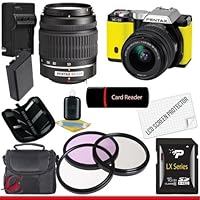
Pentax K-01 Digital Camera (Yellow) with 18-55mm AL Lens Kit

Pentax K-01 Digital Camera with 18-55mm AL Lens Kit and 50-200mm AL Lens 16GB Package
Customer Ratings: 5 stars
Buy Now
Not even my Nikon DSLR gave me the option of using it like a normal DSLR. Thie K-01 is the the only camera that has given me complete control instead of having to rely on automatic settings all the time.

Click Here For Most Helpful Customer Reviews >>

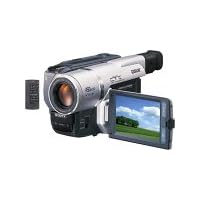
Sony DCRTRV520 Digital Camcorder

Sony DCRTRV520 Digital Camcorder
Customer Ratings: 5 stars
Buy Now
DCR-TRV520. I bought this Digitial 8 camera (I am not a previous user/owner of any camcorder) about 4 weeks ago after much prognosticating over the miniDVD format in the Panasonic and Canon brands for a similar price (I would have gone for the Sony miniDVD but didn't want to pay the extra bucks). So I made my decision based on the extra features of optical stablization, manual focus and the greater zoom capability also I trusted the Sony brand more, but that reason was entirely subjective. I have not been disappointed with this camera. The stabilization is excellent in fact, while I like compact cameras and would have preferred miniDVD because of size, this camera is not that much bigger, and increased size and weight may be an advantage as the camera feels solid and steady to hold. The auto focus is excellent I may never need to use the manual focus unless I want to get really fancy. The zoom capability works very well, even at the highest mag., and is more useful than what I would have thought. This alone places it above the other miniDVD cameras including the Sony which have lower zoom. With iMovie, $50 from Apple (I have a Mac G3), the only extra I needed was the $30 Firewire cable (4 pin-camera, to 6 pin-Mac) and I was importing and editing the video. Also, I put in a Hi8 tape of our wedding and was amazed that this non-digital format was automatically transmitted from the camera into iMovie as digital information with no apparent loss in resolution! Regarding memory stick, with iMovie there does not seem to be a way to directly import the stills, but if they are first copied to the tape, then they can be imported. However, the resolution after doing this is no better than a still made with iMovie from video. Maybe the resolution will be better after direct import, but I doubt it. In Photoshop a video still and memory stick import from tape has the same pixel count as specified for the still camera 680 x 460 I think or thereabouts. Some people say the memory stick stills suck in resolution they are not that bad. Hey, you're buying a camcorder first and foremost, not a digital camera. One other reason I got this camcorder was that some reviews said the Canon and Panasonic miniDVD didn't work too well at low light levels. I've never tried those cameras, but I can also tell you that this Sony I bought works great at low light as well. Sony 520 versus 320 I went for ther 520 because of the bigger LCD display I'm glad I did the extra size is excellent as you can replay what you have shot and easily see it on the screen. Overall, this camera has no weaknesses and some advantages. Another thought if you are considering buying Hi8 or even 8 so you can get a cheaper camcorder don't! There is so much you can do with digital if you have the computer. and the video quality if better. Its worth the extra bucks. Cheers!

Click Here For Most Helpful Customer Reviews >>

Epson Stylus Photo R3000 Wireless Wide-Format Color Inkjet

Epson Stylus Photo R3000 Wireless Wide-Format Color Inkjet Printer
Customer Ratings: 4.5 stars
List Price: $799.99
Sale Price: $757.22
Today's Bonus: 5% Off
Buy Now

At school I've been using an Epson Stylus Pro 3880 and have gotten kind of addicted to printing my photos. The R3000 is half the cost and almost exactly the same except for it's narrower 13" maximum print width (vs the 17" 3880). Both use the "UltraChrome K3 with Vivid Magenta" ink set which is the same one used by almost all of Epson's "Pro" line of printers. Honestly, I don't know why the R3000 isn't in their "Pro" line since it could reasonably be used by a pro who never needed to print anything wider than 13".

I printed some color test charts at the Sam's Club photo lab (which should be reasonable quality since they actually calibrate their printers at least once a day and when they change paper rolls) and on my R3000, then compared them to an actual X-Rite produced ColorChecker chart, and the output from the R3000 significantly beats the output from Sam's Fuji Frontier minilab photo printer. The Fuji Frontier print is noticeably duller with generally darker colors and a narrower range of saturated color reproduction. You don't have to be a color expert to see the difference.

For the R3000 the ink cost is about $1/ml which comes out to about $0.01 per square inch if you get it at a discount (search for "red river Cost of Inkjet Printing Epson R3000"). That makes a borderless 8x10 cost about $0.80 in ink, and a borderless 8.5x11" cost about $1 in ink. A sheet of Epson Ultra Premium Photo paper costs as little as $0.60 if you get it at a discount, so printing a borderless 8.5x11" ends up costing as little as $1.60 in supplies. (Not to mention that you can get third-party paper that's just as good or better than Epson's official paper for less money.)

The cheapest photo labs charge around $1.50 for an 8x10 (my local Sam's Club currently charges $1.46). If we use a whole 8.5x11 sheet of official paper and a full 8x10 worth of ink to print an 8x10, we get $1.40 in supplies per 8x10 which is slightly cheaper than even Sam's Club and significantly higher quality. Good third-party paper would be around $0.35/sheet meaning that you could also do as well as $1.15 per 8x10, maybe even better.

Admittedly though that doesn't incorporate the cost of the printer, which you won't have to incur if you just use a photo lab. If you bought the printer for say $800 and you've gotten your per-8x10 supply costs down to $1.15, then you'd need to print about 2,580 8x10's before your total costs started to get lower than Sam's Club's $1.46.

When you get larger than 8x10 though then the printer really starts to pay off. One place online that isn't too expensive and has a good reputation charges $6.30 for a 12x18 on glossy photo paper printed with a photographic lab process. It's possible to get decent 13x19" gloss ink jet photo paper (same stuff that costs $0.35/sheet for the 8.5x11) for about $1.50/sheet. 12x18" of ink costs you $2.16 so total cost for a 12x18 on the R3000 with that paper is $3.66. At that price you need to print 300 or so of these large prints before your prints start costing less than $6.30, and again the ink jet prints will have better color quality than the photographic process printer. You also have the entire lifetime of the printer to make all these prints that we're talking about. If you make on average about 10 8x10" prints every week then it would take about 5 years to make this cost back, but if you made two of the 12x18" prints per week then it would take about 2.8 years to brake even compared to the lower quality protographic process prints ordered online.

But none of these estimates take into account the value of the convenience and additional quality you get from having a modern photo inkjet printer right in front of you. Add in costs like transportation to pick up photos, time spent driving, any sort of cost of inconvenience by having to wait for prints to arrive in the mail, the additional value of better color quality, and other hard to quantify things then the real savings may be better. Depending on how much these costs add to the cost of photo lab prints, a decent ink jet printer like this might pay for itself much more quickly.

Still, you have to keep in mind that owning your own printer like this only makes sense if you're going to be doing a certain volume of printing. If you only ever print maybe 10 8x10s a month then the printer will never be worth it solely from a cost-per-print savings perspective. Also, if all you ever print is 4x6 then even just your ink cost without paper is going to be around 2.5x the cost of getting 4x6 prints made ata cheap online lab or drug store. So for small prints like 4x6 the printer will absolutely never pay for itself from the supply perspective, and probably not even from the convenience perspective.

The only problems I've heard of with this printer seem to involve priming the print head (pumping ink into the initially empty hoses that run from the ink cartridges to the print head, basically) and the printer going through unnecessary cleaning cycles, but Epson support is great about addressing these. My R3000 went though an unnecessary priming cycle when I first set it up, wasting about half the ink in the cartridges. Support got back to me in less than a day and offered to send me a full set of full replacement cartridges. I haven't seen anyone complaining of clogged nozzles or any of the usual inkjet problems.

The color gamut of the R3000 when used with the Ultra Premium Photo paper significantly exceeds the AdobeRGB colorspace in areas of dark blues and greens. This allows you to make the most of your camera's sensor capabilities IF you convert your RAW files into a format using the ProPhoto RGB color space (the most common one that actually holds those colors) AND print to the printer using proper color management with the appropriate ICC profile. Photo labs almost always require all files to be encoded as sRGB (which is smaller than both AdobeRGB and ProPhoto RGB), and printers like the Fuji Frontier have smaller gamuts than sRGB anyway, so they can't possibly achieve the wide range of colors that a high quality professional inkjet can when it's wielded by someone with sufficient color management skill.

Anyway, excellent printer, reasonable cost of ownership and operation, higher quality printing than you get at a photo lab, convenience, and excellent support from Epson. When you consider this part of your "digital darkroom" and compare its cost to the cost of materials and equipment you'd spend for an "old fashioned" film darkroom, the cost is quite reasonable.

Click Here For Most Helpful Customer Reviews >>